Repository navigation
Releases
Valet 0.4.0

Valet 0.4.0 lets you pick the model for each chat, adds slash commands and @mentions, and adds voice.
docker pull ghcr.io/askvalet/valet:0.4.0Configs from 0.3.0 work as they are. Everything below is off until you add it.
Highlights
Pick the model for each chat
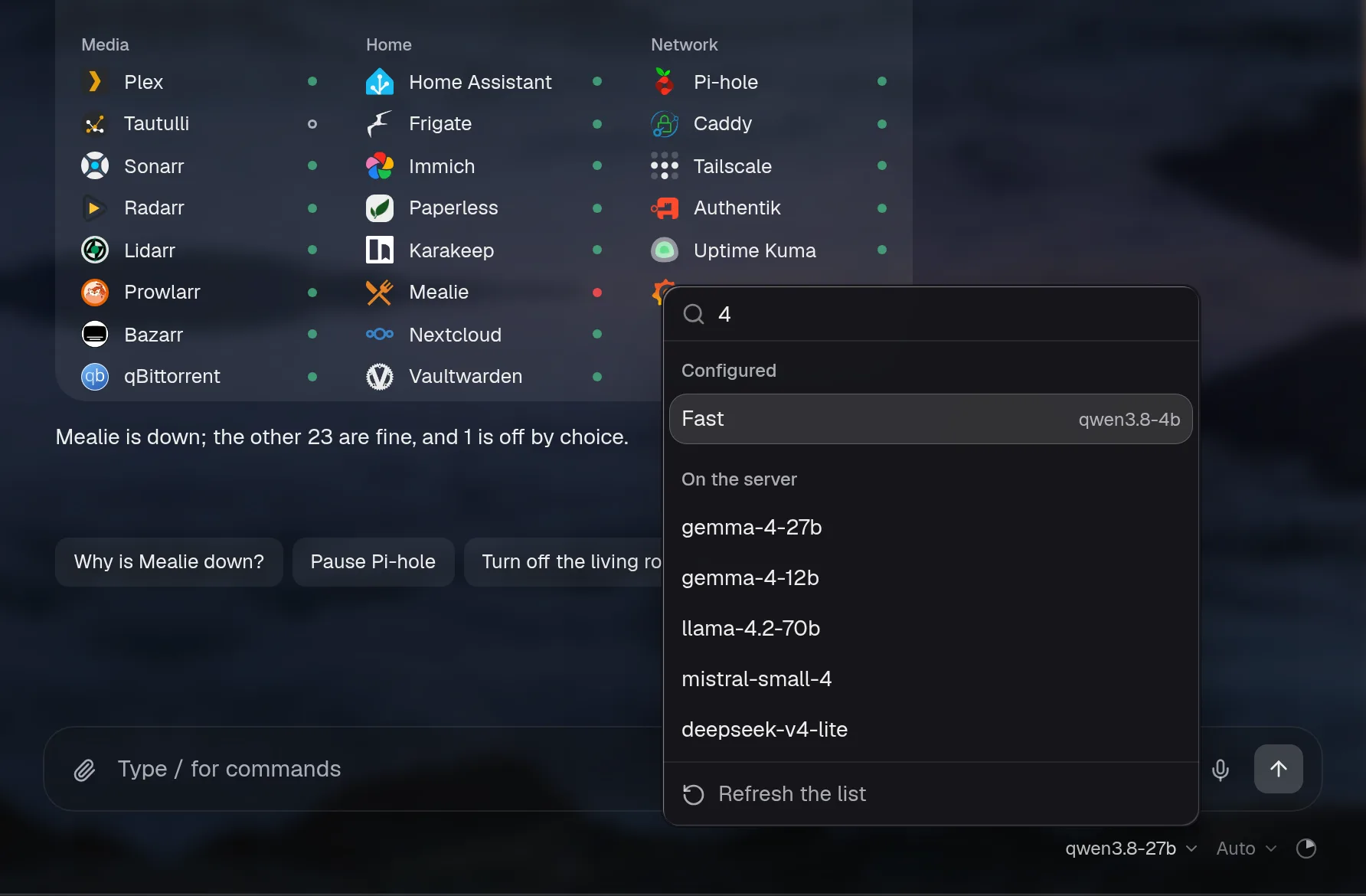
You can list more models under assistant.models. Each chat can use any of them, and a new chat starts on the main one again. auto adds every model your server lists. A { auto: true, … } entry lists another server, like OpenRouter or Anthropic. Past eight models, the menu gets a search box. The Reasoning menu beside it sets how much the model thinks (Auto, Off, Low, Medium, High), for that chat only. Background calls always use the main model, and the server only accepts models you configured or that a listed server offers.
assistant:
  baseURL: http://ollama:11434/v1
  model: qwen3:8b                      # the default, and what background calls use
  models:
    - { name: Deep, model: qwen3:32b, reasoning: high }
    - { name: Claude, provider: anthropic, model: claude-sonnet-5-5, apiKey: "${ANTHROPIC_API_KEY}" }
    - auto                             # everything the main server lists
    - { auto: true, name: OpenRouter, baseURL: https://openrouter.ai/api/v1, apiKey: "${OPENROUTER_KEY}" }
Docs: More than one model
Slash commands, @mentions and your own commands
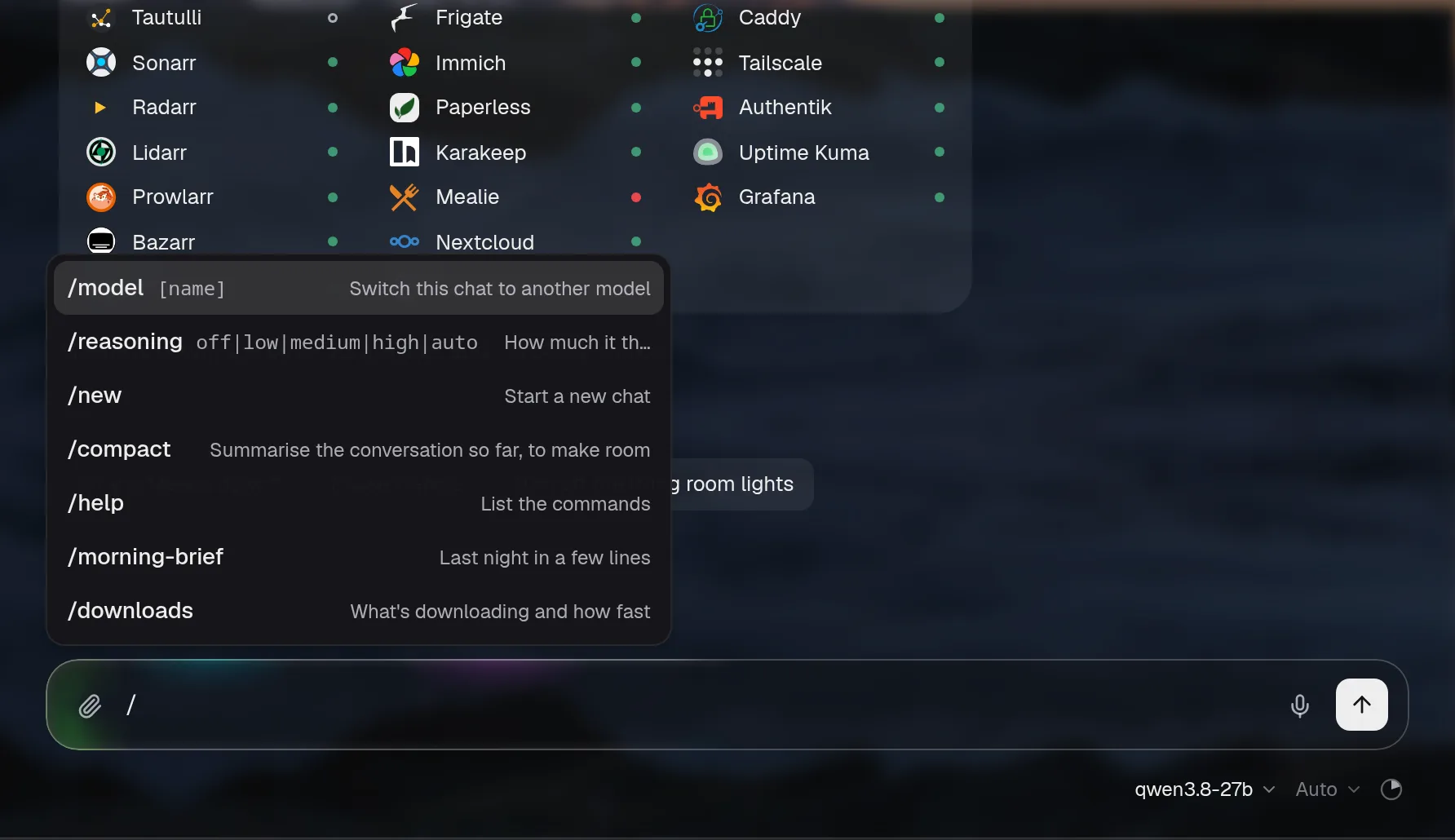
Type / at the start of the message box for /model, /reasoning, /new, /compact and /help. These run in Valet straight away, without the model and without using tokens. Type @ to name an integration, and its tools are used first. Commands you add under chat.commands show up in the / menu, in ⌘K and in /help. They go through the chat like anything you type, with the same access and approvals.
chat:
  commands:
    morning-brief:
      description: Last night, today's calendar and Hacker News
      prompt: >-
        Give me my morning brief: what happened overnight, what's on my calendar today,
        and the Hacker News stories worth reading. Keep it short, problems first.
    watch: { prompt: "Add {input} to my watchlist and tell me when it's out", reasoning: low }
    blocks: { prompt: "Who's blocking the most today?", tools: [dns] }
Docs: Commands and mentions
Voice
The voice block adds a mic to the message box and a speaker under each answer. It works with any server that speaks the OpenAI audio API. Your words go into the box so you can check them before sending. The speaker reads the answer's text, without markdown, tables or cards. The browser only ever talks to Valet, so the speech server's address and key stay on your server. Nothing is stored.
On your own network, with Speaches (runs well on a CPU):
voice:
  stt: { baseURL: http://speaches:8000/v1, model: Systran/faster-distil-whisper-small.en, language: en }
  tts: { model: speaches-ai/Kokoro-82M-v1.0-ONNX, voice: af_heart }
With OpenAI: voice: { stt: { baseURL: https://api.openai.com/v1, apiKey: "${OPENAI_API_KEY}", model: gpt-4o-mini-transcribe }, tts: { model: gpt-4o-mini-tts, voice: alloy } }
Docs: Voice. Hear it in the demo: press the speaker under any answer.
Pi-hole: which devices
Pi-hole's tool now lists the devices with the most blocked queries, by name where Pi-hole or its local DNS records know one. Give it a domain and it tells you which devices looked it up lately. Ask "Which devices asked for doubleclick.net lately?" or "Who's blocking the most today?".
Docs: Pi-hole
Also
- If you ask something else instead of answering an approval card, that now counts as a no. The card goes away, its step reads Skipped, and nothing runs. Before, the card could stay pressable and spin forever.
- An answer's copy, ask again and read-aloud buttons show when you hover over it, so long chats look cleaner. On a phone, the latest answer keeps them and a tap shows them on the others.
- The chat says "Working…" while it waits and "Thinking…" only when the model is actually reasoning.
- The model, the reasoning level and the context meter moved from the chat's header to a row under the message box.
- The chat's menus are solid now, so they're easy to read over a wallpaper.
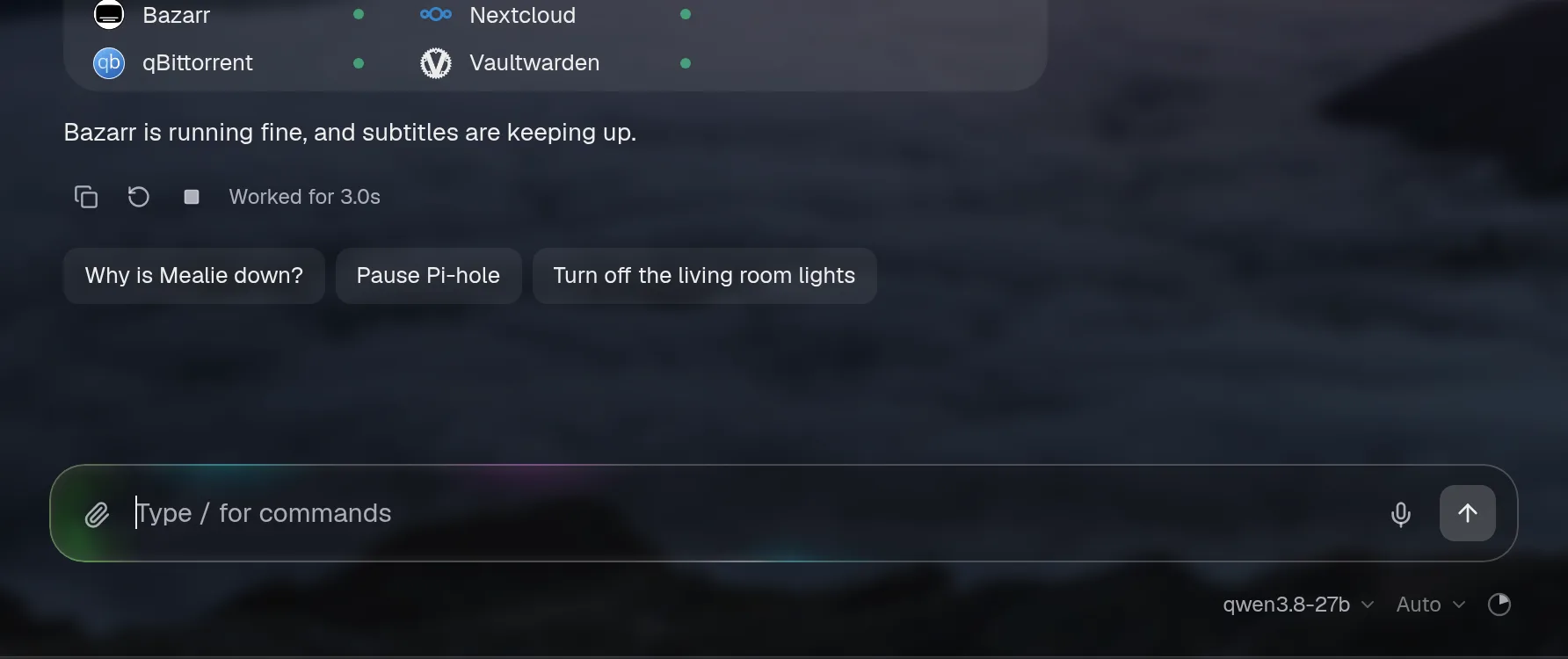
- The message box says "Type / for commands".
- The demo has voice: answers are read aloud, and the mic links to the setup docs.
Full changelog
Added
-
assistant.models: more models to pick from in the chat, for one chat at a time. Each entry needs onlymodel; what it leaves out comes from the main settings (the address only to the same provider, the key only to the same server). The server accepts only a configured choice, the context meter follows the chosen model's window, and background calls stay on the main model.config checknames duplicate names and an Anthropic choice without a key. Withoutmodelsnothing changes. -
autoinassistant.models(ormodels: auto): the chat also offers every model the main server lists at/models. Valet asks the server itself, so its key stays on the server, and keeps the list five minutes, with a refresh in the menu; if the server doesn't answer, the configured models still work and the menu says so. A request may name only the default, a configured model or one in the latest list (asked again once before it's refused). Past eight choices the menu becomes a list you type to narrow: configured models first, then the ones picked lately in this browser, then the rest, a hundred at a time. -
{ auto: true, baseURL, apiKey, provider, name }inassistant.modelslists another server's models too (several are fine: a local server, OpenRouter and Anthropic, say). It fills in from the main settings by the same rules as a configured model, and each model it finds runs on its own server with that server's key. A model whose id another choice already has is offered as<name or host>/<id>. The menu puts each server's models under its name or host, the search covers all of them, and a server that doesn't answer is named. -
autowithprovider: anthropiclists Anthropic's models (GET /v1/models, every page, by display name).config checkno longer flags it, and names an Anthropicautoentry without a key instead. -
Discovered lists leave out models that clearly aren't for chat: embeddings, speech and transcription, image models, moderation, rerankers, legacy completion models, and OpenRouter models that don't write text.
-
A Reasoning menu in the chat (Auto, Off, Low, Medium, High) sets how much the model thinks for that chat, over the config; a new chat is back on Auto. Background calls are unaffected, and so are access and approvals.
-
reasoning: medium, for the assistant and each ofmodels. -
voice: talk to the chat and hear it answer, over the OpenAI audio API (OpenAI, or a local server like Speaches).voice.sttadds a mic to the message box: tap to start and tap to stop, or hold and let go, with a level and a timer while it listens; the words go in the box to check (autoSendsends them).voice.ttsadds a speaker under each answer, beside copy, that reads it aloud (the start of it, without markdown or cards) and is a stop while it talks; another answer or a new question stops it, andspeakRepliesreads each finished answer without a press. Valet calls the speech server throughPOST /api/voice/transcribeand/api/voice/speak, behind sign-in like the chat, so the address and key stay on the server; recordings up to two minutes, readings up to 2,000 characters, a per-person limit each minute, nothing stored. Voice changes no permissions.config checkvalidates the block. Off unless set. -
Commands in the chat. Typing
/at the start of the message box opens a menu, narrowed as you type (arrows, Tab or Enter, Esc):/model [name]switches this chat to the best match among the picker's choices, or opens the picker;/reasoning off|low|medium|high|auto;/new(or/clear);/compactsummarises the conversation now with the same summariser as the automatic path, behind the same quiet line;/helplists them all. They're handled by Valet, with no model and no tokens, and none of them changes what the assistant may do. The chat's message box says "Type / for commands" (labels.message). -
@mentions. Typing@offers the integrations the chat may use, by id and name; a chosen one shows as a token in the message. The request names them, and the server refuses any it doesn't know or the assistant may not use. Withassistant.tools: lazytheir tools are loaded from the first step, so there's no step spent asking for them; withalla line tells the model what the question is about.@plextyped by hand works the same. A mention never grants anything beyondassistant.access. -
chat.commands: your own commands, as a prompt ({input}is what's typed after the name) with an optionaldescription,model,reasoningandtools(as an @mention). They're in the/menu, ⌘K and/help, and run through the normal chat with the same access and approvals.config checknames bad or built-in names, a model that isn't a choice, and an integration intoolsthat isn't there or can't be used. The assistant can add one through its usual config edit, approved before it's saved. The demo has/morning-briefand/downloads. -
The public d...
Valet 0.3.0
Added
assistant.accesstakes a key per tool:plex.plex_stop_stream: controlunderplex: readlets that one tool act, anddownloads.torrent_control: noneorvalet.report_issue: nonetakes one away from the chat, commands, rules, plans, pins and live cards alike.config checknames a key that matches no tool, with the tools that instance has. Without dotted keys nothing changes.assistant.reasoning:auto(as before),off,loworhigh.offturns a Qwen-style model's thinking off in the chat (chat_template_kwargs: { enable_thinking: false }, which servers that don't know it ignore);lowandhighsendreasoning_effort; Anthropic maps them to its thinking budget. Background calls keep the model's default.assistant.optionspassestemperature,topPandmaxOutputTokensto the model. Left out, the server's defaults.assistant.tools:all(the default, as before),lazyorauto.lazysends Valet's own tools and one line per integration, and loads an integration's tools when a question needs them;autoislazyonce all the tools come to about 6k tokens. A much smaller prompt on a big setup, for one more step on questions about an integration. When it loads some, the chat shows a "Picked tools" step.- The docs say how to keep the assistant's context small: which settings helped in testing against a local model, and which made answers worse.
Changed
- A Preply lesson counts as an online meeting: its classroom link gets the ring before it starts, the reminder and a Join button, like Meet or Zoom.
- The wall display lays out a page like the main page: a section's
columnsper screen ({ phone, tablet, desktop, wide }) and a card's owncolsandrows, with cards in a row ending flush. The demo's House page uses it: the cameras over two rows, the thermostat beside who's home and the doors, then the energy and the weather.
Fixed
- The assistant's last step, the one kept for answering, could loop on a small model: a tag or "Let me check…" hundreds of times, until the server's limit. It now doesn't think first and stops after about 400 tokens, and stray tags a model leaves in its answer (
</think>,</thinking>,<trans>) aren't shown.
Valet 0.2.0
Added
-
Home Assistant cards have icons and colour. Each row gets a small icon from what the entity is (a lock, a garage door, a person, energy, money, temperature), and the ones that say how things stand are coloured: locked, closed and at home in green, unlocked or left open in amber.
lockedandnot_homeread as Locked and Away. An entity incardscan be{ id, icon }to choose its icon. -
A widget can span columns:
cols(1 to 8) on a widget entry, besiderows, in a section with sizes or withcolumnsper screen. It never reaches past the last column, socols: 2in a grid of three is two thirds of a computer's row and the whole row on a phone. -
Wide pages have room for more: past 1760px the size grid has eight columns instead of six, and a section's
columnstakes awidecount ({ phone: 1, tablet: 2, desktop: 3, wide: 4 }, up to 8 each), which keeps thedesktopcount when left out. -
A section without a heading carries on the grid above it, with the cards' gap between them rather than a section's, so rows of different shapes read as one page.
-
With
hero.align: left, the greeting sits at the top left, level with the top bar, and each tab shows its own name in the same place. -
A tile can draw its share as a pie (
summary.pie, coloured bycolor). Pi-hole's ads blocked uses it, in red. -
A line chart's series can have a
colorof its own (#hexorvar(--token)), so two lines that mean different things, like power used and solar, read apart. -
The calendar has a week. A calendar card that's narrower than the month and day side by side but tall enough, like a third of the overview's row or a phone, shows a few days side by side with the hours down the side: only the hours in use, squeezed to the card so it never scrolls up and down, events as blocks in their calendar's colour, all-day ones in a strip on top, today shaded with a line at the time now. Swipe or use the arrows for more days; Today brings it back. A meeting has a small Join button on its block, and tapping any event shows its time, place, calendar and Join, over the week so nothing moves.
view: weekorview: agendaon the widget holds it to one. -
appearance.theme: systemfollows the device over a wallpaper too: light glass when the phone or computer is in light mode, dark glass in dark mode, and the page turns when the device does (at sunset, say), without a reload. The light/dark switch in the top bar shows over a wallpaper then, and overrides it in that browser only; switching back to what the device says follows the device again. The wall display follows the screen withsystemand stays dark otherwise.autois unchanged: dark glass over a wallpaper, as before. -
A wallpaper for each theme:
appearance.wallpaper: { light: …, dark: … }(and the same inwallpapers, per tab).dimandblurtake{ light, dark }too. The plain forms work as they did. -
Three more views for anything with pictures, chosen per widget with
view.coverflowis Cover Flow again, rebuilt: the one in the middle faces you and the rest turn away in 3D, with reflections.masonryis a wall of pictures three rows high that you throw sideways; Immich's On this day uses it.cardsis a stack of cards to deal through; Paperless's recent documents (each with its first page, title, sender and date) and Karakeep's saved links use it, and a saved link keeps its Archive button. All three follow the browser's own scrolling, with nothing redrawn as they move, have Previous and Next buttons and the arrow keys, and are a plain row when you ask for reduced motion. -
A reading pile (Karakeep's From your reading) can take any gallery view, and archiving still works from it.
-
config checknames aviewa widget's card can't take, and the views it can. -
The demo's Home tab has the week's meal plan from Mealie under the house and the PC: real food photos, today first. Mealie is down in the demo's story, so the row is the plan it last sent, marked stale.
-
The demo's Media tab has music: Navidrome's most played albums as a cover flow beside The year so far, in place of Requested. The ten albums are real ones whose covers are free to share (CC0, CC BY-SA or public domain), credited on the Credits page.
-
The demo sets reminders. Ask it to tell you when Oppenheimer finishes downloading: it asks first, and after your OK the download finishes within a few seconds and the notice arrives, as a real one would.
-
Long chats compact themselves instead of breaking. When the model's window is known, what's sent stays under about 70% of it: the oldest turns become a short summary (one tool-less call, cached for the next turns), the latest question always goes whole, and a quiet line in the chat says "Earlier messages summarised to make room". The page keeps the whole conversation. Within one answer, earlier lookups' results shrink when they pile up, and a request the model's server rejects as too long is sent once more cut right down, then answered in plain words instead of an error.
assistant.compact: falseturns it off.
Changed
- Hacker News and RSS headlines are one column to scan: a small mark for where each story is from (its picture, the site's icon, else its first letter), the title on up to two lines, then the points, comments, site or source and how long ago. A card made two rows tall fills its height with as many stories as fit, so nothing is left empty at the foot.
- The thermostat's colour says what it's doing: warm orange for heat, blue for cool, teal for auto, a quieter shade while it's idle, grey when off. It used to be the page's accent colour for heat.
view: masonryon a photos card, like an Immich album, keeps each photo's own shape and caption in the collage.- A narrow calendar's day is its title: "Thursday 5 November" sits on the header line at the size of every card's title, with the arrows at the right where other cards keep theirs, so the cards in a row line up. Wide, the month and the day are title-sized on that line too. In the plain agenda the arrows step a day at a time.
- Mealie's meal plan (
week) shows its photos landscape, the way food is photographed. - Navidrome's Most played keeps album covers square: as a list, each row's cover is square instead of cut to a poster, and as any gallery view (
row,coverflowand the rest) the covers stay square. It brings up to 10 albums, so a gallery has some to flip through; the list still shows the top five. A ranked card can sayaspect: squarefor this. - A widget that can't reach a service the page already shows as down is one problem, not two: with Mealie down and its meal plan stale, the line under the title says "Everything's running except Mealie" and asks "Why is Mealie down?" once, without "1 widget can't reach its service" or "What's wrong with Meal plan?" beside it.
- Liquid glass is clearer and reads as thick glass. The blur behind cards is 4px instead of 10, so the wallpaper shows through sharp and in colour; words stay readable because the tint thickens where they need it, now in dark too (a dark card over a bright part of the wallpaper gets a deeper smoky tint, as a light card over a dark part already got a whiter one). The edge has a bevel, soft light just inside the top and left and a faint shade at the bottom, in place of the sheen. Material after kubai087's glasswork (MIT).
- The page has one set of design foundations, and every card uses them. Chips and small buttons are one chip (32 high, one corner, 13px words; tonal, outline, chosen or quiet) and one button (28 or 36 high; quiet, tonal or solid), where there were a dozen styles: room and desktop part chips, All off, the vacuum, Pause, Updates, the suggestions on the overview and the AI tab, the camera tabs, a calendar's Join and the chat's Try again and New chat. Text sizes are eight steps instead of 26, card titles are bolder than the text under them again, corners follow one scale by role (cards and popovers, controls, chips, and artwork by its size), status dots are one size (legends a little larger), icons are 14, 16 or 18, and everything a keyboard reaches shows the same accent ring, the top bar's rings, the phone's dock and the chips included.
- Every widget is the same card. Whatever it shows, it sits in one glass card with the same background, corners, edge, shadow and padding, and its title row is the first thing inside it: the icon, the title, the note and the card's buttons at the far right, at one height, so titles line up across a row. Nothing floats on the wallpaper any more: Now playing, Recently added, On this day, an album, books, games, documents and From your reading are cards with their artwork inside, and their Previous and Next (and See archived, and the reading pile's tools) are small quiet buttons in the title row instead of over the picture or the wallpaper. A row of artwork scrolls to the card's edges and fades there, its first poster lined up with everything else. Pictures that should feel big (the stream playing, a flashback photo, a saved page, Daylight's sky) are a panel inside the card; the weather keeps only a faint tint of the sky. Coming up and other tiles with artwork are glass tiles with the poster beside the words. Tiles and cards are the same distance apart. Downloading is a card like Hacker News, each download a row inside its padding whose progress fills it from the left, round at the ends. Titles are one size and weight everywhere, in chat and on tiles too; a calendar's date and the weather's sky are headlines, not titles. Weather and the calendar keep their title for screen readers only, and start at the same padding as the cards beside them (the calendar's date no longer touches the card's edge); the thermostat names its room.
- Cards fill the height their row gives them instead of leaving an empty foot: Daylight's sky sits right under the next time and grows to fill the card, On this day's photos grow with a tall card, Downloading's rows sha...
Valet 0.1.8
Added
- Liquid glass, to try:
appearance.glass.material: liquidswaps the frosted glass for a clearer one. The blur is lighter and keeps the wallpaper's colour, the edge is lit from the top left, there's a soft shadow and a sheen inside, and hovering a card brightens its glass. In light, a card over a dark part of the wallpaper turns dark with light text, and the cards in a row decide together. Frosted stays the default. Any browser can flip between the two in ⌘K (Liquid glass, under This device), and the demo can too. - With liquid glass, asking your system for reduced transparency or high contrast makes every surface solid.
Valet 0.1.7
Added
- Online meetings from your calendar. Valet finds the meeting link in each event (Google Meet, Zoom, Microsoft Teams, Webex, Whereby, Jitsi, GoTo and a few more), and from ten minutes before a meeting until it ends the calendar's ring counts down ("in 4 min", then "Now · 20 min left") with a Join button. Two at once: the one on now leads and the ring says "+1".
- Meeting reminders: a minute before (or any list of times), one notification per meeting to your channels and to devices with notifications on. Tapping it on a device opens the meeting. Each is sent once, kept in
data/reminders.json, so a restart never sends it again. - Calendar rows show the meeting's service and a small Join button. ⌘K has join meeting (opens the next or current one) and next meeting; the assistant has
calendar_next_meeting, andcalendar_upcomingreturns join links. calendar.meetings:lead,remind,pushandme(your address, so meetings you declined are left out), orfalse. It works with no config.- Calendars read time zones (a meeting set in New York lands at the right time anywhere), moved and cancelled occurrences of a repeating event,
DURATION, monthly rules like "second Tuesday" or "last Friday", and leave cancelled events out. - Integrations and plugins can say things at a set time with
reminders(); a command can open a link withopen: true; an activity can carry acountdownand alink, and a list row alink. - The demo has an online meeting a few minutes away.
- Valet's docs in ⌘K: type what you're looking for ("wallpaper", "backups", "sonarr") and a Docs group under everything else offers the pages and sections about it, opening on askvalet.dev at the right heading. "docs" or "help" alone offers the main pages. The search runs on Valet's own copy of the docs, so it works offline, and on a read-only page too.
Security
- Calendar text is other people's invitations: only an https link on a known meeting service becomes a Join button, its host is always shown, and the link is scanned without a backtracking regex. A notification opens a link only if it's https.
Also in this release (0.1.6)
- A config with a
notify:block from before 0.1.5 (channels or insights, and nowebPush) loads again. In 0.1.5 it stopped Valet from starting.
Valet 0.1.5
Added
- Backup health: one Backups card (
valet.backups) with every backup job your services report, failed and overdue ones first, then the rest with when they last worked, their size and a small line of it run by run. A sudden drop or jump in size is flagged as worth a look. Overdue means no success within the job's schedule,backups.expect, orbackups.overdue(26 hours). Going wrong and coming right are told once each, on the page, on the timeline and throughnotify.channels, checked every 15 minutes even with the page closed. Ask "are my backups ok?", or type backups in ⌘K. - Backrest, Kopia, Duplicati, Proxmox VE, Proxmox Backup Server, Home Assistant (its automatic backups), TrueNAS (cloud sync and replication) and Healthchecks (checks named for a backup) report their jobs to it. Integrations and plugins join with
backups(), and aservice()withbackupsandbackupGet. - A wall display at
/wall(and Wall display in ⌘K): a full-screen page for a wall tablet or a spare monitor, with the time and weather large across the top and the cards you pick below, sized to fill the screen. It's its own page in the config,wall:, written likelayout, with pages that take turns (every, a touch holds one forpause). Left out, it shows your services and what's playing or downloading. It never acts, whoever is signed in: no chat, ⌘K, buttons or links. It dims nearly to black from sunset to sunrise (or set times), keeps the screen awake where the browser allows, and hides the pointer. wall.token: pair a screen that can't sign in by opening/wall#key=<token>once. That browser can read the wall's cards and nothing else.- The weather card knows today's sunrise and sunset (
sun), which the wall dims by. - The demo has three wall pages.
- Valet as an app: add it to a phone's Home Screen or install it on a computer, and it opens in its own window with Valet's icon and your title. When the server can't be reached it says so, instead of the browser's error page. See Valet as an app.
- Notifications on this device, from ⌘K: Valet's own push notifications, with no ntfy or Telegram needed. Everything that goes to your channels (reminders, rules,
live.notifywithpush: true, insights) goes to these devices too, and a notification opens the tab it's about. On iPhone and iPad it needs Valet on the Home Screen, and the switch says so.notify.webPushsets the contact and push services; it's on by default and sends nothing until a device turns it on.
Security
- The service worker caches only the "can't be reached" page, never the page, its data or anything behind sign-in. Turning notifications on needs what a button needs. Each notification is encrypted for its browser and signed with Valet's own key, kept in
data/vapid.json(0600), and Valet posts only to the browsers' push services. The CSP namesworker-src 'self'andmanifest-src 'self'.
Valet 0.1.4
Security
- The copy of the config kept for undo (
config.yaml.previous) is readable only by Valet's user, like the config itself.
Added
- What you take off the page leaves as dust: archiving a saved link, clearing finished to-dos, removing a rule or a torrent, unpinning a card, Not now on an approval and dismissing the year in review. It comes apart from the left and drifts off while its room closes. Lists that change by themselves still just change, and reduced motion gets a plain fade.
- A context meter in the chat: a small pie beside the model's name, from the tokens the model reported for its last step, with the numbers on hover and a fresh chat offered when it's nearly full. Known Claude models know their window;
assistant.contextWindowsets it for anything else. - Sounds, off by default:
appearance.sounds: { enabled, volume }, made in the browser with no files, for a switch, something done, a "not now", a notice, a message sent and something taken off. ⌘K turns them on or off for one browser. - Small touches: switches on a spring, a tick on an approval's button, the send arrow lifting out as the stop square arrives, notices that swipe away, the copy icon drawing its tick, posters that lean from the pointer, and Desk and List sliding their pill.
- GitHub repositories: a
trafficwidget and tool for your own repos, with views, visitors, clones and where visitors came from over GitHub's last 14 days. It needs a token that can push to the repo.
Changed
- The chat's working orbs: a sphere of orbiting particles while it waits for the first words, a sweeping globe while it thinks, a constellation for a lookup and a rolling wave for an action.
- A config diff, the assistant's included, shows each change with a line either side and folds what's unchanged between two changes, rather than every line from the first change to the last. A list written one short entry to a line (
- { widget: a, size: large }) gets new entries written the same way.
Fixed
- To-do list: ticking something off on the page works: the switch now says which item it is.
- The chat's send button over a wallpaper is a white square with a dark arrow again; the arrow had gone white on white.
- "Thinking" no longer starts at -0.0s.
- A config edit that replaced or removed the first key of a list entry (a section's
title, say) no longer drops its-, which turned the entry into part of the one above.
Valet 0.1.3
Added
- Proxmox VE, Speedtest Tracker, Syncthing, Backrest and Healthchecks.io are full integrations. Proxmox shows every node and guest with its CPU, memory and uptime and the storage pools by fill, and can start, shut down or reboot one guest. Speedtest Tracker charts the last days and can run a test. Syncthing shows folders and devices, out of sync first, and can rescan a folder. Backrest shows each plan's last backup and the next, and can run one now. Healthchecks shows each check with its last ping, and can pause and resume one. Everything that changes something asks first, and their old
statuswidget and settings still work. - Mealie and Tandoor are full integrations: this week's meal plan from today, a recipe of the day with its photo, and new recipes. The assistant searches and reads recipes and adds to the shopping list, asking first.
- Komga and Kavita: continue reading with covers and how far along, what's next in a series (Komga) and what was added lately. The assistant searches the library and says what you're reading.
- Miniflux: the unread articles as a pile to step through (archiving one marks it read), unread per feed, and starred. The assistant searches and reads entries, and marks them read or stars them, asking first.
- Jellyfin, Emby, Navidrome and Audiobookshelf are full integrations: what's playing (with its ring in the top bar), what you're partway through and what's new, with posters and covers. Navidrome adds recently and most played and albums to rediscover; Audiobookshelf, books in progress and your listening this week. The assistant can search each library, and stop a Jellyfin or Emby stream after asking. Existing configs keep working,
statuswidget included. - Rules: standing instructions like "when a download finishes, tell me and pause the rest" or "every morning at 7, if anything is down, tell me". Set up in chat with one approval, whose card names the trigger by the card's title and the action in its tool's own words, then run every half minute with no model. A rule runs one integration tool (never the config, Valet's own tools, plans, pins or MCP), is checked again against
assistant.accessbefore every run, waits out a cooldown, and pauses itself after three failures. Every run goes in the activity log, the timeline and your notifications.valet.ruleslists them with Pause and Remove. - List rows can carry their own buttons.
- Plain commands in ⌘K, run by rule with no model: "pause downloads", "lights off", "what's playing", "pause ads 10 min", "stop plex". Typed exactly, Enter runs one at once: something that looks shows its card, anything that changes something shows the approval card first. A half-typed command is offered below Ask, two that match are both shown, and when nothing matches Enter asks the assistant. They follow the chat's access levels and are logged as
by command; with no assistant they run page actions and tools that only look. qBittorrent, Pi-hole, Plex (Tautulli), Home Assistant (every light, switch and scene it may control, by name), Seerr, the PC's presets, Sonarr and Radarr, Prowlarr, changedetection.io, Docker and the to-do list have them, and plugins can add their own (commands). - Pi-hole's and Prowlarr's status tools answer with their cards.
Changed
assistant.access.valetdefaults tocontrol, which setting up a rule needs.valet: writekeeps reminders and turns rules off.- Turning a light on or off, or sending the vacuum, from chat answers with the floor plan as it is now. Pausing or resuming downloads answers with the downloads card.
- The docs say what the code does: which
${NAME}values are redacted, which keys the config tools leave alone, that a sandbox has no MCP server, which integrations takeinsecure, and Frigate's options.
Install: docker pull ghcr.io/askvalet/valet:0.1.3 (amd64 and arm64). See askvalet.dev, or try the live demo.
Valet 0.1.2
Changed
-
The demo, the docs site and the tests stay out of the image build entirely.
-
Pausing Pi-hole from chat answers with its chart, now showing the pause and its countdown.
-
A config edit that can't be applied is flagged on read-only pages too, without the error itself, which stays with people who can change things.
-
The MCP server reports Valet's real version.
-
The image no longer carries the README's pictures: 165 MB again.
Install: docker pull ghcr.io/askvalet/valet:0.1.2 (amd64 and arm64). See askvalet.dev, or try the live demo.
Valet 0.1.1
Added
- Valet as a read-only MCP server (
mcpServer): your own AI client can look at your homelab through Valet's read tools, behind its own token and access, with results redacted and every call logged. - The welcome card lists the services it recognises running on the machine, through a read-only Docker socket proxy, each with the lines it takes. With an assistant that may edit the config, one click or "What do you run?" sets them up in chat.
Changed
- A config edit that can't be applied now says so on the page, with the error, until the next good save. Before, only the log said.
- The top of the overview takes less room.
- The demo is honest about what Valet can do: it explains why a service is down but doesn't pretend to restart it (Valet reads Docker through a read-only proxy). Approvals are shown with pausing Pi-hole and stopping a stream instead, which real Valet does.
- The docs and README no longer claim actions Valet doesn't have, and say plainly which changes ask first: anything the assistant does.
- Saving the config no longer flashes the page empty: cards keep what they show until the new answers arrive.
- A new wallpaper always shows after a save, even when the new file has the same timestamp as the old one.
- Local AI and PC read a published JSON format, so they work with your own endpoint: only
/api/liveis needed for Local AI, the PC's screen preview is optional, and a field that doesn't fit is named in the error.examples/local-ai/serves Local AI's format from nvidia-smi and Ollama. - ROADMAP.md is gone; the changelog says what shipped.
- The year-in-review link waits until there's a story: a near-empty install doesn't offer it.
- The quick start creates
.envbeforedocker runneeds it. - The demo's model shows "(demo)" beside its name, since it's scripted.
Install: docker pull ghcr.io/askvalet/valet:0.1.1 (amd64 and arm64). See askvalet.dev, or try the live demo.