Repository navigation

Valet 0.4.0 lets you pick the model for each chat, adds slash commands and @mentions, and adds voice.
docker pull ghcr.io/askvalet/valet:0.4.0Configs from 0.3.0 work as they are. Everything below is off until you add it.
Highlights
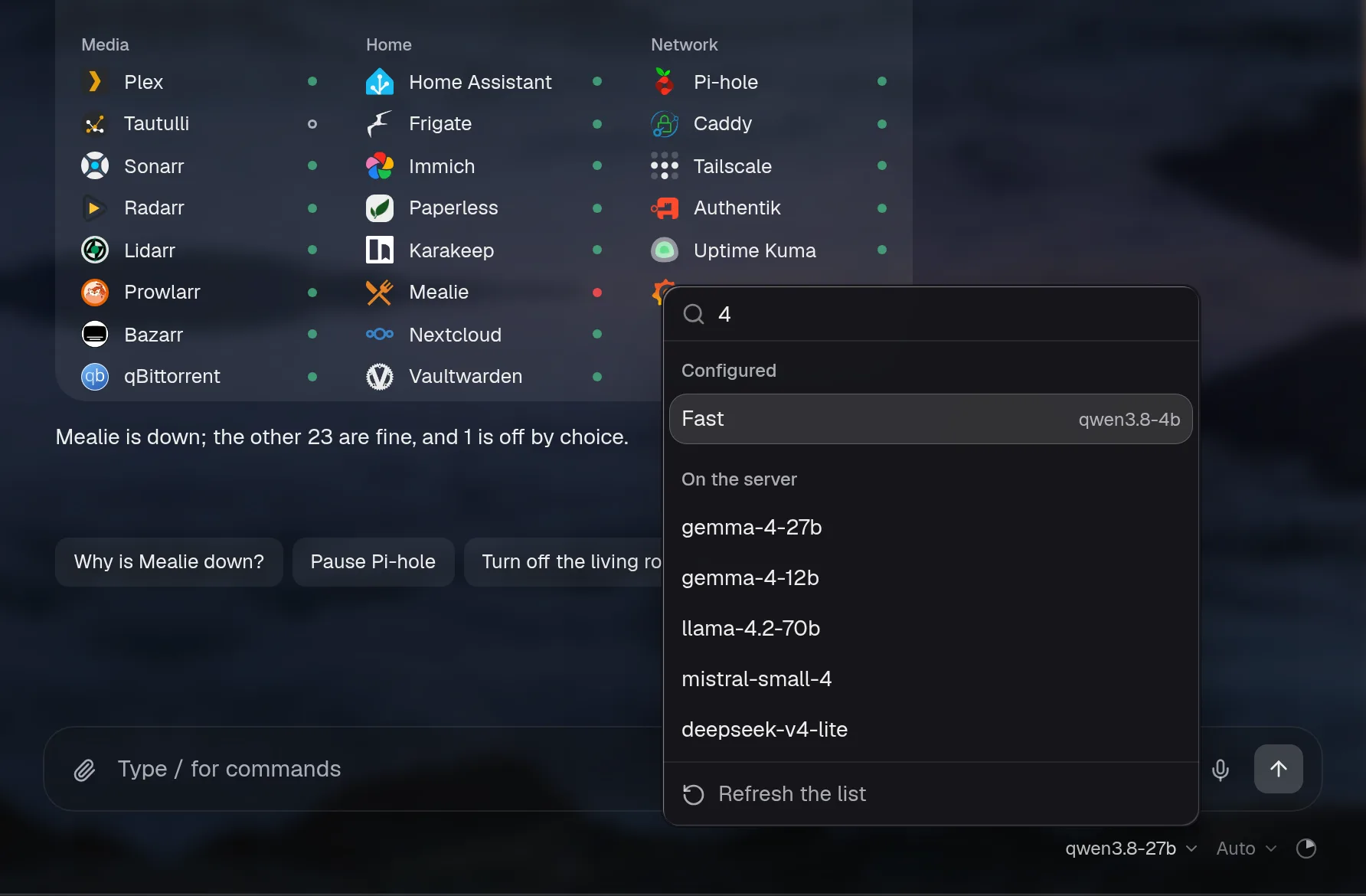
Pick the model for each chat
You can list more models under assistant.models. Each chat can use any of them, and a new chat starts on the main one again. auto adds every model your server lists. A { auto: true, … } entry lists another server, like OpenRouter or Anthropic. Past eight models, the menu gets a search box. The Reasoning menu beside it sets how much the model thinks (Auto, Off, Low, Medium, High), for that chat only. Background calls always use the main model, and the server only accepts models you configured or that a listed server offers.
assistant:
  baseURL: http://ollama:11434/v1
  model: qwen3:8b                      # the default, and what background calls use
  models:
    - { name: Deep, model: qwen3:32b, reasoning: high }
    - { name: Claude, provider: anthropic, model: claude-sonnet-5-5, apiKey: "${ANTHROPIC_API_KEY}" }
    - auto                             # everything the main server lists
    - { auto: true, name: OpenRouter, baseURL: https://openrouter.ai/api/v1, apiKey: "${OPENROUTER_KEY}" }
Docs: More than one model
Slash commands, @mentions and your own commands
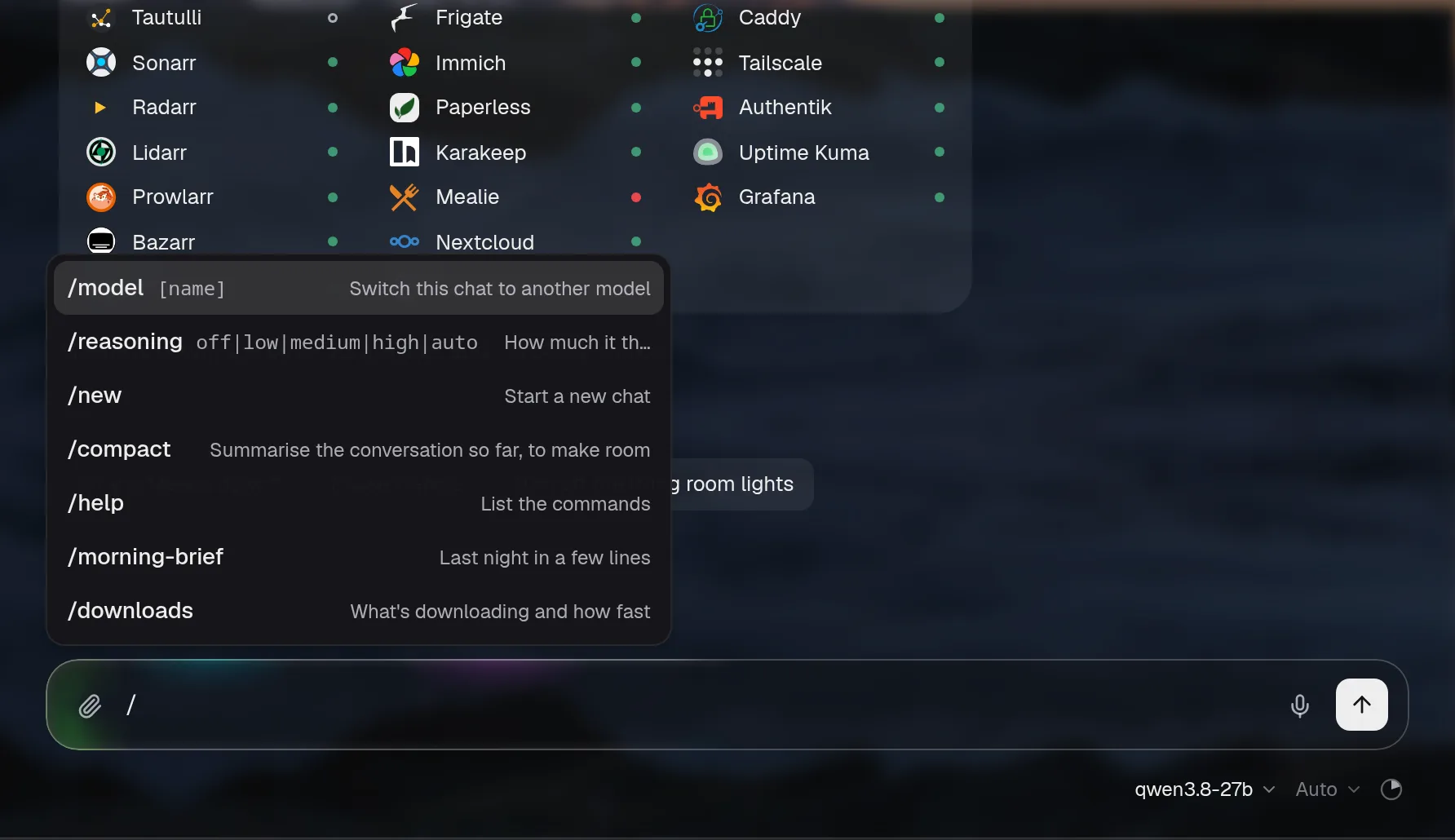
Type / at the start of the message box for /model, /reasoning, /new, /compact and /help. These run in Valet straight away, without the model and without using tokens. Type @ to name an integration, and its tools are used first. Commands you add under chat.commands show up in the / menu, in ⌘K and in /help. They go through the chat like anything you type, with the same access and approvals.
chat:
  commands:
    morning-brief:
      description: Last night, today's calendar and Hacker News
      prompt: >-
        Give me my morning brief: what happened overnight, what's on my calendar today,
        and the Hacker News stories worth reading. Keep it short, problems first.
    watch: { prompt: "Add {input} to my watchlist and tell me when it's out", reasoning: low }
    blocks: { prompt: "Who's blocking the most today?", tools: [dns] }
Docs: Commands and mentions
Voice
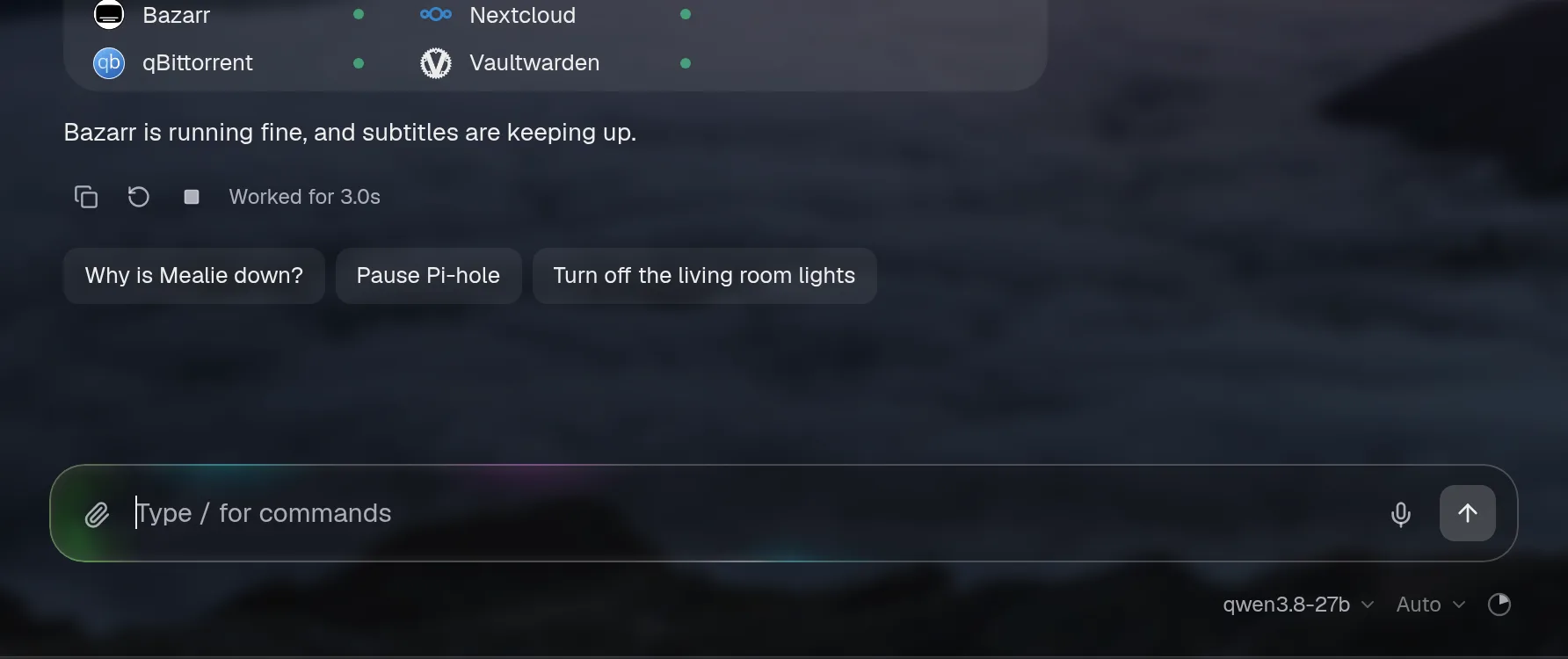
The voice block adds a mic to the message box and a speaker under each answer. It works with any server that speaks the OpenAI audio API. Your words go into the box so you can check them before sending. The speaker reads the answer's text, without markdown, tables or cards. The browser only ever talks to Valet, so the speech server's address and key stay on your server. Nothing is stored.
On your own network, with Speaches (runs well on a CPU):
voice:
  stt: { baseURL: http://speaches:8000/v1, model: Systran/faster-distil-whisper-small.en, language: en }
  tts: { model: speaches-ai/Kokoro-82M-v1.0-ONNX, voice: af_heart }
With OpenAI: voice: { stt: { baseURL: https://api.openai.com/v1, apiKey: "${OPENAI_API_KEY}", model: gpt-4o-mini-transcribe }, tts: { model: gpt-4o-mini-tts, voice: alloy } }
Docs: Voice. Hear it in the demo: press the speaker under any answer.
Pi-hole: which devices
Pi-hole's tool now lists the devices with the most blocked queries, by name where Pi-hole or its local DNS records know one. Give it a domain and it tells you which devices looked it up lately. Ask "Which devices asked for doubleclick.net lately?" or "Who's blocking the most today?".
Docs: Pi-hole
Also
- If you ask something else instead of answering an approval card, that now counts as a no. The card goes away, its step reads Skipped, and nothing runs. Before, the card could stay pressable and spin forever.
- An answer's copy, ask again and read-aloud buttons show when you hover over it, so long chats look cleaner. On a phone, the latest answer keeps them and a tap shows them on the others.
- The chat says "Working…" while it waits and "Thinking…" only when the model is actually reasoning.
- The model, the reasoning level and the context meter moved from the chat's header to a row under the message box.
- The chat's menus are solid now, so they're easy to read over a wallpaper.
- The message box says "Type / for commands".
- The demo has voice: answers are read aloud, and the mic links to the setup docs.
Full changelog
Added
-
assistant.models: more models to pick from in the chat, for one chat at a time. Each entry needs onlymodel; what it leaves out comes from the main settings (the address only to the same provider, the key only to the same server). The server accepts only a configured choice, the context meter follows the chosen model's window, and background calls stay on the main model.config checknames duplicate names and an Anthropic choice without a key. Withoutmodelsnothing changes. -
autoinassistant.models(ormodels: auto): the chat also offers every model the main server lists at/models. Valet asks the server itself, so its key stays on the server, and keeps the list five minutes, with a refresh in the menu; if the server doesn't answer, the configured models still work and the menu says so. A request may name only the default, a configured model or one in the latest list (asked again once before it's refused). Past eight choices the menu becomes a list you type to narrow: configured models first, then the ones picked lately in this browser, then the rest, a hundred at a time. -
{ auto: true, baseURL, apiKey, provider, name }inassistant.modelslists another server's models too (several are fine: a local server, OpenRouter and Anthropic, say). It fills in from the main settings by the same rules as a configured model, and each model it finds runs on its own server with that server's key. A model whose id another choice already has is offered as<name or host>/<id>. The menu puts each server's models under its name or host, the search covers all of them, and a server that doesn't answer is named. -
autowithprovider: anthropiclists Anthropic's models (GET /v1/models, every page, by display name).config checkno longer flags it, and names an Anthropicautoentry without a key instead. -
Discovered lists leave out models that clearly aren't for chat: embeddings, speech and transcription, image models, moderation, rerankers, legacy completion models, and OpenRouter models that don't write text.
-
A Reasoning menu in the chat (Auto, Off, Low, Medium, High) sets how much the model thinks for that chat, over the config; a new chat is back on Auto. Background calls are unaffected, and so are access and approvals.
-
reasoning: medium, for the assistant and each ofmodels. -
voice: talk to the chat and hear it answer, over the OpenAI audio API (OpenAI, or a local server like Speaches).voice.sttadds a mic to the message box: tap to start and tap to stop, or hold and let go, with a level and a timer while it listens; the words go in the box to check (autoSendsends them).voice.ttsadds a speaker under each answer, beside copy, that reads it aloud (the start of it, without markdown or cards) and is a stop while it talks; another answer or a new question stops it, andspeakRepliesreads each finished answer without a press. Valet calls the speech server throughPOST /api/voice/transcribeand/api/voice/speak, behind sign-in like the chat, so the address and key stay on the server; recordings up to two minutes, readings up to 2,000 characters, a per-person limit each minute, nothing stored. Voice changes no permissions.config checkvalidates the block. Off unless set. -
Commands in the chat. Typing
/at the start of the message box opens a menu, narrowed as you type (arrows, Tab or Enter, Esc):/model [name]switches this chat to the best match among the picker's choices, or opens the picker;/reasoning off|low|medium|high|auto;/new(or/clear);/compactsummarises the conversation now with the same summariser as the automatic path, behind the same quiet line;/helplists them all. They're handled by Valet, with no model and no tokens, and none of them changes what the assistant may do. The chat's message box says "Type / for commands" (labels.message). -
@mentions. Typing@offers the integrations the chat may use, by id and name; a chosen one shows as a token in the message. The request names them, and the server refuses any it doesn't know or the assistant may not use. Withassistant.tools: lazytheir tools are loaded from the first step, so there's no step spent asking for them; withalla line tells the model what the question is about.@plextyped by hand works the same. A mention never grants anything beyondassistant.access. -
chat.commands: your own commands, as a prompt ({input}is what's typed after the name) with an optionaldescription,model,reasoningandtools(as an @mention). They're in the/menu, ⌘K and/help, and run through the normal chat with the same access and approvals.config checknames bad or built-in names, a model that isn't a choice, and an integration intoolsthat isn't there or can't be used. The assistant can add one through its usual config edit, approved before it's saved. The demo has/morning-briefand/downloads. -
The public demo reads its answers aloud and shows the mic. It has no server, so each scripted answer was recorded ahead with a local speech server (Kokoro's
af_heart, about 2 MB in all,npm run demo:voicesrecords them again) and an answer with live numbers is read by the browser's own voice; the mic never records and says where voice is set up instead. -
The docs show the model menu, the reasoning menu, the
/and@menus, a custom command,/help, an answer being read aloud, the mic listening and a skipped approval.
Changed
- An answer's copy, ask again and "Worked for" show while the pointer is over it (or one of them has focus), so a long chat reads cleaner; their space stays, so nothing moves. On a touch screen the latest answer keeps them and a tap shows them on the others. Suggestions, approval cards and errors always show.
- While it waits for the model, and between steps, the chat says Working; Thinking is only for when reasoning is coming in, so a model with reasoning off no longer says it's thinking.
labels.workingchanges the word. - The model, the reasoning level and the context meter moved from the chat's header to a quiet row under the message box, on the right; their menus open upward. The header shows just the assistant's name.
- Pi-hole's
adblock_statusalso lists the devices with the most blocked queries, by name where Pi-hole or its local DNS records know one, and takes an optionaldomain(a plain name matches anywhere,*as in Pi-hole) to say which devices looked it up lately.
Fixed
- An approval card left unanswered when you ask something else is now a no: the card goes, its step reads Skipped instead of spinning forever, it can't be pressed later, nothing runs, and the model is told it wasn't done.
Compare: v0.3.0...v0.4.0