AI reports. Cross-examined.

Cross is released under the MIT License. Free for personal, academic, and open-source use. Commercial organizations are encouraged to contact us for a commercial license — see COMMERCIAL_LICENSE.md.
Cross is an open-source command-line tool that generates research reports using five AI (more or less) simultaneously, then cross-checks each report against all the others. The result is a cross-product fact-check matrix — every AI evaluating every other AI — so you can see exactly where they agree, where they diverge, and which claims don't hold up. Reports publish directly to Discourse. It's research-grade, keyboard-first, and built for people who want to publish accurate content fast.
Cross-check before you publish.
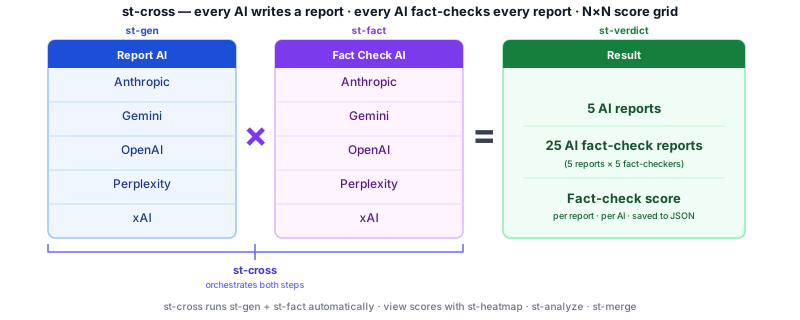
- Multi-AI generation — submit the same prompt to multiple AI providers simultaneously
- Cross-product fact-checking — each AI fact-checks every other AI's report (5×5 matrix)
- Analysis and plots — reading metrics, score heatmaps, bar charts
- Discourse publishing — post stories, fact-checks, and audio to any Discourse site
- Text-to-speech — generate and post MP3 audio via a local TTS server
- API response cache — avoid redundant API calls; replay results instantly
- Interactive CLI — menu-driven
stcommand or directst-*commands
| Provider | Model |
|---|---|
| Anthropic | claude-opus-4-5 |
| xAI | grok-4-latest |
| OpenAI | gpt-4o |
| Perplexity | sonar-pro |
| gemini-2.5-flash |
Homebrew is the standard macOS package manager. If you don't have it:
/bin/bash -c "$(curl -fsSL https://raw.githubusercontent.com/Homebrew/install/HEAD/install.sh)"pipx installs Python CLI tools into isolated environments and puts them on your PATH —
no virtualenv management, no version conflicts.
# macOS
brew install pipx
pipx ensurepath

# Linux — Debian / Ubuntu
sudo apt install pipx
pipx ensurepath

# Linux — Fedora / RHEL
sudo dnf install pipx
pipx ensurepath
Restart your terminal (or open a new one) so the updated PATH takes effect.
pipx install cross-stTo install with TTS/audio (st-speak, st-voice, st-prep --mp3):
pipx install "cross-st[tts]"Works on Python 3.10–3.13. See README-TTS-audio.md for TTS server setup.
What you'll need:
| What | Required? | Notes |
|---|---|---|
| AI API key (at least one) | ✅ Required | Google Gemini is free — no credit card. Others: Anthropic, OpenAI, xAI, Perplexity |
| Discourse forum credentials | Optional | Only needed to publish reports to a forum. Skip if unsure — see Configuring Discourse. |
st-admin --setupThe wizard walks through each item one at a time and saves everything to ~/.crossenv.
You can re-run it any time to add or change settings.
st-new my-first-report                              # create a prompt file, opens in editor
st-gen my-first-report.prompt                       # generate a report (runs prep automatically)
st-ls my-first-report.json                          # see what was created
st-print --preview --story 1 my-first-report.json   # read story 1 as a formatted preview
st-gen submits your prompt to your default AI provider, saves the response, and
runs st-prep on it automatically — so the story is ready to read straight away.
st-ls shows you what's inside the container. st-print --preview renders the
story as formatted text so you can read it before doing anything else with it.
Developers work from a cloned repo with an editable install. Two repos are needed:
the main cross repo and a separate cross-story repo for story containers.
/bin/bash -c "$(curl -fsSL https://raw.githubusercontent.com/Homebrew/install/HEAD/install.sh)"# macOS
brew install python@3.11 aspell grip
# Linux — Debian / Ubuntu
sudo apt install python3.11 python3.11-venv aspell
pip install grip
# Linux — Fedora / RHEL
sudo dnf install python3.11 aspell
pip install gripffmpeg is only needed for TTS/audio — install it when you set up the Piper server.
Why Python 3.11? Cross runs on Python 3.10, 3.11, 3.12, and 3.13 — all four pass the full import test (
tests/test_tts_stack.py). Python 3.11 is the recommended dev baseline becauserequirements.txtwas built and pinned on 3.11. Using 3.12 or 3.13 works fine; 3.11 is just the known-good reference for debugging package conflicts.
Platform support: macOS and Linux are fully supported. Windows requires WSL2 — see README_FAQ.md.
git clone https://github.com/b202i/cross-st.git
cd cross-st
Story file location —
.jsoncontainers and.promptfiles are created in whatever directory you runst-*commands from. You decide the folder structure: keep stories alongside the repo, in a separate project folder, or anywhere else that suits your workflow. A common pattern is a dedicated~/stories/directory that youcdinto before runningst-neworst-gen.
python3.11 -m venv .venv
source .venv/bin/activate
pip install -r requirements.txt
pip install -e .cp .env.example .env
# open .env and fill in at least one API keySee README_opensource.md for provider sign-up links and Discourse
configuration. API keys live in .env — never commit this file.
st-new my_topic.prompt            # create a prompt from the template, opens in editor
st-new --bang my_topic.prompt # generate with all AI, then open the interactive menuGenerate → View → Edit → Analyze → Post
st-new— create a prompt from a templatest-bang— generate reports from all 5 AI in parallelst-prep— extract title, text, markdown, and spoken versionsst-fact/st-cross— fact-check one story or the full 5×5 matrixst-analyze— generate a cross-product summary reportst-edit— review and refine in vim with optional browser previewst-post— publish to Discourse with optional MP3 audio
All steps are also accessible through the st interactive menu.
| Command | Purpose |
|---|---|
st |
Interactive menu — accepts .json or .prompt; generates .json if needed |
st-new |
Create a prompt from template; optionally generate with --bang or --st |
st-gen |
Generate a story from a prompt with one AI |
st-bang |
Generate stories from all AI in parallel |
st-prep |
Process raw AI output into title / markdown / text / spoken |
st-merge |
Merge multiple AI stories into one |
st-edit |
Edit or browser-preview a story |
st-ls |
List stories and fact-checks in a container |
st-find |
Search for keywords (with wildcards and boolean operators) in titles, prompts, and stories |
st-fact |
Fact-check a story with one AI |
st-cross |
Cross-product fact-check — all stories × all AI |
st-analyze |
Generate a cross-product analysis report |
st-speed |
Analyze AI performance and speed from timing data |
st-fix |
Revise a story using its fact-check results |
st-read |
Show reading-level metrics |
st-plot |
Plot cross-product scores |
st-heatmap |
Score heatmap across AI combinations |
st-post |
Post story (and optional audio) to Discourse |
st-speak |
Generate TTS audio for a story |
st-voice |
Manage TTS voice selection |
st-rm |
Remove a story or fact-check from a container |
st-cat |
Print raw JSON container contents |
cross/
├── cross_st/               # Python package — all runtime code lives here
│   ├── st.py               # Interactive menu (command builder)
│   ├── st-*.py             # Individual CLI commands (28 tools)
│   ├── ai_handler.py       # AI dispatcher (shim → cross-ai-core)
│   ├── base_handler.py     # Abstract base class shim → cross-ai-core
│   ├── discourse.py        # Discourse API client
│   ├── mmd_*.py            # Support modules (processing, plotting, voice, util)
│   ├── commands.py         # Entry-point dispatch for pyproject.toml
│   └── template/           # Prompt templates for st-new
├── tests/                  # Test suite
├── docs/wiki/              # GitHub Wiki source (auto-built)
├── pyproject.toml          # Package metadata and entry points
├── requirements.txt        # Pinned Python dependencies
├── .env                    # API keys and Discourse credentials (never commit)
└── tmp/                    # Transient coordination files (gitignored)
| File | Contents |
|---|---|
| README_install.md | Full install guide for a new machine (clone, venv, symlinks, keys) |
| README-TTS-audio.md | TTS audio setup — Python versions, platform install, Piper server, voices |
| README_post.md | Publishing guide — Discourse, GitHub Gist, Bluesky, Reddit, X.com |
| README_ui.md | Full menu reference and UI conventions |
| README_FAQ.md | Frequently asked questions |
| ERROR_QUICK_REFERENCE.md | API errors and solutions — quota limits, rate limits, troubleshooting |
| README_opensource.md | Setup, API keys, Discourse configuration |
| README_devel.md | Developer notes and architecture |
| README_cross_product.md | Cross-product analysis deep dive |
| README_speed_comparison.md | AI performance metrics and speed comparison strategy |
| README_testing.md | Regression testing strategy and best practices |
| TESTING_QUICKSTART.md | Run tests quickly — commands and current status |
Cross is built on two companion packages and one third-party library:
| Package | PyPI | Purpose |
|---|---|---|
| cross-ai-core | cross-ai-core · GitHub |
AI provider dispatch library — the engine that routes prompts to Anthropic, OpenAI, xAI, Perplexity, and Gemini. Install separately if you want the AI layer without the full CLI: pip install cross-ai-core |
| cross-st | cross-st |
This package — the full st-* CLI toolkit |
| yakyak | yakyak |
Third-party TTS client library used by st-speak, st-voice, and st-prep --mp3 to communicate with a local Piper TTS server. Installed automatically with cross-st[tts] and installed separately with pip install yakyak |
📺 Video tutorials — coming soon on YouTube.
MIT — free for personal, academic, and open-source use. See LICENSE for the full text.
Organizations deploying Cross in commercial or government contexts are encouraged to reach out for a licensing and support agreement. See COMMERCIAL_LICENSE.md.
For the full licensing strategy and roadmap see README_license.md.
AI reports. Cross-examined.
GitHub: github.com/b202i/cross-st