Development Standards, Decisions, and Troubleshooting
This page is intended to define decisions about code, patterns and whatever else that represents what the Teams must try their best to follow.
To view the DevOps documentation, go here.
- OpenShift
- Keyclock
- Docker (local development setup - you will need to include node.js & npm)
- Make/Test CMD
- ESLint
- Prettier - Code formatter
- Code Spell Checker
- Better Comments (optional but recommended)
- Create a new file in VS code and check the format. It must be LF as shown here.

If otherwise please make sure your VS code file editor settings are configured to use LF.

- Check for core.autocrlf settings in GIT.
Run the following command and it must return false.
git config --get core.autocrlf
If the above command returns true, please run the following command
git config --local core.autocrlf false
Ref: https://stackoverflow.com/questions/1967370/git-replacing-lf-with-crlf
Now validate again with git config --get core.autocrlf to ensure your command ran successfully. The command must return false.
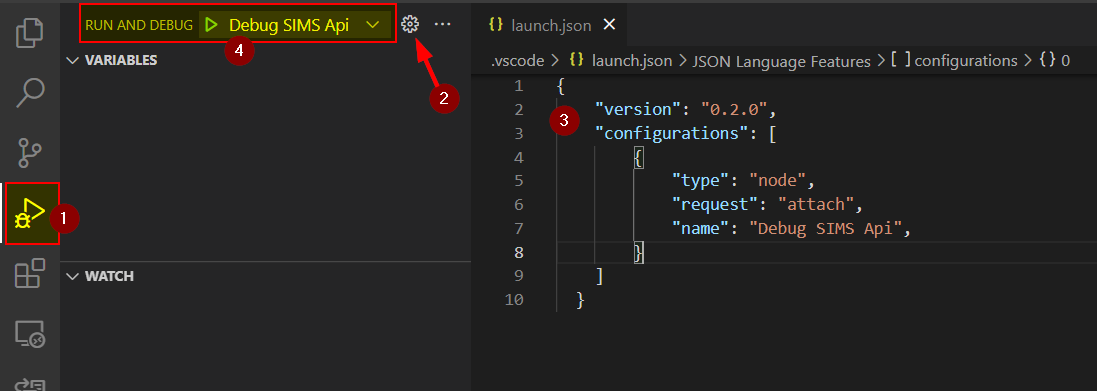
- Navigate to the debug option on VS Code (item 1 in the image below).
- Create a debug config using the settings button (item 2 in the image below).
- Create a config like the one on item 3 in the image below using the below sample.
- The configuration should be displayed on the option to debug (item 4 in the image below).
{
  "version": "0.2.0",
  "configurations": [
    {
      "name": "Attach Nest JS",
      "request": "attach",
      "sourceMapPathOverrides": {
        "webpack:///./~/*": "${workspaceFolder}/sources/packages/backend/node_modules/*",
        "webpack://?:*/*": "${workspaceFolder}/sources/packages/backend/*"
      },
      "type": "node",
      "sourceMaps": true
    }
  ]
}
- Start the API using
npm run start:debug. This command is not executing the migrations. If needed the migrations can be executed also usingnpm run setub:db. - Navigate to VSCode debug menu and attach the debug to the process.

/**
 * This is my const.
 */
const THIS_IS_A_CONST = 123456;

/**
 * My comment with a proper sentence that starts usually with a
 * capital letter and finishes with a period.
 * Try to add comments that make it better to understand the
 * business logic does not only describes the method itself.
 */
export class MyClassWithACRONYM {
  /**
   * My private local variable.
   */
  private myLocalVariable = 123;

  constructor(private readonly myVariable: string) {
    // Do something
  }

  /**
   * Try to give a comment that provides some business context instead
   * of only describing what we can read from the code itself.
   * For instance, for the below 'if' condition, instead of saying
   * 'If THIS_IS_A_CONST is equal to myNumber then do something we can explain why
   * do we need to check it from a business perspective.
   * @param myNumber my number that we need for this and that,
   * @param myOptionalParameter used in the case A and B when X is needed.
   */
  async myPublicMethod(
    myNumber: number,
    myOptionalParameter?: string
  ): Promise<number> {
    if (myNumber === THIS_IS_A_CONST) {
      // Use early return when possible to reduce code complexity.
      return this.myAsyncMethodCallA(myOptionalParameter);
    }

    return this.myAsyncMethodCallB(this.myVariable);
  }

  /**
   * Add nice comments as described before.
   */
  private myPrivateMethod() {
    // Do something.
  }
}/**
* Enumeration types for Notes.
*/
export enum NoteType {
/**
* Note type general.
*/
General = "General",
/**
* Note type Restriction.
*/
Restriction = "Restriction",
/**
* Note type System.
*/
System = "System actions",
/**
* Note type Program.
*/
Program = "Program",
}/**
* Entity for notes.
*/
@Entity({ name: TableNames.Notes })
export class Note extends RecordDataModel {
@PrimaryGeneratedColumn()
id: number;
/**
* Note type.
*/
@Column({
name: "note_type",
type: "enum",
nullable: false,
})
noteType: NoteType;
/**
* Description of the note.
*/
@Column({
name: "description",
nullable: false,
})
description: string;
/**
* Total income value retrieved from CRA file
* (currently line 15000 form tax file).
*/
@Column({
name: "cra_reported_income",
nullable: true,
})
craReportedIncome?: number;
}The dynamic router can conflict with its similar pattern static router, for eg: @Get("programs") can conflict with @Get(":id"), so when creating a dynamic router controller, make sure the similar pattern static controller is at the top and dynamic controller are at the bottom.
ref: https://stackoverflow.com/questions/58707933/node-js-express-route-conflict-issue ,
https://poopcode.com/how-to-resolve-parameterized-route-conficts-in-express-js/

- DTOs are placed on files with the suffix
dto.ts; - DTOs received by the API are named
MyClassAPIInDTOwhereAPIInDTOstates that this is a DTO that serves as API input; - DTOs returned by the API are named
MyClassAPIOutDTOwhereAPIOutDTOstates that this is a DTO that is returning data from the API; - The DTO names should be kept the same when mapped on the client application;
- All data returned from the API should be mapped to a DTO and then returned. Do not expose data in the API directly from Business Services Layer or Repository Layer;
- All DTOs must be defined as classes to allow the Swagger documentation to be generated with the automatically out-of-box features as much as possible;
- All DTOs received from the API should have class validators associated with its properties. The only exception is when a form.io Dry Run is performed.
Sample Input DTO
export class MySampleClassAPIInDTO {
  @IsPositive()
  id: number;
  @IsDate()
  myPropertyOne: Date;
  @IsOptional()
  myPropertyTwo: string;
  @ArrayMinSize(1)
  @ValidateNested({ each: true })
  @Type(() => MyNestedObject)
  someArray: MyNestedObject[];
}
Sample Output DTO
export class MySampleClassAPIOutDTO {
  id: number;
  myPropertyOne: Date;
  myPropertyTwo: string;
}The naming of controller APIs should be in line with the pattern of tag definition in swagger.
Swagger Tag resource-subresource
URN resource/subresource/{pathParameter}/{subresource}
E.g Swagger Tag students-assessment
URN /students/assessment/{assessmentId}/noa /students/assessment/{assessmentId}/award
- Resources should always be collections (except abbreviations like aest) and not singletons as seen in the example above.
- Resources and subresources should always be in lowercase.
- Complex resource or subresource names should be seperated with a hyphen character.
- Path parameters should always be camelcase e.g assessmentId.
Try to have the exception typed with unknown. More information on unknown on catch Clause Bindings
try {
  // Do something that can throw an exception.
} catch (error: unknown) {
  if (error instanceof ApiProcessError) {
    // Do something with the typed object.
    if (error.errorType === SOME_SPECIFIC_ERROR) {
      // For instance, process the specific error.
    }
    return;
  }
  // Do something else.
}- When calling an API from the vue, to add the client root, call
addClientRooteg,
here if the client type is aest, then the addClientRoot will translate the URL as api/aest/supporting-user/application/${applicationId}
- PR title must follow the pattern "[web][api][openshift][SIMS #999] Nice Description"
- Connect the issue using the button "Connect Issue", if not available install the Chrome Extension ZenHub for GitHub or similar.
- If you are the author of the PR avoid resolving the comments, instead reply to them to let the reviewer be aware of your thoughts.
- If you are a reviewer try to mark the comments as resolved to help the PR author to identify easily what is still missing.
- Comments and conversation on the PR are good to let everyone be aware of what is happening but a quick call can also save a lot of time.
- Once a review is raised, a reviewer should do the best effort to try to find a good moment to start in the next 3 business hours. It does not mean to finish it in the 3 hours, just to try to start providing some feedback. If multiple PRs are open at the same time the delays will be completely acceptable.
- PRs are about code review (not people review)
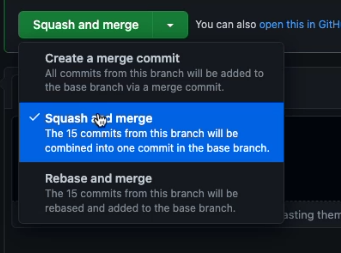
- Squash the commits before merging to keep the main timeline clean.
- Delete the branch after the merge is done (after merged do not reuse the branch).
The rollback scripts must be tested prior to PR creation. This could be done by connecting to the API container and executing the Typeorm migration commands.
- Run the DB and the API using
make local-api - Connect to API container using
make api - Execute the Typeorm migration revert command
npx typeorm migration:revertas many times as needed. The command will revert the last migration, so if there are more than one to be tested the command needed to executed multiple times. - Execute the Typeorm migration command
npx typeorm migration:run
- Comments must be present for every column.
Right now we are not targeting and testing the solutions (Student, Ministry, etc.) to be responsive at mobile level but we are committed to use as much as possible the out-of-box features available in the UI frameworks currently used. That means that we are not putting efforts towards mobile enablement other than what we are getting out-of-box by just using the modern UI frameworks.


- Reorganize components folder structure
- Suggest a new structure
- Move models to types folder?
- DTOs Input/Output naming conventions
- Follow the typescript standards to eventually remove noImplicitAny, noImplicitThis and useUnknownInCatchVariables from tsconfig.json.
- Formio neeeds to use proper variable from vue editmode or createmode instead of ClientType
- Download Camnuda modeler
https://camunda.com/download/modeler/
- Use Camelcase;
- Create PR with changed BPMNs and DMNs;
- Use this Git repo for the latest copy;
- Do not hardcode environment-specific data. Use Env variables for environment-specific data;
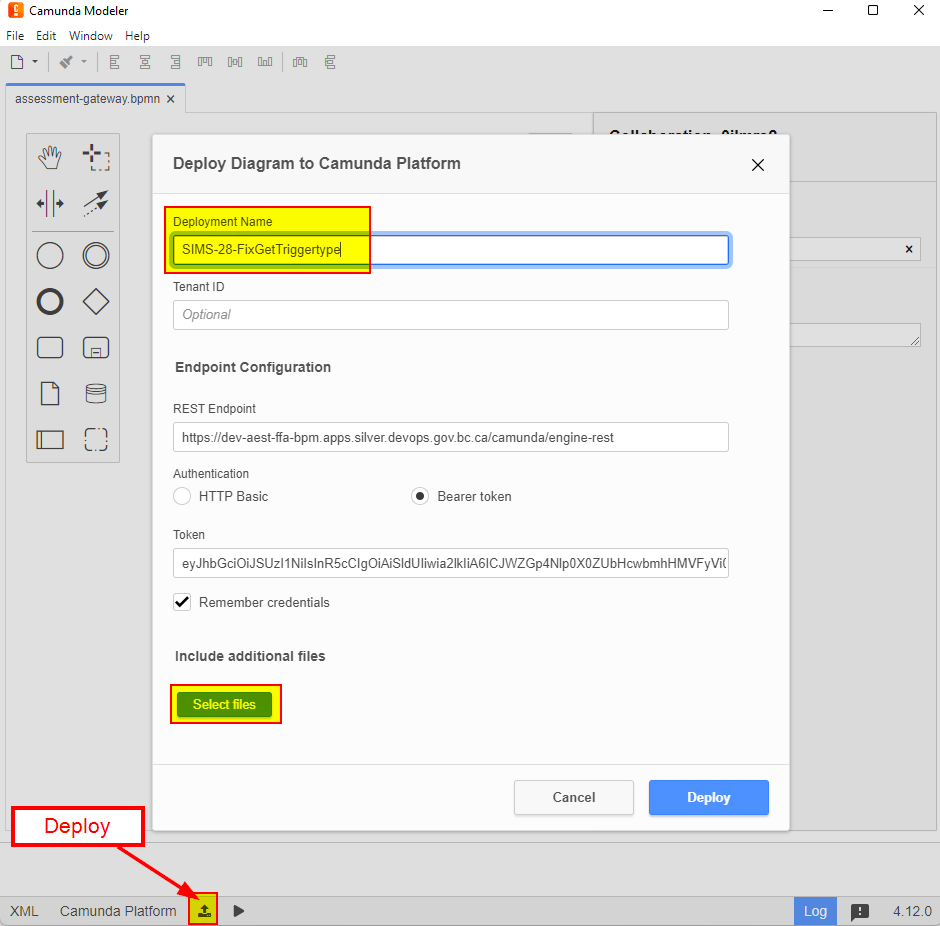
- The Camunda Modeler can be used to deploy the workflow definitions to the DEV env. Other environments should be updated using the CI/CD;
- Provide a Deployment Name that follows the
SIMS-<TicketNumber>-NiceDescription, as shown in the image below; - If during development multiple deployments were made, try to clean up the not necessary ones and leave only the most meaningful one, probably the last upload.
- Artifactory Reference: https://github.com/BCDevOps/developer-experience/blob/master/apps/artifactory/DEVHUB-README.md#docker-images
- Example pull from artifactory
docker pull artifacts.developer.gov.bc.ca/redhat-docker-remote/ubi8/nodejs-16:1
- Example pull from redhat
docker pull registry.access.redhat.com/ubi8/nodejs-16:1
- Example to see repo's in artifactory
curl -u username:password -X GET "https://artifacts.developer.gov.bc.ca/artifactory/api/repositories?type=remote" | \ jq -r '(["ARTIFACTORYKEY","SOURCEURL"] | (., map(length*"-"))), (.[] | [.key, .url]) | @tsv' | column -t
- Example to login to artifactory
docker login -u <USER_NAME> -p <USER_PASSWORD> artifacts.developer.gov.bc.ca/<REPO_NAME>
Step 1: Drag and drop the given component into the form

Step 2: Select calendar picker from the widget options in the display tab


Step 3: Use the following JSON for the widget settings.
{
  "type": "calendar",
  "allowInput": true,
  "clickOpens": true,
  "enableDate": true,
  "enableTime": false,
  "mode": "single",
  "noCalendar": false,
  "format": "yyyy-MM-dd",
  "dateFormat": "yyyy-MM-dd",
  "useLocaleSettings": false,
  "hourIncrement": 1,
  "minuteIncrement": 5,
  "time_24hr": false,
  "saveAs": "text",
  "locale": "en"
}

In case of problems with Patroni please refer to this link: https://github.com/bcgov/nr-get-token/wiki/Patroni-Troubleshooting