Repository navigation
Releases: bdarwin/logsift
Release list
Snapshot build

Latest build of main (commit 96f60a7, 2026-11-04 04:52 UTC).
| File | For |
|---|---|
Logsift-snapshot-windows-x64.msi / -windows-arm64.msi |
Windows installer (no admin rights needed) |
Logsift-snapshot-windows-x64.zip / -windows-arm64.zip |
Windows without installing: unzip, run Logsift\Logsift.exe |
Logsift-snapshot-macos-arm64.dmg / -macos-x64.dmg |
macOS Apple Silicon / Intel |
Logsift-snapshot-linux-x64.deb |
Debian / Ubuntu |
Logsift-snapshot-linux-x64.tar.gz / -linux-arm64.tar.gz |
Other Linux: unpack, run Logsift/bin/Logsift |
Logsift-snapshot-any-java21.zip |
Any OS with Java 21+ installed: run bin/logsift |
The native builds include their own Java runtime. They are not code-signed:
- macOS: if it says the app is damaged or can't be opened, run
xattr -dr com.apple.quarantine /Applications/Logsift.app. - Windows: SmartScreen may warn; choose More info → Run anyway.
Logsift Beta: agents
Beta build of branch beta/agents (commit 3ae781e, 2026-10-28 02:26 UTC).
Logsift Beta installs and runs next to Logsift: it has its own settings (~/.logsift-beta) and its own window, and doesn't register file types. Its logsift-mcp is inside it too.
| File | For |
|---|---|
Logsift-beta-agents-macos-arm64.dmg / -macos-x64.dmg |
macOS: drag Logsift Beta to Applications. If it says the app is damaged, run xattr -dr com.apple.quarantine "/Applications/Logsift Beta.app" |
Logsift-beta-agents-windows-x64.zip / -windows-arm64.zip |
Windows: unzip anywhere, run Logsift\Logsift.exe |
Logsift-beta-agents-linux-x64.tar.gz / -linux-arm64.tar.gz |
Linux: unpack, run Logsift/bin/Logsift |
Logsift-beta-agents-any-java21.zip |
Any OS with Java 21+: run bin/logsift (its own settings only when started with -Dlogsift.channel=beta, see JAVA_OPTS) |
Logsift 1.3.0
Logsift 1.3 explains heap dumps and GC logs, and is careful around production: every action on a running JVM says what it costs, and Logsift never removes files on a server.
What's new
- Heap dumps explained: open a
.hprofand Logsift says in plain sentences what fills the memory and what holds it. Why is it alive? shows the chain from a GC root to any object, and Map shows the heap as boxes as big as what they hold. Wasted memory (duplicate strings, empty collections) is found too. Big dumps open with the app's usual memory: a 12 GB dump in about 2½ minutes. - Two heap dumps compared: what grew between them, and where it is kept.
- Heap dumps on a server: read a dump where it is, over SSH, on a Linux or macOS server (only the answers come over), or copy it to another machine first. Logsift says what it takes before anything starts.
- From an OutOfMemoryError to its heap dump: right-click the line and the dump the JVM wrote opens.
- GC logs explained: open a Java GC log (Java 8 to 25; G1, Parallel, Serial, CMS, ZGC, Shenandoah) and Analyze GC says how much of the time the program stood still, the longest pauses and why, whether memory after GC keeps growing, and what to try. Charts zoom together; a click shows the line.
- Safe around production: each action on a running JVM says what it costs the service, and the README lists them all. Heap dumps and recordings left on a server stay there, readable only by your user, and Logsift says where. Heap dumps check for free space first.
- Heap dumps over a JMX port: the JVM writes the dump on its machine, and Logsift offers to copy it here over SSH.
- Find bar (Ctrl+F) at the top of the log, a bar for each log with its filters as chips, Clear All, and Find All within the filtered lines.
- Zips and folders: find in every file of a zip; folder search results can be filtered by file name, expanded and collapsed.
- Start page with everything you can open, and no toolbar on top.
- Fixed: attaching over a JMX port in the installed app, empty rows in some CSV files, and downloads behind a company proxy.
Download
| File | For |
|---|---|
Logsift-1.3.0-windows-x64.msi / -windows-arm64.msi |
Windows installer (no admin rights needed) |
Logsift-1.3.0-windows-x64.zip / -windows-arm64.zip |
Windows without installing: unzip, run Logsift\Logsift.exe |
Logsift-1.3.0-macos-arm64.dmg / -macos-x64.dmg |
macOS: Apple Silicon / Intel |
Logsift-1.3.0-linux-x64.deb |
Debian / Ubuntu |
Logsift-1.3.0-linux-x64.tar.gz / -linux-arm64.tar.gz |
Other Linux: unpack, run Logsift/bin/Logsift |
Logsift-1.3.0-any-java21.zip |
Any OS with Java 21+ installed: run bin/logsift |
The native downloads include their own Java runtime. They are not code-signed yet:
- macOS: if it says the app is damaged or can't be opened, run
xattr -dr com.apple.quarantine /Applications/Logsift.app. - Windows: if SmartScreen warns, choose More info → Run anyway.
Full list of changes: CHANGELOG.md
Logsift 1.2.0
Logsift 1.2 reads your own log formats, explains what is going on in a log, and copes much better with big files on network shares.
What's new
- Your own log formats: drop a log file and Logsift works out its layout and timestamps, or paste your logging config (log4j 1.x/2, logback, java.util.logging, Python logging). A config with several layouts makes a format for each, with a live preview of how lines split into columns.
- Insights: a new tab showing error bursts, new errors and when they began, silences, restarts and noisy messages, with buttons to jump there, show or hide them.
- Tree of loggers: loggers, threads or hosts as a package tree with line counts. Uncheck a branch to hide its lines.
- Details shows the whole entry, stack trace included. Select text and Details shows just that, and a Text | JSON switch pretty-prints JSON, even JSON inside strings.
- Columns view: select text in cells, hide columns you don't need (a chip shows what's hidden; Show All Columns brings them back).
- Network shares: the window no longer freezes while a big file is read; lines still loading show as gray bars with a Reading from disk… badge.
- Settings (Ctrl+, / ⌘,): font, tab width, encoding, refresh interval, reopening the last session and more.
- Format in the status bar: see how the current log is read, and pick another format if needed.
- Go menu, menu icons and new toolbar buttons; a splash screen at startup.
- Windows: Open with Logsift on the right-click menu of files and folders (it no longer takes over
.logfiles), Open from WSL, new builds install over the old one, and a running Logsift is closed before install or uninstall. - Logsift exits fully when its window is closed.
Download
| File | For |
|---|---|
Logsift-1.2.0-windows-x64.msi / -windows-arm64.msi |
Windows installer (no admin rights needed) |
Logsift-1.2.0-windows-x64.zip / -windows-arm64.zip |
Windows without installing: unzip, run Logsift\Logsift.exe |
Logsift-1.2.0-macos-arm64.dmg / -macos-x64.dmg |
macOS: Apple Silicon / Intel |
Logsift-1.2.0-linux-x64.deb |
Debian / Ubuntu |
Logsift-1.2.0-linux-x64.tar.gz / -linux-arm64.tar.gz |
Other Linux: unpack, run Logsift/bin/Logsift |
Logsift-1.2.0-any-java21.zip |
Any OS with Java 21+ installed: run bin/logsift |
The native downloads include their own Java runtime. They are not code-signed yet:
- macOS: if it says the app is damaged or can't be opened, run
xattr -dr com.apple.quarantine /Applications/Logsift.app. - Windows: if SmartScreen warns, choose More info → Run anyway.
Full list of changes: CHANGELOG.md
Logsift 1.1.0
Logsift 1.1 makes Logsift easier to install, open files with, and get help in.
What's new
- Windows installer (
.msi): installs for your user only (no admin rights needed), adds a Start menu entry, and opens.logfiles. - Open .log files from your file manager: double-click, Open With, or drop them on the Dock icon on macOS.
- One window: opening another file while Logsift is running opens it in the window that's already open.
- View another program's output live:
kubectl logs -f my-pod | logsift -,docker logs -f app | logsift -,journalctl -f | logsift -. - Help menu: keyboard shortcuts, documentation, report a bug (with your version and system filled in), and About.
- Update check: a button in the toolbar when a new version is out. It is one anonymous request to GitHub at most once a day, and can be turned off in the Help menu.
- Error window: if something unexpected happens, you see the details with Copy and Report buttons. Logsift keeps running.
Download
| File | For |
|---|---|
Logsift-1.1.0-windows-x64.msi / -windows-arm64.msi |
Windows installer (no admin rights needed) |
Logsift-1.1.0-windows-x64.zip / -windows-arm64.zip |
Windows without installing: unzip, run Logsift\Logsift.exe |
Logsift-1.1.0-macos-arm64.dmg / -macos-x64.dmg |
macOS: Apple Silicon / Intel |
Logsift-1.1.0-linux-x64.deb |
Debian / Ubuntu |
Logsift-1.1.0-linux-x64.tar.gz / -linux-arm64.tar.gz |
Other Linux: unpack, run Logsift/bin/Logsift |
Logsift-1.1.0-any-java21.zip |
Any OS with Java 21+ installed: run bin/logsift |
The native downloads include their own Java runtime. They are not code-signed yet:
- macOS: if it says the app is damaged or can't be opened, run
xattr -dr com.apple.quarantine /Applications/Logsift.app. - Windows: if SmartScreen warns, choose More info → Run anyway.
Full list of changes: CHANGELOG.md
Logsift 1.0.0
The first release of Logsift: a fast, free desktop viewer for very large log files, for Windows, macOS and Linux.
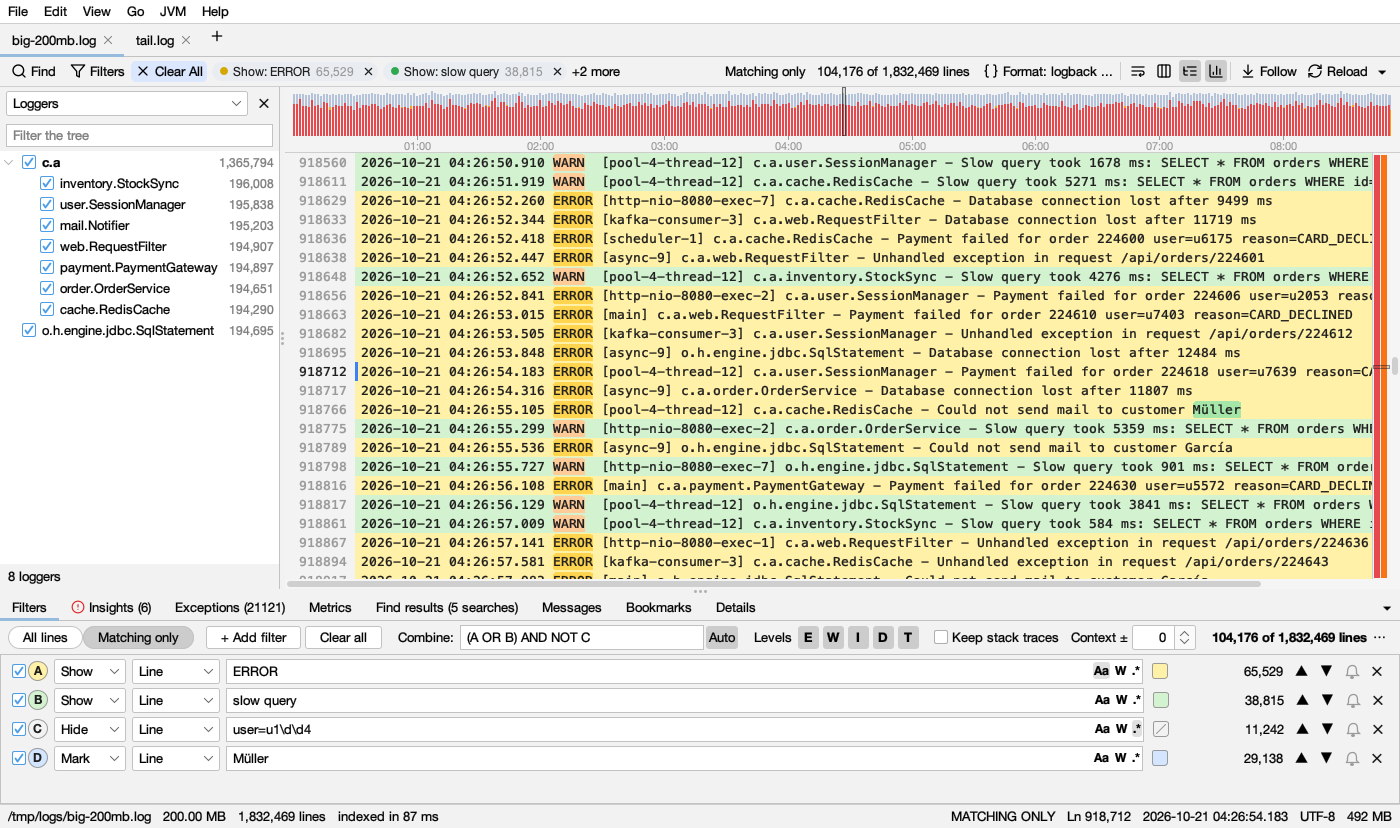
What's in it
- Huge files, instantly. A 1 GB log shows its first lines in 0.12 s and is fully indexed in 0.26 s.
- Live tail. Follow growing logs, including through rotation and truncation. You choose whether changes load automatically or when you click Reload.
- Find All. Run several searches at once, each in its own color, and search within the results. Text, whole word, regex and any case are supported.
- Filters. Combine filters with AND, OR and NOT. Filter by level and time range, keep stack traces with their line, and add context lines.
- Timeline of errors and warnings, plus a highlight bar beside the scrollbar.
- Columns parsed automatically, and JSON logs with a pretty-printed details view.
- Folder search, including inside
.gzand.zipfiles. - Remote logs over SSH/SFTP, with a file browser. They stay up to date as the remote log grows.
- Top messages, compare two logs, and merge logs by time.
- Also: bookmarks, alerts, export, sessions, many encodings (including UTF-16, Windows code pages, Shift_JIS and GB18030), and dark mode.
Download
| File | For |
|---|---|
Logsift-1.0.0-windows-x64.zip / -windows-arm64.zip |
Windows: unzip, run Logsift\Logsift.exe |
Logsift-1.0.0-macos-arm64.dmg / -macos-x64.dmg |
macOS: Apple Silicon / Intel |
Logsift-1.0.0-linux-x64.deb |
Debian / Ubuntu |
Logsift-1.0.0-linux-x64.tar.gz / -linux-arm64.tar.gz |
Other Linux: unpack, run Logsift/bin/Logsift |
Logsift-1.0.0-any-java21.zip |
Any OS with Java 21+ installed: run bin/logsift |
The native downloads include their own Java runtime. They are not code-signed yet:
- macOS: if it says the app is damaged or can't be opened, run
xattr -dr com.apple.quarantine /Applications/Logsift.app. - Windows: if SmartScreen warns, choose More info → Run anyway.