Repository navigation
Logsift 1.0.0

The first release of Logsift: a fast, free desktop viewer for very large log files, for Windows, macOS and Linux.
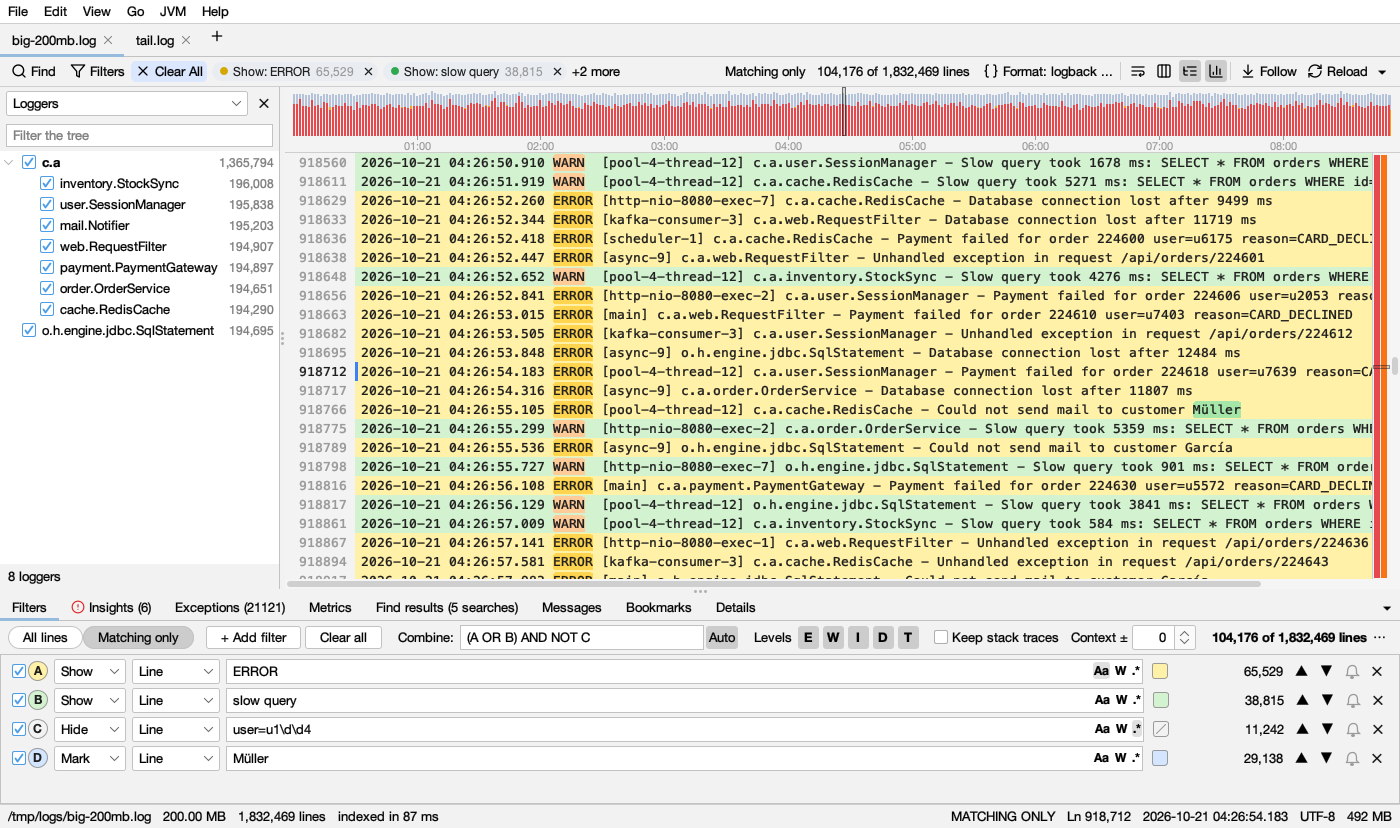
What's in it
- Huge files, instantly. A 1 GB log shows its first lines in 0.12 s and is fully indexed in 0.26 s.
- Live tail. Follow growing logs, including through rotation and truncation. You choose whether changes load automatically or when you click Reload.
- Find All. Run several searches at once, each in its own color, and search within the results. Text, whole word, regex and any case are supported.
- Filters. Combine filters with AND, OR and NOT. Filter by level and time range, keep stack traces with their line, and add context lines.
- Timeline of errors and warnings, plus a highlight bar beside the scrollbar.
- Columns parsed automatically, and JSON logs with a pretty-printed details view.
- Folder search, including inside
.gzand.zipfiles. - Remote logs over SSH/SFTP, with a file browser. They stay up to date as the remote log grows.
- Top messages, compare two logs, and merge logs by time.
- Also: bookmarks, alerts, export, sessions, many encodings (including UTF-16, Windows code pages, Shift_JIS and GB18030), and dark mode.
Download
| File | For |
|---|---|
Logsift-1.0.0-windows-x64.zip / -windows-arm64.zip |
Windows: unzip, run Logsift\Logsift.exe |
Logsift-1.0.0-macos-arm64.dmg / -macos-x64.dmg |
macOS: Apple Silicon / Intel |
Logsift-1.0.0-linux-x64.deb |
Debian / Ubuntu |
Logsift-1.0.0-linux-x64.tar.gz / -linux-arm64.tar.gz |
Other Linux: unpack, run Logsift/bin/Logsift |
Logsift-1.0.0-any-java21.zip |
Any OS with Java 21+ installed: run bin/logsift |
The native downloads include their own Java runtime. They are not code-signed yet:
- macOS: if it says the app is damaged or can't be opened, run
xattr -dr com.apple.quarantine /Applications/Logsift.app. - Windows: if SmartScreen warns, choose More info → Run anyway.