Repository navigation
Releases
MagicInput 0.6.2

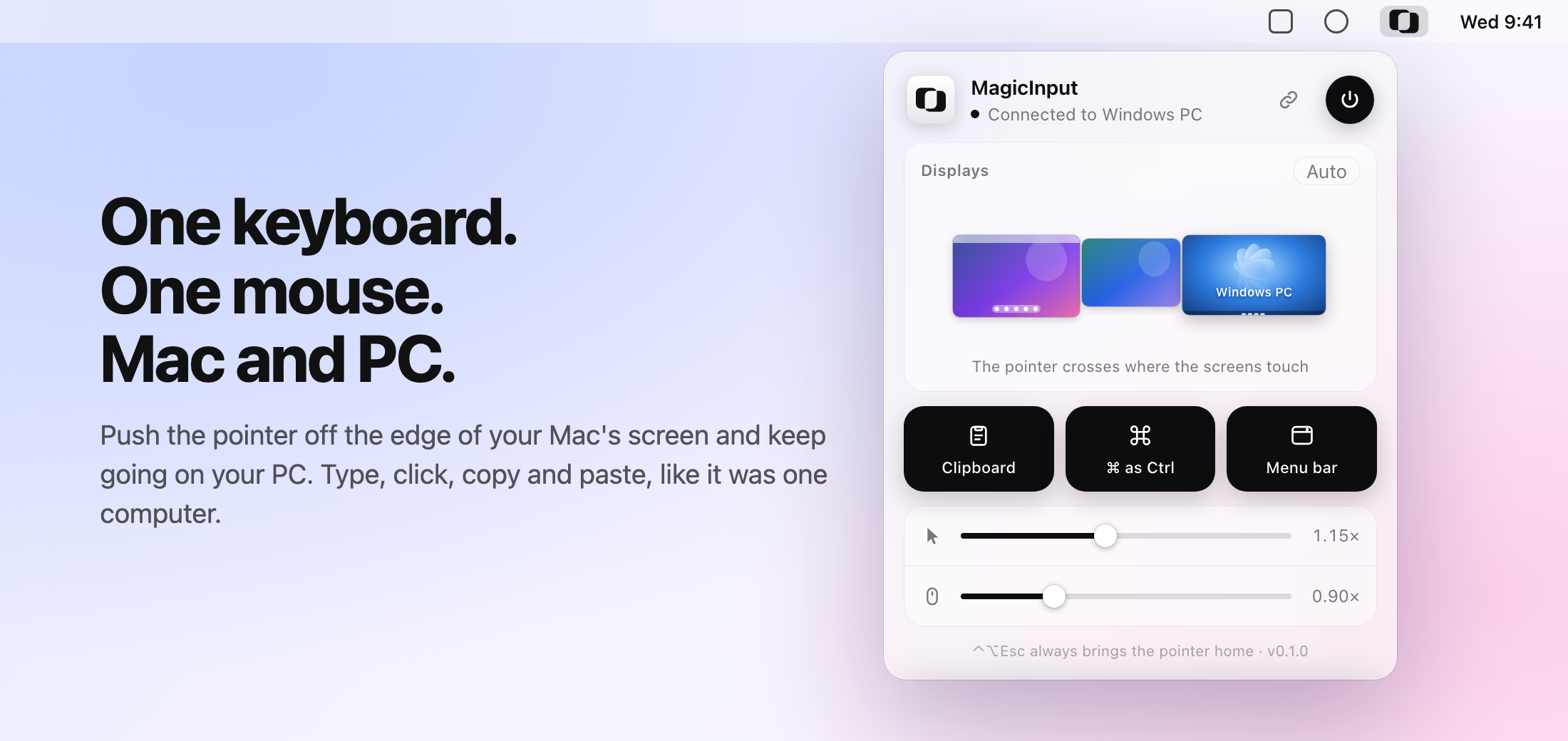
Use one keyboard and mouse across your Mac and Windows PC. MagicInput 0.6.2 makes the screens easier to tell apart in the panel.
What changed
- Every screen looks like what it is. The other computer used to be a black box. Now a PC shows a blue Windows-style desktop with a taskbar, and a Mac shows a Mac desktop with a menu bar and a Dock. Its name sits small at the bottom.
- The Mac's main screen shows its Dock, and on the PC the panel draws its own screens in the Windows style.
- Everything from 0.6.0 and 0.6.1 is still here: AirDrop to your Windows PC, each keyboard staying on its own computer, and the new icon.
0.6.2 connects to computers on 0.6.x, 0.5.0 and 0.4.0. Update both computers to use AirDrop to the PC.
Install
- Mac (macOS 13+): open
MagicInput.dmgand drag MagicInput to Applications, orbrew install --cask betoxf/tap/magicinput(brew upgrade --cask magicinputto update). - Windows 10/11: run
MagicInput-Setup.exeand click Install. Running a newer setup updates MagicInput and keeps your settings. The setup isn't code-signed yet, so SmartScreen may ask you to choose More info → Run anyway.
Free for personal use, with every feature. Businesses need a license, from bullfighterstudio.com/magicinput. SHA256SUMS.txt lists the checksums of every download.
MagicInput 0.6.1
Use one keyboard and mouse across your Mac and Windows PC. MagicInput 0.6.1 has a new icon.
What changed
- New icon: two overlapping squares. It's simpler and clearer at small sizes, and you'll see it in the Dock, the menu bar, the Windows tray, the installers and the panel. The Mac menu bar draws it live, so it stays sharp on any screen.
- Everything from 0.6.0 is still here, including AirDrop to your Windows PC: AirDrop to the Mac while you're working on the PC, and the file lands in the PC's Downloads folder.
0.6.1 connects to computers on 0.6.0, 0.5.0 and 0.4.0. Update both computers to use AirDrop to the PC.
Install
- Mac (macOS 13+): open
MagicInput.dmgand drag MagicInput to Applications, orbrew install --cask betoxf/tap/magicinput(brew upgrade --cask magicinputto update). - Windows 10/11: run
MagicInput-Setup.exeand click Install. Running a newer setup updates MagicInput and keeps your settings. The setup isn't code-signed yet, so SmartScreen may ask you to choose More info → Run anyway.
Free for personal use, with every feature. Businesses need a license, from bullfighterstudio.com/magicinput. SHA256SUMS.txt lists the checksums of every download.
MagicInput 0.6.0
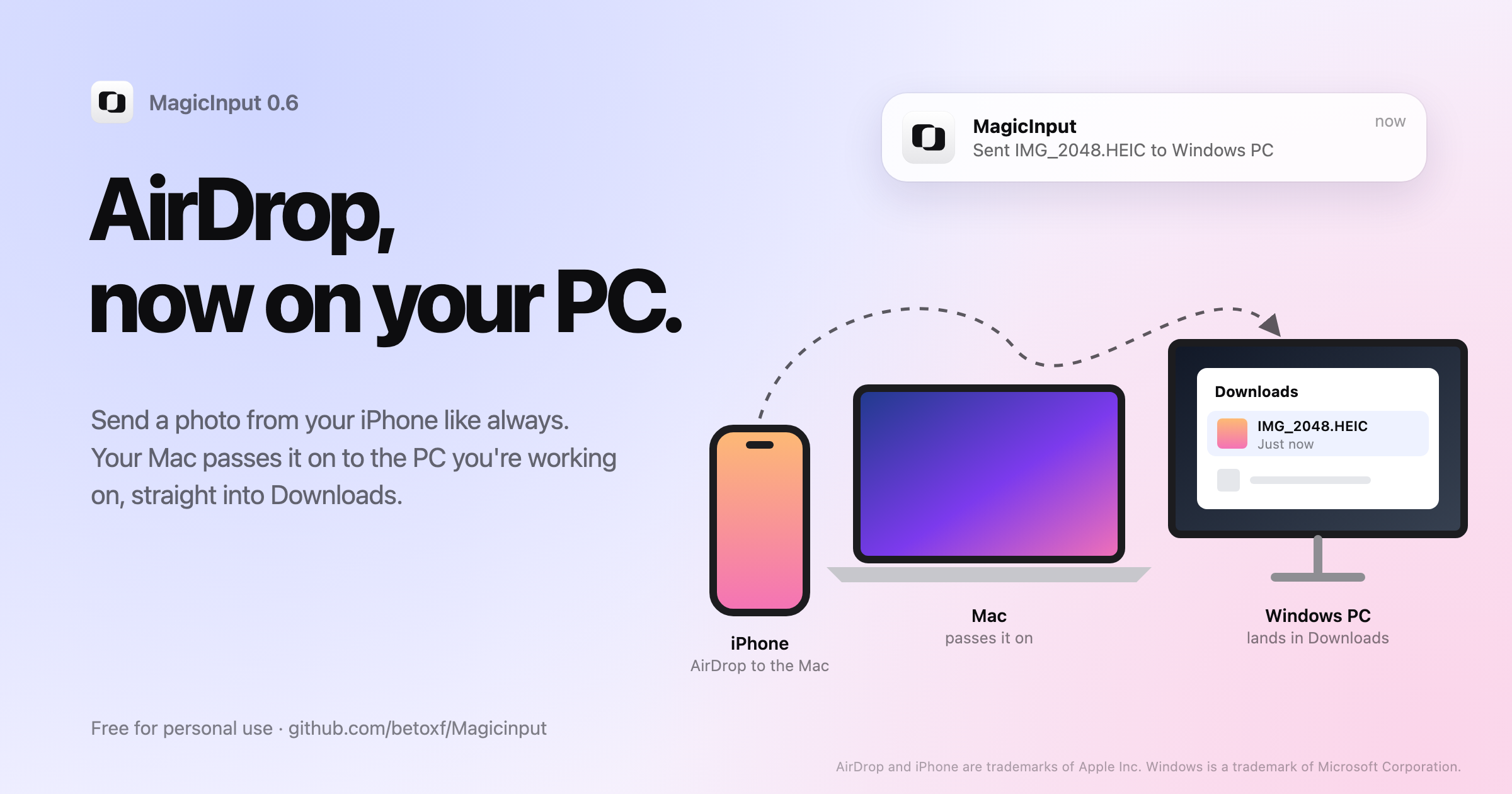
Use one keyboard and mouse across your Mac and Windows PC. MagicInput 0.6.0 brings AirDrop to your PC.
What's new
- AirDrop to your Windows PC. Windows can't receive AirDrop, so your Mac passes it on. AirDrop a photo or file from your iPhone to the Mac while you're working on the PC, and it lands in the PC's Downloads folder and opens in Explorer. If you were working on the Mac, it stays there. Files travel encrypted over your local network on a connection of their own, so the pointer stays smooth even with big videos. The first time, macOS asks to let MagicInput access the Downloads folder.
- Each keyboard stays on its own computer. If both computers have a keyboard, clicking the PC with its own mouse no longer takes over your Mac keyboard, or the other way round. The keyboards move with the pointer when it crosses the edge. A computer without a keyboard still borrows the other one's when you click it.
- Find the icon again. Opening MagicInput from Spotlight, Finder or the Start menu brings back a hidden menu bar or tray icon.
Update both computers to use AirDrop to the PC. 0.6.0 still connects to computers on 0.5.0 and 0.4.0.
Install
- Mac (macOS 13+): open
MagicInput.dmgand drag MagicInput to Applications, orbrew install --cask betoxf/tap/magicinput(brew upgrade --cask magicinputto update). - Windows 10/11: run
MagicInput-Setup.exeand click Install. Running a newer setup updates MagicInput and keeps your settings. The setup isn't code-signed yet, so SmartScreen may ask you to choose More info → Run anyway.
Free for personal use, with every feature. Businesses need a license, from bullfighterstudio.com/magicinput. SHA256SUMS.txt lists the checksums of every download.
AirDrop and iPhone are trademarks of Apple Inc. Windows is a trademark of Microsoft Corporation.
MagicInput 0.5.0
Use one keyboard and mouse across your Mac and Windows PC. MagicInput 0.5.0 is free for personal use, with every feature.
What changed
- Free, with every feature. No trial, no account, nothing to unlock. Use it on as many of your own computers as you like.
- Real installers, right here. Download the signed and notarized Mac disk image or the Windows setup below. Homebrew works too:
brew install --cask betoxf/tap/magicinput. - Business use needs a license: $10 a month, $96 a year or $199 once, for all your company's computers, at bullfighterstudio.com/magicinput. Paste the key into MagicInput (click Free for personal use at the bottom of the panel) and it shows Business license. Nothing is locked without it.
- New license: the PolyForm Noncommercial License 1.0.0. The source code stays public. Versions 0.3.0 to 0.4.0 stay under the GPL-3.0.
- Connects to computers still on 0.4.0.
Install
- Mac (macOS 13+): open
MagicInput.dmgand drag MagicInput to Applications, orbrew install --cask betoxf/tap/magicinput(brew upgrade --cask magicinputto update). - Windows 10/11: run
MagicInput-Setup.exeand click Install. Running a newer setup updates MagicInput and keeps your settings. The setup isn't code-signed yet, so SmartScreen may ask you to choose More info → Run anyway.
Open MagicInput on both computers, allow Accessibility and Input Monitoring on the Mac, and pair them through the link icon. SHA256SUMS.txt lists the checksums of every download.
MagicInput 0.4.0
Use one keyboard and mouse across your Mac and Windows PC. MagicInput 0.4.0 adds a free trial and Premium, where one license covers all your computers.
New
- 14-day free trial on every computer, no card needed.
- One license for your setup. After the trial, MagicInput keeps sharing as long as one of your computers has Premium: it unlocks the computer connected to it too. Plans: $10 a month, $96 a year or $199 once, at bullfighterstudio.com/magicinput.
- Activate in the panel: click Free trial at the bottom of the panel and paste the license key from your download page (or run
magicinput license <KEY>). Keys are checked on your computer; monthly and yearly keys renew themselves once a day. magicinput statusshows Premium and the trial.- Microsoft Store version (coming soon): the Store purchase counts as Premium.
Important
Update both computers. 0.4.0 uses protocol 5, so it won't connect to 0.3.x.
Get it
- Mac:
brew install --cask betoxf/tap/magicinput(orbrew upgrade --cask magicinput). - Installers and Premium: bullfighterstudio.com/magicinput: the Mac disk image and the Windows setup are on your download page with your license key.
- Build it yourself: from source (GPL-3.0).
SHA256SUMS.txt lists the checksums of the disk image, the setup and the Homebrew zip. The Windows setup isn't code-signed yet, so SmartScreen may ask you to choose More info → Run anyway.
MagicInput 0.3.1
Use one keyboard and mouse across your Mac and Windows PC. MagicInput 0.3.1 brings real installers for Mac and Windows, and Homebrew is back.
New
- Mac disk image. Open
MagicInput.dmgand drag MagicInput to Applications. Signed and notarized by Apple. - Windows setup. Run
MagicInput-Setup.exeand click Install: it installs MagicInput, starts it now and at every sign-in, allows it through the firewall on private networks, opens it when done, and adds MagicInput to the Start menu and to Settings → Apps (with an uninstaller). Running a newer setup updates it and keeps your settings./Sinstalls silently. - Homebrew is free again:
brew install --cask betoxf/tap/magicinput.
Fixed
- Windows: opening
magicinput-app.exefrom a newer download now updates the installed copy instead of opening the old one.
Get it
- Mac, free:
brew install --cask betoxf/tap/magicinput(orbrew upgrade --cask magicinput). - Ready-made installers: your download page at bullfighterstudio.com/magicinput: $10 per device per month, $96 per device per year, or $199 once for a Mac and a PC.
- Any computer, free: build it from source (GPL-3.0).
SHA256SUMS.txt lists the checksums of the disk image, the setup and the Homebrew zip. The Windows setup isn't code-signed yet, so SmartScreen may ask you to choose More info → Run anyway.
MagicInput 0.3.0
Use one keyboard and mouse across your Mac and Windows PC. MagicInput 0.3.0 is open source under the GPL-3.0, and the first version with official installers at bullfighterstudio.com/magicinput.
What changed
- Open source (GPL-3.0). Read the code, have it audited, or build it yourself for free.
- Official installers. The signed and notarized Mac app and the Windows app, with updates, are at bullfighterstudio.com/magicinput: $10 per device per month, $96 per device per year, or $199 once for a Mac and a PC (pricing).
- Verify your download.
SHA256SUMS.txtbelow lists the checksums of this version's official installers:shasum -a 256 MagicInput-macOS.zip. - The app itself works exactly like 0.2.0, and a 0.3.0 computer connects to one still on 0.2.0.
Install or update
Get the installers from your download page at bullfighterstudio.com/magicinput (the page you reach after paying; bookmark it).
- macOS 13+: unzip and move MagicInput to Applications. Installed with Homebrew before? Run
brew uninstall --cask magicinputfirst; your settings stay. - Windows 10/11: unzip and open
magicinput-app.exe. Already installed? In the unzipped folder, runStart-Process .\magicinput.exe -ArgumentList install -Verb RunAsin PowerShell.
New here? Open MagicInput on both computers, allow Accessibility and Input Monitoring on the Mac, and pair them through the link icon.
MagicInput 0.2.0
Note
MagicInput installers are now at bullfighterstudio.com/magicinput. This version's source code (MIT) is attached below, and SHA256SUMS.txt lists the checksums of the installers it shipped with.
Use one keyboard and mouse across your Mac and Windows PC. MagicInput 0.2.0 lets your keyboard follow your last click.
What's new
- The keyboard follows the click. Type on the Mac, click into a text field with the PC's own mouse, and keep typing on the Mac keyboard: it types on the PC. Click on the Mac again and it types on the Mac. It works the same the other way round.
- The keyboard comes back when you click on its own computer, move that computer's mouse deliberately, or press Control+Option+Esc (Ctrl+Alt+Esc on the PC). Held keys are released whenever it switches, so nothing gets stuck.
- While your keyboard is typing on the other computer, the panel says so ("Keyboard typing on …").
- Prefer the old behavior? Set
keyboard_follows_click = falsein the config file (magicinput configshows where it is).
Fixed
- Reinstalling on a Mac while MagicInput is running no longer fails with "Bootstrap failed: 5".
magicinput statusreports a stopped service as not running right away.
Important
Update both computers. 0.2.0 uses a new protocol version, so a computer on 0.2.0 won't connect to one still on 0.1.x.
Install or update
macOS 13+ — Apple silicon and Intel, signed and notarized:
brew install --cask betoxf/tap/magicinput
# Already installed:
brew update
brew upgrade --cask magicinput
Or download MagicInput-macOS.zip, unzip, and move MagicInput to Applications.
Windows 10/11 (64-bit): download MagicInput-Windows.zip, unzip, open magicinput-app.exe, and accept the administrator prompt. The Windows build is not code-signed; SmartScreen may require More info → Run anyway.
Updating on Windows: in the unzipped folder, open PowerShell (Shift + right-click → Open PowerShell window here) and run the line below, then accept the administrator prompt. It replaces the installed copy and restarts MagicInput.
Start-Process .\magicinput.exe -ArgumentList install -Verb RunAsNew here? Open MagicInput on both computers, allow Accessibility and Input Monitoring on the Mac, and pair through the link icon. Both computers must be on the same local network. Or paste the prompt from the README into an AI assistant on each computer and let it set things up (runbook).
Verify downloads with SHA256SUMS.txt. See the setup guide.
MagicInput 0.1.1
Note
MagicInput installers are now at bullfighterstudio.com/magicinput. This version's source code (MIT) is attached below, and SHA256SUMS.txt lists the checksums of the installers it shipped with.
Use one keyboard and mouse across your Mac and Windows PC. MagicInput 0.1.1 fixes control handoff when you switch back to the other computer’s own input devices.
What changed
- Reclaim control naturally. While the Mac is driving the PC, using the PC’s own mouse or keyboard brings control back to the PC. You can then push across the screen edge to drive the Mac. The same works in reverse.
- A deliberate mouse movement (more than 24 points within half a second), click, or key press reclaims control. Small accidental mouse movements do not.
- Clean release builds. Local build-machine usernames and source paths are remapped out of the Mac and Windows binaries.
New
magicinput statusshows whether MagicInput is installed and running, the pairing code, the connection, and other computers nearby, with the next step to take.--jsonmakes it easy for scripts and AI assistants.- Set up with an AI assistant: paste the prompt from the README into Claude, ChatGPT, Codex or Cursor on each computer and it installs and pairs MagicInput for you (runbook).
Included features
Bidirectional keyboard, mouse and scroll sharing; text clipboard sharing; automatic Command/Control swapping; automatic local-network discovery; pairing codes and encrypted connections; draggable display arrangement, including an iPad connected to the Mac through Sidecar; start at login.
Install or update
macOS 13+ — Apple silicon and Intel, signed and notarized:
brew install --cask betoxf/tap/magicinput
# Already installed:
brew update
brew upgrade --cask magicinput
Or download MagicInput-macOS.zip, unzip, and move MagicInput to Applications.
Windows 10/11 (64-bit): download MagicInput-Windows.zip, unzip, open magicinput-app.exe, and accept the administrator prompt. Quit the previous version before replacing it. The Windows build is not code-signed; SmartScreen may require More info → Run anyway.
Open MagicInput on both computers, allow Accessibility and Input Monitoring on the Mac, and pair through the link icon. Both computers must be on the same local network. iPad support uses the Mac’s Sidecar display; there is no standalone iPad app.
Verify downloads with SHA256SUMS.txt. See the setup guide.
Display arrangement tip: crossings only work where the screens touch in the saved layout. Align their top edges in Displays if a top strip does not lead to the other computer.