Repository navigation
Releases
CryptLok 0.2.1

A polish release for 0.2.0.
What's changed
- Key Management pages: the text wraps to the window width and the layout is more compact.
- New Virtual Disk page: the fields start further left, and the folder box and key list fit narrower windows.
- Tray icon: the padlock now fills the tray slot, so it's as big as other tray icons.
Thanks to Astro, who suggested the 0.2.0 features: keyring backup, keyring location and passphrase caching.
Install
Download CryptLok-Setup-0.2.1.exe below and run it (Windows 10/11, 64-bit). It upgrades earlier versions in place; your keys and settings are kept.
- Windows SmartScreen: the installer is not code-signed yet, so Windows may say "Windows protected your PC". Check the download first (below), then click More info > Run anyway.
- Check the download: in PowerShell,
Get-FileHash .\CryptLok-Setup-0.2.1.exemust print
1D46822398B604A870DD992CEF46AF69FC24EAB11E5AB7E646F428102E98E08E(also inSHA256SUMS.txt). - The Disk pages need the free VeraCrypt (not included).
What's new in 0.2.0 (Key Management, passphrase caching, new icon): see the 0.2.0 release.
Independent project, not affiliated with or endorsed by Broadcom/Symantec or the PGP product line. Free for noncommercial use (PolyForm Noncommercial 1.0.0).
CryptLok 0.2.0
CryptLok 0.2.0 adds key management, passphrase caching and a new look.
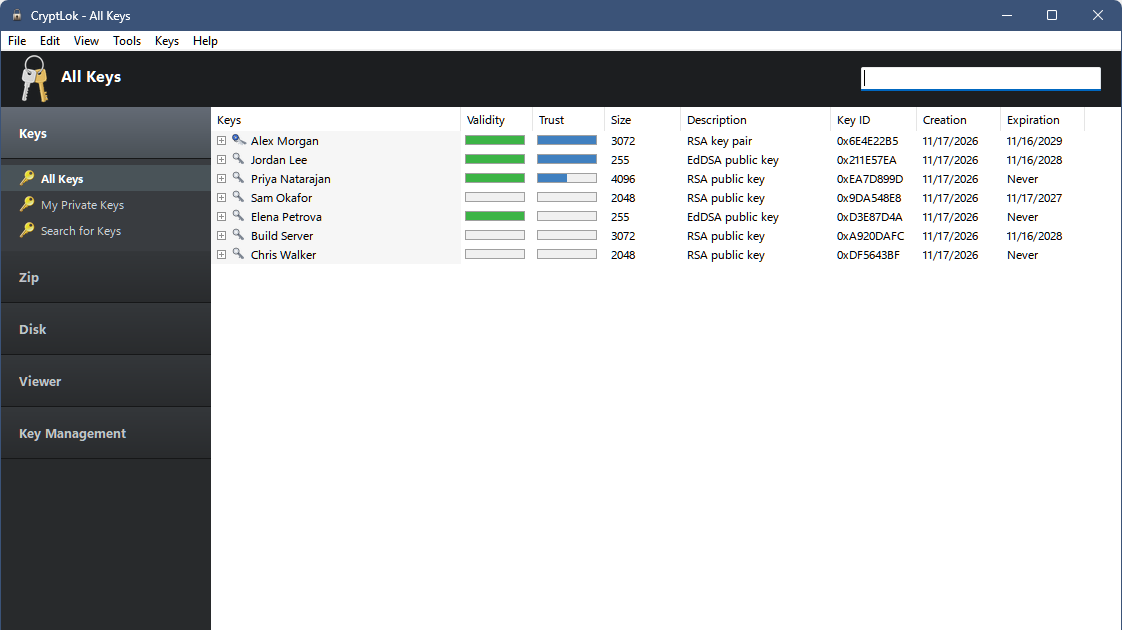
What's new
Key Management (new section in the sidebar)
- Backup Keyring saves your public and private keys, trust settings and CryptLok settings to one
.zipfile. Private keys stay protected by their passphrases. - Restore from a Backup unpacks a backup into a folder you choose and switches CryptLok to it. Your current keyring is left untouched.
- Keyring Location keeps your keyring in any folder, for example on another drive or a USB stick. CryptLok copies it, checks the copy, restarts with it and offers to remove the old copy. If a keyring on a removable drive isn't connected when CryptLok starts, it asks you to connect it instead of opening an empty keyring.
Passphrase caching (Tools > Options > Passphrase), as in the classic PGP tray
- Choose: don't cache (the default), cache while you're logged on, or cache for 2 minutes up to 8 hours.
- Only passphrases that worked are kept, encrypted in memory inside CryptLok, and forgotten when it exits. Clear Passphrase Cache in the tray menu forgets them at once.
Look: a new padlock program and tray icon.
Thanks to Astro, who suggested keyring backup, keyring location and passphrase caching.
Install
Download CryptLok-Setup-0.2.0.exe below and run it (Windows 10/11, 64-bit). It upgrades 0.1.0 in place; your keys and settings are kept.
- Windows SmartScreen: the installer is not code-signed yet, so Windows may say "Windows protected your PC". Check the download first (below), then click More info > Run anyway.
- Check the download: in PowerShell,
Get-FileHash .\CryptLok-Setup-0.2.0.exemust print
6A0921A15B3BD88ADD44598BD49DC9871D30607C63E192B8CB55FB0F529F3D5F(also inSHA256SUMS.txt). - The Disk pages need the free VeraCrypt (not included).
Independent project, not affiliated with or endorsed by Broadcom/Symantec or the PGP product line. Free for noncommercial use (PolyForm Noncommercial 1.0.0).
CryptLok 0.1.0
CryptLok is my attempt to bring back the look and feel of the legacy PGP Desktop suite that many of us used for years: the key manager, the tray clipboard tools, PGP Zip archives, self-decrypting archives, encrypted virtual disks and the shredder, all in one Windows program. It runs on the free GnuPG engine (GnuPG 2.5 is included), so everything it makes is standard OpenPGP.
Independent project, not affiliated with or endorsed by Broadcom/Symantec or the PGP product line.
Install
Download CryptLok-Setup-0.1.0.exe below and run it (Windows 10/11, 64-bit).
- Windows SmartScreen: the installer is not code-signed yet, so Windows may say "Windows protected your PC". Check the download first (below), then click More info > Run anyway.
- Check the download: in PowerShell,
Get-FileHash .\CryptLok-Setup-0.1.0.exemust print
EDBA05C640781E1D0A5754F489063F2D7FDBA23901251F91E3EFECA38F0851FD(also inSHA256SUMS.txt). - The setup option Add CryptLok to Explorer (ticked by default) adds right-click Encrypt, Shred, Sign and Verify and a
.sigfile type for your user account. - Uninstalling removes the program but never your keys (
%USERPROFILE%\.cryptlok). - The Disk pages need the free VeraCrypt (not included).
What's in 0.1.0
Keys: key list with validity and trust, Key Properties (General / Validity / Preferences, user IDs, subkeys, photo IDs), new key pairs, import (including classic pubring.pkr / secring.skr), export, trust levels, Sign Key and a list of who signed a key, Default key and Master Keys.
Clipboard and tray: Encrypt, Sign, Encrypt & Sign, Decrypt & Verify; decrypted text opens in a Text Viewer and is never put back on the clipboard; the X button keeps CryptLok in the tray (optional).
Files: Zip assistant (keys or passphrase, signed or not, Sign Only), self-decrypting .exe archives, Viewer with signature check and Compare, detached signatures (Sign a File, double-click a .sig to verify), Shredder and Wipe Free Space.
Disks: encrypted virtual disks on the installed VeraCrypt, unlocked with your GnuPG key; large disks (tested with 200 GB) are supported.
Known limits: OpenPGP version 6 / RFC 9580 keys (for example post-quantum keys from newer programs) cannot be imported yet, because GnuPG does not support them. No email-client plug-in; use the clipboard with any mail program.
Free for noncommercial use (PolyForm Noncommercial 1.0.0); artwork under its own licence (ART-LICENSE.md).