Repository navigation
Glossa 0.1.0-beta.1
Pre-release
Pre-release

·
259 commits
to main
since this release
The first public beta of Glossa, a clean-room successor to QTranslate, written in Rust.
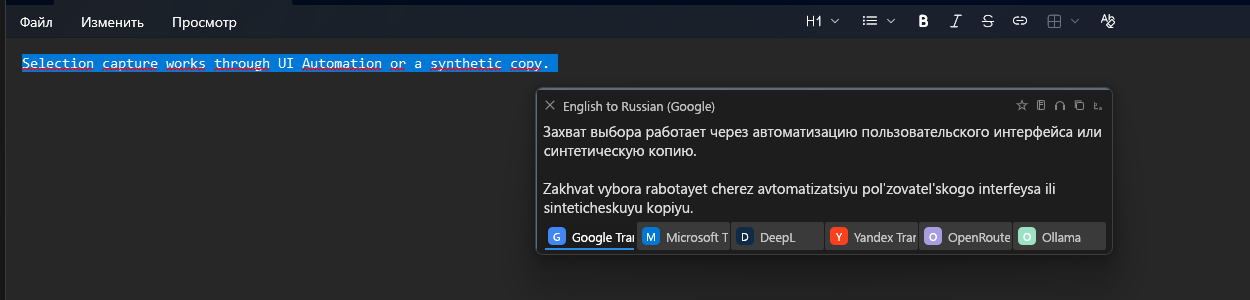
Select text in any program, press a hotkey, read the translation by the cursor.
Download
| Your system | Installer | Portable |
|---|---|---|
| Windows 10, 11 (Intel / AMD) | setup.exe | zip |
| Windows on ARM (Snapdragon) | setup.exe | zip |
| Mac with Apple silicon (M1 and later) | dmg | zip |
| Mac with Intel | dmg | zip |
| Linux (x86_64) |
deb · AppImage | tar.gz |
| Linux (ARM64) |
deb · AppImage | tar.gz |
The portable versions keep their settings in a data folder next to the program.
First launch
The builds are not signed yet, so the system asks once:
- Windows: SmartScreen → More info → Run anyway.
- macOS: open Glossa once, then System Settings → Privacy & Security → Open Anyway. It lives in the menu bar and asks for Accessibility and Screen Recording.
- Linux: built and smoke-tested automatically, but not yet run on real hardware. Reports are very welcome.
What it does
- Translate the selection in a popup by the cursor, or in the main window with several services side by side.
- Text on screen (OCR): Google Lens built in, Windows OCR, Apple Vision, Tesseract. Translate in place over the picture.
- Many services with no key: Google, Bing, Yandex, DeepL, Lara, ModernMT and more. AI translators through any OpenAI-compatible API, Ollama included.
- Dictionaries online and offline (StarDict, DSL), text to speech, including the system's own voices.
- Modules in JavaScript, Python, Java or any language. QTranslate's service scripts, themes and settings carry over.
- Light and dark themes that follow the system, Mica and Acrylic on Windows 11, spell checking, mouse mode.
Known issues
- Windows on ARM builds have not been run on ARM hardware yet.
- The Intel Mac build running on Apple silicon (Rosetta) reads only Latin text with Apple Vision; use the Apple silicon build there.
- On Wayland, copy and paste into other programs need the desktop's remote-desktop portal (GNOME, KDE).
Full list of changes: CHANGELOG.md · Install guide: docs/install.md · Bugs: issues · Checksums: SHA256SUMS