Repository navigation
Releases
Glossa 0.1.2

A small Linux update to Glossa 0.1.1.
What's new
- The AppImage can update itself: it now carries its update information, and the release publishes a
.AppImage.zsyncbeside it, so AppImageUpdate and the AppImage managers built on it replace Glossa with the latest release, downloading only what changed. Updating from 0.1.1 needs this one download by hand. - No tray, no alarm: on a Linux system without an AppIndicator library, Glossa notes once in its log that there is no tray icon and why, instead of logging a crash of its tray thread. It worked without the icon before too.
Download
| Your system | Installer | Portable |
|---|---|---|
| Windows 10, 11 (Intel / AMD) | setup.exe | zip |
| Windows on ARM (Snapdragon) | setup.exe | zip |
| Mac with Apple silicon (M1 and later) | dmg | zip |
| Mac with Intel | dmg | zip |
| Linux (x86_64) |
deb · AppImage | tar.gz |
| Linux (ARM64) |
deb · AppImage | tar.gz |
The portable versions keep their settings in a data folder next to the program.
Upgrading
Install the new version over the old one as the install guide describes; your settings stay.
First launch
The builds are not signed yet, so the system asks once:
- Windows: SmartScreen → More info → Run anyway.
- macOS: open Glossa once, then System Settings → Privacy & Security → Open Anyway. It lives in the menu bar and asks for Accessibility and Screen Recording.
- Linux: built and smoke-tested automatically, but not yet run on real hardware. Reports are very welcome.
Known issues
- Windows on ARM builds have not been run on ARM hardware yet.
- The Intel Mac build running on Apple silicon (Rosetta) reads only Latin text with Apple Vision; use the Apple silicon build there.
- On Wayland, copy and paste into other programs need the desktop's remote-desktop portal (GNOME, KDE).
Full list of changes: CHANGELOG.md · Install guide: docs/install.md · Bugs: issues · Checksums: SHA256SUMS
Glossa 0.1.1
A small update to Glossa 0.1.0: the AppImage starts on more Linux systems, and the popup can close with a click elsewhere.
What's new
- Close the popup with a click elsewhere (Windows, macOS): Options → Appearance → Popup → Close on a click elsewhere instead. The popup, unless pinned, and mouse mode's button close at the first click outside Glossa instead of after a delay. Off by default; mouse mode need not be on. Idea and first version by @Sergey-git1.
- AppImage on systems without
libxkbcommon-x11(a plain Ubuntu 22.04, for one): Glossa left at once there with nothing on the screen. The image now carries the library and uses it where the system has none. - A message instead of a silent exit when no window can be opened (a missing system library, no usable graphics).
- Windows: a control API request refused while too many are being answered now gets the whole
503with itsRetry-After.
Download
| Your system | Installer | Portable |
|---|---|---|
| Windows 10, 11 (Intel / AMD) | setup.exe | zip |
| Windows on ARM (Snapdragon) | setup.exe | zip |
| Mac with Apple silicon (M1 and later) | dmg | zip |
| Mac with Intel | dmg | zip |
| Linux (x86_64) |
deb · AppImage | tar.gz |
| Linux (ARM64) |
deb · AppImage | tar.gz |
The portable versions keep their settings in a data folder next to the program.
Upgrading
Install the new version over the old one as the install guide describes; your settings stay.
First launch
The builds are not signed yet, so the system asks once:
- Windows: SmartScreen → More info → Run anyway.
- macOS: open Glossa once, then System Settings → Privacy & Security → Open Anyway. It lives in the menu bar and asks for Accessibility and Screen Recording.
- Linux: built and smoke-tested automatically, but not yet run on real hardware. Reports are very welcome.
Known issues
- Windows on ARM builds have not been run on ARM hardware yet.
- The Intel Mac build running on Apple silicon (Rosetta) reads only Latin text with Apple Vision; use the Apple silicon build there.
- On Wayland, copy and paste into other programs need the desktop's remote-desktop portal (GNOME, KDE).
Full list of changes: CHANGELOG.md · Install guide: docs/install.md · Bugs: issues · Checksums: SHA256SUMS
Glossa 0.1.0
The first stable release of Glossa, a clean-room successor to QTranslate, written in Rust. It follows beta.2.
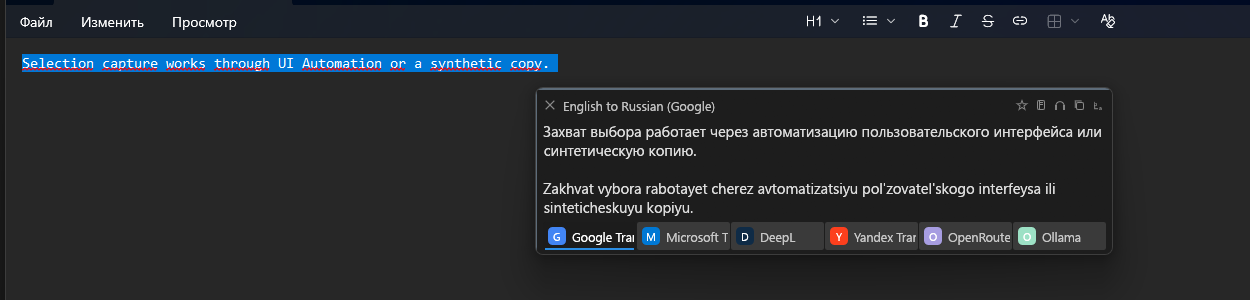
What's new since beta.2
- Modules you install yourself: from a folder or a
.zip, removable in one click. A module does not run until you approve the hosts, programs and downloads it asks for; an update that asks for more waits again. - Presets: named sets of services, dictionaries, voice and OCR engine to switch between in one click. They never hold keys or run programs.
- Python modules without Python: Glossa downloads a managed Python and gives each module its own environment.
- PaddleOCR: an offline text recognition module. Its program and models download on request.
- Local LLM: an offline translation module on llama.cpp, with no account and nothing sent anywhere.
- Module editor inside the program, and module windows and settings pages drawn by Glossa.
- Interface language switches at once, without a restart; your own language packs work too.
- Working offline: a built-in language detector and Work offline keep every request on the computer.
- Control API: the token is accepted only in the
Authorizationheader, no longer in the address. - Windows fixes: removing a running module, focus with Open the main window with the popup, and a silent exit on unknown command-line arguments.
Download
| Your system | Installer | Portable |
|---|---|---|
| Windows 10, 11 (Intel / AMD) | setup.exe | zip |
| Windows on ARM (Snapdragon) | setup.exe | zip |
| Mac with Apple silicon (M1 and later) | dmg | zip |
| Mac with Intel | dmg | zip |
| Linux (x86_64) |
deb · AppImage | tar.gz |
| Linux (ARM64) |
deb · AppImage | tar.gz |
The portable versions keep their settings in a data folder next to the program.
Upgrading from a beta
Install the new version as the install guide describes for your system; your settings stay. Key bindings that pass the control API token as ?token=… need the Authorization: Bearer … header instead (control API).
First launch
The builds are not signed yet, so the system asks once:
- Windows: SmartScreen → More info → Run anyway.
- macOS: open Glossa once, then System Settings → Privacy & Security → Open Anyway. It lives in the menu bar and asks for Accessibility and Screen Recording.
- Linux: built and smoke-tested automatically, but not yet run on real hardware. Reports are very welcome.
Known issues
- Windows on ARM builds have not been run on ARM hardware yet.
- The Intel Mac build running on Apple silicon (Rosetta) reads only Latin text with Apple Vision; use the Apple silicon build there.
- On Wayland, copy and paste into other programs need the desktop's remote-desktop portal (GNOME, KDE).
Full list of changes: CHANGELOG.md · Install guide: docs/install.md · Bugs: issues · Checksums: SHA256SUMS
Local LLM module binary 0.1.0
The bin asset of the local LLM module (modules/process/local-llm): the local-llm program for each platform. llama.cpp and the models are downloaded from their own releases. Copy each archive's sha256 and size (SIZES) into module.toml.
PaddleOCR module binary 0.1.0
The bin asset of the PaddleOCR module (modules/process/paddle-ocr): the paddle-ocr program and ONNX Runtime 1.31.1 for each platform. Copy each archive's sha256 and size (SIZES) into module.toml.
Glossa 0.1.0-beta.2
The second beta of Glossa, a clean-room successor to QTranslate, written in Rust. A small update over beta.1.
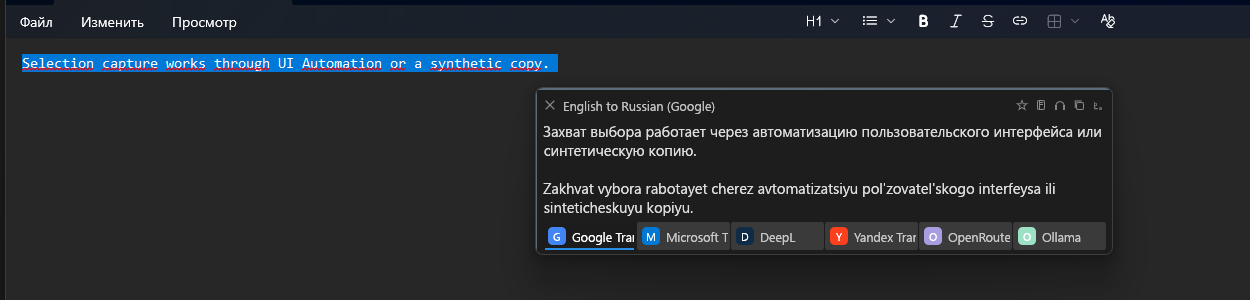
What's new
- Support the project: a link to the author's Boosty in the About window, the menus and the tray. Thank you!
- macOS: Options → Exceptions no longer lists Windows-only controls and rules that can never match on a Mac.
- The About window no longer has an empty band under its last button.
Download
| Your system | Installer | Portable |
|---|---|---|
| Windows 10, 11 (Intel / AMD) | setup.exe | zip |
| Windows on ARM (Snapdragon) | setup.exe | zip |
| Mac with Apple silicon (M1 and later) | dmg | zip |
| Mac with Intel | dmg | zip |
| Linux (x86_64) |
deb · AppImage | tar.gz |
| Linux (ARM64) |
deb · AppImage | tar.gz |
The portable versions keep their settings in a data folder next to the program.
First launch
The builds are not signed yet, so the system asks once:
- Windows: SmartScreen → More info → Run anyway.
- macOS: open Glossa once, then System Settings → Privacy & Security → Open Anyway. It lives in the menu bar and asks for Accessibility and Screen Recording.
- Linux: built and smoke-tested automatically, but not yet run on real hardware. Reports are very welcome.
Known issues
- Windows on ARM builds have not been run on ARM hardware yet.
- The Intel Mac build running on Apple silicon (Rosetta) reads only Latin text with Apple Vision; use the Apple silicon build there.
- On Wayland, copy and paste into other programs need the desktop's remote-desktop portal (GNOME, KDE).
Full list of changes: CHANGELOG.md · Install guide: docs/install.md · Bugs: issues · Checksums: SHA256SUMS
Glossa 0.1.0-beta.1
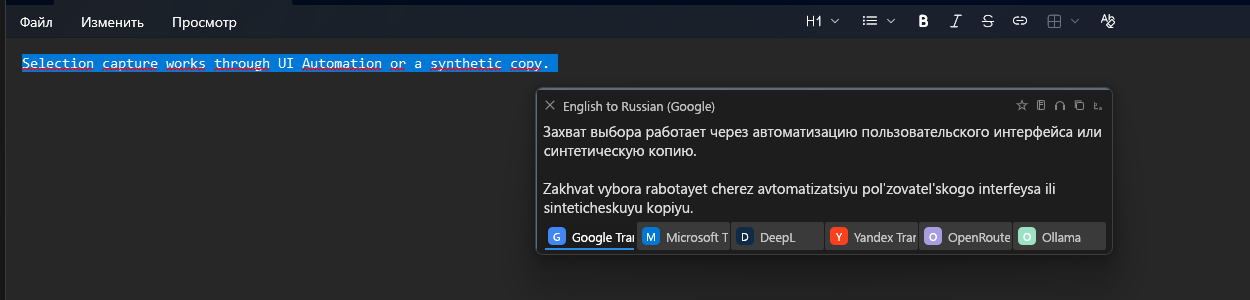
The first public beta of Glossa, a clean-room successor to QTranslate, written in Rust.
Select text in any program, press a hotkey, read the translation by the cursor.
Download
| Your system | Installer | Portable |
|---|---|---|
| Windows 10, 11 (Intel / AMD) | setup.exe | zip |
| Windows on ARM (Snapdragon) | setup.exe | zip |
| Mac with Apple silicon (M1 and later) | dmg | zip |
| Mac with Intel | dmg | zip |
| Linux (x86_64) |
deb · AppImage | tar.gz |
| Linux (ARM64) |
deb · AppImage | tar.gz |
The portable versions keep their settings in a data folder next to the program.
First launch
The builds are not signed yet, so the system asks once:
- Windows: SmartScreen → More info → Run anyway.
- macOS: open Glossa once, then System Settings → Privacy & Security → Open Anyway. It lives in the menu bar and asks for Accessibility and Screen Recording.
- Linux: built and smoke-tested automatically, but not yet run on real hardware. Reports are very welcome.
What it does
- Translate the selection in a popup by the cursor, or in the main window with several services side by side.
- Text on screen (OCR): Google Lens built in, Windows OCR, Apple Vision, Tesseract. Translate in place over the picture.
- Many services with no key: Google, Bing, Yandex, DeepL, Lara, ModernMT and more. AI translators through any OpenAI-compatible API, Ollama included.
- Dictionaries online and offline (StarDict, DSL), text to speech, including the system's own voices.
- Modules in JavaScript, Python, Java or any language. QTranslate's service scripts, themes and settings carry over.
- Light and dark themes that follow the system, Mica and Acrylic on Windows 11, spell checking, mouse mode.
Known issues
- Windows on ARM builds have not been run on ARM hardware yet.
- The Intel Mac build running on Apple silicon (Rosetta) reads only Latin text with Apple Vision; use the Apple silicon build there.
- On Wayland, copy and paste into other programs need the desktop's remote-desktop portal (GNOME, KDE).
Full list of changes: CHANGELOG.md · Install guide: docs/install.md · Bugs: issues · Checksums: SHA256SUMS