Repository navigation
Releases
ArchangeSDR 1.5.0

Highlights
- Favorites. Star a speech row of the log (the star next to the bug button) and its channel is scanned 4 times per pass, its visits spread through the pass, so a busy frequency is no longer lost among hundreds of silent hops. A favorite starred during a scan counts at once.
- A Favorites tab, between Interference and Statistics: each favorite with the number of conversations heard there, the last one to play, and the star to remove it. Favorites also have their own group, listed first, in the frequency ranges, where they can be unticked or deleted; loading a region's ranges keeps them.
- Automatic favorites (optional). In Settings → Recordings, "Automatically add frequently heard frequencies to favorites": a frequency heard in 5 conversations (interference does not count, no time limit) becomes a favorite by itself. Replies heard by another receiver within 2 min count as the same conversation. A favorite you remove is never added back by itself.
- One play button per detection. It shows Preview (the 2.5 s capture) until the whole recording is done, then Listen.
Update
cd ArchangeSDR
git pull
./install.sh
Then restart ArchangeSDR. Settings, ranges and history are kept.
ArchangeSDR 1.4.0
Highlights
- The transcript in the notification. With transcription on, each ntfy notification now ends with what was said (up to 1000 characters). If the transcript is not ready yet, the notification waits for it, 3 min at most.
- One notification per conversation. Replies heard within 2 min are appended to the same recording, and each part used to send its own notification (a 2 min conversation was notified 7 times). The notification now goes once the conversation is over: 2 min without a reply, or at the end of the scan.
- Always clean audio in ntfy. A preview or a recording made before 1.3.0 is filtered before it is attached, like the newer recordings; the files on disk stay untouched.
- Standalone only. ArchangeSDR no longer adapts to a desktop setup: one set of folders (
~/.config/archangesdr,~/.local/share/archangesdr), its own default ranges, and language, region, accent and theme chosen in the Settings tab. The--profileoption is gone.
Update
cd ArchangeSDR
git pull
./install.sh
Then restart ArchangeSDR. Settings, ranges and history are kept.
ArchangeSDR 1.3.0
Highlights
- Cleaner recordings to listen to. Each recording is now kept twice:
recordings/<id>_clean.wav, played in the log and sent by ntfy: the voice band only (300 - 3000 Hz) and, in NFM, the de-emphasis the transmitters expect. The FM hiss above 3 kHz and the AM rumble below 300 Hz are gone; about 4 dB less hiss in NFM on real recordings. The voice keeps its level, and no word is ever cut.recordings/<id>_raw.wav, the audio as received. The transcription uses it: Whisper did worse on the filtered audio.
- The two files take twice the space of one; the retention setting (Settings → Recordings) deletes both.
- Recordings made before this version (
<id>.wav) still play and transcribe as before. - The filter costs about 2 % of real time on a uConsole (Raspberry Pi CM4).
Update
cd ArchangeSDR
git pull
./install.sh
Then restart ArchangeSDR. Settings, ranges and history are kept.
ArchangeSDR 1.2.0
⚠️ Before you update
Previews and recordings older than 30 days are now deleted when the app starts (the log, the statistics and the transcripts stay). To keep all your audio, set Settings → Recordings → Keep the audio for to 0 before restarting with this version.
Highlights
- Starts in a second, even on a uConsole. The window used to stay black for 10 - 13 s on a uConsole (Raspberry Pi CM4) with a few hundred detections, while every row of the log and of the Interference tab was built. The window now draws itself first and the lists fill right after, a slice at a time, so it stays responsive.
- Paged lists: the detection log and the Interference tab show 25 rows per page, with page numbers and Previous / Next below the list (greyed at either end). A filter change goes back to the first page.
- Recordings without squelch (Settings → Recordings): the pauses are now recorded as heard, so a weak voice under the threshold is no longer cut mid-sentence. The squelch can be turned back on.
- Audio retention (Settings → Recordings): 30 days by default, 0 keeps everything. Old files are deleted once, at start.
- New-activity alert (optional, Settings → Recordings): a short chime, then the 2.5 s preview, when a new frequency starts talking.
- Mark a capture as interference: the bug button of a log row bans its frequency (undo it with Unban in the Interference tab).
- ntfy attachments in MP3 (lame or ffmpeg) under 2 MB, ntfy.sh's free-plan limit; a longer recording sends its preview.
Window
- Playback progress inside the Preview / Listen button; Preview has a puzzle-piece icon (a sample of the conversation).
- On a narrow window, the action buttons shrink to their icons (the text stays in the tooltip).
- Scrollbars always shown, easier to grab with a trackball.
- Settings grouped in one card per section.
- Tab icons: journal, bug, chart, gear.
Update
cd ArchangeSDR
git pull
./install.sh
Then restart ArchangeSDR. Settings, ranges and history are kept (see the retention note above for the audio). install.sh now also copies the app's icons.
ArchangeSDR 1.1.1
Highlights
- No more freezes or lost clicks in the detection log. The log and the Interference tab now update only the rows that changed instead of rebuilding every row. A full rebuild took ~0.15 s on a PC and seconds on a uConsole, at every new detection, every 15 s and every click on Play: buttons stopped responding and the list jumped back to the top. A refresh now takes a few milliseconds, and the scroll position and focus stay where they are.
- Fold the spectra away: an arrow under the scan cards hides the spectra (the status lines stay), to leave room for the lists on a short screen. The choice is kept.
- Statistics on small screens: the chart keeps a usable height in a short window (it was squeezed to a few pixels on the uConsole).
Also documented in the README. Since 1.1.0, the README also describes the receivers other than RTL-SDR in its requirements and usage.
Update
cd ArchangeSDR
git pull
./install.sh
Then restart ArchangeSDR. Settings, ranges and history are kept.
ArchangeSDR 1.1.0
Highlights
- Runs in real time on a Raspberry Pi 4 / ClockworkPi uConsole. The channel extraction is now done block by block (a mixer and two decimating filters) instead of an FFT of the whole capture, and the progressive listen only processes the new block. Measured on a uConsole (CM4): a 2.5 s listen went from 7.3 s to 1.1 s of processing, a 0.5 s recording block from 0.53 s to 0.2 s. Long recordings no longer drop samples.
- Other receivers through SoapySDR (optional): HackRF, Airspy, SDRplay, LimeSDR, PlutoSDR… appear next to the RTL-SDR dongles once SoapySDR's Python module and the receiver's module are installed (Arch:
soapysdrplussoapyhackrf,soapyairspy…; Debian / Ubuntu:python3-soapysdrplussoapysdr-module-…). The receiver must sample at 2.4 MS/s or more. Tested with a simulated SoapySDR so far: reports from real hardware are welcome. - Any sample rate: the detection keeps the same ~1.17 kHz resolution whatever the receiver's rate (Airspy R2 at 2.5 MS/s, Airspy Mini at 3 MS/s…). RTL-SDR dongles are unchanged (2.4 MS/s, same results).
- archSDR: language and region follow the radio menu's settings and the system locale.
For contributors
python3 -m unittest: a test suite on synthetic signals and fake receivers (no dongle needed, numpy only), ready for a CI.tools/bench.py: the processing cost of each scan step on your machine.
Update
cd ArchangeSDR
git pull
./install.sh
Then restart ArchangeSDR. Settings, ranges and history are kept.
ArchangeSDR 1.0.0
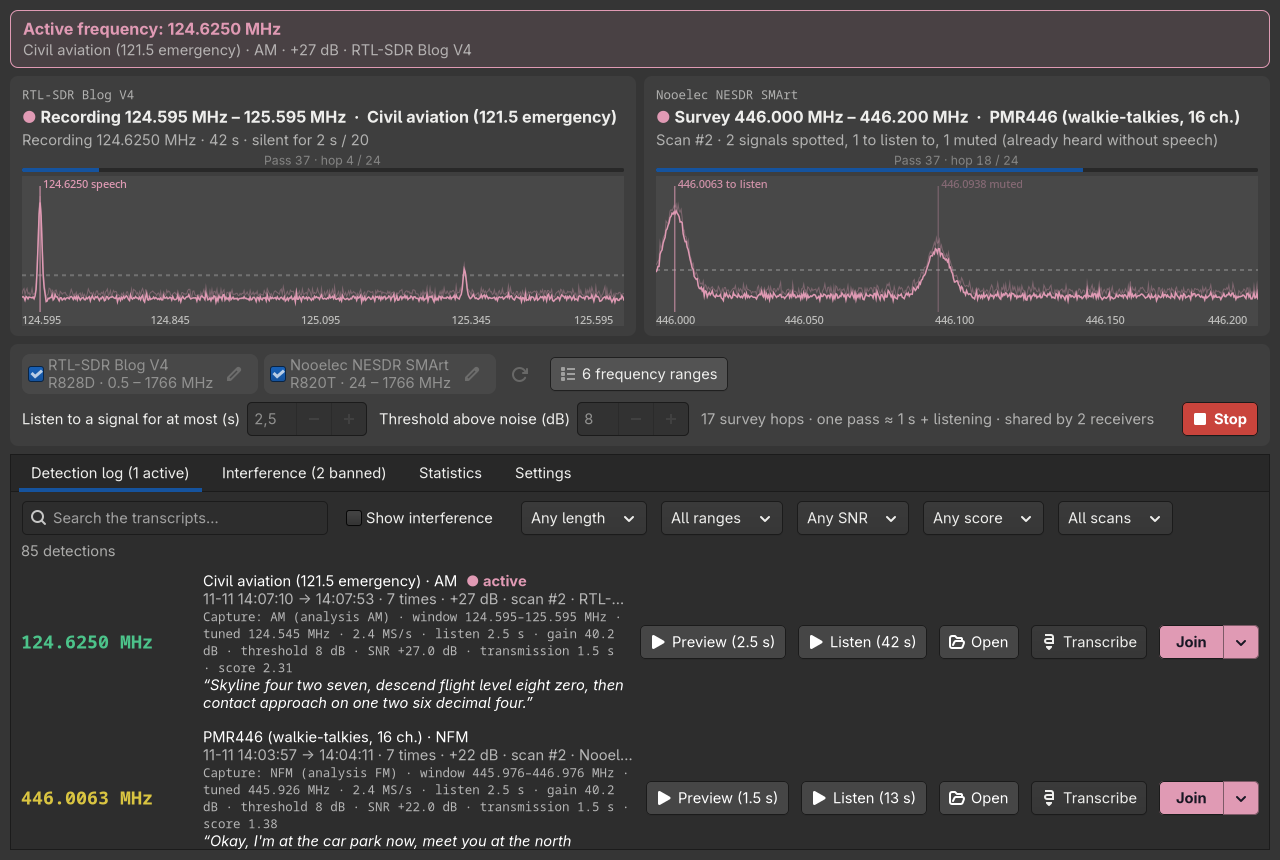
First public release of ArchangeSDR, a lightweight RTL-SDR scanner that finds people talking: it sweeps the bands you choose, listens only where something transmits, keeps what sounds like speech and records the whole conversation.
Highlights
- Speech, not a squelch: AM, FM and SSB demodulation checked for syllables, pauses, voice band and pitch; carriers, data and interference are rejected.
- Fast sweep: 0.1 s survey hops, a progressive listen (1 to 2.5 s) only where a narrow signal shows up.
- Whole conversations recorded until 20 s of silence, with a short preview of each.
- Interference memory: a frequency heard 3 times in a row without speech is banned; false positives can be whitelisted.
- Several dongles share the sweep, never two on the same frequency.
- Join a frequency in GQRX, SDR++, rtl_fm or your own command.
- Optional transcription (whisper.cpp, free and local, or any OpenAI-compatible API), searchable from the log.
- Push notifications through ntfy.
- Statistics, default ranges for 16 regions, English / French / German / Spanish, dark and light themes.
Install
git clone https://github.com/bt0r/ArchangeSDR.git
cd ArchangeSDR
./install.sh
archangesdr
Needs Python 3.8+, numpy, GTK 4 for Python and librtlsdr from your distribution (Debian 12, Ubuntu 22.04, Fedora 36, openSUSE Leap 15.4, Arch or newer). See the README for the packages and the optional extras.
Formerly SDRScanner: the sdrscanner command still works, and an existing standalone history moves to the new folders at the first start.