Repository navigation
TrueStretch 1.1.0 — Optimize Max + new design

TrueStretch 1.1.0 — Optimize Max, a new layout, and a VALORANT-style redesign
Already using TrueStretch? It updates itself — open it and click Update now (or Settings → General → Updates → Check now). Your settings, accounts and backups stay exactly as they are.
New here? Download TrueStretch.exe — one file, Windows 10 / 11, nothing to install.
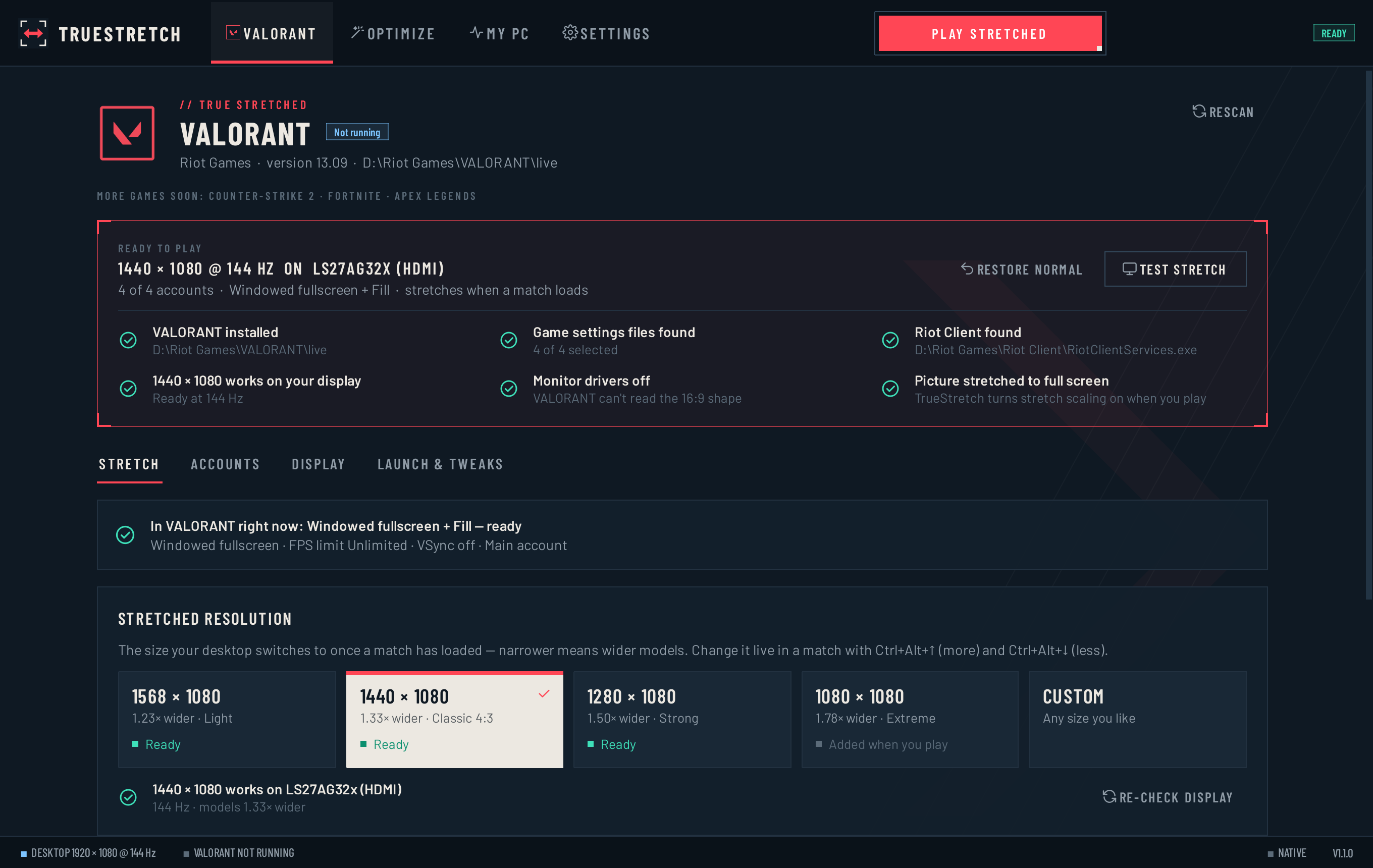
Optimize Max — every FPS and input-delay setting on your PC, one by one
A new OPTIMIZE section scans your PC with 68 checks in 12 categories and lists every change on its own — nothing bundled together. Each row shows what the setting is now, what it should be, why it matters, and how big the impact is (high / medium / low). On top you get an optimization score out of 100.
| Category | What it checks and can fix |
|---|---|
| Windows | Power mode · Game Mode · Xbox Game Bar background recording · Optimizations for windowed games (big one: TrueStretch runs VALORANT in Windowed fullscreen) · Hardware-accelerated GPU scheduling · Refresh rate · VALORANT on the fast graphics card (laptops) · Transparency effects · Pending Windows restart |
| Windows power plan | Processor minimum state · Processor boost mode · Core parking · USB selective suspend (mouse hitches) · PCI Express link power saving (GPU latency) · Wi-Fi power saving (ping spikes). Only the plugged-in values change; battery life is untouched. |
| Graphics card (NVIDIA) | Power management mode · Texture filtering quality · Vertical sync · Low latency mode · Preferred refresh rate · Driver frame cap. Changed only in VALORANT's own program profile — other games are not touched. |
| VALORANT files | VSync · HDR · Dynamic resolution · every graphics quality group (shadows, effects, post-processing, textures, shading, anti-aliasing, view distance, foliage, global illumination, reflections) — for every account on the PC, and the copy HP OMEN AI keeps. |
| Startup apps | Each program that starts with Windows (Discord, Chrome, Overwolf, Spotify, …) — disable them one at a time. Riot, Vanguard, drivers and security software are never listed. |
| Background & overlays | Discord overlay, NVIDIA overlay & Instant Replay, RTSS / Afterburner, Overwolf, Medal, OBS, Wallpaper Engine, and programs using lots of memory — with exactly how to turn each one off. |
| Network | Wi-Fi or cable. |
| Your PC | Memory running slower than rated (XMP/EXPO off in BIOS) · single-channel memory · SSD or hard drive · graphics driver age · laptop on battery · memory integrity. |
| Inside VALORANT / AMD Software / Intel Graphics | The settings only those programs can change (NVIDIA Reflex, multithreaded rendering, material quality, Anti-Lag, …) — each one listed separately with exactly where to change it. |
How it stays safe
- Nothing changes until you press Apply. Pick items one by one or Apply selected.
- Every change is verified — after applying, TrueStretch reads the setting back and tells you if it didn't stick.
- Everything can be undone — the original value is saved the first time, and Undo / Undo all put back exactly what was there (even settings that didn't exist before are removed again).
- It never touches security settings, game memory or anti-cheat. Things that can't be changed safely (BIOS memory speed, your mouse software, other people's apps) are shown as information, not changed.
- Scanning and applying run in the background with live progress — the window never freezes.
Diagnostics — a full technical report of every value TrueStretch read, where it read it from (registry key, file, driver setting), and every change made this session. Copy it or Save to Desktop for a bug report. Your Riot account ID is hidden automatically.
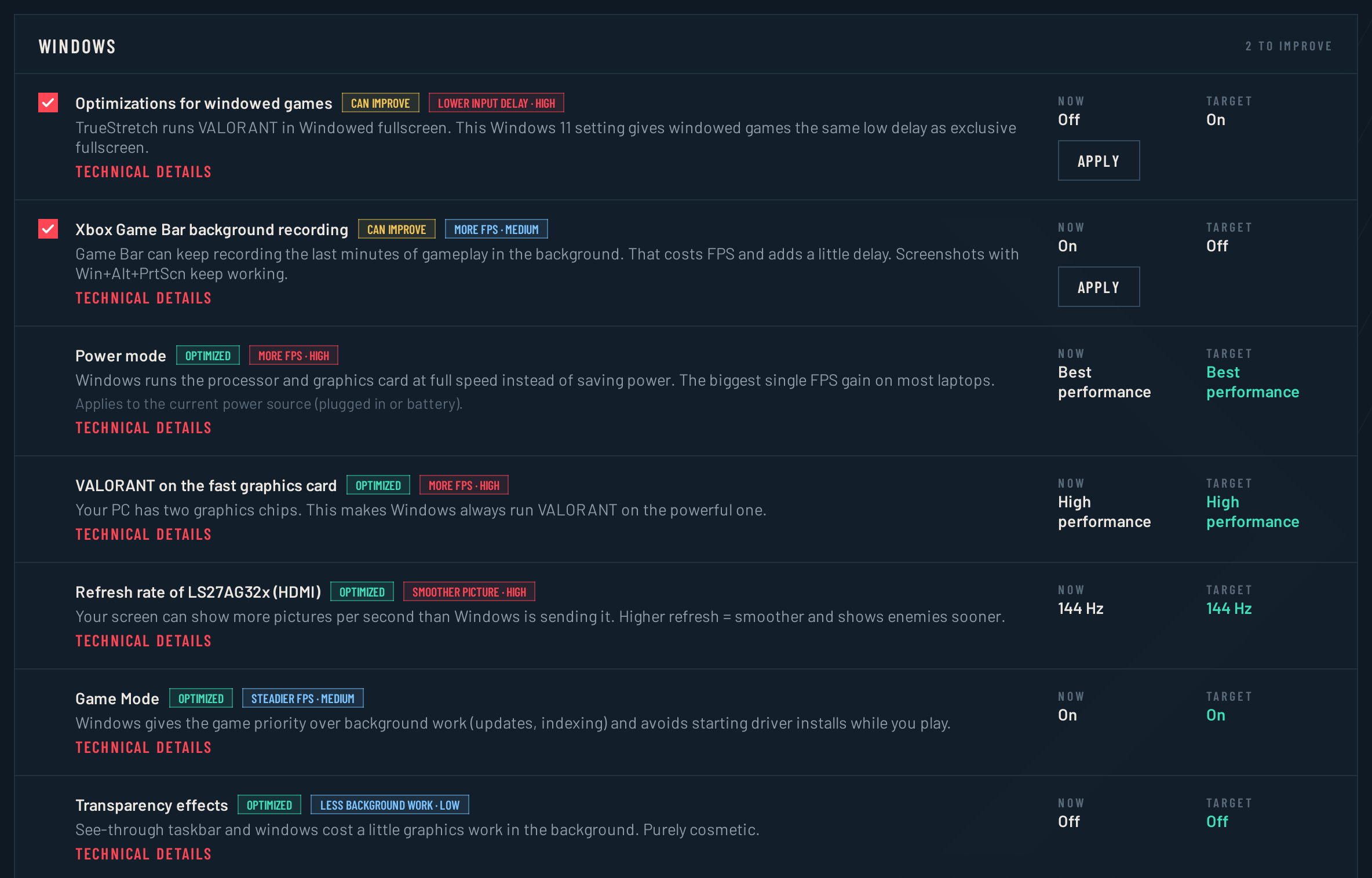
A new layout — like the VALORANT client
- Top bar with a centered PLAY button. One main action, always in the same place. It shows the live state next to it: READY, MENU · NATIVE, IN MATCH · STRETCHED.
- Four clear sections instead of eight: VALORANT (your stretch level, readiness checklist, accounts, display, launch options), OPTIMIZE, MY PC, SETTINGS (general, backups and about in one place, with centered tabs like VALORANT's settings menu).
- The readiness checklist is right on the VALORANT page — you see at a glance that everything is set.
- The manual Setup guide tab is gone: setup has been fully automatic since 1.0.0.
A VALORANT-style redesign
- Deep navy, off-white highlights and red only where it matters. The selected stretch level becomes a solid off-white panel with a red top bar — the way VALORANT marks a selected option.
- Sharp edges everywhere, thin lines, corner brackets, uppercase condensed headings (Barlow Condensed), framed red buttons, square markers, and a quiet geometric background.
- A new sharp logo. No rounded cards, no gradients, no emoji.
Responsive and faster
- Content stays centered on wide monitors and reflows on small windows: stretch levels, checklists and hardware cards change their number of columns, rows stack when there's no room, and the menu turns into icons. Works from 900 × 600 up to ultrawide.
- Snappier: only the page you're looking at redraws; the others refresh when you open them.
Fixed
- Undo of VALORANT file changes now also restores the copy HP OMEN AI keeps.
- Undo now removes settings that didn't exist before instead of leaving them behind.
New website
candyqueenjr.github.io/TrueStretch — rebuilt in the same style with scroll animations (wipe reveals, line-by-line headlines, a live timeline, count-ups), sharp 2× screenshots with a lightbox, and a layout tested from 360 px phones to 1920 px monitors.
Verify your download
SHA-256 DF942F84FB8261AB2A6596564591DE542101FA10D30728C3AEF03556E6B7AE41
In PowerShell: Get-FileHash .\TrueStretch.exe must print the same hash. The built-in updater checks this automatically. See SECURITY.md.
Something not working? Settings → Support file, then open a bug report.