Repository navigation
Releases
Tasklines 1.5.1

Fixes
- A date inside a note link, a link address or a
%% comment %%is no longer read as the task's date. Before, changing that date could rewrite the link. - Inline code written with double backticks is now always left alone.
- A tag after a repeat rule (
🔁 every week ⏳ 2026-12-01 #home) is no longer swallowed by the rule. - With Obsidian in a language such as Arabic, the Tasks plugin can write dates in that language's digits, which can't be read back. Tasklines now refuses that: plain tasks are completed with 0-9 dates, and recurring tasks are left unchanged with a message.
- In right-to-left vaults, English task names are cut off at their end, and numbers in summaries stay in place.
New
- Copy debug info command, for bug reports: versions and settings, with no note content.
- A bug report form and a Troubleshooting section in the README.
Tested on macOS, Windows, Android and iPhone. Details are in VERIFY.md.
What's Changed
- Name the urgent-and-important matrix in the plugin description by @rcasazza in #68
- Say what Obsidian 1.10 to 1.12 users get, and how to get the rest by @rcasazza in #69
- Say up front what sets Tasklines apart by @rcasazza in #70
- Link the demo video from the README by @rcasazza in #71
- Read real-world task lines correctly by @rcasazza in #72
- Make bugs easier to report and catch by @rcasazza in #73
- Keep dates readable and text in order in other languages by @rcasazza in #74
- Release 1.5.1 by @rcasazza in #75
Full Changelog: 1.5.0...1.5.1
Contributors

Assets 5
Tasklines 1.5.0
New
Urgent and important board. Task board views have a new Columns choice, Urgent and important (Eisenhower). It sorts open tasks into four boxes:
- Do first: urgent and important.
- Schedule: important, not urgent.
- Delegate: urgent, not important.
- Later: neither.
Finished tasks go in their own column. Urgent means overdue or due by tomorrow; important means high or highest priority.
- Moving a card changes one thing on its line, in the line's own format (Tasks emoji or Dataview), and the notice offers Undo:
- into an urgent box, the due date becomes today; out of one, the due date is removed;
- into an important box, the priority becomes high; out of one, the priority is removed.
- What's refused, with a notice:
- a move that would change both the date and the priority (the notice names the boxes to go through);
- moving a finished task;
- removing a recurring task's due date.
- Layout: with room for it (desktop panes, tablets), the boxes form a 2×2 grid: urgent on the left, important on top, axes labelled, all four in view. On phones, a phone held sideways and narrow panes they're swipeable columns like the other boards. Embedded in a note, each row fits its cards.
New task base. Right-click a folder and choose New task base, or run New task base for the current note's folder. Tasklines creates <folder> tasks.base inside the folder with four ready-made views of that folder's tasks: open tasks grouped by note, a status board, the urgent-and-important board, and a calendar. It never replaces an existing file.
Tested on macOS, Windows, Android and iPhone. Details are in VERIFY.md.
What's Changed
- Add an urgent-and-important board and New task base by @rcasazza in #63
- Show the urgent-and-important board as a 2×2 grid when there is room by @rcasazza in #64
- Size each row of an embedded urgent-and-important grid to its cards by @rcasazza in #65
- VERIFY: New task base on Windows by @rcasazza in #66
- Release 1.5.0: urgent-and-important board and New task base by @rcasazza in #67
Full Changelog: 1.4.1...1.5.0
Contributors
Assets 5
Tasklines 1.4.1
Housekeeping
- Cleaner review. Two CSS rules are written differently so the community directory's review no longer flags them: the text read only by screen readers is hidden with
cliprather thanclip-path, and the select bar's spacing uses thegapshorthand rather thancolumn-gap. Nothing looks or reads differently. - Clipboard, disclosed. The README now says that Copy in select mode writes the selected tasks to the clipboard, and that Tasklines never reads it.
- Ideas welcome. Feature requests and questions now have a home in Discussions; bugs still go to the issue tracker.
- A shorter description of what Tasklines does, covering the board, the calendar, Color and bulk changes.
What's Changed
- Clear the directory review's CSS warnings and disclose clipboard use by @rcasazza in #57
- Describe the board, calendar, Color and bulk changes in the manifest by @rcasazza in #58
- Keep flagged CSS property names out of the stylesheet's comments by @rcasazza in #59
- Point ideas and questions to GitHub Discussions by @rcasazza in #60
- Release 1.4.1: clear the directory's CSS warnings by @rcasazza in #62
Full Changelog: 1.4.0...1.4.1
Contributors
Assets 5
Tasklines 1.4.0
Group within groups, and color your tasks
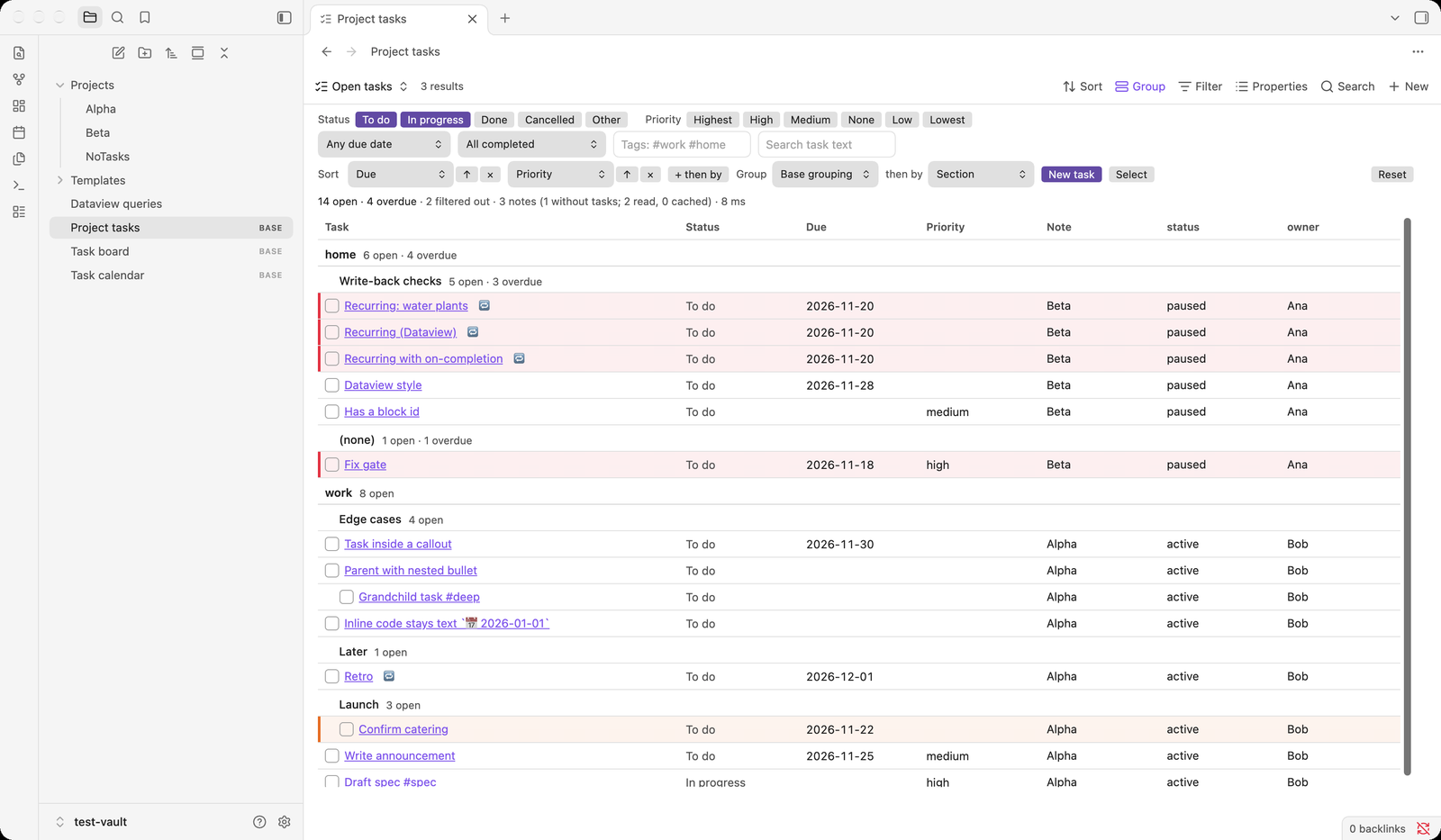
- Group, then by. In the list view, then by next to Group adds a second level inside each group: note then section, due bucket then owner, status then tag, or any other pair. Each heading has its own counts, and in select mode its own checkbox, which selects just that part.
- Color. A new Color option in the config menu of every view (list, board and calendar) tints tasks by due date (overdue red, due today orange), priority (highest red to lowest cyan) or a note property you pick, so every task from the same project, area or owner shares a color. Tints use your theme's own colors, finished tasks aren't tinted by due date or priority, and screen readers hear the same in words ("overdue", "area: home").
- A tidier select bar. The bar's buttons and menus are one height and line up; group checkboxes sit exactly above the tasks' boxes in the list, board and calendar; on phones the bar stays two rows (it could wrap to three on narrower iPhones) and its buttons are visible in light themes.
Tested on macOS, Android and iPhone, in five themes in light and dark.
What's Changed
- Tidy the select-mode bar and line up the group checkboxes by @rcasazza in #51
- Keep the phone select bar to two rows on narrower iPhones by @rcasazza in #52
- Record the select-mode theme check by @rcasazza in #53
- Add a second grouping level and a Color option by @rcasazza in #54
- Keep the select bar's buttons visible on phones in light themes by @rcasazza in #55
- Release 1.4.0: two-level grouping and Color by @rcasazza in #56
Full Changelog: 1.3.0...1.4.0
Contributors
Assets 5
Tasklines 1.3.0
Change several tasks at once
Press Select in the toolbar of any Tasklines view (list, board or calendar) to pick several tasks and change them together.
- Selecting. Tick tasks, or tap their text. Shift-click to select a range. Use the checkbox at the start of a group, board column or calendar day to select everything under it; it shows a dash when only some are selected. Select all picks every task the view shows.
- Actions. Complete, Reopen, Status, Priority, and Change date for the due, scheduled or start date: Today, Tomorrow, One day later, One week later, Pick a date…, or Remove.
- Copy. Copy the selected tasks as a plain list with links to their notes (no checkboxes, so pasting doesn't duplicate them), or as the task lines themselves.
- Undo. Every change can be undone from the notice or the action bar. Each line goes back only if it's still what the batch wrote. Completing a recurring task goes through the Tasks plugin, which adds the next occurrence, so that can't be undone; you're asked first, as you are for any batch of more than 20 tasks.
- Safe by design. Each selected task is still changed on its own, one line at a time, with the same checks as everywhere else, and in the line's own format (Tasks emoji or Dataview fields). A task whose line changed since you selected it is refused, and the rest go ahead. A large batch shows its progress and can be cancelled.
- Phones. The action bar is two rows: the count, Select all, Undo and Done, then Complete, Date and More.
- Keyboard and screen readers. Enter on Select starts select mode, Space ticks, Shift-click selects ranges, and Escape (or Done) leaves. Controls are named, and group checkboxes report a mixed state.
Tested on macOS, Windows, Android and iPhone, and on a vault of 10,000 tasks: a batch writes about 150 tasks a second, and ticking a task takes a few milliseconds.
What's Changed
- Add task board and calendar screenshots by @rcasazza in #45
- Add bulk actions by @rcasazza in #46
- Select ranges and groups, choose the date, and copy selected tasks by @rcasazza in #47
- Update group checkboxes in place when ticking a task by @rcasazza in #48
- Select mode: keyboard and accessibility check, Done's accessible name by @rcasazza in #49
- Release 1.3.0: bulk actions by @rcasazza in #50
Full Changelog: 1.2.0...1.3.0
Contributors
Assets 5
Tasklines 1.2.0
Task calendar
A new Bases layout, Task calendar, puts your tasks on the days of their dates. In the view's settings:
-
Date picks which date places a task: due, scheduled or start.
-
Layout picks Month, Agenda or Automatic.
-
Month: a grid of weeks, starting on your Obsidian language's first day of the week, with ‹ Today › to change month. Tasks without the date wait in No date.
-
Agenda: Overdue, then the coming days, then Later and No date.
-
Automatic (the default) shows the agenda on phones and the month elsewhere, so one base suits both.
-
Reschedule by dragging a task to another day, or with its ⋯ menu: Today, Tomorrow, One day later, One week later, Pick a date… and Remove date. Each is one ordinary date edit in the line's own style, with the same checks as everywhere else. The notice offers Undo.
-
A recurring task always keeps a date to repeat from.
-
A date that isn't a real day (like
2026-11-31) shows under No date, marked, so you can fix it. -
Dates only: no times of day and no reminders.
Tested
This release went through the full test pass. The calendar was tested on macOS (including a real mouse drag), Windows (with CRLF notes), Android and iPhone.
What's Changed
- Add a task calendar view by @rcasazza in #39
- Fit the date picker on iOS and record the calendar's iPhone test by @rcasazza in #40
- Record the calendar's real mouse drag test by @rcasazza in #41
- Record the calendar test on Windows by @rcasazza in #42
- Fit the Pick a date field on iOS by @rcasazza in #43
- Release 1.2.0: task calendar by @rcasazza in #44
Full Changelog: 1.1.2...1.2.0
Contributors
Assets 5
Tasklines 1.1.2
Fixes
- No more stray tooltips. Hovering over a task row showed "Tasks", hovering over a board card showed its column's name, and hovering over a column's count showed "13 tasks". Those tooltips are gone, and buttons and checkboxes still show their own.
- Screen readers hear "overdue". An overdue date on a board card was shown only in red. Screen readers now read it as overdue.
Tested
This release went through the full test pass. Since 1.1.1, the task board has been tested on Windows (including a real mouse drag and CRLF notes), Android, iPhone and Obsidian 1.13.4, the oldest supported version.
What's Changed
- Document batched releases and the full test pass by @rcasazza in #32
- Stop stray tooltips over task rows and board cards by @rcasazza in #33
- Record the iPhone task board test by @rcasazza in #34
- Say "overdue" to screen readers and drop the column count tooltip by @rcasazza in #35
- Record the task board test on Obsidian 1.13.4 by @rcasazza in #36
- Record the task board test on Windows by @rcasazza in #37
- Release 1.1.2 by @rcasazza in #38
Full Changelog: 1.1.1...1.1.2
Contributors
Assets 5
Tasklines 1.1.1
Fixes
- Task board on phones: moving a card from its ⋯ menu no longer leaves columns half off screen, and sideways swipes settle on a whole column.
- Keyboard focus: ticking a checkbox, in the board or the list, no longer drops keyboard focus. It stays on the checkbox and follows the task to its new place.
- The Undo notice after a board move stays 8 seconds, long enough to reach on a phone.
What's Changed
- Test board refusals, status settings and large boards by @rcasazza in #29
- Fix board scrolling on phones and keep focus when ticking a task by @rcasazza in #30
- Release 1.1.1 by @rcasazza in #31
Full Changelog: 1.1.0...1.1.1
Contributors
Assets 5
Tasklines 1.1.0
Task board
A new Bases layout, Task board, shows your tasks as cards in columns. Choose the columns under Columns in the view's settings: Status, Priority or Due date. The task toolbar's filters and sort still apply.
- Move a card by dragging it, or with its ⋯ menu (on phones and from the keyboard). Each move changes only that task's line, with the same safety checks as ticking or editing a task.
- Done adds the completion date. A recurring task moved to Done is completed through the Tasks plugin, so it gets its next occurrence.
- Due date: drop a card on Today or Tomorrow to set the date, or on No due date to clear it. Overdue, Next 7 days and Later show tasks but don't accept drops, because each covers a range of dates.
- Undo: after a move, the notice has an Undo button that puts the line back exactly as it was.
Other changes
- Cancelling a task now adds a cancelled date (
❌ 2026-11-21or[cancelled:: 2026-11-21]) in the line's own style, like completion dates, and reopening it removes the date. This uses the same setting as the completion date.
What's Changed
- Add a contributing guide by @rcasazza in #26
- Add a task board view by @rcasazza in #27
- Release 1.1.0: task board by @rcasazza in #28
Full Changelog: 1.0.4...1.1.0
Contributors
Assets 5
Tasklines 1.0.4
Shows the whole date while you edit a due date in a narrow column (it used to cut off the year).
What's Changed
Full Changelog: 1.0.3...1.0.4