Configuration
!wiki/ .release/old/ .modrinth/
-
Neighbor Trust & Minimum Distance
GriefPrevention:
  Claims:
    MinimumDistance: 0
Enforce a minimum distance between top-level claims to prevent claim spam and overcrowding. When set, players cannot create claims within the configured distance of another player's claim.
-
/claim trust <player> neighbor— Grant a player neighbor trust so they can bypass minimum distance checks for your claims. -
/neighbortrust <player>(alias:/distancetrust <player>) — Standalone command for the same purpose. -
/claim distance check— Show the configured minimum distance and list nearby claims. -
/claim distance toggle— While standing in your own claim, toggle whether ALL players can bypass minimum distance for that claim. - Existing nearby claims auto-grant neighbor trust to each other, cleaned up automatically when claims are abandoned.
-
-
Wither Explosion Toggle
/witherexplosionsUse this command to toggle wither explosions inside your claim. || cmd.getName().equalsIgnoreCase("expandclaim") || cmd.getName().equalsIgnoreCase("resizeclaim")) && player != null) { if (!player.hasPermission("griefprevention.extendclaim")) { GriefPrevention.sendMessage(player, TextMode.Err, Messages.NoPermissionForCommand); return true; } return this.handleExtendClaimCommand(player, args); }// abandonclaim if (cmd.getName().equalsIgnoreCase("abandonclaim") && player != null) { if (!player.hasPermission("griefprevention.abandonclaim")) { GriefPrevention.sendMessage(player, TextMode.Err, Messages.NoPermissionForCommand); return true; } return this.abandonClaimHandler(player, false); } // abandontoplevelclaim if (cmd.getName().equalsIgnoreCase("abandontoplevelclaim") && player != null) { if (!player.hasPermission("griefprevention.abandontoplevelclaim")) { GriefPrevention.sendMessage(player, TextMode.Err, Messages.NoPermissionForCommand); return true; } return this.abandonClaimHandler(player, true); } // abandonallclaims else if (cmd.getName().equalsIgnoreCase("abandonallclaims") && player != null) { if (!player.hasPermission("griefprevention.abandonallclaims")) { GriefPrevention.sendMessage(player, TextMode.Err, Messages.NoPermissionForCommand); return true; } if (args.length > 1) return false; // trust <player> else if (cmd.getName().equalsIgnoreCase("trust") && player != null) { if (!player.hasPermission("griefprevention.trust")) { GriefPrevention.sendMessage(player, TextMode.Err, Messages.NoPermissionForCommand); return true; } // requires exactly one parameter, the other player's name if (args.length != 1) return false; // untrust <player> or untrust [<group>] else if (cmd.getName().equalsIgnoreCase("untrust") && player != null) { if (!player.hasPermission("griefprevention.untrust")) { GriefPrevention.sendMessage(player, TextMode.Err, Messages.NoPermissionForCommand); return true; } // requires exactly one parameter, the other player's name if (args.length != 1) return false; // accesstrust <player> else if (cmd.getName().equalsIgnoreCase("accesstrust") && player != null) { if (!player.hasPermission("griefprevention.accesstrust")) { GriefPrevention.sendMessage(player, TextMode.Err, Messages.NoPermissionForCommand); return true; } // requires exactly one parameter, the other player's name if (args.length != 1) return false; // containertrust <player> else if (cmd.getName().equalsIgnoreCase("containertrust") && player != null) { if (!player.hasPermission("griefprevention.containertrust")) { GriefPrevention.sendMessage(player, TextMode.Err, Messages.NoPermissionForCommand); return true; } // requires exactly one parameter, the other player's name if (args.length != 1) return false; // permissiontrust <player> else if (cmd.getName().equalsIgnoreCase("permissiontrust") && player != null) { if (!player.hasPermission("griefprevention.permissiontrust")) { GriefPrevention.sendMessage(player, TextMode.Err, Messages.NoPermissionForCommand); return true; } // requires exactly one parameter, the other player's name if (args.length != 1) return false; // restrictsubclaim else if (cmd.getName().equalsIgnoreCase("restrictsubclaim") && player != null) { if (!player.hasPermission("griefprevention.restrictsubclaim")) { GriefPrevention.sendMessage(player, TextMode.Err, Messages.NoPermissionForCommand); return true; } return this.handleRestrictSubclaimCommand(player, new String[]{}); } // basicclaims else if (cmd.getName().equalsIgnoreCase("basicclaims") && player != null) { if (!player.hasPermission("griefprevention.basicclaims")) { GriefPrevention.sendMessage(player, TextMode.Err, Messages.NoPermissionForCommand); return true; } PlayerData playerData = this.dataStore.getPlayerData(player.getUniqueId()); playerData.shovelMode = ShovelMode.Basic; playerData.claimSubdividing = null; // subdivideclaims else if (cmd.getName().equalsIgnoreCase("subdivideclaims") && player != null) { if (!player.hasPermission("griefprevention.subdivideclaims")) { GriefPrevention.sendMessage(player, TextMode.Err, Messages.NoPermissionForCommand); return true; } PlayerData playerData = this.dataStore.getPlayerData(player.getUniqueId()); playerData.shovelMode = ShovelMode.Subdivide; playerData.claimSubdividing = null; return true; } else if (cmd.getName().equalsIgnoreCase("claimexplosions") && player != null) { if (!player.hasPermission("griefprevention.claimexplosions")) { GriefPrevention.sendMessage(player, TextMode.Err, Messages.NoPermissionForCommand); return true; } return this.handleClaimExplosionsCommand(sender, args); } else if (cmd.getName().equalsIgnoreCase("witherexplosions") && player != null) { if (!player.hasPermission("griefprevention.witherexplosions")) { GriefPrevention.sendMessage(player, TextMode.Err, Messages.NoPermissionForCommand); return true; } return this.handleWitherExplosionsCommand(sender, args); } // neighbortrust <player> else if (cmd.getName().equalsIgnoreCase("neighbortrust") && player != null) { if (!player.hasPermission("griefprevention.neighbortrust")) { GriefPrevention.sendMessage(player, TextMode.Err, Messages.NoPermissionForCommand); return true; } if (args.length != 1) return false; return this.handleNeighborTrustCommand(sender, args); // checkclaimdistance else if (cmd.getName().equalsIgnoreCase("checkclaimdistance") && player != null) { if (!player.hasPermission("griefprevention.checkclaimdistance")) { GriefPrevention.sendMessage(player, TextMode.Err, Messages.NoPermissionForCommand); return true; } return this.handleCheckClaimDistanceCommand(sender, args); } // toggleclaimdistance else if (cmd.getName().equalsIgnoreCase("toggleclaimdistance") && player != null) { if (!player.hasPermission("griefprevention.toggleclaimdistance")) { GriefPrevention.sendMessage(player, TextMode.Err, Messages.NoPermissionForCommand); return true; } return this.handleToggleClaimDistanceCommand(sender, args); } // givepet else if (cmd.getName().equalsIgnoreCase("givepet") && player != null) { if (!player.hasPermission("griefprevention.givepet")) { GriefPrevention.sendMessage(player, TextMode.Err, Messages.NoPermissionForCommand); return true; } //requires one parameter if (args.length < 1) return false; // ignoreplayer else if (cmd.getName().equalsIgnoreCase("ignoreplayer") && player != null) { if (!player.hasPermission("griefprevention.ignore")) { GriefPrevention.sendMessage(player, TextMode.Err, Messages.NoPermissionForCommand); return true; } // requires target player name if (args.length < 1) return false; // unignoreplayer else if (cmd.getName().equalsIgnoreCase("unignoreplayer") && player != null) { if (!player.hasPermission("griefprevention.ignore")) { GriefPrevention.sendMessage(player, TextMode.Err, Messages.NoPermissionForCommand); return true; } // requires target player name if (args.length < 1) return false; // ignoredplayerlist else if (cmd.getName().equalsIgnoreCase("ignoredplayerlist") && player != null) { if (!player.hasPermission("griefprevention.ignore")) { GriefPrevention.sendMessage(player, TextMode.Err, Messages.NoPermissionForCommand); return true; } PlayerData playerData = this.dataStore.getPlayerData(player.getUniqueId()); StringBuilder builder = new StringBuilder(); for (Entry<UUID, Boolean> entry : playerData.ignoredPlayers.entrySet()) {public boolean handleClaimsListCommand(CommandSender sender, String[] args) { if (!(sender instanceof Player)) return false; Player player = (Player) sender; if (!player.hasPermission("griefprevention.claimslist")) { GriefPrevention.sendMessage(player, TextMode.Err, Messages.NoPermissionForCommand); return true; }
  OfflinePlayer otherPlayer = player;
  if (args.length > 0 && player.hasPermission("griefprevention.claimslistother")) {
              return true;
          }
          if (!player.hasPermission("griefprevention.3dsubdivideclaims")) {
              GriefPrevention.sendMessage(player, TextMode.Err, Messages.NoPermissionForCommand);
              return true;
          }
      return false;
  Player player = (Player) sender;
  if (!player.hasPermission("griefprevention.unlockdrops")) {
      GriefPrevention.sendMessage(player, TextMode.Err, Messages.NoPermissionForCommand);
      return true;
  }

  PlayerData playerData = this.dataStore.getPlayerData(player.getUniqueId());

      return false;
  Player player = (Player) sender;
  if (!player.hasPermission("griefprevention.trapped")) {
      GriefPrevention.sendMessage(player, TextMode.Err, Messages.NoPermissionForCommand);
      return true;
  }

  PlayerData playerData = this.dataStore.getPlayerData(player.getUniqueId());
  Claim claim = this.dataStore.getClaimAt(player.getLocation(), false, playerData.lastClaim);
The self-service anti-griefing plugin for Minecraft servers — now with full 3D subdivisions




Stop responding to grief and prevent it instead. GriefPrevention stops grief before it starts automatically without any effort from administrators, and with very little (self service) effort from players.
GriefPrevention3D is a fork of the popular GriefPrevention plugin that adds full 3D subdivision support to land claims. Players can now create subdivisions with precise height boundaries for more complex builds.
Watch this video to learn more how GriefPrevention works in-game.
-
3D Subdivisions Create subdivisions with exact Y-level boundaries.
/3dsubdivideclaimsUse this command to switch to 3D subdivision mode. -
3D Admin Claims Create free, height-bounded administrative claims with exact Y coordinates.
/3dadminclaimsUse this command or/aclaim mode admin3dto switch to 3D admin claim mode. Requires thegriefprevention.adminclaimspermission. -
Shaped Claims
AllowShapedClaims: falseSet to true to enable non-rectangular claims.
/shapedclaimsUse this command to switch to the shaped claims mode. -
Nested Subclaims
AllowNestedSubClaims: falseSet to true to allow subdivisions inside other subdivisions.
-
Visualization Glow
VisualizationGlow: falseSet to true to enable glowing claim boundary visualization. (Requires 1.19.3+)
-
Unified Command Handler In GriefPreventionData/alias.yml:
enabled: trueProvides unified commands like:
/claim create/claim trust/claim abandonView Docs -
Neighbor Trust & Minimum Distance
GriefPrevention:
  Claims:
    MinimumDistance: 0
Enforce a minimum distance between top-level claims to prevent claim spam and overcrowding. When set, players cannot create claims within the configured distance of another player's claim.
-
/claim trust <player> neighbor— Grant a player neighbor trust so they can bypass minimum distance checks for your claims. -
/neighbortrust <player>(alias:/distancetrust <player>) — Standalone command for the same purpose. -
/claim distance check— Show the configured minimum distance and list nearby claims. -
/claim distance toggle— While standing in your own claim, toggle whether ALL players can bypass minimum distance for that claim. - Existing nearby claims auto-grant neighbor trust to each other, cleaned up automatically when claims are abandoned.
-
-
Wither Explosion Toggle
/witherexplosionsUse this command to toggle wither explosions inside your claim. -
Subtle Changes
- Resizing a claim now selects it and is accessible using common commands like
/claim abandonor/claim trustduring that resize session -
/restrictsubclaimwhile standing in main claims now instantly restricts all subdivisions inside -
/trustlistnow shows inherited permissions - Split the
griefprevention.eavesdroppermission togriefprevention.eavesdrop.pm&griefprevention.eavesdrop.softmutefor more granular permission control - Various bug fixes and quality-of-life improvements
- Full compatibility with original GriefPrevention features
- Works with Spigot, Paper, Purpur, and Folia
- Maintains all anti-grief protections
- Resizing a claim now selects it and is accessible using common commands like
For usage instructions, see the official GriefPrevention3D Documentation.
Addons provide additional features to GriefPrevention. Some of these addons are listed in GitHub Discussions
- 📖 Documentation - Learn how GriefPrevention3D works. Contains answers to most questions.
- Issue Tracker - Report problems or bugs on the issue tracker. Check if someone else reported your issue before posting.
- GitHub Discussions - New ideas, feature requests, or other general discussions.
- Discord Community
This is a fork of GriefPrevention by RoboMWM.
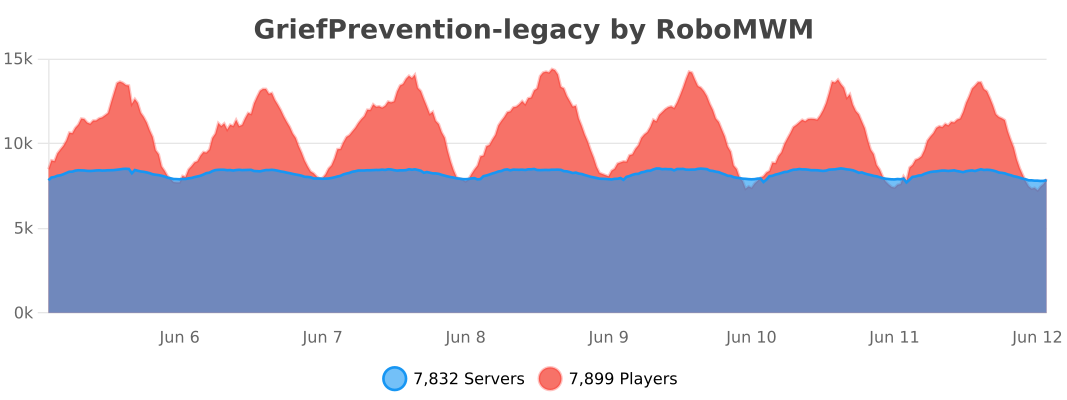
Documentation for developers working with the GriefPrevention3D API. Please feel free to help add to this page.
- Adding GriefPrevention3D as a Dependency
- Common Operations
- 3D Subdivisions API
- Command Addon API
- Events
GriefPrevention3D is hosted on JitPack, which exposes the repo as a public Maven artifact on demand.
<repositories>
    <repository>
        <id>jitpack.io</id>
        <url>https://jitpack.io</url>
    </repository>
</repositories>

<dependency>
    <groupId>com.github.castledking</groupId>
    <artifactId>GriefPrevention3D</artifactId>
    <version>17.3.6</version>
    <scope>provided</scope>
</dependency>
Replace
17.3.6with the release tag you want to build against, or with a short commit hash for snapshot-style builds. See the JitPack page for the full list of buildable versions.
repositories {
    maven { url 'https://jitpack.io' }
}

dependencies {
    compileOnly 'com.github.castledking:GriefPrevention3D:17.3.6'
}repositories {
maven("https://jitpack.io")
}
dependencies {
compileOnly("com.github.castledking:GriefPrevention3D:17.3.6")
}See the JitPack page for the project: https://jitpack.io/#castledking/GriefPrevention3D/
Always declare GriefPrevention as either a depend or softdepend in your addon's plugin.yml:
softdepend: [GriefPrevention]Use depend only if your plugin cannot load without it.
These operations all exist on upstream GriefPrevention too, and work the same way on GP3D. The notable GP3D-specific additions are the 3D subdivision API below.
import me.ryanhamshire.GriefPrevention.Claim;
import me.ryanhamshire.GriefPrevention.GriefPrevention;

Claim claim = GriefPrevention.instance.dataStore.getClaimAt(
        location,
        /* ignoreHeight = */ false,
/* cachedClaim = */ null);-
ignoreHeight = falsemakes Y matter (needed for 3D subdivisions). - Pass a previously-returned
ClaimascachedClaimto speed up repeated lookups in the same area. - Returns
nullif the location is in wilderness.
Permissions are expressed as ClaimPermission values:
import me.ryanhamshire.GriefPrevention.ClaimPermission;
import java.util.function.Supplier;

Supplier<String> denialReason = claim.checkPermission(player, ClaimPermission.Build, event);
if (denialReason != null) {
    player.sendMessage(denialReason.get());
    event.setCancelled(true);
}
ClaimPermission.Edit > Manage > Build > Container > Access — higher levels grant all lower levels.
For unified location-based permission checks (the same logic GriefPrevention uses internally), prefer:
import com.griefprevention.protection.ProtectionHelper;

Supplier<String> denial = ProtectionHelper.checkPermission(
player, location, ClaimPermission.Build, event);GriefPrevention.instance.dataStore.createClaim(
world,
x1, z1, x2, z2, // corners
minY, maxY, // Y bounds (use world min/max for 2D)
ownerUuid, // null for admin claims
/* parent = */ null,
/* id = */ null,
/* creatingPlayer = */ player);Use parent = someTopLevelClaim to create a subdivision. Pass id = null to let the data store assign one.
GriefPrevention.instance.dataStore.resizeClaim(
        claim,
        newX1, newZ1, newX2, newZ2,
        newMinY, newMaxY,
        resizingPlayer);
Claim-block math is applied automatically for the owner.
GriefPrevention.instance.dataStore.extendClaim(claim, newMinY);Useful for plugins that want to auto-extend a claim when players build below it.
GriefPrevention.instance.dataStore.changeClaimOwner(claim, newOwnerUuid);Pass null as the new owner to convert the claim to an administrative claim.
Long id = claim.getID();
Claim sameClaim = GriefPrevention.instance.dataStore.getClaim(id);
Claim IDs are stable across reloads.
import me.ryanhamshire.GriefPrevention.PlayerData;

PlayerData data = GriefPrevention.instance.dataStore.getPlayerData(player.getUniqueId());
int total = data.getAccruedClaimBlocks() + data.getBonusClaimBlocks();

// Save after changes:
GriefPrevention.instance.dataStore.savePlayerData(player.getUniqueId(), data);GP3D extends the Claim object with Y-aware accessors so addons can query vertical boundaries uniformly, whether the claim is a full-height 2D claim or a Y-bounded 3D subdivision.
int minY = GriefPrevention.getWorldMinY(world);  // e.g., -64 in 1.18+
int maxY = GriefPrevention.getWorldMaxY(world);  // e.g., 320 in 1.21
These exist so you don't have to care about the 1.17→1.18 world-height change.
int minY   = claim.getMinY();       // lowest Y the claim protects
int maxY   = claim.getMaxY();       // highest Y the claim protects
int height = claim.getYHeight();    // maxY - minY, in blocks
boolean is3D = claim.is3D();        // true if this claim has custom Y bounds
boolean inside = claim.containsY(y);
Behavior by claim type:
| Claim type | Y range |
|---|---|
| Top-level (basic) claim | Full world min → max Y |
| Admin claim | Full world min → max Y |
| 2D subdivision | Inherits parent's (world) Y range |
| 3D subdivision | Own defined Y bounds |
For a richer description of the claim's Y shape, use ClaimYInfo:
Claim.ClaimYInfo yInfo = claim.getYInfo();

yInfo.getMinY();       // int
yInfo.getMaxY();       // int
yInfo.getHeight();     // int
yInfo.is3D();          // boolean
yInfo.isSubdivision(); // boolean, true if this has a parent
yInfo.isAdminClaim();  // boolean
yInfo.getClaimType();  // human-readable, e.g. "3D Subdivision"
getClaimType() returns one of:
"Main Claim""Admin Claim""2D Subdivision""3D Subdivision""Admin 2D Subdivision""Admin 3D Subdivision"
toString() is implemented for quick debugging:
ClaimYInfo{type=3D Subdivision, minY=60, maxY=80, height=21}
if (claim.containsY(block.getY())) {
    // y is inside this claim's vertical range
}
For non-3D claims this always returns true. For 3D claims it enforces the actual Y bounds.
GP3D exposes a narrow addon seam that lets other plugins extend /claim and /aclaim tab completions and add their own subcommands — without having to fight the core for command ownership.
The relevant classes live in com.griefprevention.api:
-
ClaimCommandAddon— the interface your addon implements. -
ClaimCommandAddonRegistry— static entry point for registering addons. -
ClaimCommandContext— the command-execution context passed to your handler.
package com.griefprevention.api;

public interface ClaimCommandAddon {

    /**
     * Additional tab completions for a known subcommand.
     * Merged additively with GP3D's native completions.
     */
    List<String> getTabCompletions(
            CommandSender sender,
            String rootCommand,  // "claim" or "aclaim"
            String subcommand,   // canonical name, e.g. "trust"
            String[] args);      // args AFTER the subcommand

    /**
     * Additional subcommand names shown when the user types just `/claim `.
     * Use this to surface addon-provided subcommands in tab completion.
     */
    default List<String> getSubcommandCompletions(
            CommandSender sender, String rootCommand) {
        return List.of();
    }

    /**
     * Handle an addon-defined subcommand.
     * Only called if GP3D does NOT already own the subcommand — core always wins.
     *
     * @return true if your addon handled the command; false to fall through.
     */
    default boolean handleSubcommand(ClaimCommandContext context) {
        return false;
    }
}Passed to handleSubcommand. Provides:
context.getSender();                  // CommandSender (usually Player)
context.getRootCommand();             // "claim" or "aclaim"
context.getSubcommand();              // the subcommand the user typed
context.getArgs();                    // args AFTER the subcommand (defensive copy)
context.getSelectedOrCurrentClaim();  // @Nullable Claim — selected claim or the
                                      //                  claim the player is standing in
getSelectedOrCurrentClaim() is the key piece — GP3D has already done the "selected claim, fallback to current claim" resolution for you, so your addon can just operate on that claim if it's non-null.
import com.griefprevention.api.ClaimCommandAddonRegistry;

public final class MyAddon extends JavaPlugin {

    private final MyClaimAddon hook = new MyClaimAddon();

    @Override
    public void onEnable() {
        ClaimCommandAddonRegistry.register(hook);
    }

    @Override
    public void onDisable() {
        ClaimCommandAddonRegistry.unregister(hook);
    }
}
register() is idempotent — registering the same instance twice is a no-op. Always unregister() on disable to keep reloads clean.
A minimal /claim sell <price> addon:
import com.griefprevention.api.ClaimCommandAddon;
import com.griefprevention.api.ClaimCommandAddonRegistry;
import com.griefprevention.api.ClaimCommandContext;
import me.ryanhamshire.GriefPrevention.Claim;
import org.bukkit.ChatColor;
import org.bukkit.command.CommandSender;
import org.bukkit.entity.Player;

import java.util.List;
import java.util.Objects;

public final class SellClaimAddon implements ClaimCommandAddon {

    @Override
    public List<String> getSubcommandCompletions(CommandSender sender, String rootCommand) {
        // Show "sell" in `/claim <TAB>`
        return rootCommand.equals("claim") ? List.of("sell") : List.of();
    }

    @Override
    public List<String> getTabCompletions(
            CommandSender sender, String rootCommand, String subcommand, String[] args) {
        if (!"sell".equalsIgnoreCase(subcommand)) return List.of();
        if (args.length == 0) {
            return List.of("100", "500", "1000");
        }
        return List.of();
    }

    @Override
    public boolean handleSubcommand(ClaimCommandContext context) {
        if (!"sell".equalsIgnoreCase(context.getSubcommand())) {
            return false; // not ours
        }

        if (!(context.getSender() instanceof Player player)) {
            context.getSender().sendMessage("Run this as a player.");
            return true;
        }

        Claim claim = context.getSelectedOrCurrentClaim();
        if (claim == null) {
            player.sendMessage(ChatColor.RED + "No selected or current claim.");
            return true;
        }

        if (!Objects.equals(claim.getOwnerID(), player.getUniqueId())) {
            player.sendMessage(ChatColor.RED + "Only the owner can list this claim for sale.");
            return true;
        }

        String[] args = context.getArgs();
        if (args.length < 1) {
            player.sendMessage(ChatColor.RED + "Usage: /claim sell <price>");
            return true;
        }

        long price;
        try {
            price = Long.parseLong(args[0]);
        } catch (NumberFormatException ex) {
            player.sendMessage(ChatColor.RED + "Price must be a number.");
            return true;
        }

        // ... store the listing, charge a fee, etc.
        player.sendMessage(ChatColor.GREEN + "Claim listed for sale at " + price);
        return true;
    }
}
Register it in your plugin's onEnable:
ClaimCommandAddonRegistry.register(new SellClaimAddon());That's it — /claim sell 100 now runs your handler with the claim already resolved.
-
GP3D always owns its built-in subcommands.
trust,abandon,expand, etc. cannot be overridden by an addon. - Addons cannot register aliases that collide with built-ins. Pick unique subcommand names.
-
One addon at a time handles a given subcommand.
handleAddonSubcommandreturns on the first addon that reportstrue, so order of registration matters if two addons claim the same subcommand.
GriefPrevention fires a number of custom Bukkit events you can listen to. They live under me.ryanhamshire.GriefPrevention.events:
| Event | When it fires | Cancellable |
|---|---|---|
ClaimCreatedEvent |
A new claim is about to be created | Yes |
ClaimDeletedEvent |
A claim is deleted | No |
ClaimResizeEvent |
A claim is being resized | Yes (via ClaimChangeEvent) |
ClaimExtendEvent |
A claim is auto-extended downward | Yes (via ClaimChangeEvent) |
ClaimModifiedEvent |
A generic "claim shape changed" event | Yes (via ClaimChangeEvent) |
ClaimTransferEvent |
Claim ownership changes | Yes |
ClaimExpirationEvent |
A claim is about to expire | Yes |
ClaimPermissionCheckEvent |
Permission check runs against a claim — override to alter the result | Yes |
ClaimInspectionEvent |
Player right-clicks with the investigation tool | Yes |
TrustChangedEvent |
Trust list changes for one or more claims | Yes |
AccrueClaimBlocksEvent |
A player is about to accrue claim blocks | Yes |
PreventBlockBreakEvent |
A block break is being prevented | Yes |
PreventPvPEvent |
PvP is being prevented | Yes |
ProtectDeathDropsEvent |
Death drops are about to be protected | Yes |
SaveTrappedPlayerEvent |
/trapped is about to teleport a player |
Yes |
PlayerKickBanEvent |
GP is about to kick/ban a player | Yes |
BoundaryVisualizationEvent |
Claim borders are about to be visualized | Yes |
VisualizationEvent |
(legacy) Visualization is about to run | Yes |
Listen to them like any Bukkit event:
@EventHandler
public void onCreate(ClaimCreatedEvent event) {
    Claim created = event.getClaim();
    // ...
}
See the Javadoc on each class for the exact getters and setters.
You probably don't need to read this entire document just to get started with GriefPrevention3D. The plugin does almost all the work for you — try it out and come back here when something isn't obvious.
- Administrative Claims
- Converting Claims Between Admin and Basic
- Changing Player Claims
- Creating Claims for Players
- Adjusting a Player's Claim Limit
- Investigating a Player's Claims
- Investigating a Specific Claim
- Boundary Violation Alerts
- Fighting Wilderness Grief (World Repair)
- Fighting Chat Trolls
- Killing Drama
- Reviewing Chat Logs Efficiently
Required permission: griefprevention.adminclaims
Administrative claims are reserved areas owned by "the administration" rather than a specific player. They don't cost any player claim blocks, and any player with admin claims permission can modify all administrative claims.
- Want to grant all players permissions in admin claims?
/accesstrust public,/containertrust public, or/trust publicworks. - Want to prevent players from claiming an area without stopping them from building there? Drop an admin claim and
/trust publicinside it.
Use /adminclaims to switch to admin-claim mode and /basicclaims to switch back.
GP3D addition. Required permission: griefprevention.adminclaims
3D admin claims extend the admin claims system with exact vertical control. Instead of the standard ground-extension offset (which extends an admin claim from the clicked Y level down to the world floor), Admin3D mode uses the clicked Y coordinates directly as the vertical bounds of the claim.
-
/3dadminclaims(aliases:adminclaim3d,adminclaims3d,3dadminclaim) — switch shovel to 3D admin claim mode. -
/aclaim mode admin3d— same via the unified command handler. -
/basicclaims— switch back to normal mode.
Behavior:
- Clicked Y levels become the exact top and bottom of the claim — no automatic ground extension.
- Free to create (no claim blocks consumed) with
nullowner ID (standard admin claims). - Minimum size and claim block checks are bypassed (identical to regular
Adminmode). - Multiple 3D admin claims can stack at different Y levels inside the same X/Z footprint, useful for multi-floor admin structures.
- Claim boundary visualization uses the
ADMIN_CLAIM_3Dvisual style (glowstone/pumpkin by default) to distinguish 3D admin claims from other claim types.
Note: The existing /adminclaims (2D) mode continues to work as before. 3D admin claims are an additional tool, not a replacement.
GP3D addition. Required permission: griefprevention.adminclaims.convert
Two commands, no shovel dance:
-
/makeadmin— stand inside a basic (player-owned) claim and run the command. The claim becomes an administrative claim. -
/makebasic— stand inside an administrative claim and run the command. It becomes a basic claim owned by you.
These preserve trust data, subdivisions, and claim geometry. They are safer than the classic /transferclaim workflow when you just need to flip the ownership category without handing the claim to another player. For the "hand an admin claim to player X" flow, use /transferclaim <player> instead.
Claim-block math notes:
-
/makeadmindoes not refund blocks to the previous basic owner (they have lost the claim). -
/makebasicdoes not deduct blocks from you beyond what the claim would normally cost. For this reason/makebasicis admin-only.
Required permission: griefprevention.ignoreclaims
Any player with this permission can bypass claim protections using /IgnoreClaims, allowing them to build, break, and change permissions (trust, untrust, etc.) anywhere. Admin claims still require griefprevention.adminclaims. Run /IgnoreClaims again to go back to "respecting claims" mode and avoid accidents.
Individual actions taken while ignoring claims are not logged, so only grant this to staff you trust 100%.
Required permission: griefprevention.deleteclaims
-
/deleteclaim— deletes the claim you're standing in, even if it's not yours. Deleting public (admin) claims additionally requiresgriefprevention.adminclaims. -
/deleteallclaims <player>— deletes all of a specific player's claims, useful after permanent bans.
GP3D does not auto-remove claims for banned players because many servers have ban-appeal workflows. To do it automatically, alias your /ban command in commands.yml to also run /deleteallclaims <player>.
Anyone with griefprevention.deleteclaims may resize another player's claim with the golden shovel as if it were their own. The owner's claim block total is adjusted accordingly. There is no separate resize permission because resize can effectively un-claim any block (same risk surface as delete).
All deletions and resizes (except by the claim owner themselves) are logged.
Anyone with both griefprevention.adminclaims and griefprevention.transferclaim can create a claim for another player by first making an admin claim with /adminclaims, then running /transferclaim <player>. This is the only way to create a private claim smaller than the minimum claim size.
In GP3D you also have /makebasic (with griefprevention.adminclaims.convert) as an alternative — create the shape as an admin claim, then /makebasic to make it your basic claim, then /transferclaim to hand it to the player. Which flow you prefer is up to you.
Required permission: griefprevention.adjustclaimblocks
-
/adjustbonusclaimblocks <player> <amount>(alias/acb) — add or remove bonus claim blocks. Bonus blocks have no config cap, unlike accrued blocks. -
/acb [myservergroups.builders] 5000— grants 5,000 bonus blocks to everyone with themyservergroups.builderspermission. This is not a one-shot: players who later gain or lose the permission also gain or lose the bonus. -
/setaccruedclaimblocks <player> <amount>(alias/scb) — sets a player's accrued block total directly.
Required permission: griefprevention.claimslistother
/claimslist <player> lists all of a player's claims with sizes, locations, and the claim-block math.
Equip the investigation tool (stick by default) and right-click the claimed area. Shift+right-click shows nearby claims if you have griefprevention.visualizenearbyclaims. griefprevention.seeclaimsize adds size info and griefprevention.seeinactivity shows the owner's offline time on that tooltip.
GP3D addition. Piston and liquid events that get blocked at a claim boundary now notify the claim owner so they understand where the flow is being stopped — no config toggles, no per-claim water/lava permissions.
- A piston tries to push a block into a claim from outside.
- A piston inside a claim tries to push a block out of that claim into someone else's claim.
- Water or lava tries to flow into a claim from outside it (or fails to flow out into another owner's claim).
When the claim owner is online, they see something like:
Warning: A piston tried to enter your claim @ x:... y:... z:...!
Warning: A liquid tried to enter your claim @ x:... y:... z:...!
If several violations happen in the same burst window (~2 seconds), the plugin condenses them into a single summary line rather than spamming:
Warning: 12 liquid violations near your claim @ x:... y:... z:...!
To keep notifications useful and not noisy, the plugin remembers recent violations and suppresses repeats:
- Pistons: exact-location dedup. A specific piston pushing repeatedly against the same spot only alerts once per expiry window.
- Water: 8-block radius dedup (water flows up to 7 blocks).
- Lava (overworld / end): 5-block radius dedup (lava flows up to 4 blocks).
- Lava (nether): 8-block radius dedup (nether lava flows up to 7 blocks).
- Entries expire after ~5 minutes of no activity.
The design intentionally avoids per-claim water/lava permission toggles. Such toggles:
- Enable non-survival placements (holding water/lava in midair by claim boundary rules).
- Open weird trapping cases (fake water sources held up by claim rules so players fall to their death).
Alerts solve the real problem — player confusion about where flow is happening — without opening those traps. Pistons are treated the same way: no cross-claim toggle, just better feedback.
Required permission: griefprevention.restorenature
"Public grief" is damage done to the world rather than to a specific player: terrain damage, ugly builds, tree-topping (not possible with GP installed), wildfires (not possible with GP installed). /restorenature addresses the rest.
-
/restorenature(alias/rn) — right-click a block with the shovel to revert player changes in that area. Claims are respected. -
/restorenaturefill [radius](alias/rnf, requiresgriefprevention.restorenatureaggressive) — right-click at the level you want to fill to. Huge griefer craters fill in seconds. -
/restorenatureaggressive(alias/rna, requires the aggressive permission) — removes even some natural blocks. Use carefully. Only removes blocks at and above the clicked level.
Rule of thumb: try /rn first. Only use /rna when the griefer used natural-looking blocks.
GriefPrevention does not maintain per-block history — it doesn't "roll back" in the WorldEdit sense. Instead, it identifies player-placed blocks and removes them, then smooths unnatural terrain. This is safer than regeneration because:
- Regenerating a chunk after world-seed / worldgen changes can produce mismatched neighbors (snowy squares in deserts).
- WorldEdit's region regen works at chunk granularity and tries to "undo" outside the selection — subtle bugs can leak.
- Regeneration can put back things you wanted gone, like depleted dungeons and ore veins.
Always try the safe /restorenature first.
Required permission: griefprevention.softmute
Banning a troll often escalates: alt accounts, recruited friends, DDOS attempts. /softmute <player> lets the troll see their own messages (and so do other soft-muted players) while nobody else does. The troll thinks their messages are working and loses interest before escalating. Cheap, quiet, effective.
Required permission: griefprevention.separate
When two players cannot get along, /separate <a> <b> forces them to ignore each other in chat without either of them knowing. /unseparate reverses it. Neat, fast, stops ambient server drama from spreading.
Abridged social-interaction logs live under plugins/GriefPreventionData/Logs. They are formatted for human reading and auto-delete after 7 days. The config.yml log section lets you change the retention period and verbosity.
Note on the unified
/claimhandler. GriefPrevention3D ships a unified command surface configured inplugins/GriefPreventionData/alias.yml. With it enabled (the default), most commands on this page can also be invoked as/claim <subcommand>— for example/claim trust <player>,/claim abandon,/claim explosions. This page documents the standalone commands only, since they stay the canonical names. See Key Features › Unified Command Handler for how the unified form maps onto these standalone commands.
All permissions below start with griefprevention.. For example, "restorenature" is griefprevention.restorenature. See Permissions for the full list.
| Command | Description | Alias | Perm |
|---|---|---|---|
/AbandonClaim |
Deletes the claim you're standing in (or selected). | claims | |
/AbandonTopLevelClaim |
Deletes a claim and all its subdivisions. | claims | |
/AbandonAllClaims |
Deletes all of your claims. | abandonallclaims | |
/ClaimExplosions |
Toggles if explosions are allowed in the claim. | /claimexplosion |
claims |
/WitherExplosions |
Toggles if wither explosions may damage blocks in the claim. | /witherexplosion |
witherexplosions |
/Trust |
Gives another player permission to build in your claim. | /tr |
claims |
/UnTrust |
Revokes any permissions granted to a player in your claim. | /ut |
claims |
/AccessTrust |
Gives a player permission to use your buttons, levers, and beds. | /at |
claims |
/ContainerTrust |
Gives a player permission to use buttons, levers, beds, crafting gear, containers, and animals. | /ct |
claims |
/PermissionTrust |
Grants a player permission to share their permission level with others. |
/pt, /managetrust
|
claims |
/TrustList |
Lists the permissions for the claim you're standing in (or selected). Shows inherited permissions too. | claims | |
/SubdivideClaims |
Switches your shovel to subdivision mode. |
/sc, /subdivideclaim
|
claims |
/3DSubdivideClaims |
Switches your shovel to 3D subdivision mode (Y-bounded subclaims). | /3dsubdivideclaim |
claims |
/ShapedClaims |
Switches your shovel to shaped-claim mode (orthogonal polygon claims). Requires AllowShapedClaims: true. |
/shapedclaim |
claims |
/RestrictSubclaim |
Restricts a subclaim so it inherits no permissions from the parent. If run in a top-level claim, restricts all its subdivisions at once. | /rsc |
claims |
/BasicClaims |
Puts your shovel back in basic claims mode. | /bc |
claims |
/ExtendClaim |
Resizes the claim you're standing in (or selected) by pushing its boundary in the direction you're facing. |
/expandclaim, /resizeclaim
|
claims |
/BuyClaimBlocks |
Converts server currency to claim blocks. | /buyclaim |
buysellclaimblocks |
/SellClaimBlocks |
Converts claim blocks to server currency. | buysellclaimblocks | |
/GivePet |
Gives away a tamed animal. | givepet | |
/ClaimsList |
Lists your claims and claim-block totals. |
/claimlist, /listclaims
|
claims |
/IgnorePlayer |
Ignores a player's chat messages. | /ignore |
ignore |
/UnIgnorePlayer |
Un-ignores a player's chat messages. | /unignore |
ignore |
/IgnoredPlayerList |
Lists all players currently ignored. |
/ignores, /ignored, /ignorelist, /ignoredlist
|
ignore |
/Trapped |
Gets you out of a claim you're stuck inside. | trapped | |
/UnlockDrops |
Allows other players to pick up items you dropped when you died. | unlockdrops | |
/CheckClaimExpiry |
View claim expiration details for a player. | checkclaimexpiry |
| Command | Description | Alias | Perm |
|---|---|---|---|
/AdminClaims |
Switches the shovel tool to administrative claims mode. | /ac |
adminclaims |
/3DAdminClaims |
Switches the shovel to 3D admin claim mode (height-bounded, exact Y coordinates). |
adminclaim3d, adminclaims3d, 3dadminclaim
|
adminclaims |
/BasicClaims |
Returns the shovel to basic claims mode. | /bc |
claims |
/AdminClaimsList |
Lists all administrative claims. | adminclaims | |
/DeleteAllAdminClaims |
Deletes all administrative claims. (Console only.) | adminclaims | |
/TransferClaim |
Converts an administrative claim to a private claim. | /giveclaim |
transferclaim |
/MakeAdmin |
Converts the basic claim you're standing in to an administrative claim. | adminclaims.convert | |
/MakeBasic |
Converts the administrative claim you're standing in to a basic claim you own. | adminclaims.convert | |
/IgnoreClaims |
Toggles ignore-claims mode for admin overrides. | /ic |
ignoreclaims |
/DeleteClaim |
Deletes the claim you're standing in, even if it's not yours. | deleteclaims | |
/DeleteAllClaims |
Deletes all of another player's claims. | deleteclaims | |
/DeleteClaimsInWorld |
Deletes all claims in a world. (Console only.) |
/deleteallclaimsinworld, /clearclaimsinworld
|
deleteclaimsinworld |
/DeleteUserClaimsInWorld |
Deletes all non-admin claims in a world. (Console only.) |
/deletealluserclaimsinworld, /clearuserclaimsinworld
|
deleteclaimsinworld |
/AdjustBonusClaimBlocks |
Adds or subtracts bonus claim blocks for a player (or group with [bracketed] syntax). |
/acb |
adjustclaimblocks |
/AdjustBonusClaimBlocksAll |
Adds or subtracts bonus claim blocks for all online players. | /acball |
adjustclaimblocks |
/SetAccruedClaimBlocks |
Updates a player's accrued claim-block total. | /scb |
adjustclaimblocks |
/RestoreNature |
Switches the shovel tool to restoration mode. | /rn |
restorenature |
/RestoreNatureAggressive |
Switches the shovel to aggressive restoration mode. | /rna |
restorenatureaggressive |
/RestoreNatureFill |
Switches the shovel to fill mode. | /rnf |
restorenatureaggressive |
/SoftMute |
Toggles whether a player's messages reach only other soft-muted players. | softmute | |
/Separate |
Forces two players to ignore each other in chat. | separate | |
/UnSeparate |
Reverses /separate. |
separate | |
/GPReload |
Reloads GriefPrevention's configuration settings. | reload | |
/ClaimsList <player> |
Lists information about another player's claim blocks and claims. | claimslistother | |
/ClaimBook |
Gives a player the "How to Claim Land" manual. | claimbook | |
/UnlockDrops <player> |
Unlocks drops for another player. | unlockothersdrops |
-
/3dadminclaims(and its alias/aclaim mode admin3d) is a GP3D addition. It uses the existinggriefprevention.adminclaimspermission. See Administrator's Guide › 3D Administrative Claims. -
/makeadminand/makebasicare GP3D additions. They requiregriefprevention.adminclaims.convert(defaultop). Use them to move an existing claim between the "basic player-owned" and "administrative" pools without losing trust data. See Administrator's Guide › Converting Claims. -
/witherexplosionsis a GP3D addition. It is gated bygriefprevention.witherexplosions(defaulttrue). -
/3dsubdivideclaims,/shapedclaims, and the shaped-mode variants are GP3D additions. Shaped-mode commands hide themselves whenAllowShapedClaims: false. -
/extendclaimhas aliases/expandclaimand/resizeclaim. When a shaped claim has a shift-click segment marker,/expandclaimoperates on that segmented subsection instead of the whole side. -
Selected-claim commands: if you just resized a claim, most of the "claim-local" commands above (
/trust,/trustlist,/abandonclaim,/claimexplosions,/witherexplosions) run against the selected claim even after you walk out of it. See Key Features › Claim Selection.
GriefPrevention3D configuration lives in plugins/GriefPreventionData/:
-
config.yml— primary plugin configuration. -
messages.yml— all user-facing strings. Edit to localize or reword. -
alias.yml— unified/claim//aclaimcommand surface and standalone aliases.
Reload after edits with /gpreload.
These are the options you most likely need to know about as a GP3D admin. They live in config.yml under the GriefPrevention: root.
GriefPrevention:
  Claims:
    AllowShapedClaims: false
Master switch for orthogonal polygon parent claims.
-
false(default):/shapedclaims,/shapedclaim, and/claim mode shapedare hidden/disabled. The plugin behaves like rectangle-only GP. -
true: shaped-mode commands are available and players can create orthogonal polygon top-level claims.
See Key Features › Shaped Claims.
GriefPrevention:
  Claims:
AllowNestedSubClaims: false-
false(default): subdivisions may only exist inside top-level claims (upstream behavior). -
true: subdivisions may be created inside other subdivisions.
GriefPrevention:
  Claims:
    UseClaimSelectSessions: true
    UseClaimSelectedMessages: false
Controls what happens when a player right-clicks an existing claim corner with the claim tool.
-
UseClaimSelectSessions: true(default): the selected claim can be targeted by commands such as/claim abandonwhile waiting for the second resize click. -
UseClaimSelectSessions: false: the shovel can still resize normally, but commands use the claim the player is standing in instead of the selected corner claim. -
UseClaimSelectedMessages: false(default): players see the normalResizeStartmessage. -
UseClaimSelectedMessages: true: players see the fullerClaimSelected,ClaimSelectedTopLevel, orSubdivisionSelectedguidance.
GriefPrevention:
VisualizationGlow: false-
false(default): classic fake-block border visualization. -
true: claim borders glow (Minecraft 1.19.3+ required; ignored on older clients/servers).
GriefPrevention:
  Claims:
    MinimumDistance: 0
Enforces a minimum distance in blocks between top-level claims to prevent claim spam and overcrowding.
-
0(default): disabled — no minimum distance check. - When set to a positive integer (e.g.
10), players cannot create a claim within that many blocks of another player's claim boundary. - Claim creation is blocked with a denial message identifying the nearby claim owner and the configured distance.
- The conflicting claim's boundary is visualized as a
CONFLICT_ZONE(visible from afar, especially withVisualizationGlow: true).
Bypassing minimum distance with neighbor trust:
Specific players can be granted neighbor trust to bypass the distance check:
-
/claim trust <player> neighbor— grants neighbor trust on the claim you're standing in (or all your claims if standing outside). -
/neighbortrust <player>(alias:/distancetrust <player>) — standalone command for the same purpose. -
/claim untrust <player>— revokes manually-granted neighbor trust. -
/claim distance toggle— while standing in your own claim (or with manager permission), togglesallowAllNeighborsfor that claim. When enabled, ALL players can bypass minimum distance checks for that claim. Permission:griefprevention.toggleclaimdistance. -
/claim distance check— shows the configured minimum distance and lists all nearby claims within range, each visualized with a conflict zone boundary. Permission:griefprevention.checkclaimdistance.
Auto-granted neighbor trust:
When MinimumDistance is set, existing claims that are already too close to each other automatically have their owners added as neighbors to each other's claims. This trust is automatically removed when a claim is abandoned (and no other claims from that owner remain nearby). Auto-granted trust cannot be removed via /untrust.
Trustlist display:
/trustlist shows neighbor-trusted players with a &d> (light purple) prefix, and the legend at the bottom includes "Neighbor" when neighbors exist.
Relevant permissions:
| Permission | Default | Description |
|---|---|---|
griefprevention.neighbortrust |
child of griefprevention.claims
|
Allows use of /neighbortrust and /distancetrust. |
griefprevention.checkclaimdistance |
child of griefprevention.claims
|
Allows use of /claim distance check. |
griefprevention.toggleclaimdistance |
child of griefprevention.claims
|
Allows use of /claim distance toggle. |
All of the above are children of griefprevention.claims, so existing servers with griefprevention.claims: true (the default) continue to work without changes.
Located at plugins/GriefPreventionData/alias.yml. The important top-level knobs:
enabled: true       # master switch for the alias system
standalone: true # when false, only /claim and /aclaim are registered-
enabled: falsedisables the alias system entirely. All commands fall back to their internal English names. -
standalone: falsekeeps/claimand/aclaimbut removes the per-command standalone aliases (/trust,/abandonclaim, etc.). Useful when another plugin owns those command names.
Each subcommand block under commands.claim.subcommands (and commands.aclaim.subcommands) controls:
- Whether the subcommand is enabled.
- What names / aliases it responds to.
- Its permission node.
- Tab-completion argument types.
The file itself carries extensive inline documentation; read it directly for the full schema.
All upstream GriefPrevention config options still work. If you are migrating from upstream GP, start there — the values you already have will keep doing what they did before. See Migration for the things that changed.
This page walks through installing GriefPrevention3D and getting it running on a Spigot/Paper/Folia server.
-
Minecraft: 1.21+ (API level
1.21). - Server software: Spigot, Paper, or Folia. GP3D supports Folia's regional scheduling.
- Java: 21+ (same as Minecraft 1.21).
-
Optional: Vault for
/buyclaimblocksand/sellclaimblocks.
Older Minecraft versions are not officially supported. Some older-Minecraft compatibility fixes are carried (e.g., for COPPER_GOLEM_STATUES, CHAINS), but the plugin targets modern server jars.
- Drop the built
GriefPrevention.jarinto your server'splugins/directory. - Start the server once so GriefPrevention3D generates the default config under
plugins/GriefPreventionData/. - Stop the server, edit
config.ymlto taste, and restart. Or use/gpreloadto pick up config changes without a full restart.
-
Decide on claim modes per world.
config.ymlhasGriefPrevention.Claims.WorldModes— common values areSurvival,Creative,SurvivalRequiringClaims, andDisabled. -
Decide on the shaped-claims toggle. Shaped polygon claims are off by default. Set
GriefPrevention.Claims.AllowShapedClaims: trueinconfig.ymlif you want them. See Key Features › Shaped Claims. -
Decide on nested subclaims.
GriefPrevention.Claims.AllowNestedSubClaims: trueto allow subdivisions inside other subdivisions. -
Decide on visualization style.
GriefPrevention.VisualizationGlow: trueturns on glowing claim borders (requires 1.19.3+). -
Review the alias file.
plugins/GriefPreventionData/alias.ymlcontrols the unified/claimand/aclaimroot commands plus standalone aliases. See Key Features › Unified Command Handler.
Teach players the basics in this order:
-
Chest claim: Place a chest. The plugin auto-creates a small protected claim around it for new players (if
AutomaticNewPlayerClaimsRadius> -1). - Golden shovel: Right-click two opposite corners of the area to claim. The plugin draws a visual border.
-
Trust someone:
/trust <player>while standing inside the claim. - Expand a claim: Right-click a corner with the golden shovel, then right-click the new corner.
Once a claim exists, owners can use /claim trust, /claim abandon, /claim explosions, etc. directly, and shift-click corners to enter shaped-mode edits if enabled.
-
/claimslistlists your claims. -
/trustlistwhile standing in a claim lists permissions there, including inherited permissions from parent claims. - Admins can
/ignoreclaimsto temporarily override protections while building infrastructure.
- Read Migration if you are upgrading from upstream GriefPrevention — the behavior differences matter.
- Read Key Features for the detailed feature list.
- Read the Administrator's Guide for day-to-day server operations.
GriefPrevention3D is a fork of the original GriefPrevention plugin, extended with features modern survival servers actually need: true 3D subdivisions, non-rectangular (shaped) parent claims, nested subclaims, glowing visualizations, and a unified /claim command surface.
This wiki is the reference for server owners moving from upstream GriefPrevention to GriefPrevention3D, or setting up a new server from scratch.
- New to the plugin? Start with Getting Started.
- Coming from upstream GP? Read Migration first — it is the fastest way to see what is new, what changed, and what needs attention in your config.
- Want the feature list? See Key Features.
- Looking for a specific command or permission? See Commands and Permissions.
- Running the server? The Administrator's Guide covers day-to-day operations.
-
3D Subdivisions with real Y-level boundaries (
/3dsubdivideclaims). -
Shaped Claims — orthogonal polygon parent claims (
/shapedclaims, gated byAllowShapedClaims). -
Nested Subclaims — subdivisions inside other subdivisions (gated by
AllowNestedSubClaims). -
Glowing Visualizations for easier-to-see claim borders (gated by
VisualizationGlow, requires Minecraft 1.19.3+). -
Unified Command Handler —
/claim create,/claim trust,/claim abandon, and more, all under one root command (configurable inalias.yml). -
3D Admin Claims — free, height-limited admin claims with exact Y bounds (
/3dadminclaims). -
Admin ↔ Basic conversion via
/makeadminand/makebasic. - Boundary Violation Alerts — claim owners are notified when pistons or liquids get blocked at their claim boundary, so they know where to resize or why a flow stopped.
- Repository: the
GriefPrevention3DGitHub repo. - File issues and feature requests on the GitHub issue tracker.
This page is the reference for every feature that makes GriefPrevention3D different from upstream GriefPrevention. It is also the page to read first when configuring the plugin for your server.
- 3D Subdivisions
- Shaped Claims
- Nested Subclaims
- Visualization Glow
- Unified Command Handler
- Wither Explosion Toggle
- Minimum Distance Between Claims
- Neighbor Trust
- Claim Selection
- Subtle Changes
Create subdivisions with exact Y-level boundaries.
/3dsubdivideclaims
Use this command to switch to 3D subdivision mode. Your golden shovel will then set both the X/Z corners and the Y bounds of the subdivision, giving you precise vertical control (useful for apartment buildings, layered storage rooms, sky bases, and tunnel networks under shared surface claims).
- Available on all servers by default.
- Nested 3D subdivisions work when
AllowNestedSubClaims: true. - Parent claims remain full-height; the Y-bounding only applies to the subdivision itself.
Allow non-rectangular, orthogonal polygon parent claims.
# config.yml
GriefPrevention:
  Claims:
    AllowShapedClaims: false
Set to true to enable. Reload with /gpreload.
/shapedclaims
Use this command to switch to shaped claim mode. In shaped mode:
- Right-click in unclaimed land places orthogonal corners for a new polygon claim. Each corner must be axis-aligned (same X or same Z) as the previous corner. Click the starting corner again once a valid closed loop exists.
- Right-click an owned top-level 2D claim's corner to resize it the same way basic mode does.
-
Shift-click an owned boundary to drop a segment marker. Markers split a side into independently resizable segments, which you can then
/expandclaimindividually. - Shift-clicking a marker again removes it.
The plugin enforces the orthogonal rule in the interaction model — diagonal placements are rejected immediately with a chat message, and preview markers show the only valid next directions.
When shaped claims are disabled (AllowShapedClaims: false):
-
/shapedclaimsand/shapedclaimare hidden / hard-disabled. -
/claim mode shapedis not offered. - Shaped-only helper behavior stays dormant and falls back to basic mode.
See also: Administrator's Guide for how shaped claims interact with admin tools.
Allow subdivisions inside other subdivisions.
# config.yml
GriefPrevention:
  Claims:
    AllowNestedSubClaims: false
Set to true to allow subdivisions inside other subdivisions. Permission inheritance still follows the normal parent → child rules unless a subclaim is restricted with /restrictsubclaim.
Enable glowing claim boundary visualization.
# config.yml
GriefPrevention:
  VisualizationGlow: false
Set to true to make claim borders glow when visualized (via the golden shovel, investigation tool, or /trust feedback).
Requires Minecraft 1.19.3+. On older versions the option is simply ignored and fake-block borders are used.
GriefPrevention3D ships a unified command surface through alias.yml:
# plugins/GriefPreventionData/alias.yml
enabled: true
standalone: true
With enabled: true, the following unified form is available:
/claim create
/claim trust <player>
/claim abandon
/claim explosions
/claim expand <amount>
Most claim-local commands that used to require "stand inside the claim, then type the standalone command" can now be reached through /claim <subcommand> after a claim is selected.
- With
standalone: true(default), all the classic standalone commands —/trust,/abandonclaim,/trapped, etc. — are still registered and behave exactly as upstream. - With
standalone: false, only/claimand/aclaimare registered; the per-subcommand standalone entries are ignored. Use this mode if another plugin owns commands like/trustand you want to avoid conflicts.
Toggle whether wither explosions may damage blocks inside a specific claim.
/witherexplosions
Works the same way as /claimexplosions — stand in (or have selected) the claim, run the command. Gated by griefprevention.witherexplosions (default: true).
Enforce a minimum distance between top-level claims to prevent claim spam and overcrowding.
# config.yml
GriefPrevention:
  Claims:
MinimumDistance: 0-
0(default): disabled — no minimum distance check. - When set to a positive integer (e.g.
10), players cannot create a claim within that many blocks of another player's claim boundary. - Claim creation is blocked with a denial message identifying the nearby claim owner and the configured distance.
- The conflicting claim's boundary is visualized as a
CONFLICT_ZONE(visible from afar, especially withVisualizationGlow: true).
/claim distance check
Shows the configured minimum distance and lists all nearby claims within range, each visualized with a conflict zone boundary. Permission: griefprevention.checkclaimdistance.
A new trust level that allows specific players to bypass minimum distance checks for a claim.
/claim trust <player> neighbor
Grants a player neighbor trust on the claim you're standing in. If you're standing outside any claim, it grants neighbor trust for all your claims.
/neighbortrust <player>
Standalone alias (also available as /distancetrust <player>).
/claim untrust <player>
Revokes manually-granted neighbor trust. Auto-granted neighbor trust (from existing nearby claims) cannot be removed via /untrust — it is automatically cleaned up when the nearby claim is abandoned.
/claim distance toggle
While standing in your own claim (or with manager permission), toggles allowAllNeighbors for that claim. When enabled, ALL players can bypass minimum distance checks for that claim. Running the command again toggles it off. Permission: griefprevention.toggleclaimdistance.
When MinimumDistance is set, existing claims that are already too close to each other automatically have their owners added as neighbors to each other's claims. This trust is automatically removed when a claim is abandoned (and no other claims from that owner remain nearby).
/trustlist shows neighbor-trusted players with a &d> (light purple) prefix, and the legend at the bottom includes "Neighbor" when neighbors exist.
| Permission | Default | Description |
|---|---|---|
griefprevention.neighbortrust |
child of griefprevention.claims
|
Allows use of /neighbortrust and /distancetrust. |
griefprevention.checkclaimdistance |
child of griefprevention.claims
|
Allows use of /claim distance check. |
griefprevention.toggleclaimdistance |
child of griefprevention.claims
|
Allows use of /claim distance toggle. |
All of the above are children of griefprevention.claims, so existing servers with griefprevention.claims: true (the default) continue to work without changes.
See also: Permissions for the full list of granular claim command permissions.
Create free, height-bounded administrative claims with exact Y-level boundaries.
/3dadminclaims
Use this command (or /aclaim mode admin3d) to switch to 3D admin claim mode. Unlike regular Admin mode which extends claims from the clicked Y down to the world floor, Admin3D mode uses the clicked Y coordinates directly as the top and bottom bounds.
- Requires the
griefprevention.adminclaimspermission (same as regular admin claims). - Claims are free (no claim blocks consumed) with
nullowner ID. - Minimum size and claim block checks are bypassed.
- Multiple admin 3D claims can be stacked at different Y levels within the same X/Z area.
- Visualization uses a distinct
ADMIN_CLAIM_3Dstyle (glowstone/pumpkin by default).
Claim selection is the most ergonomic change in GP3D.
- Resizing a claim selects it. After you right-click a claim corner with the golden shovel, the claim becomes your "selected claim" for the session.
- While a claim is selected, claim-local commands run against that claim even if you walk away:
-
/trust,/untrust,/containertrust,/accesstrust,/permissiontrust,/neighbortrust /trustlist-
/abandonclaim,/deleteclaim /transferclaim/checkclaimexpiry/restrictsubclaim-
/claimexplosions,/claimwitherexplosions /extendclaim
-
- This solves the common UX complaint that 1x1x1 3D subdivisions were hard to access — now selecting/resizing a claim is a real gateway into claim management.
The flow is deliberately claim-local and obvious. The most common owner actions are reachable without memorizing a long command list or constantly walking back and forth.
Small behavior improvements worth knowing:
-
Resize selects the claim. See above — commands like
/trustand/abandonclaimrun against the selected claim. -
/restrictsubclaimon a parent claim instantly restricts all subdivisions inside that claim in one command, rather than one subclaim at a time. -
/trustlistshows inherited permissions from the parent claim, not just explicit trusts. -
Eavesdrop permission split —
griefprevention.eavesdrop.pmandgriefprevention.eavesdrop.softmuteare now separate nodes on top of the blanketgriefprevention.eavesdrop. -
/expandclaimon shaped segments operates on the segmented subsection rather than the whole side, when a shift-click segment marker exists. - Selected-claim commands: resize-oriented command variants respect the current selection context instead of only the player's block position.
-
Temporary basic-mode segment previews: shift-clicking a claim boundary in basic claims mode creates a temporary segment preview for convenience. These previews do not persist across visualization refreshes and disappear if the player does nothing with them. Only deliberate
/shapedclaimshift-click segmentation persists to the claim. -
Older-version compatibility fixes shipped for
COPPER_GOLEM_STATUES,CHAINS, and chain-material lookups.
GriefPrevention3D supports localized messages via YAML locale files. The plugin loads messages based on the GriefPrevention.Locale config setting.
-
Set your locale in
config.yml:GriefPrevention: Locale: es
-
Copy the desired locale file from
Lang/to the data folder root:GriefPreventionData/ Lang/ messages_en.yml <- bundled reference copies (refreshed on restart) messages_es.yml messages_pt_BR.yml messages_es.yml <- your active locale file (copied here by you) config.yml -
Restart the server or run
/greload.
| Path | Purpose |
|---|---|
GriefPreventionData/messages_{locale}.yml |
Active locale files read by the plugin |
GriefPreventionData/Lang/ |
Reference copies extracted from JAR on every restart |
GriefPreventionData/messages.yml |
Legacy file (backward compatibility) |
-
messages_{locale}.yml— matches yourconfig_localesetting (e.g.,messages_es.ymlforLocale: es) -
messages.yml— legacy fallback for servers migrated from older versions -
Auto-detect — if neither exists, scans for any
messages_*.ymland auto-switches - Extract from JAR — if nothing found, extracts the matching locale from the JAR
If your config says Locale: en but only messages_es.yml exists in the data folder, the plugin auto-switches to Spanish and logs:
Locale 'en' didn't match provided messages_es.yml. Auto-switched to 'es'
The in-memory locale is updated so the startup header and all messages use the detected language.
On every startup, the plugin compares your deployed locale file against the bundled JAR version. Any missing keys are automatically added and saved to your file. This means:
- New messages added in plugin updates appear automatically after restart
- You don't need to manually edit your locale file when upgrading
- Your customizations are preserved (existing keys are never overwritten)
| Locale | Language |
|---|---|
en |
English |
es |
Spanish |
pt_BR |
Brazilian Portuguese |
- Create
messages_{locale}.ymlin the JAR's resource path (undersrc/main/resources/) - Add the locale to
BUNDLED_LOCALE_FILESinDataStore.java - Add locale entries to
startups.txt(e.g.,fr1[...,fr2[...,fr3[...) - The plugin will extract it to
Lang/on next restart
Each message is stored under a Messages. key matching the enum name in Messages.java:
Messages:
  ClaimCreated: "Claims created successfully."
  NoPermission: "You don't have permission to do that."
You can customize any message by editing the corresponding key in your locale file. The plugin uses $ or & as color code prefixes, and supports &#RRGGBB hex colors.
The startup header respects your locale setting. If you have locale entries in startups.txt matching your config (e.g., es1[..., es2[..., es3[...), the plugin displays a localized header on startup.
For locales with a region suffix (e.g., pt_BR), the header falls back to the base language (e.g., pt) if no exact match is found.
This page summarizes what is new, different, or worth double-checking when moving from the original GriefPrevention (RoboMWM) to GriefPrevention3D. It is intentionally short — the goal is to help server owners recognize what has changed without reading the whole wiki.
- Claims are backwards compatible. Existing rectangle claims load without modification.
- Most commands and permissions are identical to upstream. GP3D adds a few new ones.
- Several features are off by default and must be opted into in
config.yml. - There is now a unified
/claim <subcommand>surface on top of the existing standalone commands.
| Area | What | Default |
|---|---|---|
| 3D Subdivisions |
/3dsubdivideclaims — subclaims with real Y-level bounds |
Available always |
| 3D Admin Claims |
/3dadminclaims — free, height-bounded admin claims with exact Y bounds. Also /aclaim mode admin3d. |
Permission-gated (griefprevention.adminclaims) |
| Shaped Claims |
/shapedclaims, /shapedclaim — orthogonal polygon parent claims |
Off (AllowShapedClaims: false) |
| Nested Subclaims | Subdivisions inside subdivisions |
Off (AllowNestedSubClaims: false) |
| Visualization Glow | Glowing claim borders (1.19.3+) |
Off (VisualizationGlow: false) |
Unified /claim
|
/claim create, /claim trust, /claim abandon, etc. |
On in alias.yml
|
/makeadmin / /makebasic
|
Convert claims to/from admin | Permission-gated (griefprevention.adminclaims.convert) |
/witherexplosions |
Per-claim wither explosion toggle | Permission-gated (griefprevention.witherexplosions, default true) |
| Boundary Violation Alerts | Warn claim owners when pistons/liquids are blocked at their border | On (smart deduplication + burst detection) |
When a player resizes a claim, that claim becomes the "selected claim" for their session. Commands like /trust, /untrust, /trustlist, /abandonclaim, /claimexplosions, and /witherexplosions then run against the selected claim even if the player is no longer standing inside it. This removes the old "stand in the claim, then type the command" dance for common admin flows.
Running /restrictsubclaim while standing in a top-level claim (not inside a subdivision) now instantly restricts all subdivisions inside that claim in one go. Previously this had to be done per-subclaim.
/trustlist now displays inherited permissions from the parent claim, not just explicit trusts on the current (sub)claim. This makes it obvious why a player has access somewhere.
The single griefprevention.eavesdrop permission has been split for finer control:
-
griefprevention.eavesdrop.pm— see/tell-style private messages. -
griefprevention.eavesdrop.softmute— see soft-muted messages. -
griefprevention.eavesdrop.signs— see sign placements as chat messages (already existed upstream). -
griefprevention.eavesdrop.immune— exempt from being eavesdropped. -
griefprevention.eavesdropstill exists as a blanket/legacy permission.
If you previously granted griefprevention.eavesdrop to staff, they will keep the same behavior. If you want only PM eavesdropping or only softmute eavesdropping, use the narrower nodes.
Pistons and liquids that get blocked at a claim boundary now send a chat message to the claim owner (if they're online) explaining where the violation occurred. This covers:
- Piston pushing a block into a claim.
- Piston pushing a block out of the owner's own claim into someone else's.
- Water or lava trying to flow into or out of a claim.
Messages are deduplicated per-location, with spatial buffers (8 blocks for water, 5 blocks for lava in overworld/end, 8 for lava in the nether). Rapid sequential violations are burst-condensed into a single summary line. See Administrator's Guide › Boundary Violation Alerts.
Note: this is a feedback-only system. The goal is helping players understand where flow is being blocked, not adding new protection switches.
-
Backup your
plugins/GriefPreventionData/folder. - Replace the plugin jar with the GP3D build.
- Start the server and watch the console for migration-related log messages.
- Review
config.yml— the new toggles (AllowShapedClaims,AllowNestedSubClaims,VisualizationGlow) will be appended if missing. - Review
alias.ymlfor the unified command handler settings. - Restart once more, or run
/gpreloadif you only changed config values.
Existing claims, trust data, and claim block totals are preserved. Rectangle claims continue to work exactly as before; shaped polygon claims are only created when a player explicitly enters shaped mode (and only if AllowShapedClaims: true).
The data format is forward-compatible for rectangle claims, so going back to upstream GP will usually work, but:
- Any shaped (polygon) claims created with GP3D will not round-trip back to upstream GP. Upstream does not understand polygon footprints and will reject or truncate the data.
- Any 3D subclaims with Y-level bounds will not round-trip back to upstream GP either.
If you know you might roll back, keep AllowShapedClaims: false. Or, more simply, take a full backup of GriefPreventionData/ before enabling those features.
All permissions start with griefprevention. unless noted. Defaults match plugin.yml.
| Permission | Default | Description |
|---|---|---|
griefprevention.claims |
true |
Required for claim-related slash commands. Parent of all granular claim permissions below. |
griefprevention.createclaims |
true |
Allows players to create claims with the shovel. |
griefprevention.abandonallclaims |
true |
Allows /abandonallclaims. |
griefprevention.buysellclaimblocks |
true |
Allows /buyclaimblocks and /sellclaimblocks. |
griefprevention.trapped |
true |
Allows /trapped. |
griefprevention.givepet |
true |
Allows /givepet. |
griefprevention.unlockdrops |
true |
Allows /unlockdrops. |
griefprevention.ignore |
true |
Allows /ignore, /unignore, and /ignorelist. |
griefprevention.witherexplosions |
true |
Allows /witherexplosions (GP3D addition). |
All permissions below are children of griefprevention.claims in plugin.yml. This means granting griefprevention.claims: true (the default) automatically grants all of them. To restrict a specific command, explicitly set that child permission to false while keeping griefprevention.claims: true.
| Permission | Command(s) | Description |
|---|---|---|
griefprevention.trust |
/trust |
Grant build trust to a player. |
griefprevention.untrust |
/untrust |
Revoke trust from a player. |
griefprevention.accesstrust |
/accesstrust |
Grant access trust (bed, buttons, levers). |
griefprevention.containertrust |
/containertrust |
Grant container trust (chests, crops, animals). |
griefprevention.permissiontrust |
/permissiontrust |
Grant permission trust (manage trustlist). |
griefprevention.neighbortrust |
/neighbortrust, /distancetrust
|
Grant neighbor trust to bypass minimum distance. |
griefprevention.checkclaimdistance |
/claim distance check |
Check minimum distance to nearby claims. |
griefprevention.toggleclaimdistance |
/claim distance toggle |
Toggle whether all players bypass minimum distance for a claim. |
griefprevention.claimslist |
/claimslist |
List claim blocks and claims. |
griefprevention.abandonclaim |
/abandonclaim |
Abandon a claim. |
griefprevention.abandontoplevelclaim |
/abandontoplevelclaim |
Abandon a claim and all its subdivisions. |
griefprevention.extendclaim |
/extendclaim |
Resize a claim by pushing/pulling a boundary. |
griefprevention.subdivideclaims |
/subdivideclaims |
Switch to 2D subdivision mode. |
griefprevention.restrictsubclaim |
/restrictsubclaim |
Restrict a subclaim from inheriting parent permissions. |
griefprevention.basicclaims |
/basicclaims |
Switch to basic claims mode. |
griefprevention.claimexplosions |
/claimexplosions |
Toggle explosions in a claim. |
griefprevention.checkclaimexpiry |
/checkclaimexpiry |
View claim expiration details. |
griefprevention.shapedclaims |
/shapedclaims |
Switch to shaped (non-rectangular) claims mode. |
griefprevention.3dsubdivideclaims |
/3dsubdivideclaims |
Switch to 3D subdivision mode. |
griefprevention.buysellclaimblocks |
/buyclaimblocks, /sellclaimblocks
|
Buy/sell claim blocks for currency. |
griefprevention.witherexplosions |
/witherexplosions |
Toggle wither explosions in a claim. |
griefprevention.unlockdrops |
/unlockdrops |
Allow others to pick up your death drops. |
griefprevention.trapped |
/trapped |
Teleport out of a claim you can't build in. |
griefprevention.givepet |
/givepet |
Give away a tamed pet. |
griefprevention.createclaims |
(shovel) | Create new claims with the golden shovel. |
griefprevention.accruals |
(passive) | Accrue claim blocks at the configured hourly rate. |
griefprevention.ignore |
/ignore, /unignore, /ignorelist
|
Ignore/unignore players in chat. |
griefprevention.abandonallclaims |
/abandonallclaims |
Abandon all your claims at once. |
Example — disable only /3dsubdivideclaims for a group:
# LuckPerms example
/lp permission set griefprevention.3dsubdivideclaims false
Players in that group will still have access to all other claim commands via griefprevention.claims: true, but /3dsubdivideclaims will be denied.
| Permission | Default | Description |
|---|---|---|
griefprevention.adminclaims |
op |
Create, delete, and build in administrative claims. |
griefprevention.adminclaims.convert |
op |
GP3D addition. Use /makeadmin and /makebasic to convert claims between basic and admin ownership. |
griefprevention.claimslistother |
op |
Access /claimslist <player> for other players. |
griefprevention.ignoreclaims |
op |
Allows /ignoreclaims admin override mode. |
griefprevention.deleteclaims |
op |
Delete and resize other players' claims. |
griefprevention.deleteclaimsinworld |
op |
Allows /deleteclaimsinworld and /deleteuserclaimsinworld. |
griefprevention.transferclaim |
op |
Allows /transferclaim. |
griefprevention.adjustclaimblocks |
op |
Adjust bonus claim blocks, set accrued blocks. |
griefprevention.restorenature |
op |
Allows /restorenature. |
griefprevention.restorenatureaggressive |
op |
Allows /restorenatureaggressive and /restorenaturefill. |
griefprevention.softmute |
op |
Allows /softmute. |
griefprevention.separate |
op |
Allows /separate and /unseparate. |
griefprevention.claimbook |
op |
Allows /claimbook. |
griefprevention.unlockothersdrops |
op |
Allows /unlockdrops <player>. |
griefprevention.reload |
op |
Allows /gpreload. |
griefprevention.visualizenearbyclaims |
op |
Shift+right-click with the investigation tool to see all nearby claims. |
griefprevention.seeclaimsize |
op |
See another player's claim size with the investigation tool. |
griefprevention.seeinactivity |
op |
See how long a claim owner has been offline via the investigation tool. |
griefprevention.overrideclaimcountlimit |
op |
Bypass the total claim-count limit. |
griefprevention.spam |
op |
Bypass spam protection. |
griefprevention.lava |
op |
Place lava where they have build permission (still not near other players). |
griefprevention.notignorable |
op |
Cannot be ignored via /ignore. |
GP3D splits the single upstream griefprevention.eavesdrop permission into finer-grained nodes. All default op.
| Permission | Default | Description |
|---|---|---|
griefprevention.eavesdrop |
op |
Blanket / legacy permission — grants PM and softmute eavesdropping. |
griefprevention.eavesdrop.pm |
op |
GP3D addition. See private (/tell-style) messages only. |
griefprevention.eavesdrop.softmute |
op |
GP3D addition. See soft-muted messages only. |
griefprevention.eavesdrop.signs |
op |
See newly-placed signs as chat messages. |
griefprevention.eavesdrop.immune |
op |
Exempt from being eavesdropped (for staff who need privacy). |
griefprevention.eavesdropimmune |
op |
Legacy alias for the above — players with this can't have their PMs eavesdropped. |
| Permission | Default | Description |
|---|---|---|
griefprevention.checkclaimexpiry |
false |
Allows /checkclaimexpiry. |
griefprevention.premovementchat |
false |
Chat before moving (bypasses anti-bot delay). |
griefprevention.extendclaim.toolbypass |
false |
Use /extendclaim without holding the modification tool. |
griefprevention.deathblow |
— | Bundled in griefprevention.admin.*. |
griefprevention.admin.* is a convenience node that grants the full admin bundle:
griefprevention.ignoreclaimsgriefprevention.adminclaimsgriefprevention.adminclaims.convertgriefprevention.adjustclaimblocksgriefprevention.deleteclaimsgriefprevention.spamgriefprevention.lavagriefprevention.eavesdropgriefprevention.deathblowgriefprevention.softmutegriefprevention.reloadgriefprevention.visualizenearbyclaimsgriefprevention.overrideclaimcountlimitgriefprevention.transferclaimgriefprevention.claimslistothergriefprevention.separategriefprevention.eavesdrop.signsgriefprevention.eavesdrop.pmgriefprevention.eavesdrop.softmutegriefprevention.eavesdrop.immunegriefprevention.claimbookgriefprevention.notignorablegriefprevention.seeinactivitygriefprevention.deleteclaimsinworldgriefprevention.unlockothersdropsgriefprevention.seeclaimsizegriefprevention.restorenaturegriefprevention.restorenatureaggressive
Grant this to senior staff who need everything. Use the narrower nodes for junior staff with scoped responsibilities.
GriefPrevention3D provides its own PlaceholderAPI expansion with identifier gp3d. These placeholders can be used in any plugin that supports PlaceholderAPI (chat plugins, scoreboards, holograms, TAB, etc.).
In addition, GriefPrevention's official PlaceholderAPI expansion can be installed from the PlaceholderAPI eCloud to provide claim block and owner placeholders.
No setup is required. GriefPrevention3D automatically registers its PlaceholderAPI expansion on startup.
-
Expansion ID:
gp3d - Persists: Yes
Install the official GriefPrevention PlaceholderAPI expansion:
/papi ecloud download GriefPrevention
/papi reload
-
Expansion ID:
griefprevention
| Placeholder | Description | Example Output |
|---|---|---|
%gp3d_in_subdivision% |
Whether the player is inside a subdivision (child claim) |
true / false
|
%gp3d_in_3d_subdivision% |
Whether the player is inside a 3D subdivision |
true / false
|
%gp3d_is_trusted% |
Whether the player has any trust level in the current claim |
true / false
|
%gp3d_trust_level% |
The player's trust level in the current claim (localized) |
Owner, Manager, Builder, Container, Access, Untrusted, Unclaimed
|
The %gp3d_trust_level% placeholder returns a localized string based on the player's trust in the current claim.
| Trust Level | Description |
|---|---|
Owner |
Player owns the claim |
Manager |
Player has Manage trust (can manage claim settings and trust others) |
Builder |
Player has Build trust (can build and break blocks) |
Container |
Player has Container trust (can access containers) |
Access |
Player has Access trust (can use doors, buttons, and enter the claim) |
Neighbor |
Player has Neighbor trust (can create claims close to others) |
Untrusted |
Player is inside a claim but has no trust |
Unclaimed |
Player is not standing inside a claim |
These placeholders are provided by PlaceholderAPI's GriefPrevention expansion.
| Placeholder | Description | Example Output |
|---|---|---|
%griefprevention_claims% |
Number of claims the player owns | 5 |
%griefprevention_claims_formatted% |
Formatted claim count | 5 |
%griefprevention_bonusclaims% |
Player's bonus claim blocks | 1000 |
%griefprevention_bonusclaims_formatted% |
Formatted bonus claim blocks | 1,000 |
%griefprevention_accruedclaims% |
Player's accrued claim blocks | 2500 |
%griefprevention_accruedclaims_formatted% |
Formatted accrued claim blocks | 2,500 |
%griefprevention_remainingclaims% |
Remaining claim blocks available to the player | 3200 |
%griefprevention_remainingclaims_formatted% |
Formatted remaining claim blocks | 3,200 |
| Placeholder | Description | Example Output |
|---|---|---|
%griefprevention_currentclaim_ownername% |
Owner of the claim the player is currently standing in | Steve |
%griefprevention_currentclaim_ownername_color% |
Owner name with Minecraft colors applied | §aSteve |
Example (EssentialsChat, ChatControl, etc.):
Format: "{prefix} <player> %gp3d_trust_level%"
Result:
[Member] <Steve> Builder
Example (HolographicDisplays):
Line 1: "&bCurrent Claim Status"
Line 2: "&eTrust: &f%gp3d_trust_level%"
Line 3: "&eClaim Blocks: &f%griefprevention_remainingclaims_formatted%"
Line 4: "&eOwner: &f%griefprevention_currentclaim_ownername%"
Line 5: "&eIn Subdivision: &f%gp3d_in_subdivision%"
Line 6: "&eIn 3D Subdivision: &f%gp3d_in_3d_subdivision%"
Example:
Title: "&6Claim Info"
Line 1: "&eTrust: &f%gp3d_trust_level%"
Line 2: "&eClaim Blocks: &f%griefprevention_remainingclaims_formatted%"
Line 3: "&eOwner: &f%griefprevention_currentclaim_ownername%"
Line 4: "&eSub: &f%gp3d_in_subdivision%"
Line 5: "&e3D Sub: &f%gp3d_in_3d_subdivision%"
The trust level strings returned by %gp3d_trust_level% are fully localizable through messages.yml:
Messages:
  PlaceholderTrustLevelUnclaimed: "Unclaimed"
  PlaceholderTrustLevelOwner: "Owner"
  PlaceholderTrustLevelManager: "Manager"
  PlaceholderTrustLevelBuilder: "Builder"
  PlaceholderTrustLevelContainer: "Container"
  PlaceholderTrustLevelAccess: "Access"
  PlaceholderTrustLevelNeighbor: "Neighbor"
PlaceholderTrustLevelUntrusted: "Untrusted"- GriefPrevention3D automatically registers its PlaceholderAPI expansion.
-
%gp3d_trust_level%uses localized strings frommessages.yml. - Player-specific placeholders require the target player to be online.
- GriefPrevention3D uses
persist() = true, allowing placeholders to remain available across PlaceholderAPI reloads. - Both
gp3dandgriefpreventionplaceholders can be used together in any PlaceholderAPI-compatible plugin.
Getting Started
Features
- Key Features
- 3D Subdivisions
- Shaped Claims
- Nested Subclaims
- Visualization Glow
- Unified
/claimHandler - Claim Selection
- Boundary Violation Alerts
Reference
Admin