Repository navigation

Caution
This app writes directly to your Animal Crossing: New Horizons save, and a corrupted island may be impossible to recover.
Back up your save with JKSV or Checkpoint before every editing session, and copy that backup to a computer.
Tested on one console and one save only (game 3.0.3). Use it offline. No warranty of any kind.
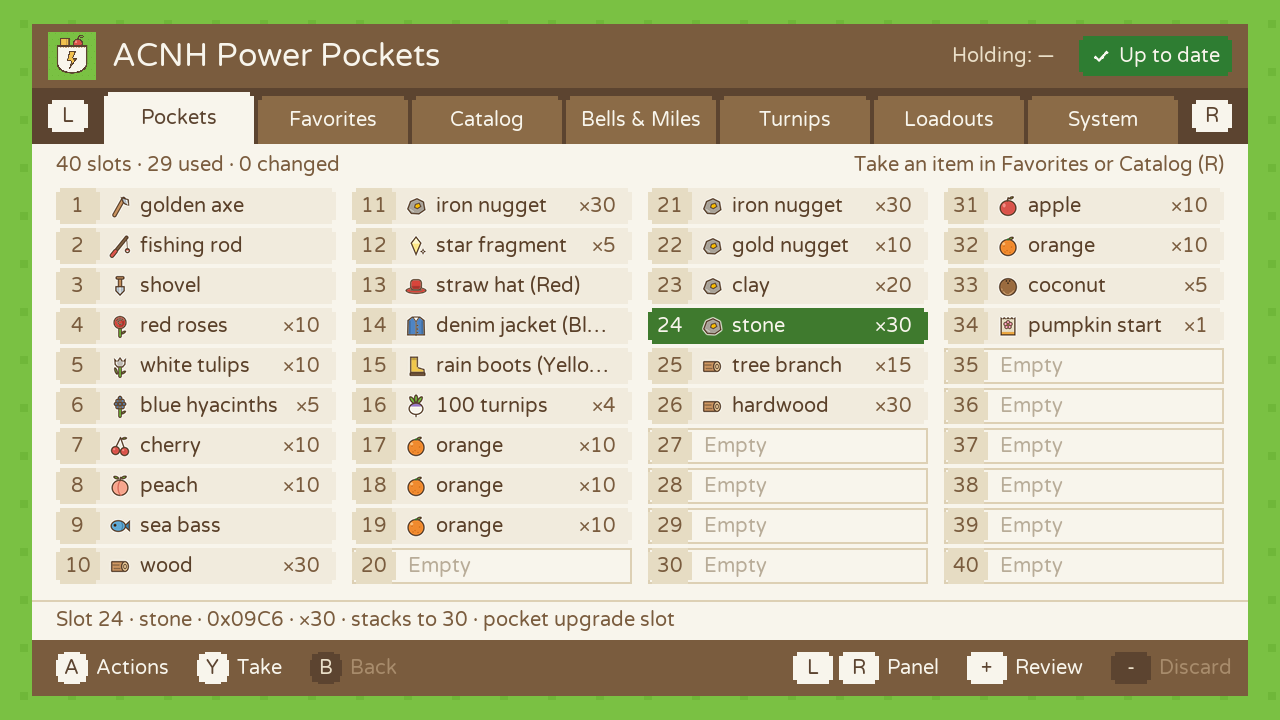
New: 30 and 40 pocket slots. If you bought the pocket upgrades at Nook's Cranny, the app now shows and edits all of your slots, not just the first 20.
What's new
- All your pocket slots. The game keeps slots 21 to 40 in a second block of the save, with a counter of how many are unlocked (0, 10 or 20). The app reads that counter, never changes it, and shows your 20, 30 or 40 slots in 2, 3 or 4 columns. Every pocket action works on all of them: Y to the next empty slot, Fill empty slots, Quantity…, Clear slot, Revert, the Review screen. Locked slots are never touched.
- Loadouts follow. A loadout of 30 or 40 slots is saved in a 320-byte file; 20-slot loadouts keep the old 160-byte format. A loadout that uses slots you don't have is refused instead of being loaded halfway.
- 69 built-in favorites. Useful items and tools (fish bait, medicine, ladder, fossil…), seasonal materials (pine cone, maple leaf, snowflakes…) and a few rare finds (golden toilet, robot hero, coelacanth, golden stag…) join the fruits, vegetables and materials of 1.1.1. Favorites can hold 100 items.
- System › Info shows how many pocket slots the save has.
Checked in the game (ACNH 3.0.3)
On a 40-slot save, items placed in slots 21 to 40 landed exactly where they should (slot 21 = first of the third row, slot 40 = last of the fourth), with the right quantities. Stack quantities were already confirmed in 1.1.x. The Turnips panel still hasn't been compared with Nook's Cranny.
The save engine is unchanged; a script checks it on every build. The only new place the app writes to is the bag block of the pockets, exactly like the first 20 slots.
Install or update
- Extract
ACNH-Power-Pockets-v1.2.0.zipto the root of your SD card and overwrite the old files. Your favorites, loadouts and backups stay. - Fully close Animal Crossing (HOME › X › Close).
- Hold R while starting Animal Crossing to open the Homebrew Menu, then launch ACNH Power Pockets.
Questions and feedback: GBAtemp thread · Bugs and test results: GitHub issues
SHA-256 of the zip: 7574fd820fe17d7042a035d3427b19c11baee48e480096400957b338b2e27cac
Built by GitHub Actions from commit cb0b542.