Repository navigation
Releases
ACNH Power Pockets v1.2.0

Caution
This app writes directly to your Animal Crossing: New Horizons save, and a corrupted island may be impossible to recover.
Back up your save with JKSV or Checkpoint before every editing session, and copy that backup to a computer.
Tested on one console and one save only (game 3.0.3). Use it offline. No warranty of any kind.
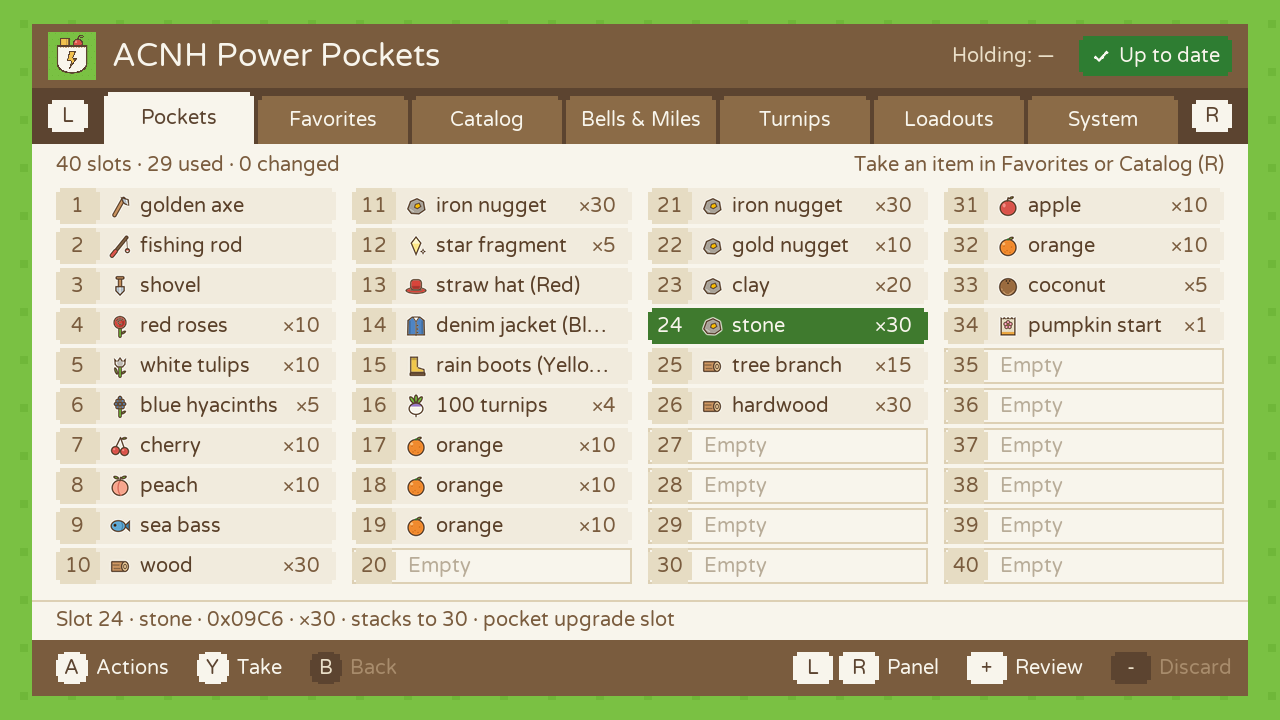
New: 30 and 40 pocket slots. If you bought the pocket upgrades at Nook's Cranny, the app now shows and edits all of your slots, not just the first 20.
What's new
- All your pocket slots. The game keeps slots 21 to 40 in a second block of the save, with a counter of how many are unlocked (0, 10 or 20). The app reads that counter, never changes it, and shows your 20, 30 or 40 slots in 2, 3 or 4 columns. Every pocket action works on all of them: Y to the next empty slot, Fill empty slots, Quantity…, Clear slot, Revert, the Review screen. Locked slots are never touched.
- Loadouts follow. A loadout of 30 or 40 slots is saved in a 320-byte file; 20-slot loadouts keep the old 160-byte format. A loadout that uses slots you don't have is refused instead of being loaded halfway.
- 69 built-in favorites. Useful items and tools (fish bait, medicine, ladder, fossil…), seasonal materials (pine cone, maple leaf, snowflakes…) and a few rare finds (golden toilet, robot hero, coelacanth, golden stag…) join the fruits, vegetables and materials of 1.1.1. Favorites can hold 100 items.
- System › Info shows how many pocket slots the save has.
Checked in the game (ACNH 3.0.3)
On a 40-slot save, items placed in slots 21 to 40 landed exactly where they should (slot 21 = first of the third row, slot 40 = last of the fourth), with the right quantities. Stack quantities were already confirmed in 1.1.x. The Turnips panel still hasn't been compared with Nook's Cranny.
The save engine is unchanged; a script checks it on every build. The only new place the app writes to is the bag block of the pockets, exactly like the first 20 slots.
Install or update
- Extract
ACNH-Power-Pockets-v1.2.0.zipto the root of your SD card and overwrite the old files. Your favorites, loadouts and backups stay. - Fully close Animal Crossing (HOME › X › Close).
- Hold R while starting Animal Crossing to open the Homebrew Menu, then launch ACNH Power Pockets.
Questions and feedback: GBAtemp thread · Bugs and test results: GitHub issues
SHA-256 of the zip: 7574fd820fe17d7042a035d3427b19c11baee48e480096400957b338b2e27cac
Built by GitHub Actions from commit cb0b542.
ACNH Power Pockets v1.1.1
Caution
This app writes directly to your Animal Crossing: New Horizons save, and a corrupted island may be impossible to recover.
Back up your save with JKSV or Checkpoint before every editing session, and copy that backup to a computer.
Tested on one console and one save only (game 3.0.3). Use it offline. No warranty of any kind.
A small quality-of-life update on top of 1.1.0.
What's new
- L / R wrap around. R on System goes back to Pockets, and L on Pockets opens System.
- 41 built-in favorites instead of 22. Fruits (apple, cherry, orange, peach, pear, coconut), vegetables (potato, carrot, wheat, sugarcane, tomato, orange pumpkin) and common materials (wood, softwood, hardwood, stone, clay, tree branch, bamboo piece) were added. Favorites can now hold 80 items, so you keep about the same room for your own.
Checked in the game (ACNH 3.0.3)
- Stack quantities: 9 tickets, 30 wood, 1 apple and 10 pears placed came out exact. A stack changed from 30 to 12 gave 12, and a 61-nugget stack left by 1.0.0 went back to 30.
- Turnips panel: not compared with Nook's Cranny yet.
Install or update
- Extract
ACNH-Power-Pockets-v1.1.1.zipto the root of your SD card and overwrite the old files. Your favorites, loadouts and backups stay. - Fully close Animal Crossing (HOME › X › Close).
- Hold R while starting Animal Crossing to open the Homebrew Menu, then launch ACNH Power Pockets.
Questions and feedback: GBAtemp thread · Bugs and test results: GitHub issues
SHA-256 of the zip: 46a62a6824270fbf2a596dffc01b73d1e10ca590d1b53c7069f44c2d169109e5
Built by GitHub Actions from commit 18925d4.
ACNH Power Pockets v1.1.0
Caution
This app writes directly to your Animal Crossing: New Horizons save, and a corrupted island may be impossible to recover.
Back up your save with JKSV or Checkpoint before every editing session, and copy that backup to a computer.
Tested on one console and one save only (game 3.0.3). Use it offline. No warranty of any kind.
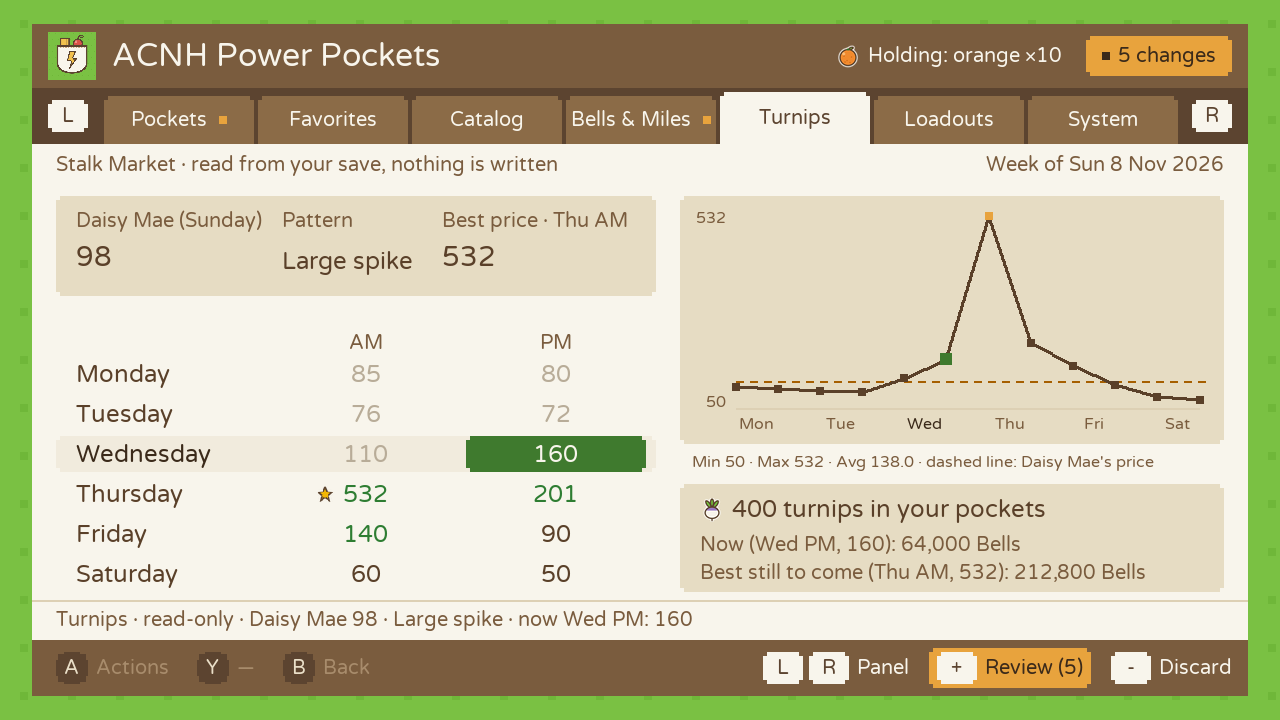
New: the Turnips panel, this week's turnip prices on the console.
What's new
The game works out the whole week of Stalk Market prices when the week starts and keeps them in the save. A new Turnips panel, between Bells & Miles and Loadouts, reads them and shows:
- Daisy Mae's price, the week's pattern (Fluctuating, Large spike, Decreasing, Small spike) and the best price.
- The twelve Nook's Cranny prices, Monday to Saturday, AM and PM. The current half-day is highlighted from the console clock and past ones are grayed out.
- A graph of the week, with Daisy Mae's price as a dashed line.
- What the turnips in your pockets are worth now, and at the best price still to come.
- A banner when the save is from a past week (you haven't played since Sunday), because the prices shown are then last week's.
It only reads. The panel has no action and can't write anything. The save engine is unchanged, and a script still checks that on every build.
Inspired by Turnips by averne. No code was taken from it.
What was checked in the game
Turnips panel: not yet. The prices and the pattern are read where NHSE documents them for 3.0.x. The date of the last save, used to tell this week from a past one, is read where Turnips reads it. Before you rely on it, compare the panel with Daisy Mae's price on Sunday and with Nook's Cranny's price of the day. A problem report has a choice for "The Turnips panel doesn't match the game".
Stack quantities: yes. Version 1.0.1's fix is included, and it is now checked in the game on ACNH 3.0.3: 9 tickets, 30 wood, 1 apple and 10 pears placed came out exact, a stack changed from 30 to 12 gave 12, and a 61-nugget stack left by 1.0.0 went back to 30.
Install or update
- Extract
ACNH-Power-Pockets-v1.1.0.zipto the root of your SD card and overwrite the old files. It goes intoswitch/acnh_power_pockets/, and your favorites, loadouts and backups stay. - Fully close Animal Crossing (HOME › X › Close).
- Hold R while starting Animal Crossing to open the Homebrew Menu, then launch ACNH Power Pockets.
Questions and feedback: GBAtemp thread · Bugs and test results: GitHub issues
items.txt and item_stacks.txt come from NHSE (GPL-3.0); font.ttf is Varela Round (SIL OFL 1.1). See THIRD_PARTY_NOTICES.md in the zip.
SHA-256 of the zip: 43185830dd490af4c745321a0d57ef725bdfd55814078884b7092823f99d9693
Built by GitHub Actions from commit 2be6edd.
ACNH Power Pockets v1.0.1
Caution
This app writes directly to your Animal Crossing: New Horizons save, and a corrupted island may be impossible to recover.
Back up your save with JKSV or Checkpoint before every editing session, and copy that backup to a computer.
Tested on one console and one save only (game 3.0.3). Use it offline. No warranty of any kind.
Fixes stack quantities. Everyone on 1.0.0 should update.
What was wrong in 1.0.0
A second console test on ACNH 3.0.3 showed two quantity bugs. The game didn't report any corruption in either case.
- Every stack came out one item larger. 9 Nook Miles Tickets placed gave 10 in the game. The game stores "quantity − 1" in the count field, and 1.0.0 wrote the quantity itself.
- Stacks could go past the game's limit. Changing wood to 50 gave 11 in the game: wood stacks to 30, and the game cuts a larger stack in its own way.
What 1.0.1 changes
- Quantities are written as the game expects them: 9 placed is 9 in the game.
- Each item stops at its own limit: 30 for wood and ores, 10 for tickets, fruit and Bell bags, 50 for fences, 99 for weeds, and so on. The limits come from NHSE's item data, in the new file
item_stacks.txt. - The same data marks about 10,500 items as
1/slot, up from about 9,300. They are mostly furniture. - A stack already above the limit (from 1.0.0 or another editor) shows ⚠ and "more than the game allows". The app never changes it on its own: Quantity… › A brings it back to the limit.
1/slotitems no longer show their variant field as a quantity.
The save engine is unchanged; this is all interface code. Checked in the game on ACNH 3.0.3 (with v1.1.0, same code): 9 tickets, 30 wood, 1 apple and 10 pears placed came out exact, a stack changed from 30 to 12 gave 12, and a 61-nugget stack left by 1.0.0 went back to 30.
Install or update
- Extract
ACNH-Power-Pockets-v1.0.1.zipto the root of your SD card and overwrite the old files. It goes intoswitch/acnh_power_pockets/, and your favorites, loadouts and backups stay. - Fully close Animal Crossing (HOME › X › Close).
- Hold R while starting Animal Crossing to open the Homebrew Menu, then launch ACNH Power Pockets. System › Info should say version 1.0.1 and list "Stack limits".
Questions and feedback: GBAtemp thread · Bugs and test results: GitHub issues
items.txt and item_stacks.txt come from NHSE (GPL-3.0); font.ttf is Varela Round (SIL OFL 1.1). See THIRD_PARTY_NOTICES.md in the zip.
SHA-256 of the zip: 1c3a9aa61ac5cfe2f2ab620b2ddb8b64a4f5029334d30df8d90d2637429140ca
Built by GitHub Actions from commit 08733ec.
ACNH Power Pockets v1.0.0
Warning
Superseded by v1.0.1. This version gets stack quantities wrong: every stack it places comes out one item larger (9 tickets give 10), and it lets a stack go past the game's limit (50 wood came out as 11 in the game). No save corruption was seen. Please update.
Caution
This app writes directly to your Animal Crossing: New Horizons save, and a corrupted island may be impossible to recover.
Back up your save with JKSV or Checkpoint before every editing session, and copy that backup to a computer.
This first release has been tested on one console and one save only (game 3.0.3). Use it offline. No warranty of any kind.
First release of ACNH Power Pockets, a fork of ACNH-Save-Editor by cbreezy210, rebuilt around inventory work.
What's in it
- Six panels switched with L / R: Pockets, Favorites, Catalog, Bells & Miles, Loadouts, System. A opens an action menu, Y does the most common action.
- Prepare, review, apply. Every edit stays in memory. + shows the Review screen (before » after); Apply writes everything in one go, − discards it all.
- Ten slots in ten presses. Take an item once, then each Y drops it in the next empty slot. Occupied slots are never overwritten.
- Favorites managed in the app (stored in
user_favorites.txt), shown as Yours then Built-in. - A picture and a color for every item (98 original drawings).
- Honest quantities. About 9,300 items that never stack (clothes, furniture, fish, recipes, tools…) are marked
1/slotand never get a quantity, because for them that field selects the variant. - Guarded direct writes. Restoring a backup and the Save Doctor live in the System panel, need A held for 1.5 s, and are blocked while changes are pending. ZL / ZR do nothing.
Save safety
- The upstream save engine is kept; a script checks on every build that the only change inside it is the name of its SD folder.
- Integrity hashes are recomputed before every write, and all 21 are verified first: nothing is written if one doesn't match. Without this, the very first console test was refused by the game as corrupted; with it, edits were accepted.
- An SD backup is made before every write, plus a pre-edit backup kept until the game saves again. Backups are validated before any restore.
Known limitations
- Tested on a single console and a single island (ACNH 3.0.3). Other save versions open read-only.
Stack quantities are exactWrong, see the warning above: stacks come out one item larger, and are not capped at the game's limit. Fixed in v1.0.1.- Primary resident only, 20 pocket slots only.
Questions and feedback: GBAtemp thread · Bugs and test results: GitHub issues
Install
- Extract
ACNH-Power-Pockets-v1.0.0.zipto the root of your SD card. It createsswitch/acnh_power_pockets/. - Fully close Animal Crossing (HOME › X › Close).
- Hold R while starting Animal Crossing to open the Homebrew Menu, then launch ACNH Power Pockets.
It has its own folder and file name, so it doesn't replace or share anything with an upstream ACNH-Save-Editor install.
SHA-256 of the zip: 7863d254b710d9a7df939a35f5939d25dfe26f095cafc7c41ca0db47b8efbd6b
Built by GitHub Actions from commit 079cebb. The zip was updated after publication to add LICENSE, THIRD_PARTY_NOTICES.md and licenses/ (items.txt comes from NHSE under GPL-3.0, font.ttf is Varela Round under SIL OFL 1.1); the app itself is unchanged.