Repository navigation
Releases
PS5 Backup Center 3.1.0

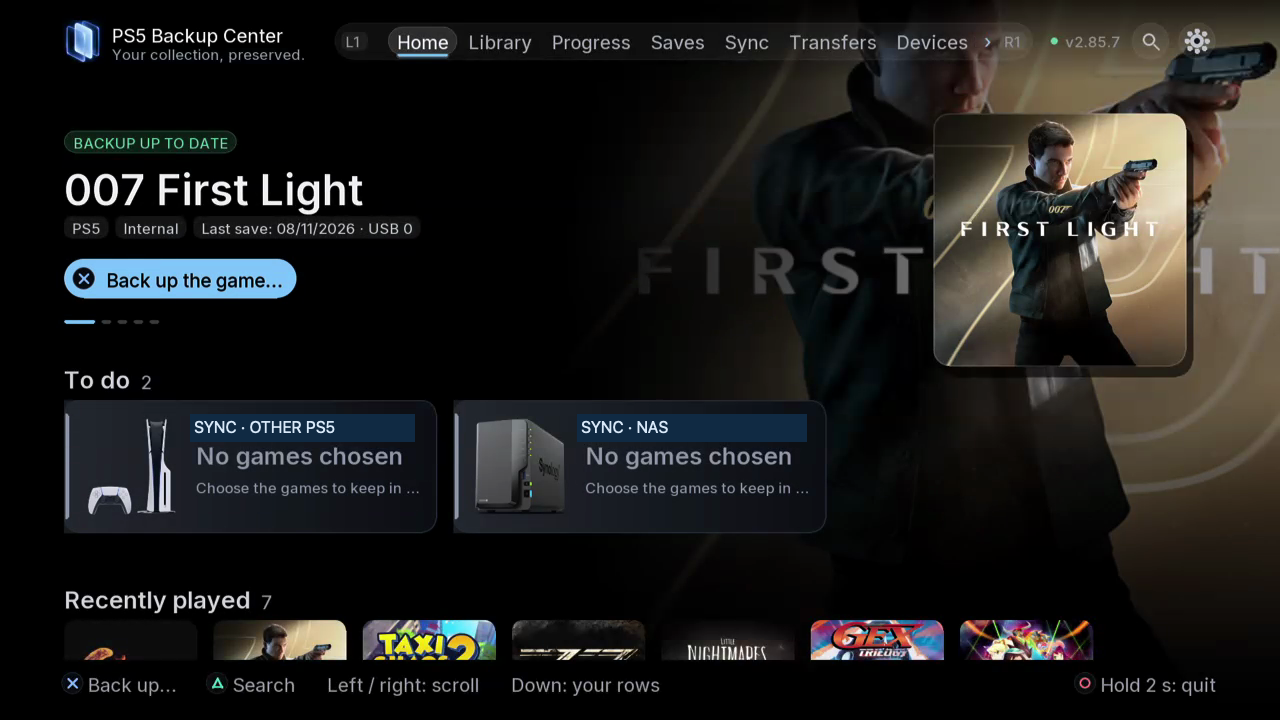
Download, install, and transfer your games.
Receive games from a paired PS5 on your local network. Back up, compare, sync, and restore saves across PS5 consoles, USB drives, NAS, and cloud storage, from the TV or a browser. Manage PS5 apps and DLC and saves from Nintendo Switch and compatible emulators. Free and open source.
Why you will like it
- One app for everything: PS5 and PS4 games, apps, ROMs and saves in a single library, with official names and covers.
- It reads inside your saves: mission, level, percentage, play time. You see which copy goes furthest, not just which one is newest.
- Duplicates found by content, a 30-day trash, protected versions and confirmations before anything is deleted.
- Verified restores: the copy is checked first, the current save is backed up, the game is never touched while it runs.
- Runs by itself: a background engine keeps working when you close the app, and plans back up on schedule.
Two PS5s, one collection
- Pair two consoles with a 6-digit code.
- Browse the other PS5's library and receive its games and saves on your local network.
- Send a save or a whole game to the other console, installed and ready to play.
- Keep your latest progress, your apps and their settings in sync on both sides.
Switch, Switch 2 and emulators
- Switch saves (JKSV, over ftpd or SMB) matched to your Eden / ProsperoEden games, profile by profile, both ways.
- Switch 2 games and saves from the Églantine emulator, under their own Switch 2 shelf.
- Detected automatically: PS2, PS1, PSP, N64, Dreamcast, GameCube / Wii, Xbox 360 and many more emulators, with their ROMs, saves and covers.
Disks, NAS and files
- USB drives, NAS and PCs over SMB 2/3, FTP, FTPS or WebDAV (Synology, QNAP, Nextcloud, Windows shares); each NAS is « Used for » backups, sync or both.
- The cloud: Amazon S3, Backblaze B2, Wasabi, Cloudflare R2, Scaleway, OVHcloud, Synology C2 or any S3 service, plus pCloud, Koofr and Nextcloud. Connect Google Drive and personal OneDrive from your phone. Dropbox enrollment is limited during development.
- Copy or move games between internal storage and USB, compress or extract game images.
- Files: copy, move or delete anything between your PS5, USB, NAS, Switch and the other PS5.
On the TV and in any browser
The TV app is made for the controller; the same interface opens on your phone or computer at http://<your-PS5-IP>:52370. 19 languages, 8 themes, sounds and music.
Always up to date
The app checks for new versions by itself, tells you on Home and installs them for you, with one-press roll-back to the previous version. Only versions tested on our own consoles are published.
Install
- Download PPSA99950.zip below and extract it: you get a PPSA99950 folder.
- Copy it to /data/homebrew/ on your PS5 (FTP or USB).
- Open PS5 Backup Center from your homebrew launcher. The app starts its own engine.
Optional: ps5-backup-center-3.1.0-engine.elf starts the engine alone from an ELF loader (port 9021).
Requires a PS5 that can already run homebrew apps.
What's new in 3.1.0
- Connect your own Google Drive or personal OneDrive account from your phone, then use it as a backup destination on PS5. Backblaze B2 was also tested end to end.
- Compare and sort your saves before choosing what to keep, sync, or restore.
- Transfer games and saves between paired PS5 consoles on your local network. Track game transfers in the TV app or browser and install received games on your PS5.
- Manage PS5 apps and DLC and work with saves from Nintendo Switch consoles and compatible emulators.
Dropbox support is available with limited enrollment while the Dropbox app is in development.
Full history: https://github.com/consolecenterstudio/ps5-backup-center/blob/main/CHANGELOG.md
Support the developer
PS5 Backup Center is free and will stay free. It is made by one independent developer, in spare time and on personal consoles. If it saved your progress once, you can help cover test consoles, drives and tools:
- BTC (Bitcoin network): 16J2KqxzzAwqrbdtsBAXLcfXySH3WEqvas
- ETH (Ethereum, ERC20): 0xc8bdccce6d52570e059f58f0f4c5c6199bee298d
- BNB (BNB Smart Chain, BEP20): 0xc8bdccce6d52570e059f58f0f4c5c6199bee298d
- SOL (Solana): EyiGLmxw1b1AZxhVmpfP4cXYGTDuYJaWXonvKww2hDaD
Send only on the network listed. Gifts, Ko-fi and projects to fund: https://github.com/consolecenterstudio/ps5-backup-center#support-the-developer
Checksums (SHA-256)
7a716a89ce4d5a38bd2d5c46c2ecd81147e434154c05bf0d5a39c12b331a9568  PPSA99950.zip
d83f6e318b5999df303e9e05f9eb82a731045e2c2fdc3369bbd24f688788ab1b  ps5-backup-center-3.1.0-engine.elf
Nouveautés 3.1.0 · fr
Téléchargez, installez et transférez vos jeux. Récupérez vos jeux depuis une PS5 jumelée sur votre réseau local. Sauvegardez, comparez, synchronisez et restaurez vos parties entre vos PS5, vos disques USB, votre NAS et vos espaces cloud, depuis la télé ou le navigateur. Gérez vos applications et DLC PS5, ainsi que vos sauvegardes Switch et d’émulateurs compatibles.
Connectez Google Drive et OneDrive personnel depuis votre téléphone. L’accès à Dropbox est limité pendant le développement.
Nouveautés 3.1.0 · fr-CA
Téléchargez, installez et transférez vos jeux. Récupérez vos jeux depuis une PS5 jumelée sur votre réseau local. Sauvegardez, comparez, synchronisez et restaurez vos parties entre vos PS5, vos disques USB, votre NAS et vos espaces infonuagiques, depuis la télé ou le navigateur. Gérez vos applications et DLC PS5, ainsi que vos sauvegardes Switch et d’émulateurs compatibles.
Connectez Google Drive et OneDrive personnel depuis votre téléphone. L’accès à Dropbox est limité pendant le développement.
الجديد 3.1.0 · ar
نزّل ألعابك وثبّتها وانقلها. استقبل الألعاب من جهاز PS5 مقترن على شبكتك المحلية. انسخ ملفات الحفظ احتياطيًا وقارنها وزامنها واستعدها عبر أجهزة PS5 ووحدات USB وNAS والتخزين السحابي من التلفاز أو المتصفح. أدِر تطبيقات PS5 ومحتواها الإضافي وملفات حفظ Switch والمحاكيات المتوافقة.
اربط Google Drive وحساب OneDrive الشخصي من هاتفك. التسجيل في Dropbox محدود خلال فترة التطوير.
Neuerungen 3.1.0 · de
Lade deine Spiele herunter, installiere und übertrage sie. Empfange Spiele von einer gekoppelten PS5 im lokalen Netzwerk. Sichere, vergleiche, synchronisiere und stelle Spielstände auf PS5-Konsolen, USB-Laufwerken, NAS und Cloud-Speichern über den Fernseher oder Browser wieder her. Verwalte PS5-Apps, DLCs und Spielstände von Switch und kompatiblen Emulatoren.
Verbinde Google Drive und ein persönliches OneDrive-Konto vom Handy aus. Die Dropbox-Anmeldung ist während der Entwicklung begrenzt.
Novedades 3.1.0 · es
Descarga, instala y transfiere tus juegos. Recibe juegos de una PS5 emparejada en tu red local. Guarda copias, compara, sincroniza y restaura partidas entre tus PS5, unidades USB, NAS y la nube, desde el televisor o el navegador. Gestiona aplicaciones y DLC de PS5 y partidas de Switch y emuladores compatibles.
Conecta Google Drive y una cuenta personal de OneDrive desde el móvil. El acceso a Dropbox es limitado durante el desarrollo.
Novedades 3.1.0 · es-419
Descarga, instala y transfiere tus juegos. Recibe juegos de otra PS5 vinculada en tu red local. Respalda, compara, sincroniza y restaura partidas entre tus PS5, unidades USB, NAS y la nube, desde la TV o el navegador. Administra aplicaciones y DLC de PS5 y partidas de Switch y emuladores compatibles.
Conecta Google Drive y una cuenta personal de OneDrive desde tu celular. El acceso a Dropbox es limitado durante el desarrollo.
Novità 3.1.0 · it
Scarica, installa e trasferisci i tuoi giochi. Ricevi giochi da una PS5 abbinata sulla rete locale. Esegui il backup, confronta, sincronizza e ripristina i salvataggi tra PS5, unità USB, NAS e cloud, dalla TV o dal browser. Gestisci app e DLC PS5 e i salvataggi di Switch ed emulatori compatibili.
Collega Google Drive e OneDrive personale dal telefono. L’accesso a Dropbox è limitato durante lo sviluppo.
新機能 3.1.0 · ja
ゲームをダウンロード、インストール、転送。 ローカルネットワーク上のペアリング済みPS5からゲームを受信できます。テレビやブラウザーから、PS5、USBドライブ、NAS、クラウド間でセーブデータをバックアップ、比較、同期、復元できます。PS5のアプリやDLC、Switchや対応エミュレーターのセーブも管理できます。
スマートフォンからGoogle Driveと個人用OneDriveを連携できます。開発中のDropboxは登録数に制限があります。
새로운 기능 3.1.0 · ko
게임을 다운로드하고 설치하고 전송하세요. 로컬 네트워크에서 페어링한 PS5의 게임을 받으세요. TV나 브라우저에서 PS5, USB 드라이브, NAS, 클라우드 간 저장 데이터를 백업하고 비교하고 동기화하고 복원하세요. PS5 앱과 DLC, Switch 및 호환 에뮬레이터 저장 데이터도 관리할 수 있습니다.
휴대폰에서 Google Drive와 개인 OneDrive를 연결하세요. 개발 기간에는 Dropbox 등록이 제한됩니다.
Nieuw 3.1.0 · nl
Download, installeer en verplaats je games. Ontvang games van een gekoppelde PS5 op je lokale netwerk. Maak back-ups, vergelijk, synchroniseer en herstel je saves tussen PS5-consoles, USB-schijven, NAS en cloudopslag via de tv of browser. Beheer PS5-apps en DLC en saves van Switch en compatibele emulators.
Koppel Google Drive en een persoonlijk OneDrive-account vanaf je telefoon. Deelname aan Dropbox is beperkt tijdens de ontwikkeling.
Nowości 3.1.0 · pl
Pobieraj, instaluj i przenoś gry. Odbieraj gry ze sparowanej PS5 w sieci lokalnej. Twórz kopie, porównuj, synchronizuj i przywracaj zapisy między PS5, dyskami USB, NAS i chmurą z telewizora lub przeglądarki. Zarządzaj aplikacjami i DLC PS5 oraz zapisami Switch i zgodnych emulatorów.
Połącz Google Drive i osobiste konto OneDrive z telefonu. Rejestracja w Dropbox jest ograni...
PS5 Backup Center 3.0.0
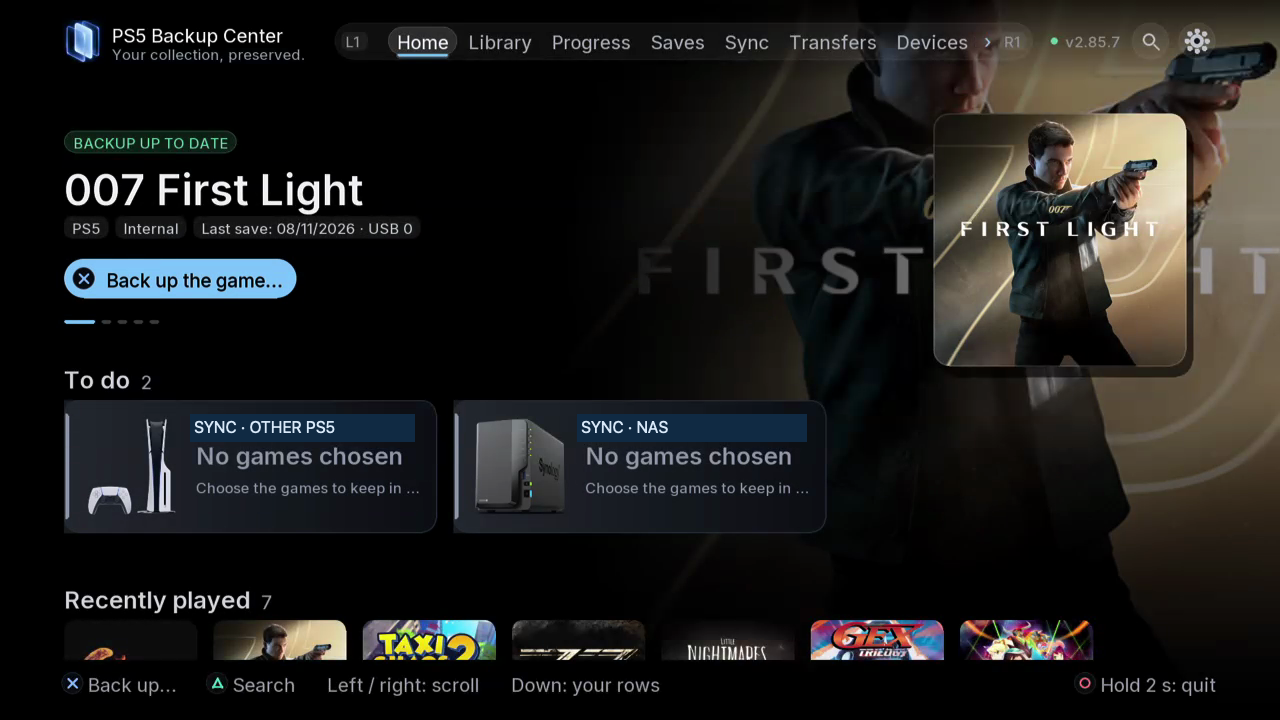
Your collection. Your progress. Your backups.
PS5 Backup Center keeps everything you care about on your PS5 safe: game saves, installed games, apps, DLC, emulator ROMs and progress. It finds what has never been backed up, keeps dated and verified copies on a USB drive, a NAS or your other PS5, and brings any version back in a few presses. Free and open source, no subscription, no PC needed.
Why you will like it
- One app for everything: PS5 and PS4 games, apps, ROMs and saves in a single library, with official names and covers.
- It reads inside your saves: mission, level, percentage, play time. You see which copy goes furthest, not just which one is newest.
- Duplicates found by content, a 30-day trash, protected versions and confirmations before anything is deleted.
- Verified restores: the copy is checked first, the current save is backed up, the game is never touched while it runs.
- Runs by itself: a background engine keeps working when you close the app, and plans back up on schedule.
Two PS5s, one collection
- Pair two consoles with a 6-digit code.
- Browse the other PS5's library from here and back up its games and saves remotely.
- Send a save or a whole game to the other console, installed and ready to play.
- Keep your latest progress, your apps and their settings in sync on both sides.
- Reach a PS5 away from home with an optional encrypted Internet link.
Switch, Switch 2 and emulators
- Switch saves (JKSV, over ftpd or SMB) matched to your Eden / ProsperoEden games, profile by profile, both ways.
- Switch 2 games and saves from the Églantine emulator, under their own Switch 2 shelf.
- Detected automatically: PS2, PS1, PSP, N64, Dreamcast, GameCube / Wii, Xbox 360 and many more emulators, with their ROMs, saves and covers.
Disks, NAS and files
- USB drives, NAS and PCs over SMB 2/3, FTP, FTPS or WebDAV (Synology, QNAP, Nextcloud, Windows shares); each NAS is « Used for » backups, sync or both.
- The cloud: Amazon S3, Backblaze B2, Wasabi, Cloudflare R2, Scaleway, OVHcloud, Synology C2 or any S3 service, plus pCloud, Koofr and Nextcloud. Google Drive, OneDrive and Dropbox sign-in from your phone: activation in a coming update.
- Copy or move games between internal storage and USB, compress or extract game images.
- Files: copy, move or delete anything between your PS5, USB, NAS, Switch and the other PS5.
On the TV and in any browser
The TV app is made for the controller; the same interface opens on your phone or computer at http://:52370. 19 languages, 8 themes, sounds and music.
Always up to date
The app checks for new versions by itself, tells you on Home and installs them for you, with one-press roll-back to the previous version. Only versions tested on our own consoles are published.
Install
- Download PPSA99950.zip below and extract it: you get a PPSA99950 folder.
- Copy it to /data/homebrew/ on your PS5 (FTP or USB).
- Open PS5 Backup Center from your homebrew launcher. The app starts its own engine.
Optional: ps5-backup-center-3.0.0-engine.elf starts the engine alone from an ELF loader (port 9021).
Requires a PS5 that can already run homebrew apps.
New in 3.0
- Cloud storage (Devices › Cloud): Amazon S3, Backblaze B2, Wasabi, Cloudflare R2, Scaleway, OVHcloud, Synology C2 or any S3 service, picked by name; pCloud, Koofr and Nextcloud over WebDAV, preset. Keys can be pasted from your phone with a QR code.
- NAS over WebDAV next to FTP and SMB, much faster; « Used for »: backups, sync or both, and several syncs with the same NAS.
- A full on-screen keyboard: special characters (R1), capitals (L1), accents, every button shows its controller key.
- Clearer Home, Library, Backups and Tasks, new device pictures, « Follow us » (X, YouTube, Reddit).
- Google Drive, OneDrive and Dropbox: each person connects their own account from the phone. Activation in a coming update.
Full history: https://github.com/consolecenterstudio/ps5-backup-center/blob/main/CHANGELOG.md
Support the developer
PS5 Backup Center is free and will stay free. It is made by one independent developer, in spare time and on personal consoles. If it saved your progress once, you can help cover test consoles, drives and tools:
- BTC (Bitcoin network): 16J2KqxzzAwqrbdtsBAXLcfXySH3WEqvas
- ETH (Ethereum, ERC20): 0xc8bdccce6d52570e059f58f0f4c5c6199bee298d
- BNB (BNB Smart Chain, BEP20): 0xc8bdccce6d52570e059f58f0f4c5c6199bee298d
- SOL (Solana): EyiGLmxw1b1AZxhVmpfP4cXYGTDuYJaWXonvKww2hDaD
Send only on the network listed. Gifts, Ko-fi and projects to fund: https://github.com/consolecenterstudio/ps5-backup-center#support-the-developer
Checksums (SHA-256)
60cbb9e0e1e8657513ae30038114115c743fa2772c932f1c44e3a28f8c771b84  PPSA99950.zip
f15cb65c8fbd1f1ebd4d57ef2617768f5ce99ae75bd6df225ecf12671d1b46a7  ps5-backup-center-3.0.0-engine.elf
الجديد في 3.0 · ar
- أضف NAS أو الوحدة من الأجهزة وتحقق من هويتها قبل الحفظ. للـNAS اختر البروتوكول المدعوم واختبر الاتصال واختر المجلد. بين PS5 أكد رمز الاقتران؛ ولـSwitch جهز ftpd وتصديراً من JKSV. يدعم التطبيق FTP / FTPS وSMB وWebDAV. يحدد «الاستخدام» ما إذا كان الـNAS مخصصاً لملفات الحفظ أو للمزامنة أو لكليهما.
- للسحابة، افتح الأجهزة › السحابة: اختر خدمة S3 (Amazon S3 وBackblaze B2 وWasabi وCloudflare R2 وScaleway وOVHcloud وSynology C2…) وأدخل مفاتيحها — يفتح رمز QR النموذج نفسه على هاتفك لتلصقها فيه — أو pCloud أو Koofr أو Nextcloud بحسابك. يتصل Google Drive وOneDrive وDropbox بحسابك الخاص من هاتفك (التفعيل في تحديث قادم).
- لوحة مفاتيح كاملة على الشاشة.
Neu in 3.0 · de
- Füge NAS oder Konsole bei den Geräten hinzu und prüfe die Identität vor dem Speichern. Wähle beim NAS ein unterstütztes Protokoll, teste die Verbindung und den Zielordner. Bestätige zwischen PS5 den Kopplungscode; bereite bei Switch ftpd und einen JKSV-Export vor. FTP / FTPS, SMB und WebDAV werden unterstützt. „Verwendet für“ legt fest, ob das NAS Spielstände, Sync oder beides aufnimmt.
- Für die Cloud öffne Geräte › Cloud: Wähle einen S3-Dienst (Amazon S3, Backblaze B2, Wasabi, Cloudflare R2, Scaleway, OVHcloud, Synology C2…) und gib seine Schlüssel ein – der QR-Code öffnet dasselbe Formular auf deinem Handy, damit du sie dort einfügen kannst – oder pCloud, Koofr, Nextcloud mit deinem Konto. Google Drive, OneDrive und Dropbox verbindest du mit deinem eigenen Konto vom Handy aus (Aktivierung in einem kommenden Update).
- Vollständige Bildschirmtastatur.
Novedades de 3.0 · es-419
- En dispositivos, añade el NAS o la consola y comprueba la identidad antes de guardar. Para un NAS, elige el protocolo compatible, prueba la conexión y selecciona la carpeta. Para dos PS5, confirma el código de asociación; para Switch prepara ftpd y un exportado JKSV. FTP / FTPS, SMB y WebDAV son compatibles. «Usado para» elige si el NAS guarda partidas guardadas, sincro o ambas cosas.
- Para la nube, abre Dispositivos › Nube: elige un servicio S3 (Amazon S3, Backblaze B2, Wasabi, Cloudflare R2, Scaleway, OVHcloud, Synology C2…) e ingresa sus claves —el código QR abre el mismo formulario en tu celular para que las pegues— o pCloud, Koofr, Nextcloud con tu cuenta. Google Drive, OneDrive y Dropbox se conectan con tu propia cuenta desde tu celular (activación en una próxima actualización).
- Teclado completo en pantalla.
Novedades de 3.0 · es
- En dispositivos, añade el NAS o la consola y comprueba la identidad antes de guardar. Para un NAS, elige el protocolo compatible, prueba la conexión y selecciona la carpeta. Para dos PS5, confirma el código de asociación; para Switch prepara ftpd y un exportado JKSV. FTP / FTPS, SMB y WebDAV son compatibles. «Usado para» elige si el NAS guarda partidas, sincro o ambas cosas.
- Para la nube, abre Dispositivos › Nube: elige un servicio S3 (Amazon S3, Backblaze B2, Wasabi, Cloudflare R2, Scaleway, OVHcloud, Synology C2…) e introduce sus claves —el código QR abre el mismo formulario en tu móvil para que las pegues— o pCloud, Koofr, Nextcloud con tu cuenta. Google Drive, OneDrive y Dropbox se conectan con tu propia cuenta desde tu móvil (activación en una próxima actualización).
- Teclado completo en pantalla.
Nouveau dans la 3.0 · fr-CA
- Ajoutez le NAS, choisissez le protocole pris en charge, renseignez la connexion, testez puis sélectionnez le dossier avant enregistrement. FTP / FTPS, SMB et WebDAV sont pris en charge. « Utilisé pour » choisit si le NAS sert aux sauvegardes, à la synchro, ou aux deux.
- Pour le nuage, ouvrez Appareils › Nuage : choisissez un service S3 (Amazon S3, Backblaze B2, Wasabi, Cloudflare R2, Scaleway, OVHcloud, Synology C2…) et saisissez ses clés — le code QR ouvre le même formulaire sur votre téléphone pour les coller — ou pCloud, Koofr, Nextcloud avec votre compte. Google Drive, OneDrive et Dropbox se connectent avec votre propre compte depuis votre téléphone (activation dans une prochaine mise à jour).
- Clavier complet à l’écran.
Nouveau dans la 3.0 · fr
- Ajoutez le NAS, choisissez le protocole pris en charge, renseignez la connexion, testez puis sélectionnez le dossier avant enregistrement. FTP / FTPS, SMB et WebDAV sont pris en charge. « Utilisé pour » choisit si le NAS sert aux sauvegardes, à la synchro, ou aux deux.
- Pour le nuage, ouvrez Appareils › Nuage : choisissez un service S3 (Amazon S3, Backblaze B2, Wasabi, Cloudflare R2, Scaleway, OVHcloud, Synology C2…) et saisissez ses clés — le code QR ouvre le même formulaire sur votre téléphone pour les coller — ou pCloud, Koofr, Nextcloud avec votre compte. Google Drive, OneDrive et Dropbox se connectent avec votre propre ...
PS5 Backup Center 2.99.5
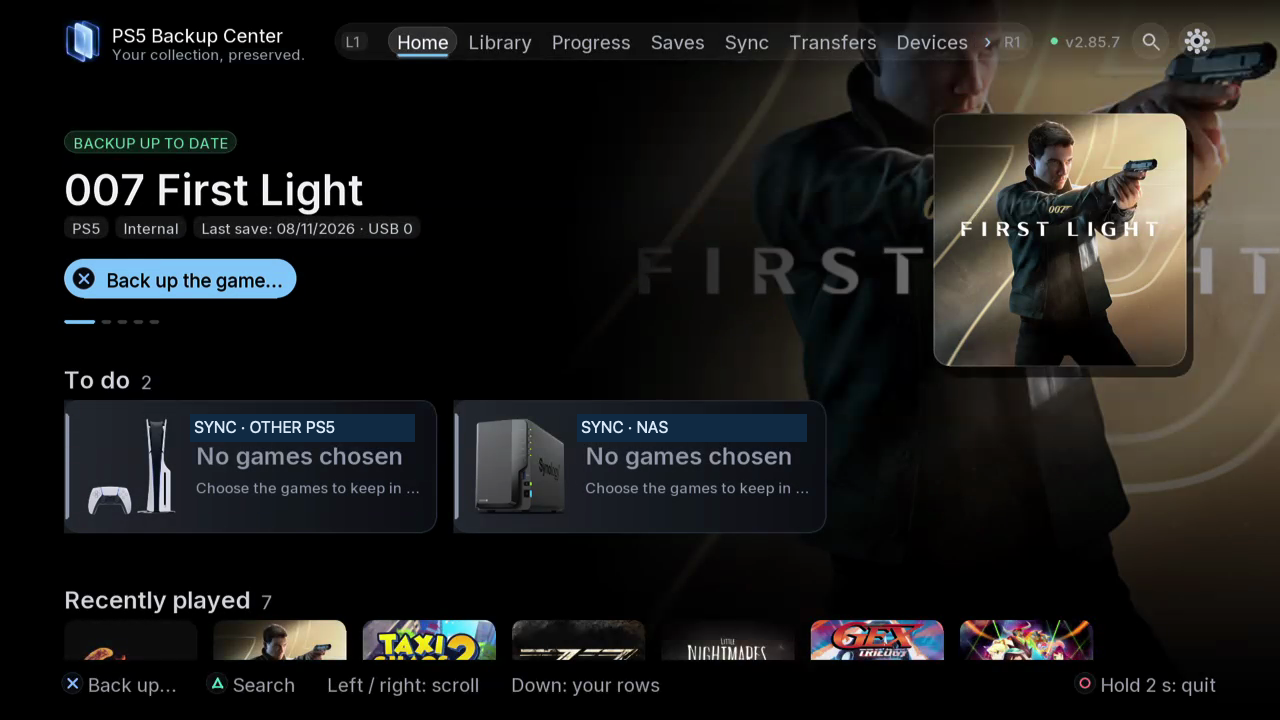
Your collection. Your progress. Your backups.
PS5 Backup Center keeps everything you care about on your PS5 safe: game saves, installed games, apps, DLC, emulator ROMs and progress. It finds what has never been backed up, keeps dated and verified copies on a USB drive, a NAS or your other PS5, and brings any version back in a few presses. Free and open source, no subscription, no PC needed.
Why you will like it
- One app for everything: PS5 and PS4 games, apps, ROMs and saves in a single library, with official names and covers.
- It reads inside your saves: mission, level, percentage, play time. You see which copy goes furthest, not just which one is newest.
- Duplicates found by content, a 30-day trash, protected versions and confirmations before anything is deleted.
- Verified restores: the copy is checked first, the current save is backed up, the game is never touched while it runs.
- Runs by itself: a background engine keeps working when you close the app, and plans back up on schedule.
Two PS5s, one collection
- Pair two consoles with a 6-digit code.
- Browse the other PS5's library from here and back up its games and saves remotely.
- Send a save or a whole game to the other console, installed and ready to play.
- Keep your latest progress, your apps and their settings in sync on both sides.
- Reach a PS5 away from home with an optional encrypted Internet link.
Switch, Switch 2 and emulators
- Switch saves (JKSV, over ftpd or SMB) matched to your Eden / ProsperoEden games, profile by profile, both ways.
- Switch 2 games and saves from the Églantine emulator, under their own Switch 2 shelf.
- Detected automatically: PS2, PS1, PSP, N64, Dreamcast, GameCube / Wii, Xbox 360 and many more emulators, with their ROMs, saves and covers.
Disks, NAS and files
- USB drives, NAS and PCs over SMB 2/3, FTP or FTPS (Synology, QNAP, Windows shares).
- Copy or move games between internal storage and USB, compress or extract game images.
- Files: copy, move or delete anything between your PS5, USB, NAS, Switch and the other PS5.
On the TV and in any browser
The TV app is made for the controller; the same interface opens on your phone or computer at http://:52370. 19 languages, 8 themes, sounds and music.
Always up to date
The app checks for new versions by itself, tells you on Home and installs them for you, with one-press roll-back to the previous version. Only versions tested on our own consoles are published.
Install
- Download PPSA99950.zip below and extract it: you get a PPSA99950 folder.
- Copy it to /data/homebrew/ on your PS5 (FTP or USB).
- Open PS5 Backup Center from your homebrew launcher. The app starts its own engine.
Optional: ps5-backup-center-2.99.5-engine.elf starts the engine alone from an ELF loader (port 9021).
Requires a PS5 that can already run homebrew apps.
New in 2.99
- Same emulator progress on both PS5s: ProsperoEden and Églantine saves, game by game and profile by profile; the most recent wins, the old one is copied first.
- Several games at once on the other PS5: tick them, then back up their saves, make a full backup or take the newer saves here.
- Support the project: the ♥ at the top right, QR codes, gifts and projects to fund. The app stays free.
- Report a problem from Settings, easier task clearing, and a Beta update channel for those who want new versions first.
Full history: https://github.com/consolecenterstudio/ps5-backup-center/blob/main/CHANGELOG.md
Support the developer
PS5 Backup Center is free and will stay free. It is made by one independent developer, in spare time and on personal consoles. If it saved your progress once, you can help cover test consoles, drives and tools:
- BTC (Bitcoin network): 16J2KqxzzAwqrbdtsBAXLcfXySH3WEqvas
- ETH (Ethereum, ERC20): 0xc8bdccce6d52570e059f58f0f4c5c6199bee298d
- BNB (BNB Smart Chain, BEP20): 0xc8bdccce6d52570e059f58f0f4c5c6199bee298d
- SOL (Solana): EyiGLmxw1b1AZxhVmpfP4cXYGTDuYJaWXonvKww2hDaD
Send only on the network listed. Gifts, Ko-fi and projects to fund: https://github.com/consolecenterstudio/ps5-backup-center#support-the-developer
Checksums (SHA-256)
12ea416b70c9dafc5895f7edf0c5c202a45b8a67f4379d1770a6e8bd538decd1  PPSA99950.zip
3c8d4dd2b35b8685e82711b31d8250671d22c3773c1f129367969196e05e9d46  ps5-backup-center-2.99.5-engine.elf
PS5 Backup Center 2.98.4
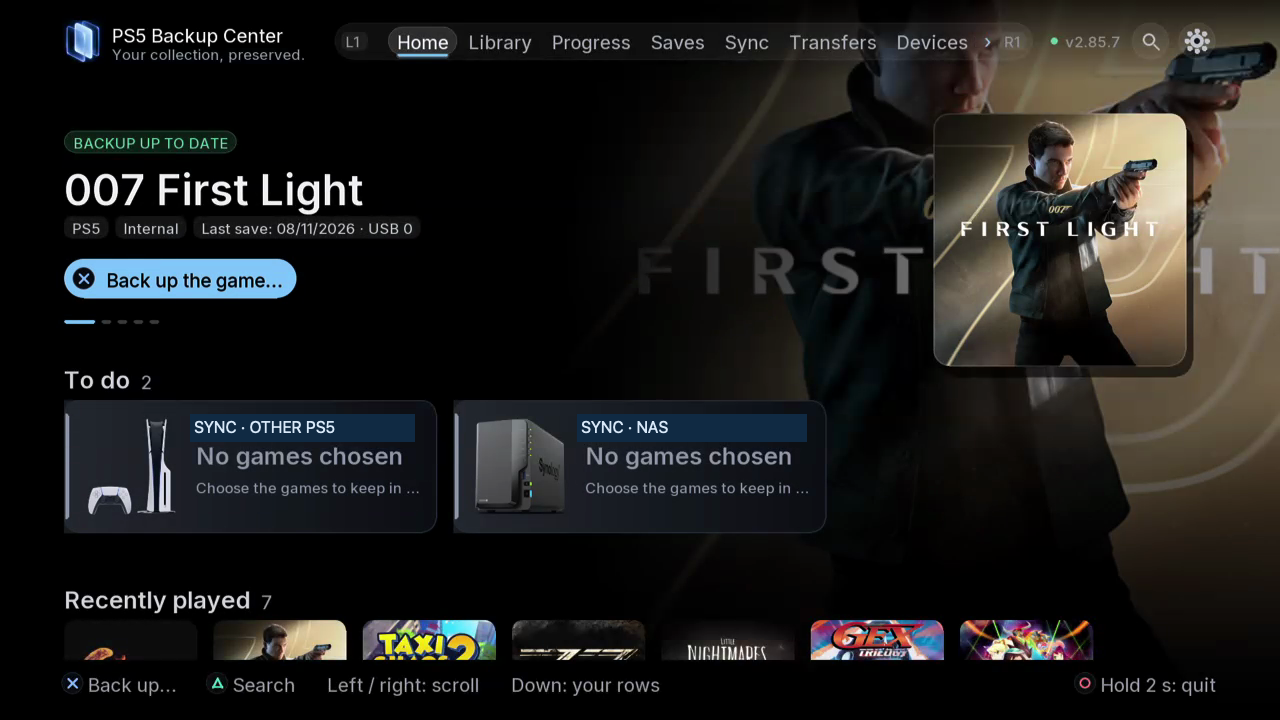
Your collection. Your progress. Your backups.
PS5 Backup Center keeps everything you care about on your PS5 safe: game saves, installed games, apps, DLC, emulator ROMs and progress. It finds what has never been backed up, keeps dated and verified copies on a USB drive, a NAS or your other PS5, and brings any version back in a few presses. Free and open source, no subscription, no PC needed.
Why you will like it
- One app for everything: PS5 and PS4 games, apps, ROMs and saves in a single library, with official names and covers.
- It reads inside your saves: mission, level, percentage, play time. You see which copy goes furthest, not just which one is newest.
- Duplicates found by content, a 30-day trash, protected versions and confirmations before anything is deleted.
- Verified restores: the copy is checked first, the current save is backed up, the game is never touched while it runs.
- Runs by itself: a background engine keeps working when you close the app, and plans back up on schedule.
Two PS5s, one collection
- Pair two consoles with a 6-digit code.
- Browse the other PS5's library from here and back up its games and saves remotely.
- Send a save or a whole game to the other console, installed and ready to play.
- Keep your latest progress, your apps and their settings in sync on both sides.
- Reach a PS5 away from home with an optional encrypted Internet link.
Switch, Switch 2 and emulators
- Switch saves (JKSV, over ftpd or SMB) matched to your Eden / ProsperoEden games, profile by profile, both ways.
- Switch 2 games and saves from the Églantine emulator, under their own Switch 2 shelf.
- Detected automatically: PS2, PS1, PSP, N64, Dreamcast, GameCube / Wii, Xbox 360 and many more emulators, with their ROMs, saves and covers.
Disks, NAS and files
- USB drives, NAS and PCs over SMB 2/3, FTP or FTPS (Synology, QNAP, Windows shares).
- Copy or move games between internal storage and USB, compress or extract game images.
- Files: copy, move or delete anything between your PS5, USB, NAS, Switch and the other PS5.
On the TV and in any browser
The TV app is made for the controller; the same interface opens on your phone or computer at http://:52370. 19 languages, 8 themes, sounds and music.
Always up to date
The app checks for new versions by itself, tells you on Home and installs them for you, with one-press roll-back to the previous version. Only versions tested on our own consoles are published.
Install
- Download PPSA99950.zip below and extract it: you get a PPSA99950 folder.
- Copy it to /data/homebrew/ on your PS5 (FTP or USB).
- Open PS5 Backup Center from your homebrew launcher. The app starts its own engine.
Optional: ps5-backup-center-2.98.4-engine.elf starts the engine alone from an ELF loader (port 9021).
Requires a PS5 that can already run homebrew apps.
New in 2.98
- The other PS5's library: browse its games and saves and back them up from here, with "up to date here / there" badges.
- The other PS5's card shows the version installed there.
- After an update, "Update installed" and its countdown come first, then "What's new".
- Lighter package; updates from this repository built in.
Full history: https://github.com/consolecenterstudio/ps5-backup-center/blob/main/CHANGELOG.md
Support the developer
PS5 Backup Center is free and will stay free. It is made by one independent developer, in spare time and on personal consoles. If it saved your progress once, you can help cover test consoles, drives and tools:
- BTC (Bitcoin network): 16J2KqxzzAwqrbdtsBAXLcfXySH3WEqvas
- ETH (Ethereum, ERC20): 0xc8bdccce6d52570e059f58f0f4c5c6199bee298d
- BNB (BNB Smart Chain, BEP20): 0xc8bdccce6d52570e059f58f0f4c5c6199bee298d
- SOL (Solana): EyiGLmxw1b1AZxhVmpfP4cXYGTDuYJaWXonvKww2hDaD
Send only on the network listed. Gifts, Ko-fi and projects to fund: https://github.com/consolecenterstudio/ps5-backup-center#support-the-developer
Checksums (SHA-256)
ca023a0ec7aea88f5ca64c6b803b3e18aa1fdb6528d3423ef64e61eafc31f049  PPSA99950.zip
af5a0685cc8ea60178be197ac83573d3bf0ba74bf0092138529bb7e6ccc50374  ps5-backup-center-2.98.4-engine.elf