Repository navigation

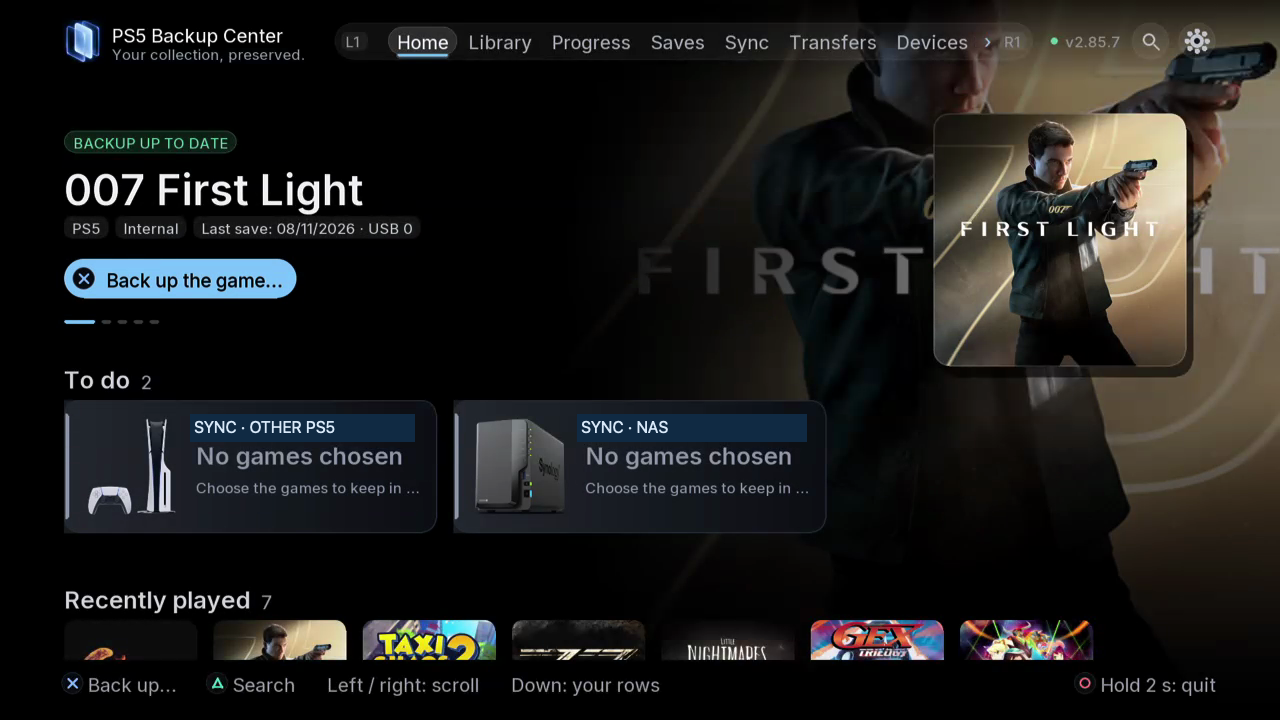
Download, install, and transfer your games.
Receive games from a paired PS5 on your local network. Back up, compare, sync, and restore saves across PS5 consoles, USB drives, NAS, and cloud storage, from the TV or a browser. Manage PS5 apps and DLC and saves from Nintendo Switch and compatible emulators. Free and open source.
Why you will like it
- One app for everything: PS5 and PS4 games, apps, ROMs and saves in a single library, with official names and covers.
- It reads inside your saves: mission, level, percentage, play time. You see which copy goes furthest, not just which one is newest.
- Duplicates found by content, a 30-day trash, protected versions and confirmations before anything is deleted.
- Verified restores: the copy is checked first, the current save is backed up, the game is never touched while it runs.
- Runs by itself: a background engine keeps working when you close the app, and plans back up on schedule.
Two PS5s, one collection
- Pair two consoles with a 6-digit code.
- Browse the other PS5's library and receive its games and saves on your local network.
- Send a save or a whole game to the other console, installed and ready to play.
- Keep your latest progress, your apps and their settings in sync on both sides.
Switch, Switch 2 and emulators
- Switch saves (JKSV, over ftpd or SMB) matched to your Eden / ProsperoEden games, profile by profile, both ways.
- Switch 2 games and saves from the Églantine emulator, under their own Switch 2 shelf.
- Detected automatically: PS2, PS1, PSP, N64, Dreamcast, GameCube / Wii, Xbox 360 and many more emulators, with their ROMs, saves and covers.
Disks, NAS and files
- USB drives, NAS and PCs over SMB 2/3, FTP, FTPS or WebDAV (Synology, QNAP, Nextcloud, Windows shares); each NAS is « Used for » backups, sync or both.
- The cloud: Amazon S3, Backblaze B2, Wasabi, Cloudflare R2, Scaleway, OVHcloud, Synology C2 or any S3 service, plus pCloud, Koofr and Nextcloud. Connect Google Drive and personal OneDrive from your phone. Dropbox enrollment is limited during development.
- Copy or move games between internal storage and USB, compress or extract game images.
- Files: copy, move or delete anything between your PS5, USB, NAS, Switch and the other PS5.
On the TV and in any browser
The TV app is made for the controller; the same interface opens on your phone or computer at http://<your-PS5-IP>:52370. 19 languages, 8 themes, sounds and music.
Always up to date
The app checks for new versions by itself, tells you on Home and installs them for you, with one-press roll-back to the previous version. Only versions tested on our own consoles are published.
Install
- Download PPSA99950.zip below and extract it: you get a PPSA99950 folder.
- Copy it to /data/homebrew/ on your PS5 (FTP or USB).
- Open PS5 Backup Center from your homebrew launcher. The app starts its own engine.
Optional: ps5-backup-center-3.1.0-engine.elf starts the engine alone from an ELF loader (port 9021).
Requires a PS5 that can already run homebrew apps.
What's new in 3.1.0
- Connect your own Google Drive or personal OneDrive account from your phone, then use it as a backup destination on PS5. Backblaze B2 was also tested end to end.
- Compare and sort your saves before choosing what to keep, sync, or restore.
- Transfer games and saves between paired PS5 consoles on your local network. Track game transfers in the TV app or browser and install received games on your PS5.
- Manage PS5 apps and DLC and work with saves from Nintendo Switch consoles and compatible emulators.
Dropbox support is available with limited enrollment while the Dropbox app is in development.
Full history: https://github.com/consolecenterstudio/ps5-backup-center/blob/main/CHANGELOG.md
Support the developer
PS5 Backup Center is free and will stay free. It is made by one independent developer, in spare time and on personal consoles. If it saved your progress once, you can help cover test consoles, drives and tools:
- BTC (Bitcoin network): 16J2KqxzzAwqrbdtsBAXLcfXySH3WEqvas
- ETH (Ethereum, ERC20): 0xc8bdccce6d52570e059f58f0f4c5c6199bee298d
- BNB (BNB Smart Chain, BEP20): 0xc8bdccce6d52570e059f58f0f4c5c6199bee298d
- SOL (Solana): EyiGLmxw1b1AZxhVmpfP4cXYGTDuYJaWXonvKww2hDaD
Send only on the network listed. Gifts, Ko-fi and projects to fund: https://github.com/consolecenterstudio/ps5-backup-center#support-the-developer
Checksums (SHA-256)
7a716a89ce4d5a38bd2d5c46c2ecd81147e434154c05bf0d5a39c12b331a9568  PPSA99950.zip
d83f6e318b5999df303e9e05f9eb82a731045e2c2fdc3369bbd24f688788ab1b  ps5-backup-center-3.1.0-engine.elf
Nouveautés 3.1.0 · fr
Téléchargez, installez et transférez vos jeux. Récupérez vos jeux depuis une PS5 jumelée sur votre réseau local. Sauvegardez, comparez, synchronisez et restaurez vos parties entre vos PS5, vos disques USB, votre NAS et vos espaces cloud, depuis la télé ou le navigateur. Gérez vos applications et DLC PS5, ainsi que vos sauvegardes Switch et d’émulateurs compatibles.
Connectez Google Drive et OneDrive personnel depuis votre téléphone. L’accès à Dropbox est limité pendant le développement.
Nouveautés 3.1.0 · fr-CA
Téléchargez, installez et transférez vos jeux. Récupérez vos jeux depuis une PS5 jumelée sur votre réseau local. Sauvegardez, comparez, synchronisez et restaurez vos parties entre vos PS5, vos disques USB, votre NAS et vos espaces infonuagiques, depuis la télé ou le navigateur. Gérez vos applications et DLC PS5, ainsi que vos sauvegardes Switch et d’émulateurs compatibles.
Connectez Google Drive et OneDrive personnel depuis votre téléphone. L’accès à Dropbox est limité pendant le développement.
الجديد 3.1.0 · ar
نزّل ألعابك وثبّتها وانقلها. استقبل الألعاب من جهاز PS5 مقترن على شبكتك المحلية. انسخ ملفات الحفظ احتياطيًا وقارنها وزامنها واستعدها عبر أجهزة PS5 ووحدات USB وNAS والتخزين السحابي من التلفاز أو المتصفح. أدِر تطبيقات PS5 ومحتواها الإضافي وملفات حفظ Switch والمحاكيات المتوافقة.
اربط Google Drive وحساب OneDrive الشخصي من هاتفك. التسجيل في Dropbox محدود خلال فترة التطوير.
Neuerungen 3.1.0 · de
Lade deine Spiele herunter, installiere und übertrage sie. Empfange Spiele von einer gekoppelten PS5 im lokalen Netzwerk. Sichere, vergleiche, synchronisiere und stelle Spielstände auf PS5-Konsolen, USB-Laufwerken, NAS und Cloud-Speichern über den Fernseher oder Browser wieder her. Verwalte PS5-Apps, DLCs und Spielstände von Switch und kompatiblen Emulatoren.
Verbinde Google Drive und ein persönliches OneDrive-Konto vom Handy aus. Die Dropbox-Anmeldung ist während der Entwicklung begrenzt.
Novedades 3.1.0 · es
Descarga, instala y transfiere tus juegos. Recibe juegos de una PS5 emparejada en tu red local. Guarda copias, compara, sincroniza y restaura partidas entre tus PS5, unidades USB, NAS y la nube, desde el televisor o el navegador. Gestiona aplicaciones y DLC de PS5 y partidas de Switch y emuladores compatibles.
Conecta Google Drive y una cuenta personal de OneDrive desde el móvil. El acceso a Dropbox es limitado durante el desarrollo.
Novedades 3.1.0 · es-419
Descarga, instala y transfiere tus juegos. Recibe juegos de otra PS5 vinculada en tu red local. Respalda, compara, sincroniza y restaura partidas entre tus PS5, unidades USB, NAS y la nube, desde la TV o el navegador. Administra aplicaciones y DLC de PS5 y partidas de Switch y emuladores compatibles.
Conecta Google Drive y una cuenta personal de OneDrive desde tu celular. El acceso a Dropbox es limitado durante el desarrollo.
Novità 3.1.0 · it
Scarica, installa e trasferisci i tuoi giochi. Ricevi giochi da una PS5 abbinata sulla rete locale. Esegui il backup, confronta, sincronizza e ripristina i salvataggi tra PS5, unità USB, NAS e cloud, dalla TV o dal browser. Gestisci app e DLC PS5 e i salvataggi di Switch ed emulatori compatibili.
Collega Google Drive e OneDrive personale dal telefono. L’accesso a Dropbox è limitato durante lo sviluppo.
新機能 3.1.0 · ja
ゲームをダウンロード、インストール、転送。 ローカルネットワーク上のペアリング済みPS5からゲームを受信できます。テレビやブラウザーから、PS5、USBドライブ、NAS、クラウド間でセーブデータをバックアップ、比較、同期、復元できます。PS5のアプリやDLC、Switchや対応エミュレーターのセーブも管理できます。
スマートフォンからGoogle Driveと個人用OneDriveを連携できます。開発中のDropboxは登録数に制限があります。
새로운 기능 3.1.0 · ko
게임을 다운로드하고 설치하고 전송하세요. 로컬 네트워크에서 페어링한 PS5의 게임을 받으세요. TV나 브라우저에서 PS5, USB 드라이브, NAS, 클라우드 간 저장 데이터를 백업하고 비교하고 동기화하고 복원하세요. PS5 앱과 DLC, Switch 및 호환 에뮬레이터 저장 데이터도 관리할 수 있습니다.
휴대폰에서 Google Drive와 개인 OneDrive를 연결하세요. 개발 기간에는 Dropbox 등록이 제한됩니다.
Nieuw 3.1.0 · nl
Download, installeer en verplaats je games. Ontvang games van een gekoppelde PS5 op je lokale netwerk. Maak back-ups, vergelijk, synchroniseer en herstel je saves tussen PS5-consoles, USB-schijven, NAS en cloudopslag via de tv of browser. Beheer PS5-apps en DLC en saves van Switch en compatibele emulators.
Koppel Google Drive en een persoonlijk OneDrive-account vanaf je telefoon. Deelname aan Dropbox is beperkt tijdens de ontwikkeling.
Nowości 3.1.0 · pl
Pobieraj, instaluj i przenoś gry. Odbieraj gry ze sparowanej PS5 w sieci lokalnej. Twórz kopie, porównuj, synchronizuj i przywracaj zapisy między PS5, dyskami USB, NAS i chmurą z telewizora lub przeglądarki. Zarządzaj aplikacjami i DLC PS5 oraz zapisami Switch i zgodnych emulatorów.
Połącz Google Drive i osobiste konto OneDrive z telefonu. Rejestracja w Dropbox jest ograniczona na etapie rozwoju.
Novidades 3.1.0 · pt-BR
Baixe, instale e transfira seus jogos. Receba jogos de um PS5 pareado na rede local. Faça backup, compare, sincronize e restaure seus saves entre consoles PS5, unidades USB, NAS e nuvem pela TV ou navegador. Gerencie aplicativos e DLCs de PS5 e saves de Switch e emuladores compatíveis.
Conecte o Google Drive e o OneDrive pessoal pelo celular. O acesso ao Dropbox é limitado durante o desenvolvimento.
Novidades 3.1.0 · pt-PT
Descarrega, instala e transfere os teus jogos. Recebe jogos de uma PS5 emparelhada na rede local. Faz cópias de segurança, compara, sincroniza e restaura dados guardados entre PS5, discos USB, NAS e serviços na nuvem, na TV ou no navegador. Gere aplicações e DLC da PS5 e dados guardados da Switch e de emuladores compatíveis.
Liga o Google Drive e uma conta pessoal do OneDrive através do telemóvel. O acesso ao Dropbox é limitado durante o desenvolvimento.
Что нового 3.1.0 · ru
Загружайте, устанавливайте и переносите игры. Получайте игры с сопряжённой PS5 в локальной сети. С телевизора или в браузере создавайте резервные копии, сравнивайте, синхронизируйте и восстанавливайте сохранения на PS5, USB, NAS и в облаке. Управляйте приложениями и DLC PS5, а также сохранениями Switch и совместимых эмуляторов.
Подключайте Google Drive и личный OneDrive с телефона. Регистрация в Dropbox ограничена на время разработки.
Yenilikler 3.1.0 · tr
Oyunlarınızı indirin, kurun ve aktarın. Yerel ağınızdaki eşleştirilmiş PS5’ten oyun alın. TV veya tarayıcıdan PS5, USB sürücüler, NAS ve bulut depolama arasında kayıtları yedekleyin, karşılaştırın, eşitleyin ve geri yükleyin. PS5 uygulamalarını, DLC’leri ve Switch ile uyumlu emülatör kayıtlarını yönetin.
Google Drive ve kişisel OneDrive hesabınızı telefonunuzdan bağlayın. Geliştirme sırasında Dropbox kaydı sınırlıdır.
Tính năng mới 3.1.0 · vi
Tải xuống, cài đặt và chuyển trò chơi. Nhận trò chơi từ một PS5 đã ghép đôi trên mạng nội bộ. Sao lưu, so sánh, đồng bộ và khôi phục dữ liệu lưu giữa PS5, ổ USB, NAS và dịch vụ đám mây từ TV hoặc trình duyệt. Quản lý ứng dụng, DLC PS5 và dữ liệu lưu của Switch và trình giả lập tương thích.
Kết nối Google Drive và OneDrive cá nhân từ điện thoại. Việc đăng ký Dropbox bị giới hạn trong giai đoạn phát triển.
新功能 3.1.0 · zh-Hans
下载、安装和传输游戏。 从本地网络中已配对的 PS5 接收游戏。通过电视或浏览器,在 PS5、USB 驱动器、NAS 和云存储之间备份、比较、同步和恢复存档。管理 PS5 应用、DLC 以及 Switch 和兼容模拟器的存档。
在手机上连接 Google Drive 和个人 OneDrive。开发期间 Dropbox 注册名额有限。
新功能 3.1.0 · zh-Hant
下載、安裝及傳輸遊戲。 從區域網路中已配對的 PS5 接收遊戲。透過電視或瀏覽器,在 PS5、USB 磁碟、NAS 與雲端儲存空間之間備份、比較、同步及還原存檔。管理 PS5 應用程式、DLC,以及 Switch 與相容模擬器的存檔。
在手機上連接 Google Drive 和個人 OneDrive。開發期間 Dropbox 註冊名額有限。