Repository navigation
Releases
Releases · cornz/TrimWM
TrimWM 0.10.1

Bug fixes
- The tab bar lists the floating windows of a tabs workspace after the tabs, where
focus nextalready visited them. The bar now also appears for one tab with a floating window.
Verification
- All 224 tests pass, including a new test for listing, highlighting and selecting a floating window in the tab bar.
- The app is signed with Developer ID, uses the hardened runtime, and is notarized with a stapled ticket.
Full Changelog: v0.10.0...v0.10.1
TrimWM 0.10.0
Changes
- BSP workspaces tile in a fixed grid: two columns, then two rows, then each quarter split side by side, so up to eight windows sit in two rows. The shape depends only on how many windows are open, not on focus, and no tile spans both columns. A new window splits the one tile the grid needs split, and closing a window moves at most one other window. Before, a new window halved the focused one by its aspect ratio, and closing the left window of three left two full-width rows.
split horizontalandsplit verticalare gone from the default bindings (Option+H/V). Existing bindings andautotile split-ratiostill load and do nothing.
Verification
- All 223 tests pass, including new tests for the grid shape at every window count, keeping the shape regardless of focus, and moving at most one window when a window opens or closes.
- The app is signed with Developer ID, uses the hardened runtime, and is notarized with a stapled ticket.
Full Changelog: v0.9.7...v0.10.0
TrimWM 0.9.7
Changes
- While another app holds Secure Input, the menu bar shows a lock and the menu names that app. macOS then withholds the hotkeys from TrimWM, so an Option chord typed its character instead; a browser can keep Secure Input on after its password field lost focus.
Bug fixes
- When macOS refuses the event tap that side-specific chords such as
right-cmd+cneed, usually for missing Input Monitoring access, every other hotkey keeps working instead of TrimWM staying paused or rejecting the configuration. The menu names the unavailable chords; they work once access is granted, without a relaunch.
Verification
- All 219 tests pass, including new tests for reading the Secure Input owner, the menu warning, and keeping hotkeys while retrying a refused event tap.
- The app is signed with Developer ID, uses the hardened runtime, and is notarized with a stapled ticket.
Full Changelog: v0.9.6...v0.9.7
TrimWM 0.9.6
Changes
- Every BSP window that appears splits the focused window again, also one that vanished for a moment or whose app relaunched, instead of returning to its old place as in 0.9.3. A new window of an app whose window had just closed, as Warp's, took that window's place instead of splitting the focused one.
Bug fixes
- A window that went off screen while its workspace was hidden no longer leaves an empty tile on that workspace. When its app was hidden, switching to the workspace unhides the app; when the app ordered the window out, the window leaves the layout.
Verification
- All 217 tests pass, including new tests for windows that went off screen on a hidden workspace and for returning windows splitting the focused one.
- The app is signed with Developer ID, uses the hardened runtime, and is notarized with a stapled ticket.
Full Changelog: v0.9.5...v0.9.6
TrimWM 0.9.5
Bug fixes
- BSP windows return to their old layout once they fit side by side again. When an app applied a resize late, TrimWM briefly took its old size for its minimum and stacked the windows to fit it, and they stayed stacked after the minimum was forgotten, until TrimWM restarted or the workspace switched layouts.
Verification
- All 221 tests pass, including new tests for a reflowed tree returning once it fits and staying once it changed.
- The app is signed with Developer ID, uses the hardened runtime, and is notarized with a stapled ticket.
Full Changelog: v0.9.4...v0.9.5
TrimWM 0.9.4
Changes
- The first line of the status menu no longer lists the workspaces: the menu bar already shows them with their layout glyphs. It shows the version, and an error or the paused status when there is one.
Verification
- All 219 tests pass, including the updated test for the status menu title.
- The app is signed with Developer ID, uses the hardened runtime, and is notarized with a stapled ticket.
Full Changelog: v0.9.3...v0.9.4
TrimWM 0.9.3
Bug fixes
- A BSP window that vanishes for a moment, for example while its app is hidden, returns to its old place instead of splitting the focused window. When all windows of a workspace vanish at once, as on another Space, they come back in their old layout in whatever order they reappear.
- The first window of an app that relaunched within 30 seconds, as after an update, takes the place of its old window. Before, two columns above a full-width line could turn into a line above two columns.
- Closing a BSP window focuses the window that grows into its space, instead of the last window of the workspace.
Verification
- All 219 tests pass, including new tests for windows returning to their place, in every order after all of them vanished, and for relaunched apps.
- The app is signed with Developer ID, uses the hardened runtime, and is notarized with a stapled ticket.
Full Changelog: v0.9.2...v0.9.3
TrimWM 0.9.2
Improvements
- No focus border around a WM-fullscreen window or the active tab: each is the only tiled window in view, and the tab bar already marks the active tab. A focused floating window above them keeps its border.
- New option
border single-window falsealso leaves out the border around the only window of a BSP or Niri workspace. The default,true, keeps it.
Verification
- All 211 tests pass, including new tests for when the focus border shows and for the new option.
- The app is signed with Developer ID, uses the hardened runtime, and is notarized with a stapled ticket.
Full Changelog: v0.9.1...v0.9.2
TrimWM 0.9.1
New features
- Place the tab bar at the bottom or as a rail at the right too:
tabs positionnow acceptstop,bottom,left, andright. A bottom bar looks like the top one; a right rail like the left one, with its accent mark at the right edge, and it expands to the left over the window on hover. The menu bar has glyphs for both.
Bug fixes
- Keep an expanded tab rail open while the pointer is pushed against the screen edge it sits at. macOS treated the see-through edge of the glass as outside the bar, so the rail collapsed; the bar now takes the mouse on its whole area and only collapses once the pointer is really off it.
Verification
- All 210 tests pass, including new tests for bottom and right bars, rails expanding away from their edge, and the pointer at the screen edge.
- The app is signed with Developer ID, uses the hardened runtime, and is notarized with a stapled ticket.
Full Changelog: v0.9.0...v0.9.1
TrimWM 0.9.0
New features
- Tabs layout (
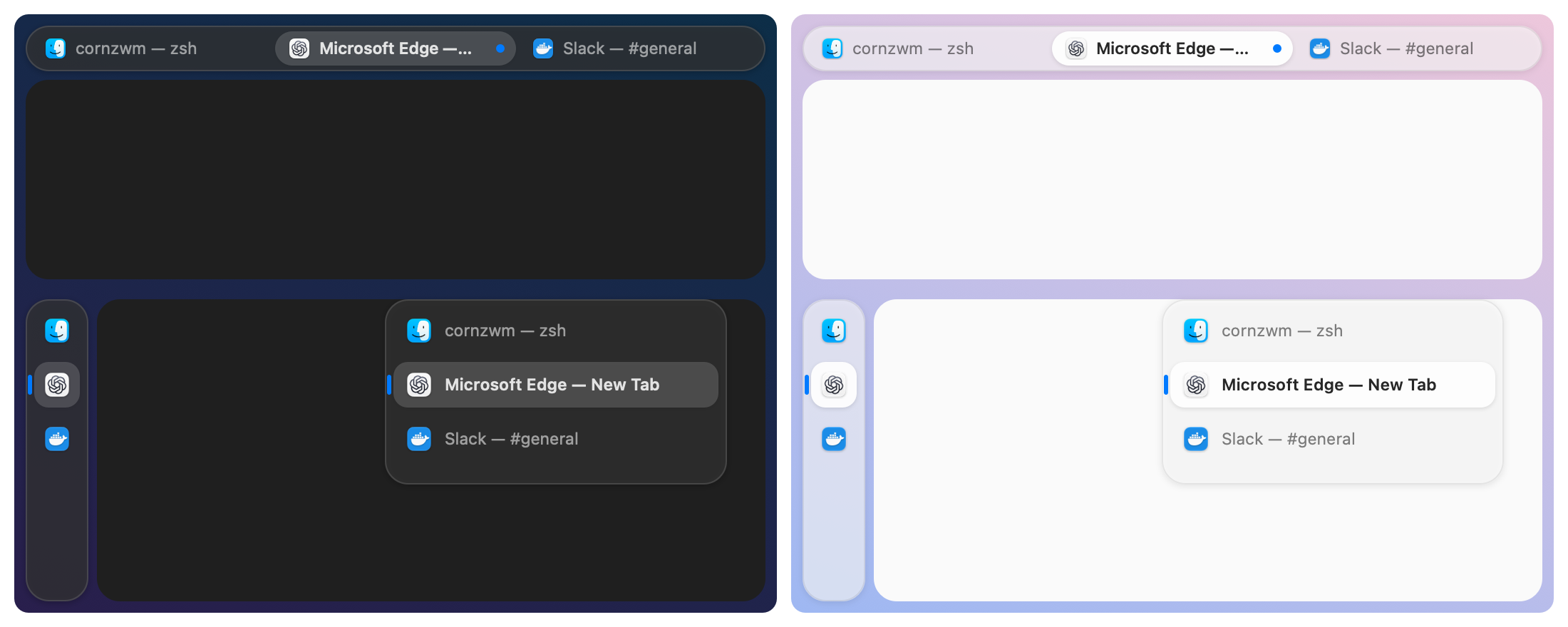
layout tabs,Option+Tin the default configuration): every window of the workspace shares one frame like tabs in a browser. A Liquid Glass tab bar with app icons and window titles switches between them by click,focus, andfocus next;movereorders them. Floating windows stay above the active tab.tabs position top: a capsule tab bar above the window; the active tab is raised with an accent dot.tabs position left: an icon rail that expands over the window to show titles on hover.tabs sizesets the bar's height or width, andtabs autohide truehides the bar until the tabs change or the pointer touches its screen edge.- With your own configuration, add
bindsym $mod+t layout tabsto get the shortcut.
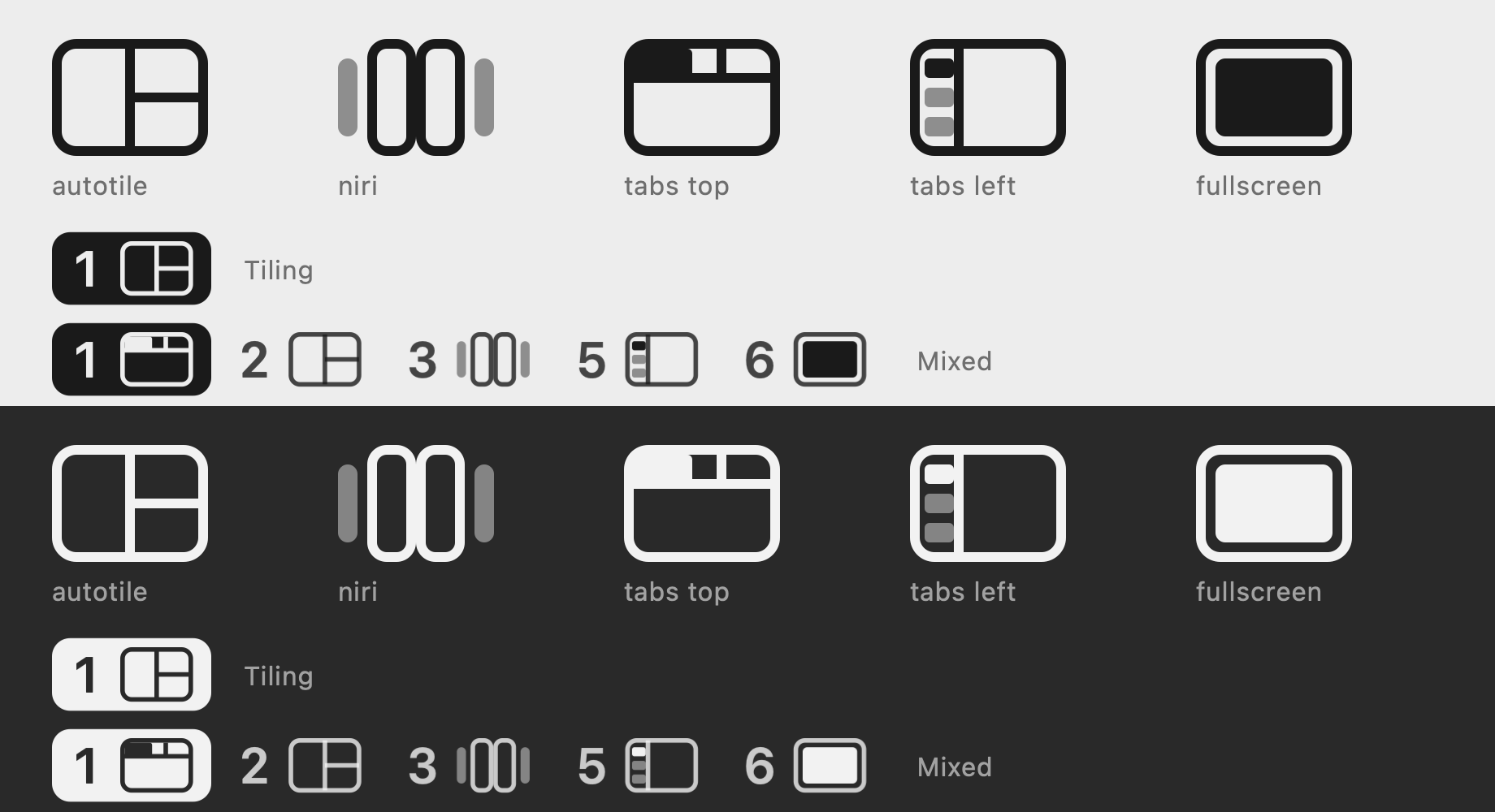
- Layout glyphs in the menu bar: each occupied workspace shows its number and a glyph for BSP, scrolling columns, tabs at the top or left, or WM-fullscreen, instead of
T,N, andF.
Improvements
- Window titles are tracked live, so tabs follow title changes.
- The README now shows all three layouts.
Verification
- All 207 tests pass, including new tests for the tabs layout, tab bar geometry, menu-bar glyphs, configuration, and title events.
- The tab bar was checked live on macOS 27 at the top and on the left, with real Liquid Glass.
- The app is signed with Developer ID, uses the hardened runtime, and is notarized with a stapled ticket.
Full Changelog: v0.8.1...v0.9.0