GitHub App Installation
Install the Crodox GitHub app in your GitHub Enterprise environment to grant Crodox access to your repositories.
The Crodox-DEV GitHub app enables Crodox to:
- Access your repositories
- Read code and parse structure
- Create pull requests from parsed selections
- Manage permissions per organization
When you attempt to link your GitHub account in Crodox:
- Go to Settings
- Click Re-link GitHub (or during initial setup)
- You will be redirected to GitHub Enterprise for authorization
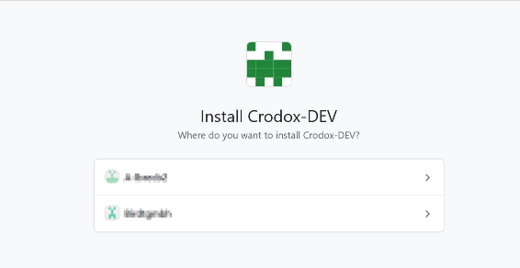
If the Crodox app is not yet installed in your GitHub organization:
- You will see "Where do you want to install Crodox-DEV?"
- Select the GitHub organization or workspace where you want to install the app
- Click the arrow to proceed with installation
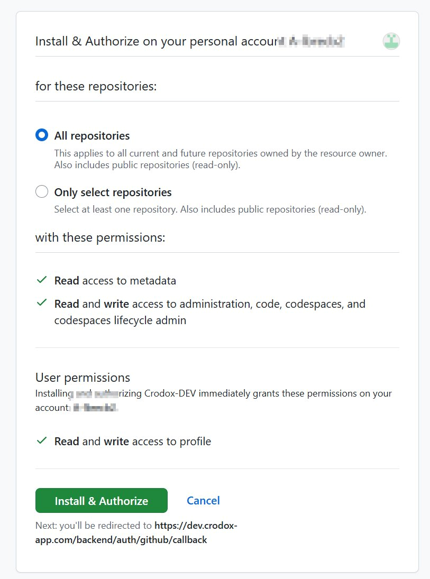
On the authorization screen, you will see:
Repository Access:
- All repositories - Grant access to all current and future repositories (recommended)
- Only select repositories - Choose specific repositories to grant access
App Permissions:
- Read access to metadata
- Read and write access to administration, code, codespaces, and codespaces lifecycle admin
User Permissions:
- Read and write access to your profile
- Select your preferred repository access level
- Review the permissions listed
- Click Install & Authorize to proceed
- You will be redirected back to Crodox after authorization
Before creating a Workbench, ensure your GitHub repositories meet these requirements:
- Template Repository - The repository must be marked as a Template Repository in GitHub Enterprise
- Crodox App Access - The repository must be included in the Crodox app's access scope
- Readable Content - The repository must contain source code that matches your Crodox grammar
See GitHub Repository Setup for instructions on configuring template repositories.
Issue: "Installation failed" or permission denied
Solution:
- Ensure you have admin permissions in the GitHub organization
- Check that your GitHub Enterprise instance allows third-party app installation
- Contact your GitHub Enterprise administrator if needed
Issue: App is installed but I can't see my repositories
Solution:
- Re-check Repository Access Management in Settings
- Ensure the repositories are included in the app's access scope
- Click Manage Repository Access to update permissions
See also: GitHub Integration - Repository management · GitHub Re-linking - Update app permissions