Repository navigation
GhostPort
a little ghost in your localhost.
Somewhere inside your computer, a service is listening. GhostPort v0.1.1 is a local-first command-line utility that inspects TCP ports on your own machine, identifies the listening process when the operating system allows it, and checks how local HTTP services respond. ♡
No dashboards, no cloud account, no background daemon. GhostPort is an independent CyberStudios™ project and does not require CyberCore or any other CyberStudios software.
ghostport-cli on PyPI · Source on GitHub · v0.1.1 release · README
python -m pip install ghostport-cli
ghostport inspect 8080 --http
The PyPI package is named ghostport-cli; the command and import name are ghostport. Requires Python 3.11 or newer on Windows, Linux, or macOS.
ghostport inspect PORT [--http] [--expect-json] [--json] [--verbose]
                       [--timeout SECONDS] [--path /PATH]
| Option | What it does |
|---|---|
--http |
Send one bounded HTTP GET request and inspect the response headers. |
--expect-json |
Check that the content type is a supported JSON media type. Requires --http. |
--json |
Stable, versioned machine-readable output for scripts. |
--verbose, -v
|
Extra diagnostics with sensitive values redacted. |
--timeout, -t
|
Per-operation timeout from 0.05 to 30 seconds. Default: 3 seconds. |
--path |
HTTP request path. Default: /. |
Three independent checks keep the report honest: TCP (loopback connection), process (PID and name when permissions allow, never affecting the TCP result), and HTTP (status code, content type, server header, and response time, without reading the response body).
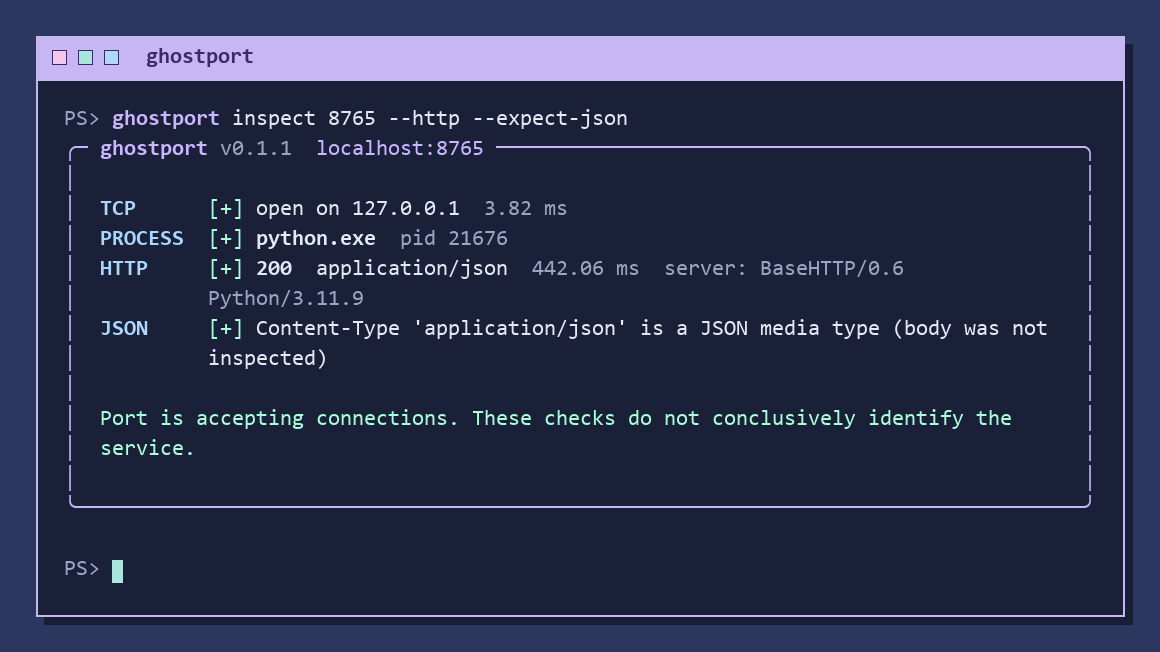
Real output from ghostport inspect 8765 --http --expect-json against a temporary local Python JSON test server. A JSON content type doesn't conclusively identify a service, and GhostPort doesn't claim it does.
| Code | Meaning |
|---|---|
0 |
TCP connection succeeded and requested HTTP checks passed. |
1 |
TCP connection failed, timed out, or encountered an error. |
2 |
Invalid arguments or unsupported option combinations. |
3 |
TCP succeeded, but the requested HTTP or JSON check failed. |
The --json report uses schema_version: 1 with independent tcp, process, and http sections.
- Connects only to
127.0.0.1and::1. No arbitrary host scanning. - Never kills, signals, or modifies processes, and needs no administrator privileges.
- No telemetry and no external requests. Redirects aren't followed.
- Process identification depends on OS permissions, and closed loopback ports can take about two seconds to report on Windows.
- TLS-only services aren't supported by the plain HTTP probe.
Portgeist is GhostPort's pixel-art mascot: a friendly little network caretaker with mint cursor eyes and an Ethernet cable tail. The poses are decorative and don't represent diagnostic results.

| Connected | Sleeping | Confused |
|---|---|---|
 |
 |
 |