A simple tasks api with nodejs, knex, joi, jwt and swagger
$ git clone https://github.com/danielschmitz/tasks-node-knex-swagger.git
$ cd tasks-node-knex-swagger
$ npm install
$ cp .env.example .env
$ npm run createdb
$ npm run dev
Go to http://localhost:3000/swagger
To make some calls to the API, you must be logged in. To do this, go to the /auth/login row in swagger and click on the "Try it Out" button:
Image Example

The swagger setup already comes with the email and password information for user 1. Thus, you do not need to provide any information. Just click the "Execute" button
Image Example

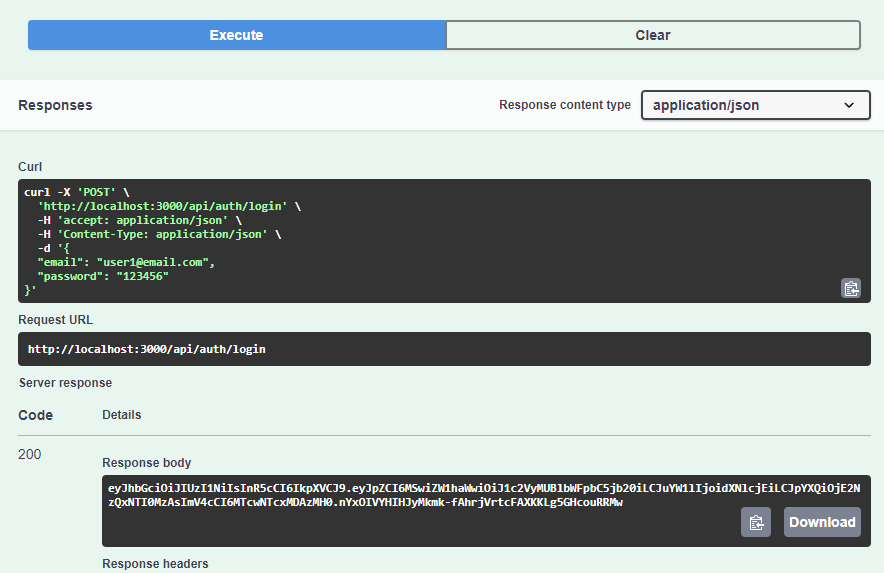
After performing this action, you get the authentication token as an answer:
Image Example
Copy the token, go to the top of the page, and click on the "Authorize" button.
Image Example

With this token, you can access other API calls, such as "/categories".
The database used in development mode is sqlite3. And in production, postgreSQL.
ORM

TODO
.envSets the JWT SECRET and the DATABASE_URL (in production mode)knexfile.jsKnex configuration https://knexjs.org/src/swagger.jsSwagger configuration. At the end of the file, inendpointsFilesthe api files are added to swagger generate.src/api/Contains the api, where each file is an api of a certain entity and inindex.jsthose files are exported to node.
The migration CLI is bundled with the knex install, and is driven by the node-liftoff module. To install globally, run:
$ npm install knex -g
Creating new migration files can be achieved by running:
$ knex migrate:make migration_name
Once you have finished writing the migrations, you can update the database matching your NODE_ENV by running:
$ knex migrate:latest
To create a seed file, run:
$ knex seed:make seed_name
To run seed files, execute:
$ knex seed:run