Repository navigation
v0.19.0

A new look for the dashboard card, with a Material option.
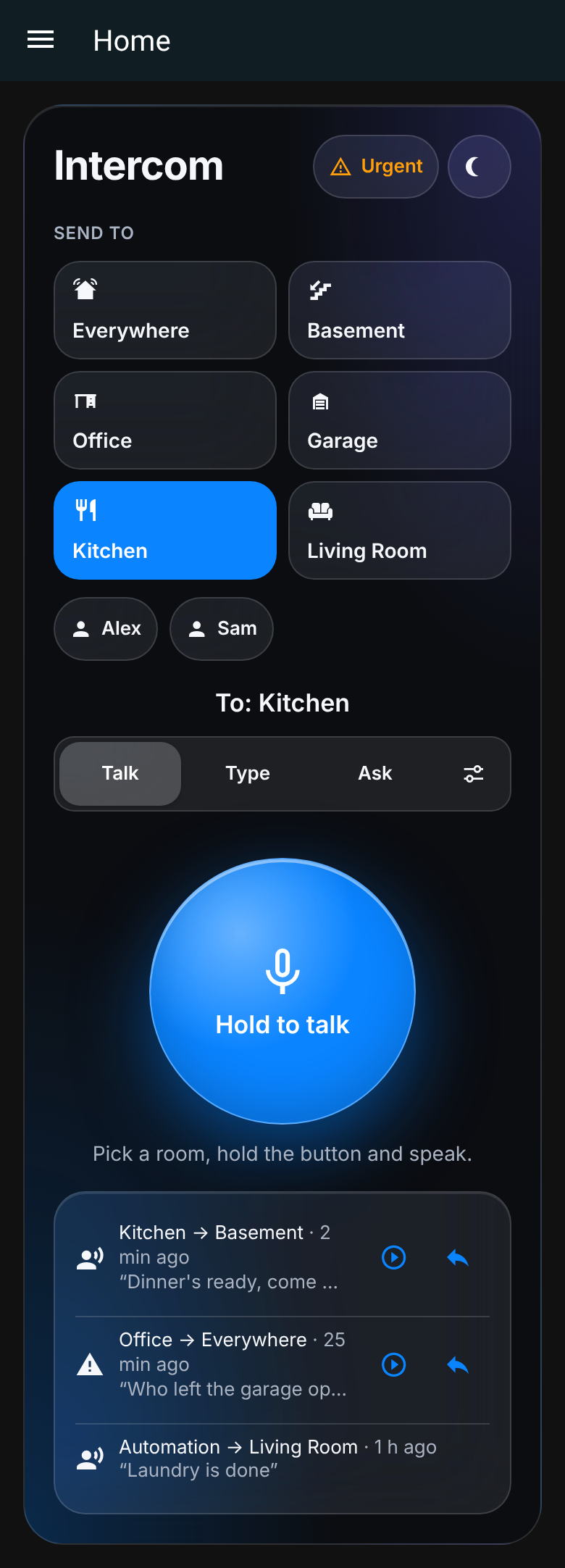
Glass (new default)
Frosted, Apple-like surfaces with soft colour glows, room tiles with icons, an iOS-style Talk / Type / Ask segmented control and a talk button with depth. Compact and kiosk layouts keep their shapes.
Material
Set Appearance → Material. The whole palette (selected rooms, segmented button, success/warning colours and the gradient talk button) is generated from the one colour you pick, in light and dark. Filled icons and filter chips with check marks.
New card options (also in the visual editor)
appearance:glass(default),material, orhome-assistant, which keeps your dashboard theme as before.theme:autofollows Home Assistant's dark mode, or forcelight/dark.color: any colour. Text on light colours switches to dark for contrast.
type: custom:roomcall-card
appearance: material
theme: auto
color: "#7c4dff"
The card editor is now translated in all five languages (en, es, de, fr, nl), including fields that were English-only before. The guides from #59 are corrected, and docs screenshots are verified against their sources in CI.
Updating
Update through HACS (or roomcall.zip) and reload the dashboard. To keep the old look, set Appearance → Home Assistant theme.
The iPhone app is unchanged in this release. Keep using RoomCall-0.18.2-unsigned.ipa from v0.18.2.
Validation: lint, format, mypy, browser QA (layout at 240–600 px, large text, each appearance in light and dark, contrast, no overflow), standalone tests and the HA test suites at 100% statement coverage, strict docs, HACS and hassfest all passed in CI. New tests_ha/test_card_appearance.py runs the shipped card JavaScript.
PR #60 · PR #59 · Card guide · Full Changelog: v0.18.2...v0.19.0