Repository navigation
Releases: daredoole/RoomCall
Release list
v0.23.0

RoomCall 0.23.0 lets you call a whole floor or label, adds tap to start and stop on the card, and adds a button message blueprint.
- Target a whole floor or label:
floorsandlabelsonroomcall.broadcastand the
communicate operations, by id, name or alias. Labels match the speaker, its device
or its room. An unknown floor or label fails rather than reaching every room, and
agent restrictions apply to each speaker reached. - The card offers a floor when it holds two or more RoomCall rooms and is not the
whole house. Nothing to configure, and no change if you do not use floors. - New card option Tap to start and stop (
tap_to_talk), for anyone who finds holding
a button hard. Off by default. The microphone closes itself after 2 minutes, or when
you leave the page or window. - New Button message blueprint: press a Zigbee, Matter or other button and your message
plays in the rooms you pick. It speaks a fixed message; it doesn't record your voice.
After updating through HACS, restart Home Assistant and refresh the dashboard to load the new card.
Test build: Echo calls (PR #72, not a release)

v0.22.1
RoomCall 0.22.1 fixes receiver announcements and makes Android/Google TV audio devices easier to find.
- Show audio-capable devices online now or seen within 24 hours in the speaker picker,
including standby Cast TVs. Keep saved selections editable and identify Android TV
Remote controls separately from Google Cast audio endpoints. - Accept Denon’s NET report for its HEOS Music input. Wait 10 seconds after waking or
switching a Denon AVR and 2 seconds before restoration, with per-device startup/restore
overrides under Communication → Speaker startup and restore delays. - Keep the short-lived audio signature as the only URL query parameter so HEOS receivers
that strip query separators can fetch authenticated clips and live audio. - Preserve Sonos and Music Assistant session volume/mute when only timing overrides
are set, including user changes made while a pending announcement expires.
After updating through HACS, restart Home Assistant and refresh the dashboard to load the new card.
The integration, standalone package and dashboard card are version 0.22.1. Native iOS source/version is unchanged. Release files include signed GitHub build provenance; request acceptance still does not prove audible playback.
v0.22.0
What's Changed
- feat(card): simple layout for new cards by @daredoole in #64
- docs: user-first navigation and use-case guides by @daredoole in #66
- feat: add first-run URL repairs and room listening checks by @daredoole in #63
- feat: support Music Assistant with conservative speaker selection by @daredoole in #65
- docs: first-visit README and docs home by @daredoole in #67
- fix: address HACS review (signed media URLs, log, I/O, redaction) by @daredoole in #68
- chore: release 0.22.0 by @daredoole in #69
Full Changelog: v0.21.0...v0.22.0
Contributors

Assets 6
v0.21.0
Prepare receiver and TV audio routes before sending, then restore supported state afterward.
- Verify companion identity; use explicit receiver/HDMI mappings when needed. Wake controls and confirm the selected input instead of assuming a fetched URL was audible.
- Restore supported power, input, volume, mute and Android app/media state. Replayable Cast media can preserve paused/playing state and its last reported position. Exact provider-session recovery is best effort.
- Respect external app/input/session changes and current permissions. Keep shared-output calls serialized through playback/restoration, including buffered live audio.
- Show interruption previews and independent restoration outcomes for people and agents. Refresh guides, translations and reviewed screenshots.
Both Python packages retain 100% statement coverage; both supported Home Assistant suites and browser QA pass. Acceptance and restoration requests do not prove audible playback.
This is a Home Assistant/server update. The existing native app remains compatible; a new IPA is not required.
v0.20.0
The iPhone app gets the dashboard card's Glass and Material looks, and RoomCall can now slow down (or speed up) its speech.
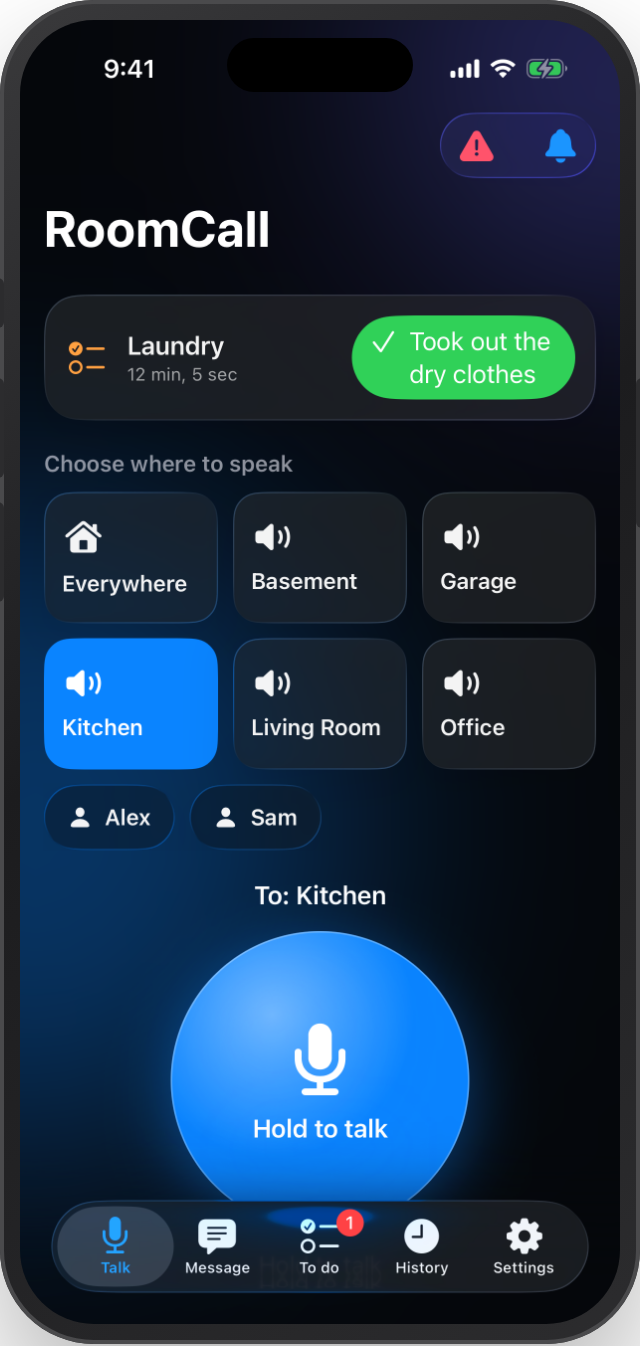
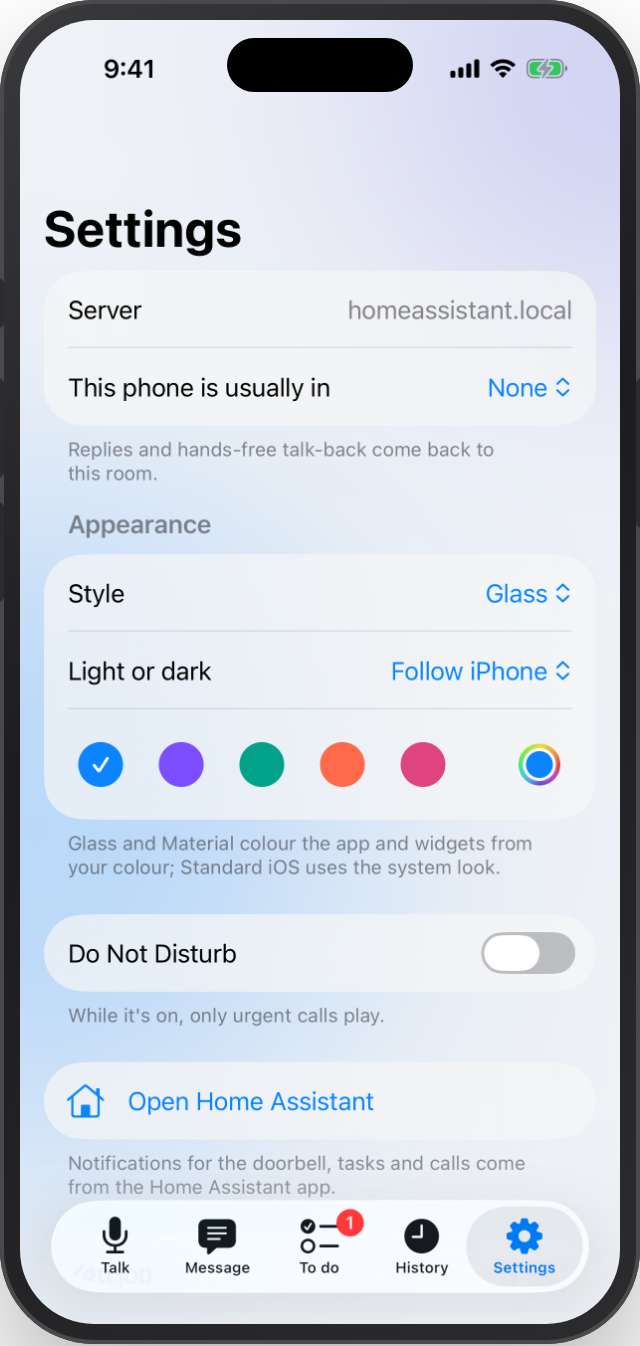
iPhone app (0.20.0, build 4)
- Glass (default): Liquid Glass surfaces on iOS 26 (frosted material on iOS 18–25) over soft colour glows. Room tiles with icons, a glossy talk button that turns red with rings while live, and glass cards, lists and notices.
- Material: a tonal palette generated from your colour, check-marked selection and a gradient talk button. Standard iOS keeps the system look.
- Settings → Appearance: style, light / dark / follow iPhone, and a button colour (five presets or any colour). Home-screen widgets use the same colour.
Speaking speed
- New Speaking speed option (0.5–1.5, default 1) under Settings → Devices & services → RoomCall → Configure, and in the card's Settings → Setup.
- It applies to typed messages, announcements and reminders. It works with any text-to-speech engine and keeps the voice's pitch; the chime is unchanged. Try 0.85 if speech sounds rushed.
Update
- Home Assistant: update RoomCall in HACS (or install roomcall.zip), restart, then set the speaking speed under Configure.
- iPhone: download RoomCall-0.20.0-unsigned.ipa, sign it with the same identity as your current install, and install. Its source run and checksum are in RoomCall-0.20.0-build.json. It is a separate CI artifact and isn't covered by the integration's provenance bundle.
Validation: the iOS CI run on the release commit passed the native unit, UI (including a new appearance test) and screenshot tests and the unsigned device build. The HA suite passed with 320 passed, 1 skipped at 100% statement coverage, with real-ffmpeg tests for the speed change. Browser QA, lint, iOS localization checks, the screenshot manifest, Codex review, HACS and hassfest all passed. Physical-device behaviour and acoustic latency are not measured by CI.
PR #61 · iOS guide · Full Changelog: v0.19.0...v0.20.0
v0.19.0
A new look for the dashboard card, with a Material option.
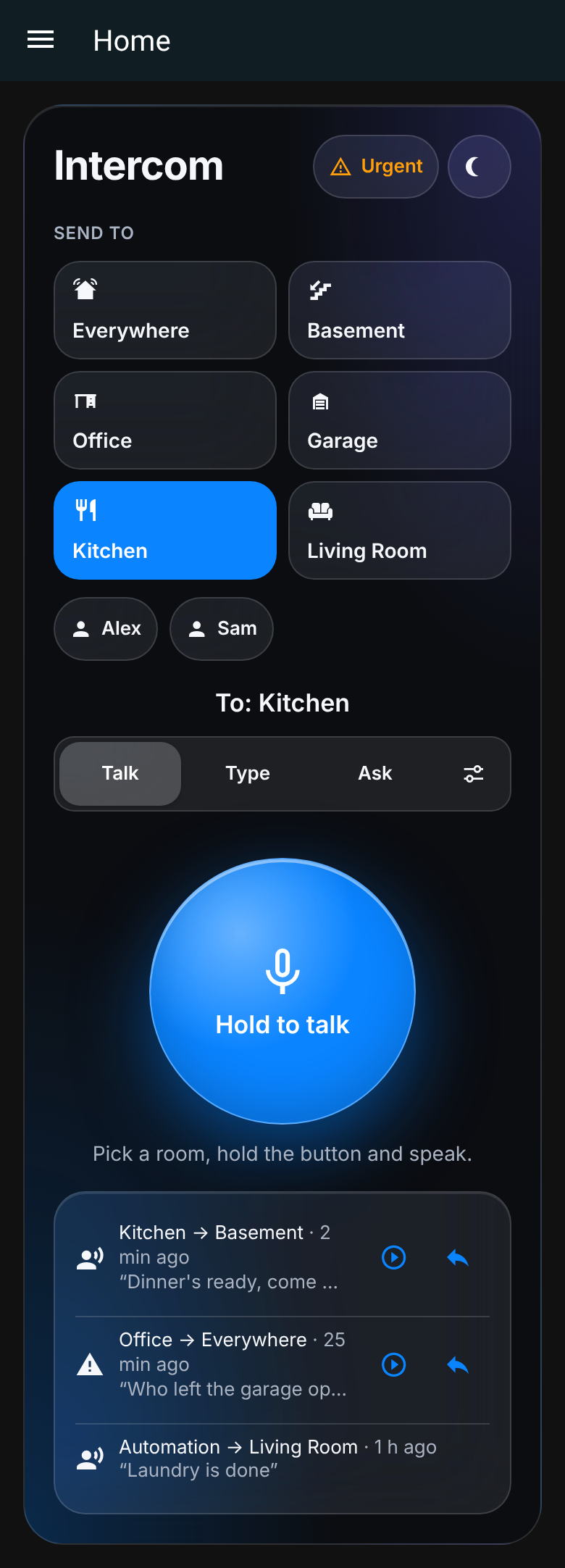
Glass (new default)
Frosted, Apple-like surfaces with soft colour glows, room tiles with icons, an iOS-style Talk / Type / Ask segmented control and a talk button with depth. Compact and kiosk layouts keep their shapes.
Material
Set Appearance → Material. The whole palette (selected rooms, segmented button, success/warning colours and the gradient talk button) is generated from the one colour you pick, in light and dark. Filled icons and filter chips with check marks.
New card options (also in the visual editor)
appearance:glass(default),material, orhome-assistant, which keeps your dashboard theme as before.theme:autofollows Home Assistant's dark mode, or forcelight/dark.color: any colour. Text on light colours switches to dark for contrast.
type: custom:roomcall-card
appearance: material
theme: auto
color: "#7c4dff"
The card editor is now translated in all five languages (en, es, de, fr, nl), including fields that were English-only before. The guides from #59 are corrected, and docs screenshots are verified against their sources in CI.
Updating
Update through HACS (or roomcall.zip) and reload the dashboard. To keep the old look, set Appearance → Home Assistant theme.
The iPhone app is unchanged in this release. Keep using RoomCall-0.18.2-unsigned.ipa from v0.18.2.
Validation: lint, format, mypy, browser QA (layout at 240–600 px, large text, each appearance in light and dark, contrast, no overflow), standalone tests and the HA test suites at 100% statement coverage, strict docs, HACS and hassfest all passed in CI. New tests_ha/test_card_appearance.py runs the shipped card JavaScript.
PR #60 · PR #59 · Card guide · Full Changelog: v0.18.2...v0.19.0
v0.18.2
Fix native live-call completion reporting after playback requests were already accepted.
The app now completes on Home Assistant’s independent delivery receipt while HA continues transcription, history and notifications. Partial and failed requests remain failures; acceptance does not establish audibility. Queued delivery gets a bounded 130-second confirmation window separate from the 30-second handshake timeout. Missing confirmation reports an unknown outcome and advises checking history before retrying. Waiting and uncertainty text is translated in all five languages.
Update the iPhone app
Download RoomCall-0.18.2-unsigned.ipa, sign it using the same Apple/signing identity as your current installation, and install the update. The app and widget extension report 0.18.2, build 3. The public OAuth metadata fix from 0.18.1 is retained.
RoomCall 0.18.0 or later on HA already provides the delivery receipt. This correction is in the native app. Individual speakers can still have buffering/wake-up delays, and repeated calls can queue behind active playback. Playback serialization and selected destinations are preserved.
The unsigned IPA is a separate device CI artifact; its source run and checksum are in RoomCall-0.18.2-build.json, and it is not covered by the integration/Python-package provenance bundle. Physical-device latency is not benchmarked by CI.
Validation: native unit/UI/screenshot tests and unsigned device compilation passed before publication. A real-ffmpeg HA WebSocket regression confirms that closing after acceptance retains every PCM frame, the saved recording and the transcript while transcription was initially blocked. HA 2026.10.2: 311 passed; HA 2026.2.3: 310 passed + one compatibility skip; standalone: 33 passed, all at 100% statement coverage. Lint, format, mypy, resource synchronization, browser QA, strict docs, HACS and hassfest passed.
The HA integration ZIP and Python packages also carry version 0.18.2; roomcall.zip is the manual HA installation asset.
v0.18.1
Fix native iPhone sign-in failing with Invalid redirect URI on Home Assistant servers using a private certificate authority.
HA validates the app callback by fetching the OAuth client metadata itself. Trusting the private CA on the iPhone does not make HA trust it. New sign-ins use a small public HTTPS metadata page; authorization and token requests still go only to your selected HA server, with PKCE and state checks. Existing saved credentials retain their original client ID for refresh.
Update the iPhone app
Download RoomCall-0.18.1-unsigned.ipa, sign it with your own Apple identity and install it using the same signing/bundle identity as your current app. Then scan the QR code and sign in again. The app and widget extension report version 0.18.1, build 2.
This fix is in the native app; updating only the HA integration does not replace an installed iPhone build. RoomCall 0.18.0 on HA already provides the required backend. HA needs outbound HTTPS access to https://daredoole.github.io/RoomCall/ios-client.html for new sign-ins. Private server certificates still need to be trusted on the iPhone.
The IPA is a separate unsigned device CI artifact, not an App Store/TestFlight build. Its checksum and source run are in RoomCall-iOS-build.json; it is not covered by the integration/Python-package provenance bundle.
Validation: HA 2026.10.2 310 passed, HA 2026.2.3 309 passed + one compatibility skip, standalone 33 passed, all at 100% statement coverage. Regression tests exercise HA’s actual redirect validator, private-CA failure, public metadata, native authorization parameters and both legacy/new refresh identities. Native unit/UI/screenshot tests and device compilation are verified before publishing.
The HA integration ZIP and Python packages also carry version 0.18.1. For a manual HA update, use roomcall.zip; HACS users can use their normal update flow.
v0.18.0
RoomCall 0.18.0 brings the five message-workflow features together with the completed sideloadable iOS app.
- Prepared speech: configured fast/balanced/quality engine-and-voice choices, preparation without playback, and owner-scoped in-memory speech/chime caching. Labels are not performance guarantees.
- Durable jobs: opt-in queued text messages survive reloads/restarts, with current permission checks and original expiration. Potentially dispatched jobs become
interruptedand are never replayed automatically. - Household profiles: reusable destinations, message defaults, volume, language, voice and chime choices in the Type tab and agent API. Explicit speech profiles override household voice defaults.
- Delivery timeline: preparation and dispatch stages, endpoint fetch/playback evidence and explicit human acknowledgment remain distinct. Completed requests do not prove anyone heard them.
- Agent permissions: optional per-account RoomCall operation/destination/hour/urgency/volume/rate restrictions and authenticated owned-job WebSocket updates. These are additional RoomCall limits, not HA-wide token scopes.
- Native iOS: in-app hold to talk, text, satellite questions, tasks, history, foreground doorbell alerts, Siri, widgets and Live Activities. Correct translations in all five languages. No system Push to Talk entitlement or HomePod Intercom membership.
- Updated docs: current human/agent guides, roadmap, lifecycle examples, signing instructions and actual simulator screenshots.
- Repository hygiene: remove generated coverage data from tracking and replace a local hostname fixture. Historical author metadata and old paths remain in Git history.
Install or update
Update RoomCall in HACS, then restart Home Assistant. For a manual installation, download roomcall.zip below and extract it to /config/custom_components/roomcall/, then restart. Refresh the dashboard if it retains older card resources.
New profiles and agent policies are configured under RoomCall → Configure → Communication. Durable retention is opt-in per message; ordinary jobs remain memory-only. Prepared audio is memory-only and is cleared on reload. The default Piper voice is not changed by this release.
The integration ZIP is the Home Assistant release asset. iOS unsigned IPA artifacts are available in successful iOS workflow runs; they need your own signing and are not directly installable files. The native app requires HA 2026.10+ for PKCE sign-in. Receiving always-on background audio is not implemented.
Validation
- HA 2026.10.2: 309 passed, 100% statement coverage.
- HA 2026.2.3: 308 passed, one compatibility skip, 100% statement coverage.
- Standalone server: 33 passed, 100% statement coverage; CI also tests Python 3.12/3.13.
- Browser messaging, previews, household presets, timeline, responsive layouts and consent-based WebRTC QA passed.
- Lint, formatting, mypy, native translation synchronization, strict documentation build and final PR CI checks passed.
Python coverage does not measure JavaScript or Swift execution. Native simulator/device compilation was validated separately; physical speaker audibility and iPhone installation were not tested.
Documentation · Communication guide · AI guide · iOS app and signing
Focused changes: #51, #54, #52, #53, #55. Release preparation: #56. Changes developed as 0.13.0–0.17.0 first ship together in this GitHub release.