Repository navigation
Reordering Inputs
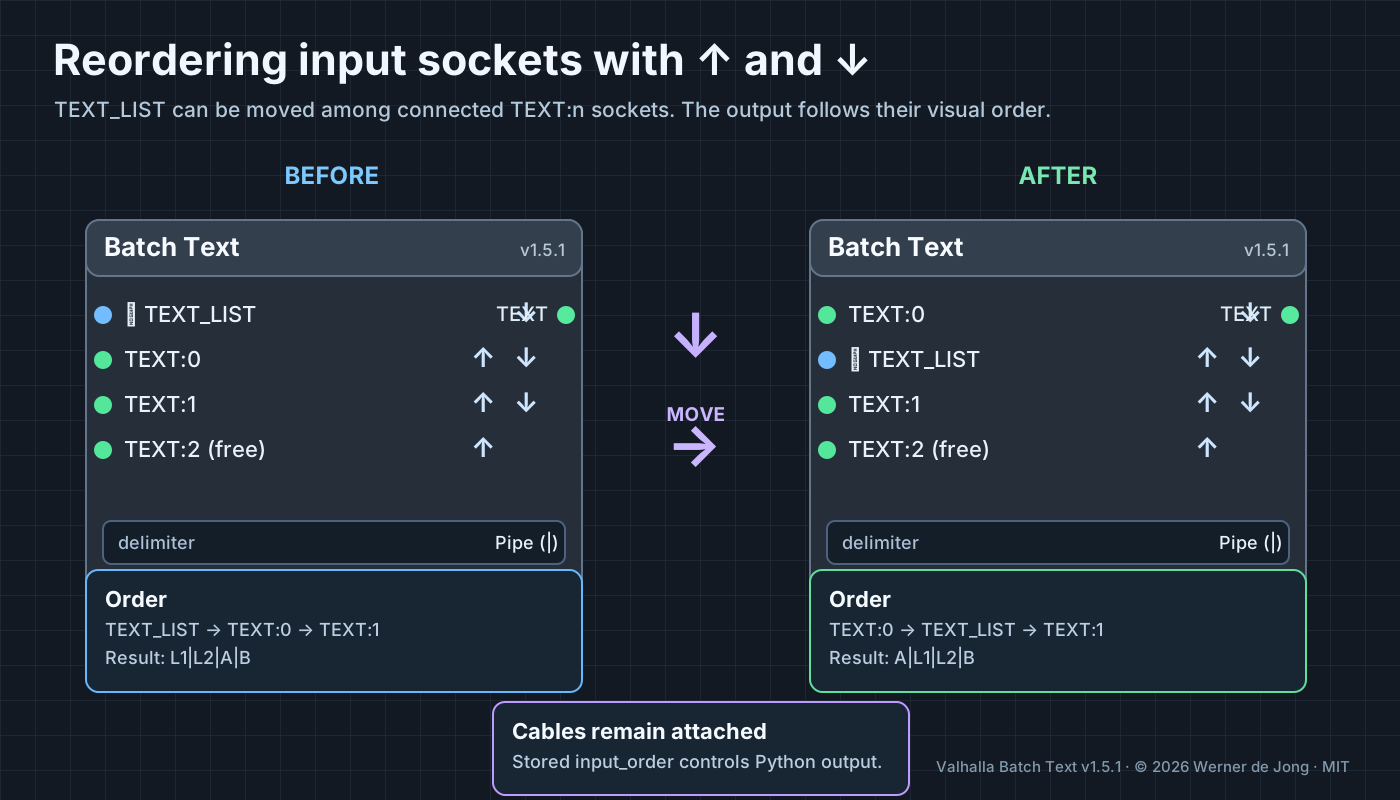
The up/down arrows beside the sockets change the order in which Batch Text processes values. The arrows do not simply change the appearance of the node: the Python backend receives the saved order.
- Connect a native
STRINGlist toTEXT_LIST(optional) and regularSTRINGvalues toTEXT:0,TEXT:1, etc. - Click the down arrow (↓) next to a socket to move it one position lower, or the up arrow (↑) to move it one position higher.
- Watch the sockets and attached cables move together; ComfyUI does not connect them to a different source.
- Save the workflow and reopen it after restarting ComfyUI to confirm port positions and cables persist; then queue it as usual.
- Connect
TEXTto a text preview to verify the resulting sequence.
TEXT_LIST contains L1 and L2; TEXT:0 = A, TEXT:1 = B; delimiter = Pipe (|).
| Visible order (top-to-bottom) | Result |
|---|---|
TEXT_LIST, TEXT:0, TEXT:1
|
`L1 |
TEXT:0, TEXT_LIST, TEXT:1
|
`A |
TEXT:0, TEXT:1, TEXT_LIST
|
`A |
Important: TEXT_LIST expands into its individual strings at the position where its socket appears. The delimiter is placed between every resulting item, not just between ports.
- The frontend updates the sockets' physical order, keeps link objects attached and updates LiteGraph
target_slotindices. - Numbered
TEXT:nlabels stay with their socket and its existing source connection when moved. The last freeTEXT:nis an unconnected placeholder and does not contribute output. - Workflow metadata
valhalla_batch_text_socket_orderand the hiddeninput_orderwidget preserve the selected order. The API prompt still usesinput_order. Do not edit these values manually. - Older workflows without order metadata retain the old fallback order:
TEXT_LISTfirst, thenTEXT:0,TEXT:1, etc. - If the ordering does not affect the output, ensure the installed node is v1.5.4 or later, restart ComfyUI, and hard-refresh the frontend.
Two outlined ↑ / ↓ buttons appear beside each input, on the same row. All connected ordinary TEXT:n inputs can move relative to one another, as can TEXT_LIST. When you move TEXT:1 above TEXT:0, those names stay attached to their original cables and the joined output respects their new top-to-bottom order. The unused free text socket shows disabled arrows until connected.
In modern ComfyUI versions with a central link store, an occupied target slot cannot be overwritten by the endpoint from another connected socket. v1.5.3 fixes this: the node temporarily uses its unconnected spare TEXT:n input to move existing link endpoints safely and then repositions the complete socket objects. The original link IDs, source nodes and reroute chains remain intact.
Try it: connect A to TEXT:0, B to TEXT:1, and an optional native list to TEXT_LIST. Move TEXT:1 above TEXT:0 and watch its cable follow TEXT:1. Next move TEXT_LIST between the numbered inputs; its cable must move with it. Queue the workflow: the output order must match the displayed top-to-bottom socket order. Save and reload to confirm it persists.
The owner tested and approved this behavior in a live ComfyUI workflow before the v1.5.3 GitHub publication.
GitHub issue #1 was fixed by restoring the saved socket order and matching socket identities to their original connected links when reopening a workflow. The positions and cables now persist after a full ComfyUI restart. Confirmed in a local workflow by the project owner on 28 October 2026.