Repository navigation
Releases
Fable II for Steam Deck 1.0.5

An update to the native Steam Deck version of Fable 2 Recomp: an in-game settings menu, and a smooth 60 fps even in the heaviest scenes.
Download: Fable2-SteamDeck-1.0.5.tar.gz below. It holds no game content: you need your own copy of Fable II Game of the Year Edition as a disc image (.iso).
What's new
Deck Recomp: a settings menu in the game
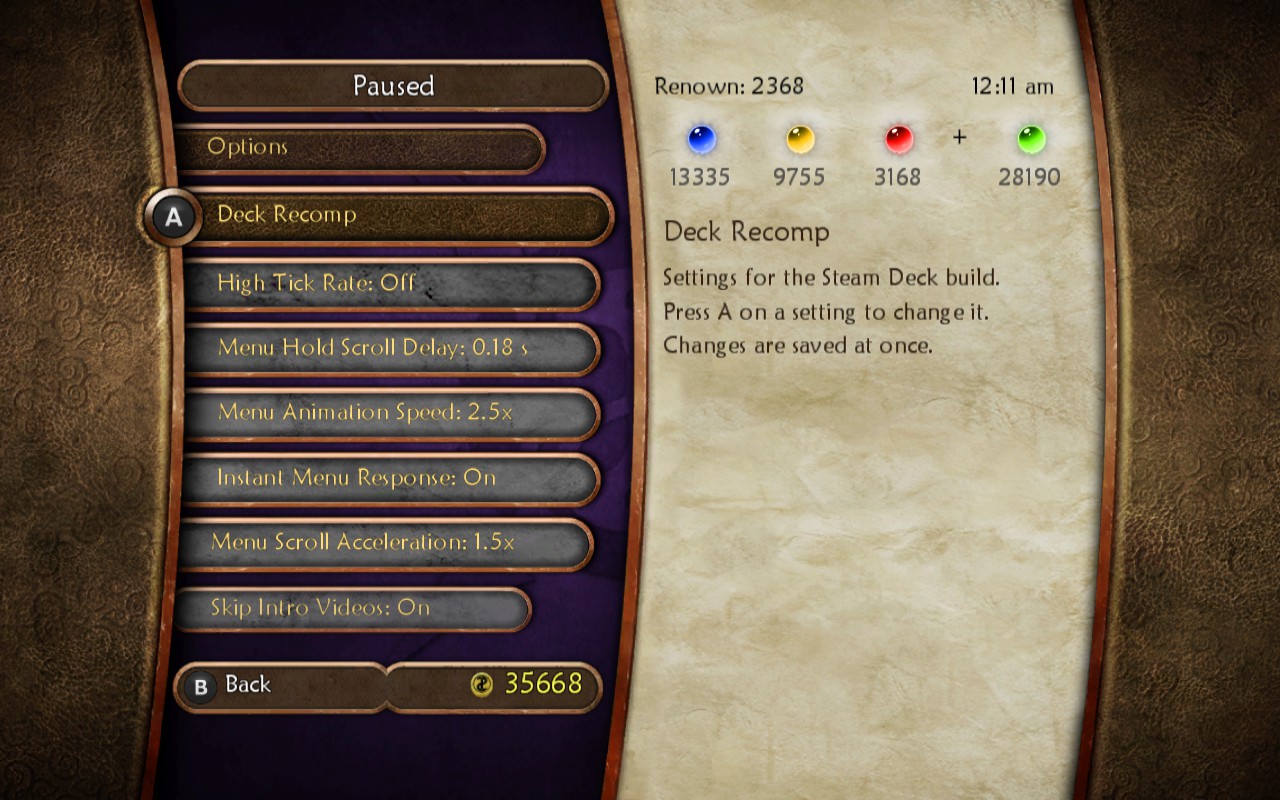
Pause the game and open Deck Recomp, a new entry just below Options. It lists this build's settings in the game's own menu style, so there's no need to edit fable2_config.toml in Desktop Mode any more:
- High Tick Rate (experimental)
- Menu Hold Scroll Delay, Menu Animation Speed, Instant Menu Response, Menu Scroll Acceleration
- Skip Intro Videos
- Motion Blur
- Button Icons (Steam Deck dark or light, or Xbox 360)
- Frame Rate Cap (30, 40, 45, 60 or unlimited)
- Async Shader Compilation
Press A on a setting to step through its values. Each change is saved straight away and, where possible, applies at once; settings that need a restart say (after restart). While a setting is highlighted, the right-hand page explains what it does.
A smooth 60 fps, even in the heaviest scenes
With the default 60 fps cap, the game now holds 60 fps in the heaviest scenes we test, like Bowerstone Old Town and Bowerstone Market. The one exception is the first time an area's shaders are seen (see below).
In Bowerstone Old Town, the heaviest of them, the frame rate without a cap went from about 59 fps in 1.0.4 to about 65 fps (roughly 10% faster), so the 60 fps cap now has headroom instead of dipping below it. The GPU does about 14% less work per frame there:
- Shaders specialised for the textures they read. Each shader is now compiled for the texture formats actually bound to it, so the GPU no longer checks the format for every pixel it shades.
- Fewer render-target copies. Clears of the Xbox 360's render-target memory (EDRAM) are applied directly instead of being copied around.
Async shader compilation, on by default
The first time something new appears, the shaders it needs have to be compiled for the Deck's GPU, which used to stop the game for a moment. They are now compiled on background threads, and whatever needs them (a part of an object, or an effect) is left out for a moment until they're ready. This reduces those stutters, mostly on first visits to an area; compiled shaders are kept, so later visits are smooth. Turn it off under Async Shader Compilation in the Deck Recomp menu if you prefer the original behaviour.
Your shader cache from 1.0.4 is kept and reused, so updating doesn't mean compiling everything again.
Installing
- Download
Fable2-SteamDeck-1.0.5.tar.gzbelow. - On the Deck, in Desktop Mode, move it to
~/Games/and extract it there (right-click → Extract → Extract archive here). Extract it on the Deck itself, so the executable flags are kept. - Put your Fable II GOTY disc image (
.iso) in~/Downloads. The newFable2-SteamDeckfolder or an SD card work too. - Double-click
Fable2.shin theFable2-SteamDeckfolder (choose Execute). Let it extract the game files, and choose Add to Steam when it asks. From then on, start Fable II from Gaming Mode like any other game.
Requires SteamOS 3.6 or newer.
Adding it to Steam by hand
If you skipped the offer: in Desktop Mode, open Steam → Games → Add a Non-Steam Game to My Library, browse to Fable2.sh (set the file type to All files) and add it. Under the shortcut's Properties → Compatibility, make sure no Proton version is forced.
Updating from an earlier version
Extract the archive over your existing ~/Games/Fable2-SteamDeck folder. Your saves, game files and shader cache are kept. fable2_config.toml is replaced with the defaults, so if you changed settings, back it up first and copy your changes back afterwards, or simply set them again in the new Deck Recomp menu.
Tips
- Faster start-up: turn on Skip Intro Videos in the Deck Recomp menu.
- Battery life: choose 30 or 40 fps under Frame Rate Cap, or use the Quick Access Menu's frame limit.
- Logging: this build writes only warnings and errors to
logs/. For a bug report, setlog_level = "info"infable_2.tomland reproduce the problem.
Source
darokk/Fable-2-Recomp steam-deck-linux at the steamdeck-1.0.5 tag (df4a331), with darokk/rexglue-sdk steam-deck-vulkan at a80d08e4. Changes since 1.0.4: game 593ab3c (async shader compilation option), 15966fc (Deck Recomp menu), f0a7b52 (async on by default), 0f3b241 (descriptions), 8f78f10 and df4a331 (README); SDK 50d98827 (EDRAM clear forwarding), 3fe23c5a (shaders specialised on texture formats), 849b8ca9 (specialised shaders compiled in the background), a80d08e4 (shader cache from 1.0.4 kept; async skip-draws mode).
All credit for the recompilation itself goes to himdo and the Fable 2 Recomp contributors.
SHA-256 of Fable2-SteamDeck-1.0.5.tar.gz:
14cfbe344c419c300433e4bf1178e5e366e76c8d071147cbbba550a4f74e5720
Fable II for Steam Deck 1.0.4
An update to the native Steam Deck version of Fable 2 Recomp: smoother frame rates in heavy scenes and an option to turn off anti-aliasing.
Download: Fable2-SteamDeck-1.0.4.tar.gz below. It holds no game content: you need your own copy of Fable II Game of the Year Edition as a disc image (.iso).
What's new
Faster in heavy scenes
In busy places like Bowerstone Old Town, the Deck is limited by its GPU and by the 15 W it shares between CPU and GPU. This release takes load off both:
- The render thread no longer spins while it waits. About once per frame the game waits for the GPU to report which objects are hidden (occlusion queries). It used to poll for the result millions of times per second, keeping a CPU core fully busy. It now sleeps briefly between checks and still gets the real result. The power this frees goes to the GPU, which runs at higher clocks in heavy scenes.
- The recompiled game code keeps the game's registers in native variables instead of memory (the last two of the recompiler's register optimisations, now made safe for this game), and is compiled as a whole with link-time optimisation, so game functions can call each other directly.
- The GPU command thread does less work per draw (fewer calls across libraries, no locked memory operation per draw).
Together, heavy scenes like Old Town now stay closer to 60 fps, and dip less. Lighter scenes were already at the 60 fps cap and stay there.
Option: turn off anti-aliasing
Fable II renders its scenes with 2x multisample anti-aliasing (MSAA). On the Deck that takes a noticeable share of the GPU's time in heavy scenes. Set disable_msaa = true under [patches] in fable2_config.toml for a steadier 60 fps, at the cost of slightly jaggier edges. It takes effect the next time you start the game. Off by default, so the game looks as before. This option comes from upstream (himdo/Fable-2-Recomp himdo#226 by dekp23).
Installing
- Download
Fable2-SteamDeck-1.0.4.tar.gzbelow. - On the Deck, in Desktop Mode, move it to
~/Games/and extract it there (right-click → Extract → Extract archive here). Extract it on the Deck itself, so the executable flags are kept. - Put your Fable II GOTY disc image (
.iso) in~/Downloads. The newFable2-SteamDeckfolder or an SD card work too. - Double-click
Fable2.shin theFable2-SteamDeckfolder (choose Execute). Let it extract the game files, and choose Add to Steam when it asks. From then on, start Fable II from Gaming Mode like any other game.
Requires SteamOS 3.6 or newer.
Adding it to Steam by hand
If you skipped the offer: in Desktop Mode, open Steam → Games → Add a Non-Steam Game to My Library, browse to Fable2.sh (set the file type to All files) and add it. Under the shortcut's Properties → Compatibility, make sure no Proton version is forced.
Updating from an earlier version
Extract the archive over your existing ~/Games/Fable2-SteamDeck folder. Your saves, game files and shader cache are kept. fable2_config.toml is replaced with the defaults, so if you changed settings, back it up first and copy your changes back afterwards (1.0.4 adds the disable_msaa setting).
Tips
- Smoother game logic: in
fable2_config.toml, set bothhigh_tick_rateandhigher_hf_tick_ratetotrue. The game's own logic otherwise updates at 15 Hz, which can feel choppy even at 60 fps. - Frame rate cap: the game runs at up to 60 fps out of the box, instead of the original 30 fps lock. To change it, edit
fps_limitunder[perf]infable2_config.toml(30 = the original lock). - Button icons, menus, cloth: Steam Deck button icons (
deck_button_promptsunder[input]:"dark","light"or"off"), the faster menus (themenu_*settings under[patches]) and smooth capes and coats (interpolationunder[patches]) work as before. - Logging: this build writes only warnings and errors to
logs/. For a bug report, setlog_level = "info"infable_2.tomland reproduce the problem.
Source
darokk/Fable-2-Recomp steam-deck-linux at the steamdeck-1.0.4 tag (d825201), with darokk/rexglue-sdk steam-deck-vulkan at 44c5d11a. Changes since 1.0.3: game 72b2b56 (link-time optimisation of the game code, direct calls), d2583e7 (registers as native variables), cdb1c53 (disable_msaa, from upstream himdo#226), 41c1b20 (render thread sleeps while waiting), 0217f27 and d825201 (README); SDK 923f2e8e (command thread), 8a657dbc (link flags), 44c5d11a (register optimisations made safe).
All credit for the recompilation itself goes to himdo and the Fable 2 Recomp contributors.
SHA-256 of Fable2-SteamDeck-1.0.4.tar.gz:
e28525a9697b6e75c31ba917a1d68a1f53feffd0aef79e438b9fcde001fbd89b
Fable II for Steam Deck 1.0.3
An update to the native Steam Deck version of Fable 2 Recomp: a much easier first install. The game itself is the same as 1.0.2.
Download: Fable2-SteamDeck-1.0.3.tar.gz below. It holds no game content: you need your own copy of Fable II Game of the Year Edition as a disc image (.iso).
What's new
The game files are extracted for you
You no longer need to build an extraction tool or type terminal commands. Put your Fable II disc image somewhere on the Deck and start Fable2.sh. On the first start it:
- finds the disc image in the game folder, the folder above it,
~/Downloads,~/Desktop,~/Games, your home folder or an SD card, and asks to extract from it. If it doesn't find one, it opens a file picker. Only real Fable II discs are offered. A disc with an unknown or unsupported version gets a warning first, which you can override. - extracts the game files (
default.xexand thedatafolder, about 6.7 GB) with a progress bar, after checking there is enough free space. It takes a few minutes. If you cancel, nothing half-extracted is left behind. The disc image is not changed, and you can delete it afterwards. - offers to add Fable II to your Steam library, so it shows up in Gaming Mode under the name Fable II. No more Add a Non-Steam Game by hand.
It needs nothing beyond what SteamOS already has. Started from a terminal, it asks its questions there instead. You can still copy default.xex and data in by hand, as before.
Installing
- Download
Fable2-SteamDeck-1.0.3.tar.gzbelow. - On the Deck, in Desktop Mode, move it to
~/Games/and extract it there (right-click → Extract → Extract archive here). Extract it on the Deck itself, so the executable flags are kept. - Put your Fable II GOTY disc image (
.iso) in~/Downloads. The newFable2-SteamDeckfolder or an SD card work too. - Double-click
Fable2.shin theFable2-SteamDeckfolder (choose Execute). Let it extract the game files, and choose Add to Steam when it asks. From then on, start Fable II from Gaming Mode like any other game.
Requires SteamOS 3.6 or newer.
Adding it to Steam by hand
If you skipped the offer: in Desktop Mode, open Steam → Games → Add a Non-Steam Game to My Library, browse to Fable2.sh (set the file type to All files) and add it. Under the shortcut's Properties → Compatibility, make sure no Proton version is forced.
Updating from 1.0, 1.0.1 or 1.0.2
Extract the archive over your existing ~/Games/Fable2-SteamDeck folder. Your saves, game files and shader cache are kept, and the game starts as before (the extraction only runs when the game files are missing). fable2_config.toml is replaced with the defaults, so if you changed settings, back it up first and copy your changes back afterwards.
Tips
- Smoother game logic: in
fable2_config.toml, set bothhigh_tick_rateandhigher_hf_tick_ratetotrue. The game's own logic otherwise updates at 15 Hz, which can feel choppy even at 60 fps. - Frame rate cap: the game runs at up to 60 fps out of the box, instead of the original 30 fps lock. To change it, edit
fps_limitunder[perf]infable2_config.toml(30 = the original lock). - Button icons, menus, cloth: Steam Deck button icons (
deck_button_promptsunder[input]:"dark","light"or"off"), the faster menus (themenu_*settings under[patches]) and smooth capes and coats (interpolationunder[patches]) work as in 1.0.2. - Logging: this build writes only warnings and errors to
logs/. For a bug report, setlog_level = "info"infable_2.tomland reproduce the problem.
Source
darokk/Fable-2-Recomp steam-deck-linux at the steamdeck-1.0.3 tag (99ce7e0), with darokk/rexglue-sdk steam-deck-vulkan at 7e4ecfcf (unchanged). Changes since 1.0.2: 99ce7e0 (first-start extraction in Fable2.sh, extras/x360extract.py). The game binary is the same as in 1.0.2.
All credit for the recompilation itself goes to himdo and the Fable 2 Recomp contributors. The extractor is a Python port of the project's x360extract disc reader.
SHA-256 of Fable2-SteamDeck-1.0.3.tar.gz:
06f0969c2b09379215ce215847dec6eb460d259bc71b621eb4b19ad2cc790f9a
Fable II for Steam Deck 1.0.2
An update to the native Steam Deck version of Fable 2 Recomp: a crash fix, up to 7.5% higher frame rates, and smoother capes and coats.
Download: Fable2-SteamDeck-1.0.2.tar.gz below. It holds no game content: you need the files from your own copy of Fable II Game of the Year Edition.
What's new
Crash fix: crimes with guards nearby
Committing a crime with a guard nearby (just before the fine/fight dialog appears), or going on a rampage in town, could crash the game. A small empty grey panel showed up in the bottom-right corner just before the crash. Every earlier Linux version, 1.0 included, had this bug. It came from a helper for the F5 script console that inspected every script call and read from an invalid address when a call's first argument wasn't text. That helper now stops checking once it has found what it needs, and the address checks reject such pointers on Linux too. A long crime spree in Bowerstone now runs without a crash.
Faster: up to 7.5% more frames per second
The recompiled game code now keeps more of the CPU's state in registers. Five of the recompiler's register optimisations are on. The game thread also no longer takes a process-wide lock for each of its thousands of tiny atomic updates per frame. The build's profile-guided optimisation was re-recorded on the new code.
Measured on a Steam Deck OLED in Gaming Mode, same spots and settings, 90 seconds each (median of 5-second windows):
| Spot | 1.0.1 | 1.0.2 | Gain |
|---|---|---|---|
| Bowerstone Market (adult hero, busy square) | 56.3 fps | 59.2–60.0 fps (two runs) | +5–7% (now at the 60 fps cap) |
| Bowerstone Old Town (childhood, snow) | 54.5 fps | 58.6 fps | +7.5% |
| Old Town, slowest 5 seconds | 53.9 fps | 57.2 fps | +6% |
| Game thread CPU load (market) | 62% | 38–40% | about −37% |
With the game thread this lightly loaded, the GPU is now the limit in both spots.
Smoother capes and coats
Cloth (capes, coats, long skirts) now follows the body as it is drawn instead of jumping with every game logic tick, and subtitles and the HUD update on every high-frequency tick. This is upstream's interpolation change (himdo/Fable-2-Recomp himdo#210). It's on by default and can be turned off with interpolation = false under [patches] in fable2_config.toml.
Updating from 1.0 or 1.0.1
The archive's folder is still Fable2-SteamDeck, so extract it over your existing folder in ~/Games/. Your saves, game files and shader cache are kept. fable2_config.toml is replaced with the new defaults, so if you changed settings, back it up first and copy your changes back afterwards (1.0.2 adds the interpolation setting).
Installing
- Get the game files. You need
default.xexand the wholedatafolder (about 6.5 GB) from your Fable II GOTY disc image. If you already play the Windows version of Fable 2 Recomp, copy them from its folder. Otherwise extract them from your ISO with the repository's disc extractor (see Extract the game files in Linux.md). - On the Deck, in Desktop Mode, copy
Fable2-SteamDeck-1.0.2.tar.gzto~/Games/and extract it there (right-click → Extract → Extract archive here). Extract it on the Deck itself, so the executable flags are kept. - Copy
default.xexand thedatafolder into~/Games/Fable2-SteamDeck/, next toFable2.sh. - Desktop Mode: double-click
Fable2.sh(choose Execute). - Gaming Mode: still in Desktop Mode, open Steam → Games → Add a Non-Steam Game to My Library, browse to
Fable2.sh(set the file type to All files) and add it. Under the shortcut's Properties → Compatibility, make sure no Proton version is forced. It then shows up in your library in Gaming Mode.
Requires SteamOS 3.6 or newer.
Tips
- Smoother game logic: in
fable2_config.toml, set bothhigh_tick_rateandhigher_hf_tick_ratetotrue. The game's own logic otherwise updates at 15 Hz, which can feel choppy even at 60 fps. - Frame rate cap: the game runs at up to 60 fps out of the box, instead of the original 30 fps lock. To change it, edit
fps_limitunder[perf]infable2_config.toml(30 = the original lock). - Button icons and menus: Steam Deck button icons (
deck_button_promptsunder[input]:"dark","light"or"off") and the faster menus (themenu_*settings under[patches]) work as in 1.0.1. - Logging: this build writes only warnings and errors to
logs/. For a bug report, setlog_level = "info"infable_2.tomland reproduce the problem.
Source
darokk/Fable-2-Recomp steam-deck-linux at the steamdeck-1.0.2 tag (d32b5b2), with darokk/rexglue-sdk steam-deck-vulkan at 7e4ecfcf (unchanged). Changes since 1.0.1: 5772e97 (cloth interpolation, four register flags), e744bfd (crash fix), d32b5b2 (fifth register flag).
All credit for the recompilation itself goes to himdo and the Fable 2 Recomp contributors.
SHA-256 of Fable2-SteamDeck-1.0.2.tar.gz:
4d55fab69bcdd6f3be2440d8b909e6881fa9ef610f492fe10f6246354ff359c6
Fable II for Steam Deck 1.0.1
An update to the native Steam Deck version of Fable 2 Recomp: Steam Deck button icons and much more responsive menus. Performance is the same as 1.0.
Download: Fable2-SteamDeck-1.0.1.tar.gz below. It holds no game content: you need the files from your own copy of Fable II Game of the Year Edition.
What's new
Steam Deck button icons
The button prompts show the Steam Deck's buttons instead of the Xbox 360 ones: L1/R1, L2/R2, View/Menu, and the Deck's A/B/X/Y, D-pad and sticks. They're drawn in the game's own style: A/B/X/Y as shaded orbs, the others on the game's green medallion. The pub games (Spinnerbox, Keystone, Fortune's Tower) show them too: their movies are updated when the game starts, and the untouched originals are kept as data/pubgames/<game>/game.swf.orig.
To change them, edit deck_button_prompts under [input] in fable2_config.toml:
"dark"(default): dark grey buttons"light": white buttons"off": the game's original Xbox 360 icons (the pub games' original movies are put back too)
Faster menus
- Instant response: a press moves the selection straight away, about 0.1 s sooner than the original game.
- Shorter hold delay: holding a direction starts repeating after 0.18 s instead of 0.25 s, then speeds up to 1.5× over the first 1.5 seconds. A quick tap still moves just one item.
- Quicker animations: menu slides and fades run 2.5× faster.
Each part can be adjusted or turned off under [patches] in fable2_config.toml:
| Setting | Default | Original game |
|---|---|---|
menu_instant_response |
true |
false |
menu_repeat_delay (seconds) |
0.18 |
0.25 |
menu_scroll_acceleration |
1.5 |
1 |
menu_animation_speed |
2.5 |
1 |
Other
- Keyboard prompts (the keycaps shown when you play with keyboard and mouse) now show their text; the font was missing from the package.
Updating from 1.0
The archive's folder is still Fable2-SteamDeck, so extract it over your existing folder in ~/Games/. Your saves, game files and shader cache are kept. fable2_config.toml is replaced with the new defaults, so if you changed settings, back it up first and copy your changes back afterwards.
Installing
- Get the game files. You need
default.xexand the wholedatafolder (about 6.5 GB) from your Fable II GOTY disc image. If you already play the Windows version of Fable 2 Recomp, copy them from its folder. Otherwise extract them from your ISO with the repository's disc extractor (see Extract the game files in Linux.md). - On the Deck, in Desktop Mode, copy
Fable2-SteamDeck-1.0.1.tar.gzto~/Games/and extract it there (right-click → Extract → Extract archive here). Extract it on the Deck itself, so the executable flags are kept. - Copy
default.xexand thedatafolder into~/Games/Fable2-SteamDeck/, next toFable2.sh. - Desktop Mode: double-click
Fable2.sh(choose Execute). - Gaming Mode: still in Desktop Mode, open Steam → Games → Add a Non-Steam Game to My Library, browse to
Fable2.sh(set the file type to All files) and add it. Under the shortcut's Properties → Compatibility, make sure no Proton version is forced. It then shows up in your library in Gaming Mode.
Requires SteamOS 3.6 or newer.
Tips
- Smoother game logic: in
fable2_config.toml, set bothhigh_tick_rateandhigher_hf_tick_ratetotrue. The game's own logic otherwise updates at 15 Hz, which can feel choppy even at 60 fps. - Frame rate cap: the game runs at up to 60 fps out of the box, instead of the original 30 fps lock. To change it, edit
fps_limitunder[perf]infable2_config.toml(30 = the original lock). - Logging: this build writes only warnings and errors to
logs/. For a bug report, setlog_level = "info"infable_2.tomland reproduce the problem.
Source
darokk/Fable-2-Recomp steam-deck-linux at the steamdeck-1.0.1 tag (0b6a454), with darokk/rexglue-sdk steam-deck-vulkan at 7e4ecfcf. Changes since 1.0: acba415 and 0b6a454 (button icons), 14947c3 and f24daab (menus).
All credit for the recompilation itself goes to himdo and the Fable 2 Recomp contributors.
SHA-256 of Fable2-SteamDeck-1.0.1.tar.gz:
11c2c44b29fc5eb218ff0e6a0a4e47b7b5889f819970c96b938f60ee1b77e8ff
Fable II for Steam Deck 1.0
A native Steam Deck version of Fable 2 Recomp, the static recompilation of Fable II. It runs directly on SteamOS with Vulkan, with no Proton and no emulator, and is tuned for the Deck's CPU, GPU and 15 W power budget.
Download: Fable2-SteamDeck-1.0.tar.gz below. It holds no game content: you need the files from your own copy of Fable II Game of the Year Edition.
Performance (Steam Deck OLED, Gaming Mode)
| Scene | Frame rate |
|---|---|
| Outdoor areas and interiors (e.g. Bowerstone Inn) | 60 fps (cap) |
| Bowerstone market, standing | 60 fps (cap) |
| Bowerstone market, turning the camera | 50 fps, no stutters |
| Busy city worst case | 40+ fps |
The game presents one frame per game frame, so the Deck's performance overlay shows its real frame rate.
Installing
- Get the game files. You need
default.xexand the wholedatafolder (about 6.5 GB) from your Fable II GOTY disc image. If you already play the Windows version of Fable 2 Recomp, copy them from its folder. Otherwise extract them from your ISO with the repository's disc extractor (see Extract the game files in Linux.md). - On the Deck, in Desktop Mode, copy
Fable2-SteamDeck-1.0.tar.gzto~/Games/and extract it there (right-click → Extract → Extract archive here). Extract it on the Deck itself, so the executable flags are kept. - Copy
default.xexand thedatafolder into~/Games/Fable2-SteamDeck/, next toFable2.sh. - Desktop Mode: double-click
Fable2.sh(choose Execute). - Gaming Mode: still in Desktop Mode, open Steam → Games → Add a Non-Steam Game to My Library, browse to
Fable2.sh(set the file type to All files) and add it. Under the shortcut's Properties → Compatibility, make sure no Proton version is forced. It then shows up in your library in Gaming Mode.
Saves, settings, logs and the shader cache are kept in the Fable2-SteamDeck folder. To update to a later version, extract it over the same folder. Requires SteamOS 3.6 or newer.
Tips
- Frame rate cap: 60 fps by default (
fps_limitunder[perf]infable2_config.toml; 30 = the original lock). - First visits: the first time an area loads, its shaders are compiled, which can stall briefly. Later visits are smooth.
- Logging: this build writes only warnings and errors to
logs/. For a bug report, setlog_level = "info"infable_2.tomland reproduce the problem.
Known issues
- A texture or object can occasionally render wrong for a single frame (as on Windows).
- The window can stay white for several seconds at start-up before the first video.
- Higher internal resolution (
resolution_scale) doesn't sharpen the image yet.
What's in this build
Based on Fable 2 Recomp 1.6.1 plus himdo's later changes, together with the Steam Deck work proposed upstream in himdo#202 and himdo/rexglue-sdk#34:
- Vulkan renderer performance work for the Deck (GPU memory handling, render target and occlusion query fixes, camera-turn stutter fix)
- Profile-guided optimisation from Deck play sessions, ThinLTO, Zen 2 CPU target
- Guest threads that busy-wait now sleep instead of spinning, leaving more of the power budget to the GPU
- Native Lua garbage collector
- 60 fps cap by default
- Menus laid out for the Deck's 16:10 screen
- Correct hero and dog textures and eyes on Vulkan
Source: darokk/Fable-2-Recomp steam-deck-linux at the steamdeck-1.0 tag (68be279), with darokk/rexglue-sdk steam-deck-vulkan at 7e4ecfcf.
Once these changes are merged upstream, Steam Deck builds will continue on himdo/Fable-2-Recomp.
All credit for the recompilation itself goes to himdo and the Fable 2 Recomp contributors.
SHA-256 of Fable2-SteamDeck-1.0.tar.gz:
7eea475669de1e11a2927a21234c7e1f908f2cab57c02044c78771cef80cecfd