Repository navigation

An update to the native Steam Deck version of Fable 2 Recomp: an in-game settings menu, and a smooth 60 fps even in the heaviest scenes.
Download: Fable2-SteamDeck-1.0.5.tar.gz below. It holds no game content: you need your own copy of Fable II Game of the Year Edition as a disc image (.iso).
What's new
Deck Recomp: a settings menu in the game
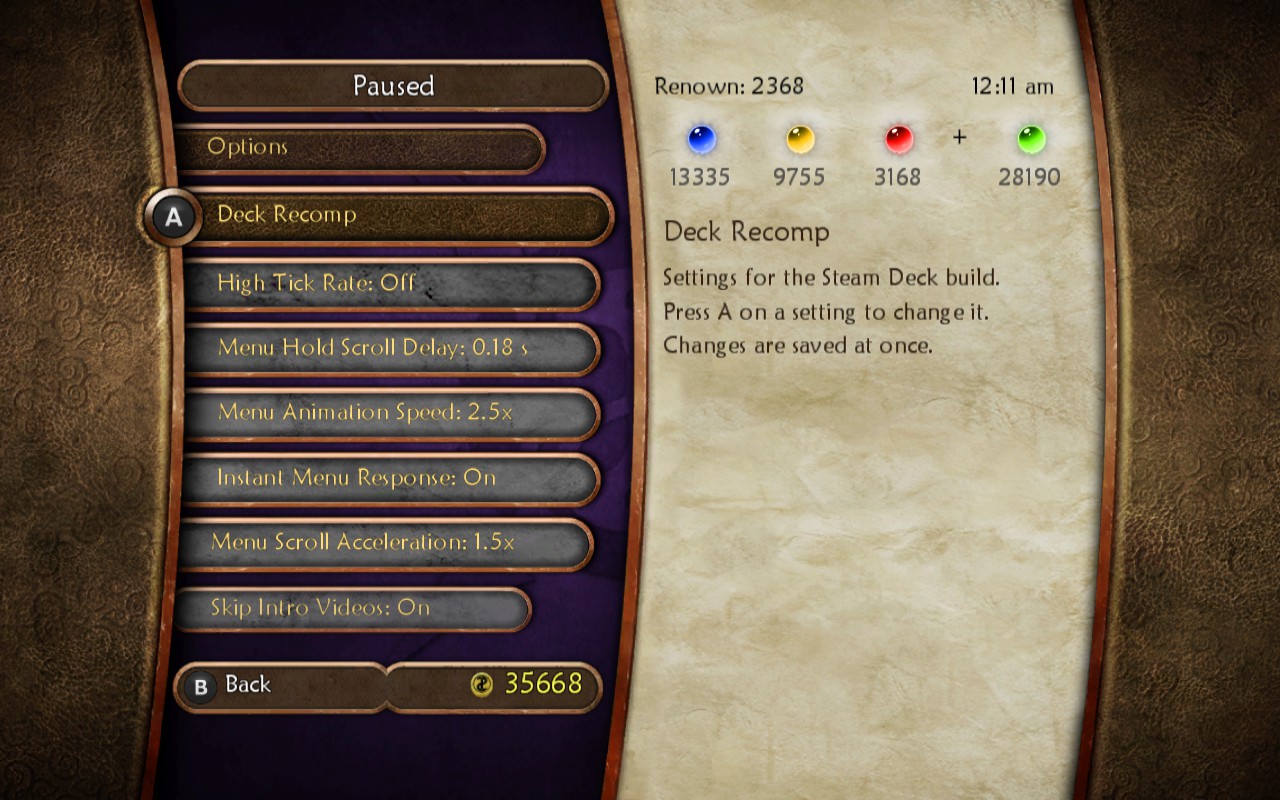
Pause the game and open Deck Recomp, a new entry just below Options. It lists this build's settings in the game's own menu style, so there's no need to edit fable2_config.toml in Desktop Mode any more:
- High Tick Rate (experimental)
- Menu Hold Scroll Delay, Menu Animation Speed, Instant Menu Response, Menu Scroll Acceleration
- Skip Intro Videos
- Motion Blur
- Button Icons (Steam Deck dark or light, or Xbox 360)
- Frame Rate Cap (30, 40, 45, 60 or unlimited)
- Async Shader Compilation
Press A on a setting to step through its values. Each change is saved straight away and, where possible, applies at once; settings that need a restart say (after restart). While a setting is highlighted, the right-hand page explains what it does.
A smooth 60 fps, even in the heaviest scenes
With the default 60 fps cap, the game now holds 60 fps in the heaviest scenes we test, like Bowerstone Old Town and Bowerstone Market. The one exception is the first time an area's shaders are seen (see below).
In Bowerstone Old Town, the heaviest of them, the frame rate without a cap went from about 59 fps in 1.0.4 to about 65 fps (roughly 10% faster), so the 60 fps cap now has headroom instead of dipping below it. The GPU does about 14% less work per frame there:
- Shaders specialised for the textures they read. Each shader is now compiled for the texture formats actually bound to it, so the GPU no longer checks the format for every pixel it shades.
- Fewer render-target copies. Clears of the Xbox 360's render-target memory (EDRAM) are applied directly instead of being copied around.
Async shader compilation, on by default
The first time something new appears, the shaders it needs have to be compiled for the Deck's GPU, which used to stop the game for a moment. They are now compiled on background threads, and whatever needs them (a part of an object, or an effect) is left out for a moment until they're ready. This reduces those stutters, mostly on first visits to an area; compiled shaders are kept, so later visits are smooth. Turn it off under Async Shader Compilation in the Deck Recomp menu if you prefer the original behaviour.
Your shader cache from 1.0.4 is kept and reused, so updating doesn't mean compiling everything again.
Installing
- Download
Fable2-SteamDeck-1.0.5.tar.gzbelow. - On the Deck, in Desktop Mode, move it to
~/Games/and extract it there (right-click → Extract → Extract archive here). Extract it on the Deck itself, so the executable flags are kept. - Put your Fable II GOTY disc image (
.iso) in~/Downloads. The newFable2-SteamDeckfolder or an SD card work too. - Double-click
Fable2.shin theFable2-SteamDeckfolder (choose Execute). Let it extract the game files, and choose Add to Steam when it asks. From then on, start Fable II from Gaming Mode like any other game.
Requires SteamOS 3.6 or newer.
Adding it to Steam by hand
If you skipped the offer: in Desktop Mode, open Steam → Games → Add a Non-Steam Game to My Library, browse to Fable2.sh (set the file type to All files) and add it. Under the shortcut's Properties → Compatibility, make sure no Proton version is forced.
Updating from an earlier version
Extract the archive over your existing ~/Games/Fable2-SteamDeck folder. Your saves, game files and shader cache are kept. fable2_config.toml is replaced with the defaults, so if you changed settings, back it up first and copy your changes back afterwards, or simply set them again in the new Deck Recomp menu.
Tips
- Faster start-up: turn on Skip Intro Videos in the Deck Recomp menu.
- Battery life: choose 30 or 40 fps under Frame Rate Cap, or use the Quick Access Menu's frame limit.
- Logging: this build writes only warnings and errors to
logs/. For a bug report, setlog_level = "info"infable_2.tomland reproduce the problem.
Source
darokk/Fable-2-Recomp steam-deck-linux at the steamdeck-1.0.5 tag (df4a331), with darokk/rexglue-sdk steam-deck-vulkan at a80d08e4. Changes since 1.0.4: game 593ab3c (async shader compilation option), 15966fc (Deck Recomp menu), f0a7b52 (async on by default), 0f3b241 (descriptions), 8f78f10 and df4a331 (README); SDK 50d98827 (EDRAM clear forwarding), 3fe23c5a (shaders specialised on texture formats), 849b8ca9 (specialised shaders compiled in the background), a80d08e4 (shader cache from 1.0.4 kept; async skip-draws mode).
All credit for the recompilation itself goes to himdo and the Fable 2 Recomp contributors.
SHA-256 of Fable2-SteamDeck-1.0.5.tar.gz:
14cfbe344c419c300433e4bf1178e5e366e76c8d071147cbbba550a4f74e5720