Repository navigation

Know when a camera card is safe to format, and tell your cards apart.
Highlights
-
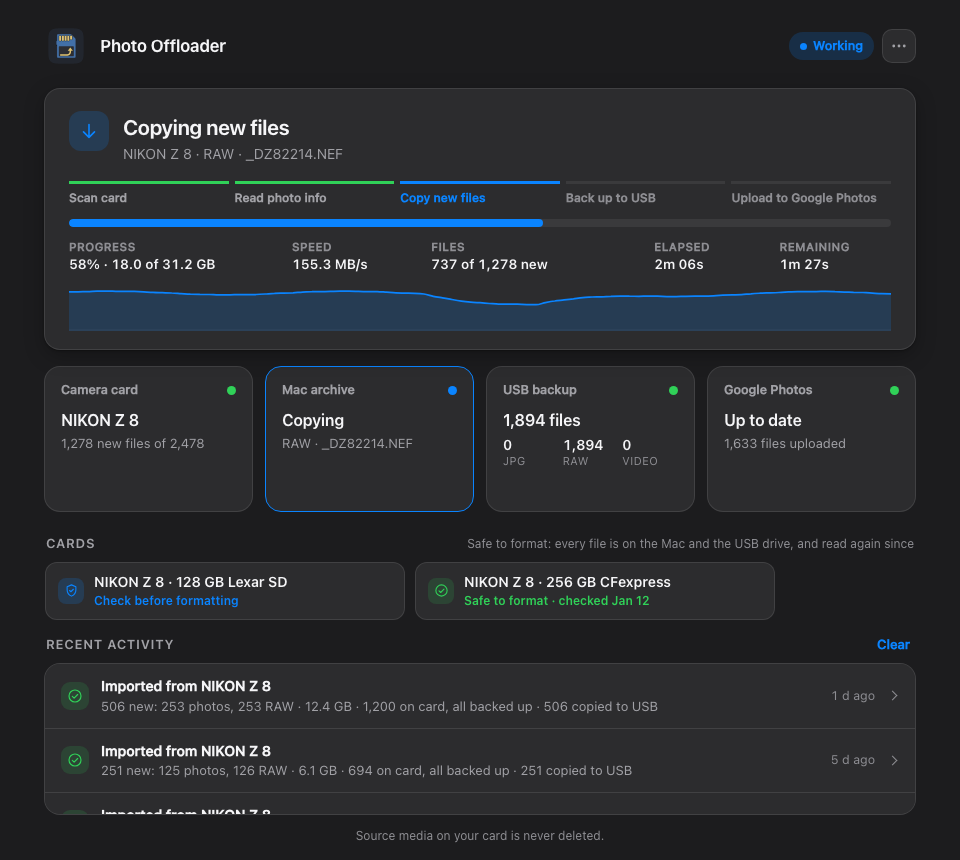
Know when a card is safe to format. A Cards row above Recent activity shows each card Photo Offloader has seen in one of three states:
- Don't format says how many of its files aren't on the Mac or the USB drive yet.
- Check before formatting means every file has a copy on both, verified when it was made.
- Safe to format means a check has also read every copy again since, with the date.
A card's report offers Check new copies (only the copies no check has read yet) and Check every copy. The card doesn't need to be inserted, so a backup days after the import still moves it on, with a notification. The Camera card box, the menu bar (
✓,?or!by its icon) and the end of each import say the same. -
Cards are told apart. Every card from one camera has the same name, so each now shows its size and kind, such as 64 GB SanDisk SD or 256 GB CFexpress, and can be renamed. An SD card in the Mac's built-in slot is recognised by its serial number, so after a format it keeps its name.
-
Taking a card out mid-copy is now documented: nothing half-copied looks finished, and putting the card back resumes file by file.
Upgrading
From your checkout, git pull and run ./install.sh. Your photos, catalog, history and settings are kept.
The full list of changes is in the changelog.