Repository navigation
Configuration
The supplied DEMO ONLY - Mock AI (no inference) instance is a credential-free delivery test, not a model. Keep it unchanged and use the own-provider checklist to add a separate real connection. Select the real instance under the panel's AI provider, not its metric Queries selector.
| Setting | Purpose |
|---|---|
| Provider |
openai, lmstudio, openwebui, grafana-llm, copilot-studio, or an OpenAI-compatible custom endpoint. |
| Base URL | Administrator-controlled provider base URL; examples below. Dashboard queries cannot replace it. |
| Default model | Used when a panel or query omits a model. |
| Allowed models | Exact permitted model IDs; include the default. Empty permits only the default model. |
| Timeout | Server-side provider deadline, 1-600 seconds. |
| Maximum output tokens | Administrator ceiling; the lower panel request cap wins. |
| Allow insecure HTTP | Explicitly permits non-TLS provider traffic. Default is off. |
| Enable image analysis | Explicitly permits images for approved models; disabled by default. |
| Allowed vision models | Exact image-capable model IDs, one per line. Must be a subset of the allowed/default model policy. |
Provider URLs must be reachable from the Grafana server/container. The mock fixture alone contains the non-secret reviewMock: true notice marker; normal configurations omit it. Its warning requires Custom plus http://mock-ai:8080/v1 (ignoring surrounding whitespace and trailing slashes), clears on provider/URL changes, and does not alter backend routing or authentication. There is no mock toggle in the editor.
| Provider | Example Base URL | Model and credentials |
|---|---|---|
| OpenAI | https://api.openai.com/v1 |
An approved model ID; API key or bearer token. |
| LM Studio | http://host.docker.internal:1234/v1 |
Loaded model ID; enable the HTTP override only for the intended trusted local connection. |
| Open WebUI |
https://webui.example.com or https://webui.example.com/api
|
Exact model ID exposed by WebUI; its API key or bearer token. Both bases route to /api/models and /api/chat/completions. A deployment subpath is preserved, for example /ai/api. |
| Grafana LLM | https://grafana.example.com/api/plugins/grafana-llm-app/resources/llm/v1 |
base or large; a Grafana service-account token in Bearer token. |
| Copilot Studio | https://directline.botframework.com/v3/directline |
A local agent alias, for example operations-agent; the published agent's approved channel secret in Direct Line secret. |
| Custom | https://models.example.com/v1 |
An OpenAI-compatible Chat Completions endpoint and its approved model ID. |
Grafana LLM uses the configured grafana-llm-app on Grafana 13 or later. A subpath deployment such as https://example.com/monitoring/api/plugins/grafana-llm-app/resources/llm/v1 is supported. The service account needs access to that app (plugins.app:access, scoped to plugins:id:grafana-llm-app where fine-grained RBAC is available). Credentials remain server-side. Requests use the service-account identity rather than impersonating the current viewer. The LLM app maps base and large to actual models; it has its own two-minute upstream timeout, which this data source cannot extend. Do not supply a Grafana login page, arbitrary API endpoint, or provider-specific model ID for this connection.
Copilot Studio accepts only HTTPS on directline.botframework.com, europe.directline.botframework.com, or india.directline.botframework.com, at /v3/directline, using the default HTTPS port or 443. The HTTP override does not relax this rule. Set a local alias in Default agent alias and include it in Allowed agent aliases; discovery lists this configuration rather than making a model-selection request. The channel secret identifies the published agent. Temperature and output-token controls are not sent to Direct Line and are controlled by the agent. Approve the alias for image analysis only after enabling file uploads in the published agent.
The Direct Line preview connection does not implement end-user token exchange or browser/enterprise SSO. A sign-in/OAuth response produces an explicit authentication error. Use only an organization-approved channel and agent authentication configuration; possessing a channel secret does not authorize bypassing user authentication. Replies must correlate to the sent activity and include an acceptingInput/expectingInput hint or endOfConversation signal; progress without a completion signal fails at the deadline rather than becoming an assessment. Save & test exchanges and discards a channel token without starting inference, so it does not prove the agent will answer or that end-user authentication is satisfied. See the companion panel's Copilot Studio notes for the protocol and enterprise-authentication boundaries.
Under Image analysis policy, enable Enable image analysis and fill Allowed vision models with exact model IDs already approved under Allowed models. An empty image-model list is not permitted when image analysis is enabled. Verify vision support with the provider; model names and successful text requests do not establish image support. For Grafana LLM, approve base or large only when the corresponding configured model supports images.
The backend enforces PNG/JPEG only, at most 8 images, at most 4 MiB decoded bytes per image and 12 MiB total, 4096 pixels per side, 16,000,000 pixels per image and 32,000,000 pixels total. Both the incoming JSON and rebuilt provider JSON are limited to 18 MiB. Text-only requests and the serialized text portion of image requests retain their 1 MiB cap. These are ceilings, not promises of provider acceptance; a provider may enforce smaller limits. Dashboard screenshots may reveal visible data, labels, or annotations, so use the companion panel's preview before explicitly sending them.
The /capabilities resource exposes the effective vision policy and these limits to the panel without contacting the provider. Changing the administrator policy takes effect server-side even if a browser has an older preview.
The panel can send query data only, images only, or both. Include query data with images controls whether serialized query rows accompany attachments; it does not disable the configured prompt or ordinary dashboard context. See Panel Integration for exact controls and the separate metric-query versus AI-connection selectors.
For Chat Completions providers, Maximum output tokens is an administrator ceiling from 1 to 1,048,576, defaulting to 256,000. The effective request cap is the lower of this ceiling and any panel/query cap. Omitting the panel cap does not mean unlimited output: the backend still sends its ceiling, and the provider's own limits also apply. Model context-window size is not a promise of the same maximum output size.
| Example | Effective behavior |
|---|---|
| Panel cap 8,192; data-source ceiling 16,384 | Backend sends max_tokens: 8192. |
| Panel cap 8,192; data-source ceiling 4,096 | Backend sends max_tokens: 4096. |
| Panel cap omitted; data-source ceiling 16,384 | Backend sends max_tokens: 16384. |
| Panel soft answer target 500 | Adds a prompt instruction; does not change the hard cap or reserve 500 answer tokens. |
Reasoning models can spend the whole effective budget before producing visible text. Start with a bounded budget appropriate for the model and increase it deliberately if the response reports a length limit. The gateway does not currently provide a reasoning-effort switch; adjust only provider-supported settings or choose a different model. Do not assume all models support disabling reasoning.
Timeout defaults to 300 seconds and accepts 1–600 seconds. It bounds the backend provider request separately from token count. Set the panel's response timeout appropriately, and check reverse-proxy and provider deadlines too: the earliest deadline wins. The optional Grafana LLM app has its own upstream deadline. Raising a token cap can make a request slower; raising a timeout does not increase its token cap. Copilot Studio generation controls belong to the published agent, while this data source still bounds the conversation wait.
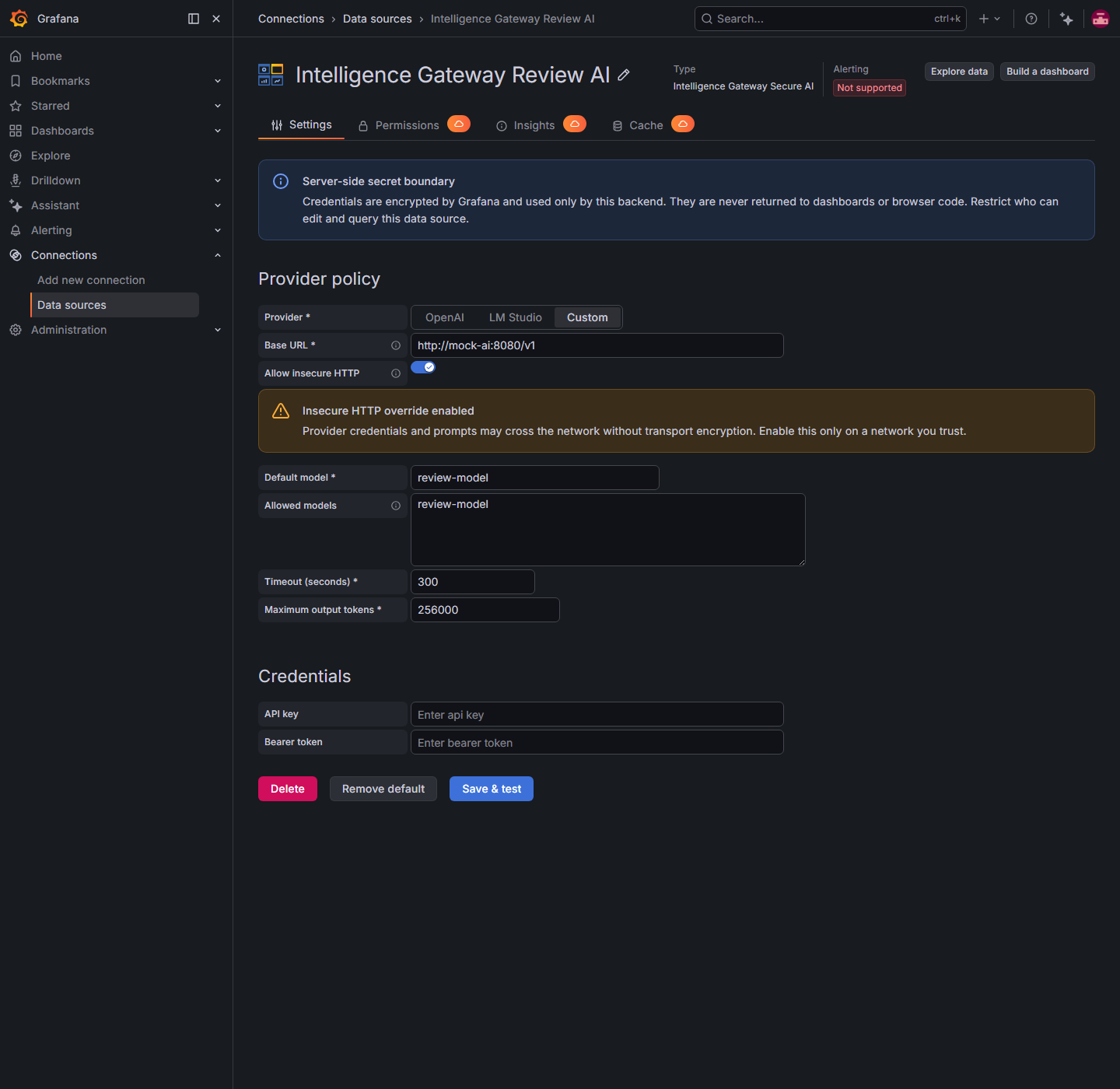
HTTPS is required by default. Enable Allow insecure HTTP only when an administrator has verified that an organizational endpoint is protected by trusted network controls and TLS is unavailable. The plugin deliberately does not guess whether an arbitrary corporate hostname or address is local. The override can expose credentials and prompts in transit; OpenAI remains restricted to api.openai.com.
Enter only the API key or bearer token required by the provider. A bearer token takes precedence over an API key. OAuth client-credentials exchange and streaming are not supported; responses are buffered.
For Grafana LLM, Bearer token specifically holds the Grafana service-account token; an API key in the other field is not used as a fallback.
For Copilot Studio, Direct Line secret is stored as secureJsonData.directLineSecret; API keys and bearer tokens are not fallback channel credentials.
After save, Grafana returns only configured/reset flags through secureJsonFields. To replace a secret, select its reset control, enter the new value, and save again.
apiVersion: 1

datasources:
  - name: Intelligence Gateway Secure AI
    uid: intelligence-gateway-secure
    type: digitalrcs-intelligencegateway-datasource
    access: proxy
    jsonData:
      provider: openai
      baseUrl: https://api.openai.com/v1
      defaultModel: gpt-4.1-mini
      timeoutSeconds: 300
      allowedModels:
        - gpt-4.1-mini
      maxOutputTokens: 256000
      allowInsecureHttp: false
      enableVision: false
      allowedVisionModels: []
    secureJsonData:
      apiKey: ${OPENAI_API_KEY}
Set OPENAI_API_KEY in the Grafana server or container secret environment, not in a dashboard, committed YAML, or browser panel option.
An empty allowed-model list now permits only the configured default, not every provider model. Add any additional model IDs used by your panels and include the default model. Model discovery returns only permitted IDs and removes provider-specific metadata.
The nonfunctional OAuth client-secret control and streaming switch have been removed. Legacy allowStreaming and clientSecret configuration values are ignored; streaming requests are always rejected. Remove unused stored client secrets through provisioning or Grafana's data-source API. The explicit Allow insecure HTTP override is unchanged.
Upgrade both companion plugins to 1.1.0 for image assessment. Existing text-only instances retain their model and credential policy. Image analysis remains off unless explicitly enabled with an approved image-model list; installation does not grant permission to send screenshots. Restart Grafana after replacing plugin packages or metadata, then reload the browser page so both plugins' new frontend modules are loaded. See Release 1.1.0 for the release scope and verification checklist.