var: Before ES6, it was the only variable. Scoped to global scope (everything can access it) or function scoped (only accessible within the function)let: declares a new variable that be reassigned later on (note: possible withvar)const: declares new variable that cannot be reassigned (note: reassigning will throw an 'Uncaught TypeError'); default variable unless reassignment is necessary
- A primitive is a data that is not an object and has no methods.
- JS has 7 primitive data types:
string,number,bigint,boolean,null,undefined, andsymbol(new in ES6) - Primitives are immutable and can only be reassigned a new value.
- Note 1: Do NOT confuse the primitive itself to the variable assigned to the primitive value.
- Note 2: commonly referred to as "assign by copy" or "assign by value-copy"
-
.join() -
.split('') -
toUpperCase() -
toLowerCase() -
join('')
Two features to understand:
nullis an empty or non-existent valuenullmust be assigned
let a = null
console.log(a) // nullundefinedusually means a variable has been declared, but not defined
let b
console.log(b) // undefined- returns a string indicating the type of the unevaluated operand
let a = null
let b
console.log(typeof a) // object
console.log(typeof b) // undefined - type conversion done in code using the inbuilt functions (e.g.,
Number(),String(),Boolean())
- Surrounding Context
-Since JS is a weakly-typed languages, values can be converted between different types automatically
- Occurs usually when operators are applied to different types (e.g.,)
==:
\\ `==` is much less predictable than `===`
console.log(5 == 5) // true
console.log(5 == '5') // true
console.log(true == 'true') // false
console.log('1' == true) // true - Loose equality: Compare two values for equality after converting both values to a common type.
- Strict equality: Comparing two values for equality, neither value is implicitly converted to some other value before being compared.
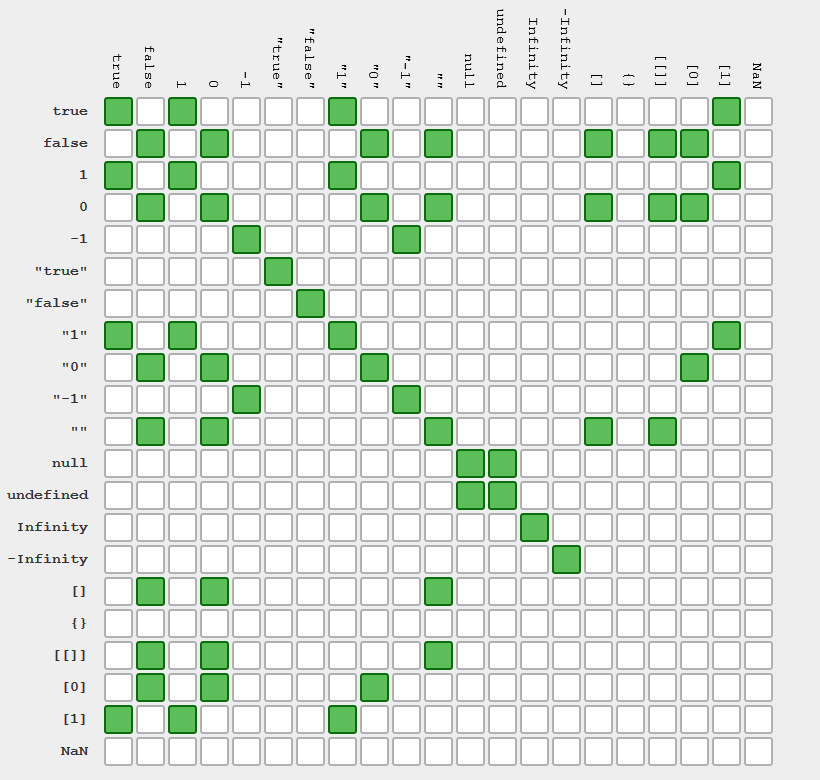
- always falsy:
false,0,''or""(empty string),null,undefined,NaN - truthy: everything else including
'0','false',[](empty array),{}(empty object),function(){}(an 'empty' function)
!: not operator!!: Putting double bang in front of something will give you its truthiness- Other Logical Operators (e.g.,
&&,||)
TK
- list-like data structure in Javascript
.indexOf.length- returns property for the number of elements
-
.push()method - adds to the end of an array -
.pop()method - removes and returns the the most recent element popped off -
.shift -
.slice -
.reverse -
.splice(index, count [optional], inputElements [optional])- mutates the original array by adding or removing elemnts from the middle of an array (rather than from either end) and returns the original array with those elements removed -
concat
TK TK TK - find place
.map.filter.reduce.forEach
TK
https://developer.mozilla.org/en-US/docs/Web/JavaScript/Reference/Global_Objects/Array
TK
- Primitive MDN Page
- Javascipt - Null vs. Undefined
- Explaining Value vs. Reference in Javascript
- Parameters & Arguments in JavaScript
TK TK TK - find place end
exampleString = 'abaacdade'
const frequencyCounter = (string) => {
  const recordedChars = {}
  const charArr = string.split('')
  for (let i=0; i<charArr.length; i++){
    if (recordedChars[charArr[i]] > 0){
      recordedChars[charArr[i]] = recordedChars[charArr[i]] + 1
    }
    else{
      recordedChars[charArr[i]] = 1
    }
  }
  return recordedChars
}

console.log(frequencyCounter(exampleString))
- an object is a collection of key-value pairs
- bracket notation needs quotes to access key unless you are intentionally accessing the variable that contains the key name
Enumerability and ownership of properties
TK
.getOwnPropertyNames()- method that returns an array of all properites (including non-enumerable properties except for those which use Symbol) found directly in a given object.prototype.hasOwnProperty()- method returns a boolean indicating whether the object has the specified property as its own property (as opposed to inheriting it).assign()- method copies all enumerable own properties from one or more source objects to a target object. It returns the target object.keys()- method returns an array of a given object's own enumerable property names, in the same order as we get with a normal loop.values()- method returns an array of a given object's own enumerable property values, in the same order as that provided by a for...in loop (the difference being that a for-in loop enumerates properties in the prototype chain as well)
function Person(first, last, age, eye) {
  this.firstName = first;
  this.lastName = last;
  this.age = age;
  this.eyeColor = eye;
}constructor()- method
- It's the order in which the computer executes statements in a script.
- Code is run in order from the first line in the file to the last line unless a computer comes across structures that can change control flow, such as conditionals and loops
if: directs to block of code below iftrueelse: directs to block of code below iffalseelse if: directs to block of code below iftrueand above conditional statements arefalseswitch: matches the expression's value to a caseclauseand executes statements associated with the case
if (condition1) {
  //  block of code to be executed if condition1 is true
} else if (condition2) {
  //  block of code to be executed if the condition1 is false and condition2 is true
} else {
  //  block of code to be executed if the condition1 is false and condition2 is false
}
switch (expression) {
case value1:
//Statements executed when the
//result of expression matches value1
[break;]
case value2:
//Statements executed when the
//result of expression matches value2
[break;]
...
case valueN:
//Statements executed when the
//result of expression matches valueN
[break;]
[default:
//Statements executed when none of
//the values match the value of the expression
[break;]]
}- shortcut for the
ifstatement - for
falsestatements, the condition could be expressions:null,NaN,0, the empty string (""), andundefined
// syntax example 1
condition ? exprIfTrue : exprIfFalse

// syntac example 2
function example(…) {
    return condition1 ? value1
         : condition2 ? value2
         : condition3 ? value3
         : value4;
}

// equivalent to:
function example(…) {
    if (condition1) { return value1; }
    else if (condition2) { return value2; }
    else if (condition3) { return value3; }
    else { return value4; }
}while: loop with (1)whilekeyword, (2) conditional expression that evaluates to a boolean, (3) a code block that eventually makes a base condition to exit the loop
// initialization outside of loop
while(// condition){
 // code block with update (note: update should go to a final state that breaks out of the loop)
}

// example
let i=0
while(i<5){
 console.log('hi')
 i++
}for: loop with (1)forkeyword, (2) three optional expressions, (3) a code block
// for (initialization; condition; update){
//  code block
// }

// example -- note: similar to `while`, these three fields can do a lot more
for (let i=0; i < 5; i++){
 console.log('hi')
}continue: jumps over one iteration in the loop and checks the next loopbreak: jumps out of the loop
- JavaScript type coercion explained
- Control Flow MDN Page
- JavaScript Switch Statement
- switch MDN Page
- [Conditional (ternary) operator](https://developer.mozilla.org/en US/docs/Web/JavaScript/Reference/Operators/Conditional_Operator)
- JavaScript — Null vs. Undefined
Scope determines the accessibility of identifiers (e.g., variables) based off where it was created.
Note: JavaScript is lexically scoped
- Lexical Scope means the location where a variable is declared determines its scope (see Variable Declaration)
- Global Scope is when a variable declaration is made outside of a function and can be referenced throughout a file
Note: window is the global object in the browser
- Variable declarations inside of functions are 'locally scoped'
- Variable Shadowing:
TK - https://en.wikipedia.org/wiki/Variable_shadowing
- any block of code (code inside curly braces) has its own scope
Note: must use
letrather thanvarto maintain block scope
TK
ECMAScript is the Javacript's language standard (e.g.,ES6 (ES2015), ES2019)
Template literals can be used to avoid concatenating strings or expressions.
function helloWorld(name){
 return `Hi ${name}!`
}

// same example with template literals
function combiningGroups(groupsize1, groupsize2){
 return `The new group has ${groupsize1 + groupsize2} people.`
}A slightly different way of declaring a function that is shorter syntactically and binds this to its enclosing execution context.
// arrow function
const milesToWalk = (miles) => {
 return miles + 500
}

// original function declaration
function milesToWalk(miles){
 return miles + 500
}TK
.callor.apply- call-site of the function
TK
- parameter - the placeholder listed for potential variables when defining a function
- argument - the actual value passed to the function when that function is invoked
- syntax that allows us ot represent an indefinite number of arguments as an array
function sum(...theArgs) {
 return theArgs.reduce((previous, current) => {
  return previous + current;
});

console.log(sum(1, 2, 3, 4)); // expected output: 10i. What is closure?
Good Defn: the combination of a function bundled together (enclosed) with references to its surrounding state (lexical environment)
Layman's Terms: access to an outer function’s scope from an inner function
ii. How is closure used?
- How to understand the keyword this and context in JavaScript
- MDN web docs
- Understanding Scope and Context in JavaScript
- Understanding JavaScript 'this' keyword (Context)
- The many faces of
thisin javascript - What is JavaScript Interview: What is Closure?
- Understanding Currying in JavaScript
TK
QuickSort for Chrome, but it's a bit nuanced . Chrome's v8 engine uses a combination of QuickSort and InsertionSort for arrays (length < 10). Mozilla Firefox's SpiderMonkey uses MergeSort for stability.
currying execute deobfuscate instantiate
Why does this thing exist? Which problems does it solve/create?
-- Shadow DOM on drawbacks
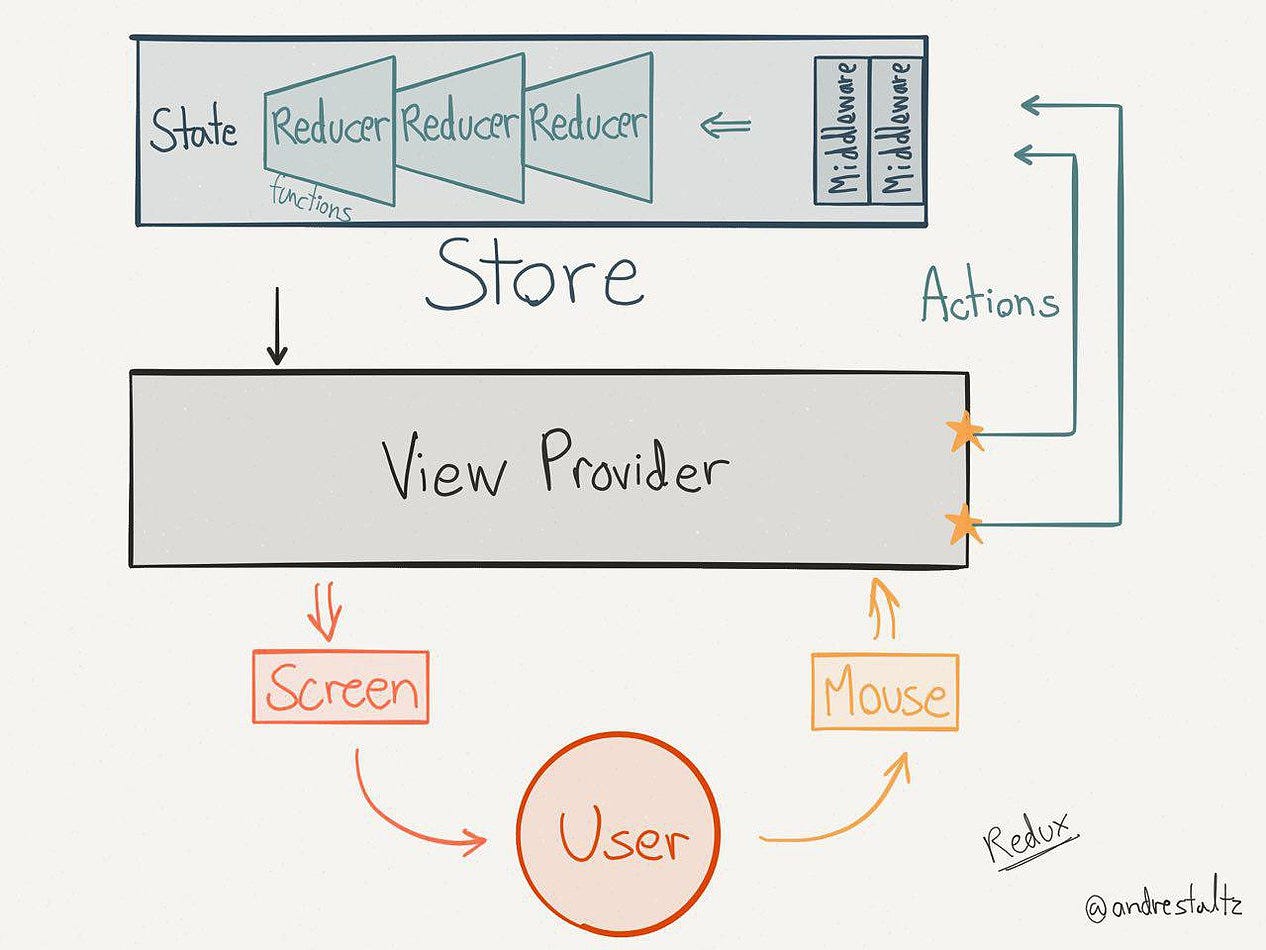
A state management library that holds and updates the entire state by providing it in a read-only store
Pros: Properties don’t dictate structure (in relation to React)
Cons: Sometimes used unnecessarily, other forms of storage do exist for caching and media delivery
- An object that is returned by a pure function with no side-effects
- It contains the "type" and updates to the state
- Sent to the store using dispatch() and the store updates the state using the info provided in the action
- Pure function that takes the current state and action and performs a state update
- Usually in the form of a switch statement that takes in the
action.typeand creates a new state with this action
Example
- Holds the entire state in a single object acting as a single source of truth
- Assign it a vairable using
createStore(combinedReducer) - Store passes two arguments to the reducer (previous state and the action)
We want everything that takes a long time to occur in one central place. Having the time issues in one place makes our life easier.
- A runtime environment software that allows the ability to execute JavaScript programs directly on your operating system outside of the browser (Note: similar to how JavaScript executed in the browser has access to the DOM (e.g.,
document,window)) - JS programs using
nodecan perform OS-specific functionality such as read/write from files or establish network connections (e.g.,__dirname) - Node's package manager (
npm) is similar topipin Python,gemin Ruby,brewin Unix, andaptin Linux
The asynchronous, single-threaded nature is not built into the JS language, but it's built on the core JS language inside the browser (or the programming environment) and accessed using the browser API's.
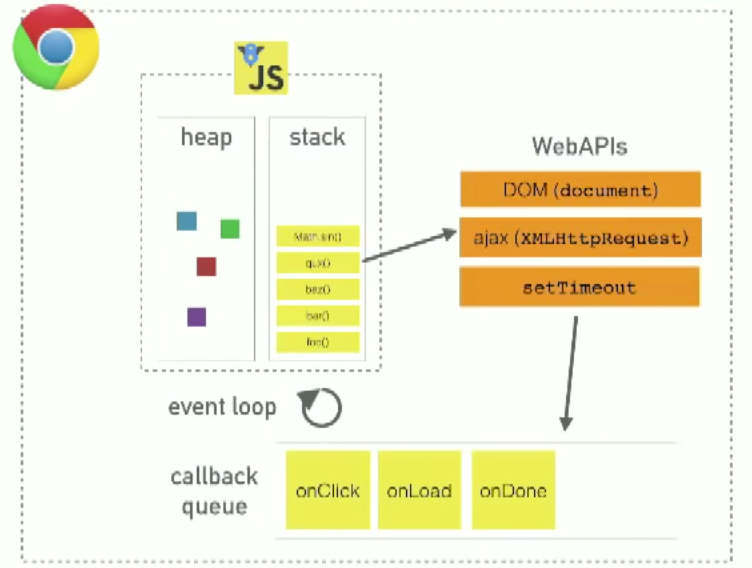
- Heap - a large mostly unstructured region of memory where objects are allocated
- Call Stack - a representation of the single thread provided for JS code execution
- Browser or Web API's - these components are built into the web browser (or the computer environment) to provide extra functionality on top of JS (Note: the point of the API's is to abstract away the complexity involved and provide the extra capabilities)
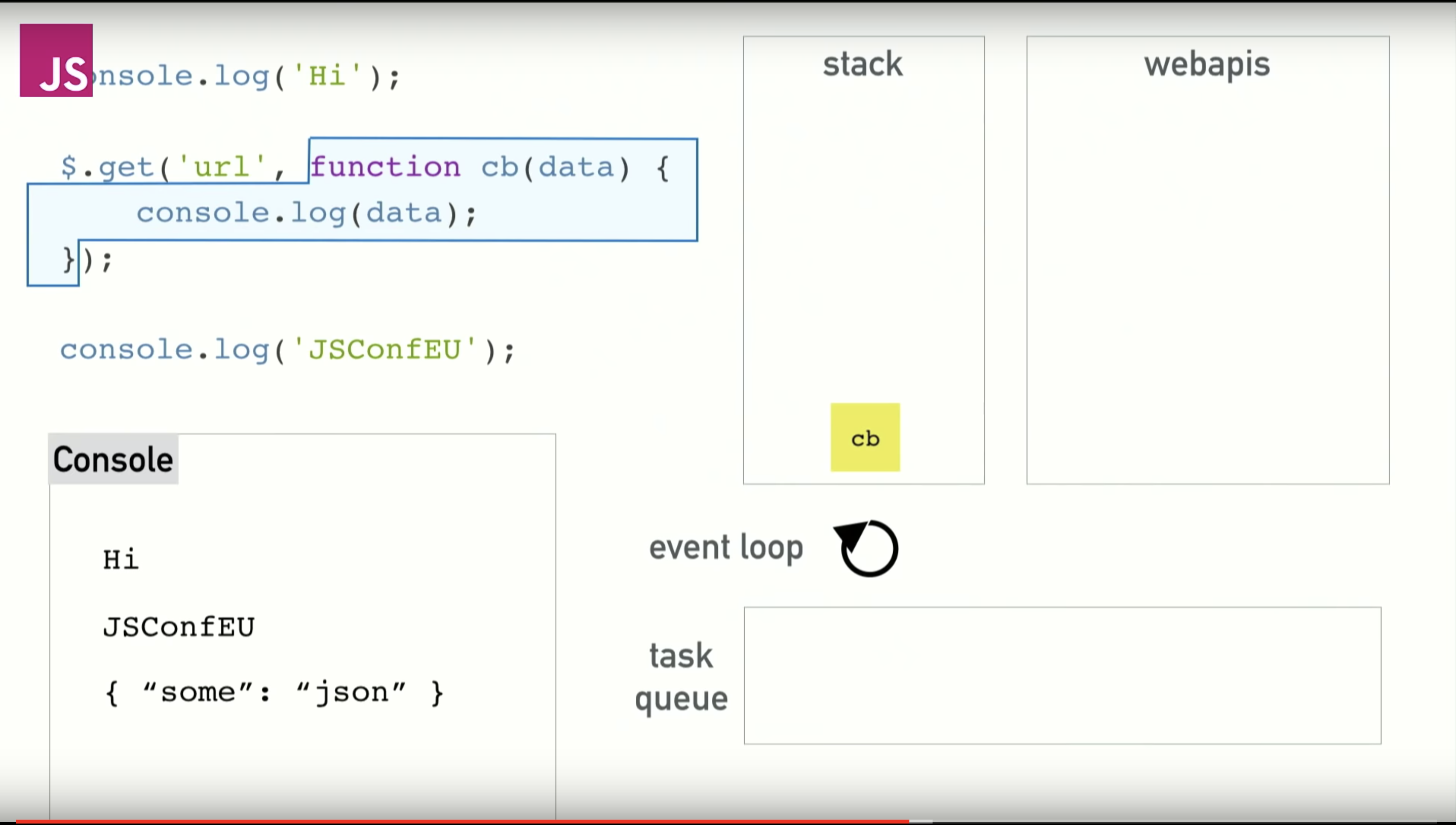
Things that are slow and on that stack (TK).
The browser is more than the runtime and similarly in node (there's extra things in C) (TK)
a promise is a returned object you attach callbacks to, instead of passing callbacks into a function -- promise constructor takes in one argument: a callback function with two parameters — resolve and reject.
“async” before a function means one simple thing: a function always returns a promise. Other values are wrapped in a resolved promise automatically.
The keyword await makes JavaScript wait until that promise settles and returns its result.
async function f() {

  let promise = new Promise((resolve, reject) => {
    setTimeout(() => resolve("done!"), 1000)
  });

  let result = await promise; // wait till the promise resolves (*)

  alert(result); // "done!"
}

f();- Ryan Dahl: Original Node.js presentation
- JavaScript: Promises explained with simple real life analogies
- Async/await
- Concurrency model and the event loop
- Event Loop Explained
- Asynchronous JavaScript: From Callback Hell to Async and Await
- Understanding JS: The Event Loop
- Art of Node
- Pass by reference
The Database Management System is responsible for translating declarative queries into concrete file system operations
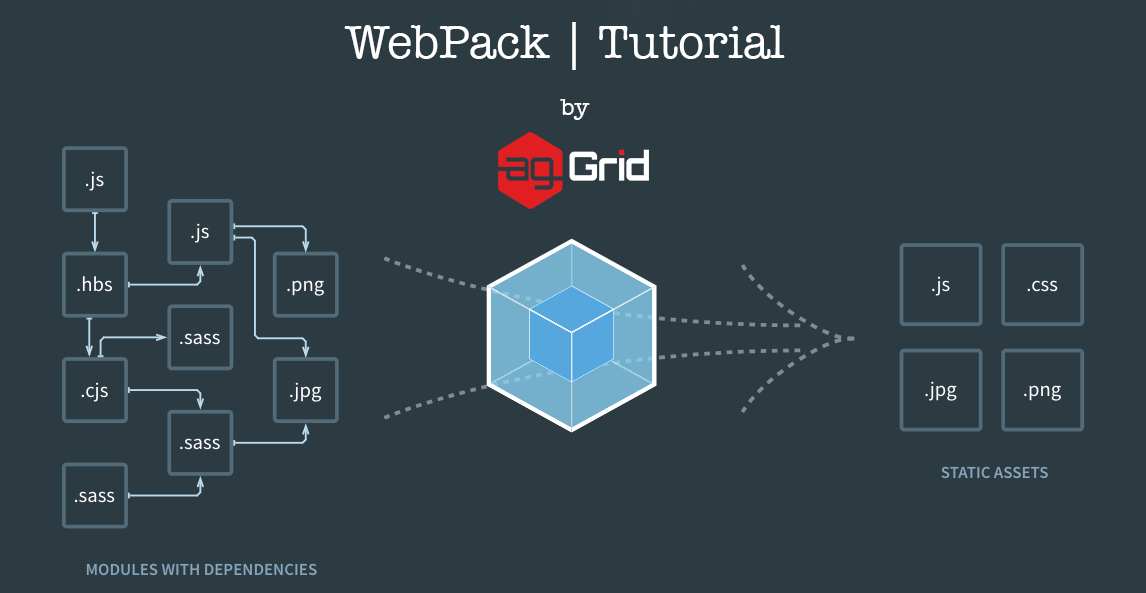
"Webpack is a module bundler. It takes disparate dependencies, creates modules for them and bundles the entire network up into manageable output files. This is especially useful for Single Page Applications (SPAs)."
- a toolchain used to convert ES2015+ code into a backwards compatible version of JS in current and older browsers and environments
- Transform syntax
- Polyfill features that are missing in the original environment
- Source code transformations (i.e., codemods)
- Other Features
// Babel Input: ES2015 arrow function
[1, 2, 3].map((n) => n + 1);

// Babel Output: ES5 equivalent
[1, 2, 3].map(function(n) {
  return n + 1;
});- Block scoped variables - see
letkeyword - Classes - TK
- Promises - TK
- Modules - can now import/export multiple named values
- MVC Pattern
- Test-Driven Development
- Debugging + Chrome Console
- WebAssembly