Repository navigation
Releases
Releases · dsidxavekko/MenuFold
MenuFold 0.4.1

MenuFold 0.4.1 — macOS 26+, Apple silicon.
What's new
- Support MenuFold. Settings → About now lists crypto addresses (BTC, ETH, SOL, TRX) for donations,
with a copy button and a QR code for each.
Install
- Download
MenuFold-0.4.1.dmg, open it and drag MenuFold to Applications. - Open MenuFold from Applications. It is not notarised by Apple, so macOS blocks the first launch:
go to System Settings → Privacy & Security and click Open Anyway. You only do this once:
later versions install through Check for Updates…. - Keep it in the Dock: right-click its icon → Options → Keep in Dock.
Already on 0.3 or older? Install this version from the DMG once; it updates itself after that.
Verify the download
shasum -a 256 -c SHA256SUMS
MenuFold 0.4.0
MenuFold 0.4.0 — macOS 26+, Apple silicon.
What's new
- Automatic updates. MenuFold checks for a new version once a day and installs it for you.
Use Check for Updates… in the app menu or the Dock icon's menu, and switch the checks off in
Settings → General. - Disk image. MenuFold now comes as a DMG: open it and drag MenuFold to Applications.
- If you open MenuFold straight from the disk image, it offers to move itself to Applications.
- From now on, updates install without the Open Anyway step.
- Fixed: in Settings → Categories, category names are left-aligned again.
Install
- Download
MenuFold-0.4.0.dmg, open it and drag MenuFold to Applications. - Open MenuFold from Applications. It is not notarised by Apple, so macOS blocks the first launch:
go to System Settings → Privacy & Security and click Open Anyway. You only do this once:
later versions install through Check for Updates…. - Keep it in the Dock: right-click its icon → Options → Keep in Dock.
Already on 0.3 or older? Install this version from the DMG once; it updates itself after that.
Verify the download
shasum -a 256 -c SHA256SUMS
MenuFold 0.3.1
MenuFold 0.3.1 — macOS 26+, Apple silicon.
Fixes
- Settings → Categories: the category name now shows left-aligned next to its icon, without the stray "Category Name" label.
- The
LICENSEfile now has the full, standard MIT text (GitHub recognises it as MIT).
Install
- Download
MenuFold-0.3.1-macos26-arm64.zipand unzip it. - Move
MenuFold.appto/Applications, replacing the old copy. - Open it. The app is ad-hoc signed, not notarised, so macOS blocks the first launch:
go to System Settings → Privacy & Security and click Open Anyway. - Pin it to the Dock like any other app.
Verify the download
shasum -a 256 -c SHA256SUMS
MenuFold 0.3.0
MenuFold 0.3.0 — macOS 26+, Apple silicon.
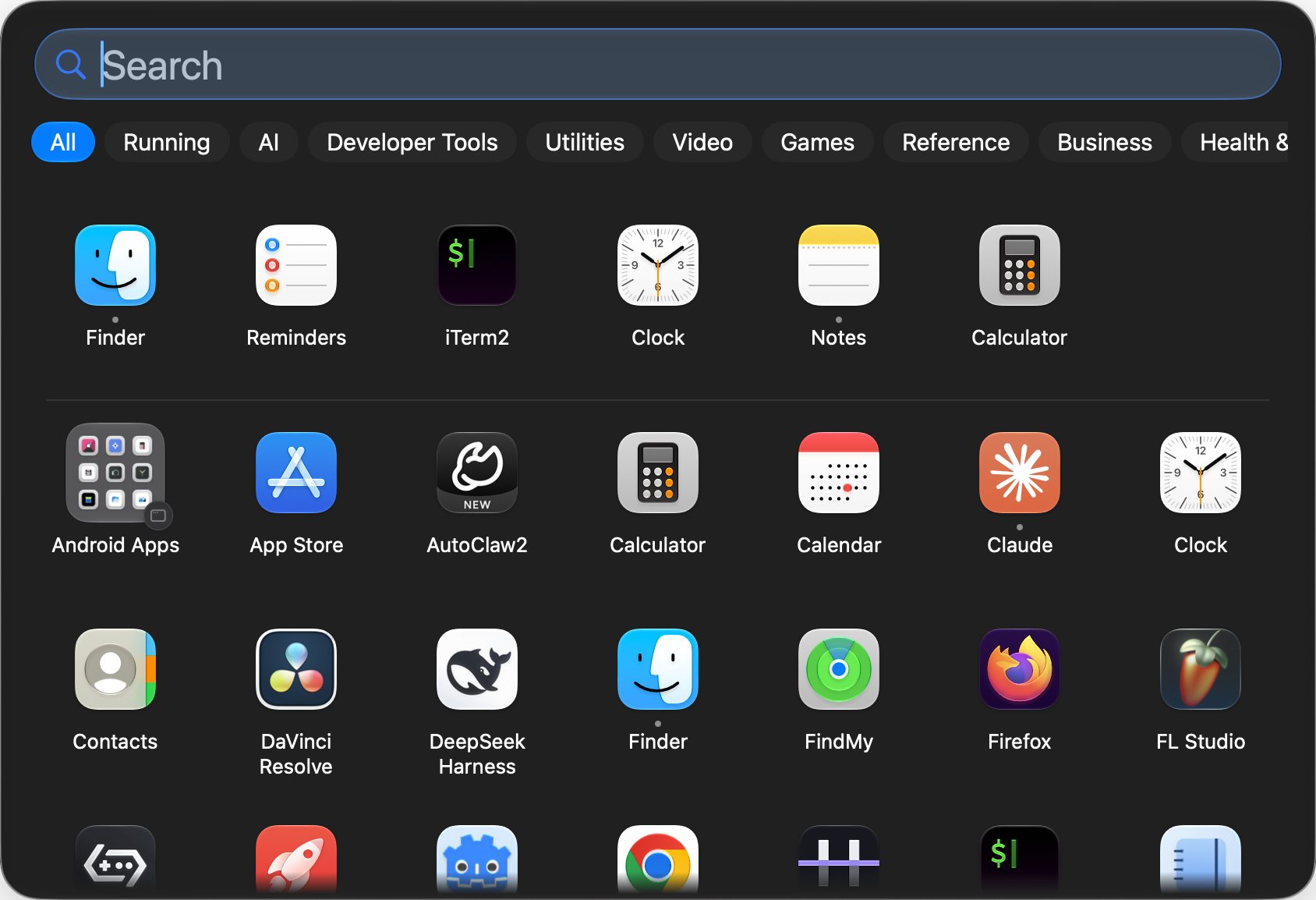
What's new
- Running tab: the apps that are open right now, right after "All". You can turn it off in Settings → Categories.
- Keyboard navigation: arrow keys to move, Return to launch, ⌘R to show in Finder, ⌘⌫ to move to the Trash.
- Frequent apps: the apps you open most sit in a row above the grid. You can turn it off or clear the history in Settings → General.
- Running indicator: a Dock-style dot under each running app, plus Quit / Force Quit in its menu.
- Move to Trash from the app menu, with a confirmation that offers to quit the app first.
- Custom app icons: any picture, or the icon of another file or app (right-click an app → Change Icon…).
- More Dock icons: the macOS launcher icon, the Applications folder icon or your own picture.
- English interface next to Ukrainian. App names follow your system language, and search matches both the localized and the English name.
- The panel no longer has the drawn rim or the window shadow.
Install
- Download
MenuFold-0.3.0-macos26-arm64.zipand unzip it. - Move
MenuFold.appto/Applications. - Open it. The app is ad-hoc signed, not notarised, so macOS blocks the first launch:
go to System Settings → Privacy & Security and click Open Anyway. - Pin it to the Dock like any other app.
Verify the download
shasum -a 256 -c SHA256SUMS
MenuFold 0.2.0
MenuFold 0.2.0 — macOS 26+, Apple silicon.
Install
- Download
MenuFold-0.2.0-macos26-arm64.zipand unzip it. - Move
MenuFold.appto/Applications. - Open it. The app is ad-hoc signed, not notarised, so macOS blocks the first launch:
go to System Settings → Privacy & Security and click Open Anyway. - Pin it to the Dock like any other app.
Verify the download
shasum -a 256 -c SHA256SUMS
MenuFold 0.1.0

First public build of MenuFold — a Dock replacement that opens a Launchpad-style grid of every app, with folders, category tabs and search.
Requires macOS 26+ on Apple silicon.
Install
- Download
MenuFold-0.1.0-macos26-arm64.zipand unzip it. - Move
MenuFold.appto/Applications. - The first time, right-click the icon → Open (the build is ad-hoc signed, not notarised, so a plain double-click is blocked by Gatekeeper).
- Pin it to the Dock like any other app. Clicking the Dock icon opens the panel; a second click, Esc or clicking elsewhere closes it.
Verify the download
shasum -a 256 -c SHA256SUMSWhat's in 0.1.0
The first release already includes the fixes from the pre-release audit:
- No more folder data loss. Dropping an app onto a folder no longer dissolves unrelated folders or the drop target. A folder is only dissolved when it genuinely drops to one app.
- Layout file is safe. A corrupt
layout.jsonis moved aside with a timestamp and a fresh one is written straight away, so a bad file can no longer wipe the configuration on quit. Read errors (permissions, lock, I/O) leave the file untouched and retry next launch. Files from a newer version are preserved instead of being rewritten in an older format. - Drag & panel fixes. Dragging a tile out no longer leaves the panel half-transparent or click-through, a stale fade-out can no longer hide a panel that was just reopened, and a drag always carries the app you actually grabbed.
- App icon, and Settings reaches you. The bundle ships a real icon (no more generic app icon in the Dock), and Settings is reachable from the panel instead of only via ⌘,.
- Grid hygiene. Apps on external volumes, Time Machine backups, temp folders and the Trash are filtered out; Finder folders are keyed from normalised paths.
Notes
- Ad-hoc signed and unsandboxed by design: this is a personal, self-built tool. There is no auto-update.
- MenuFold never moves, copies or deletes app bundles; Finder folders are mirrored read-only.
- Built from tag
v0.1.0byscripts/release.sh(Xcode 27.2, macOS 27.2 SDK, arm64).