


Ask questions and share feedback in Discussions.
History Workbench helps you create CAD projects with confidence through simple version control: tracking iterations over time, reviewing in-progress work, and showing model changes as detailed 3D and parametric tree comparisons. Once you can review every iteration visually, it's hard to work any other way.
It helps answer questions like:
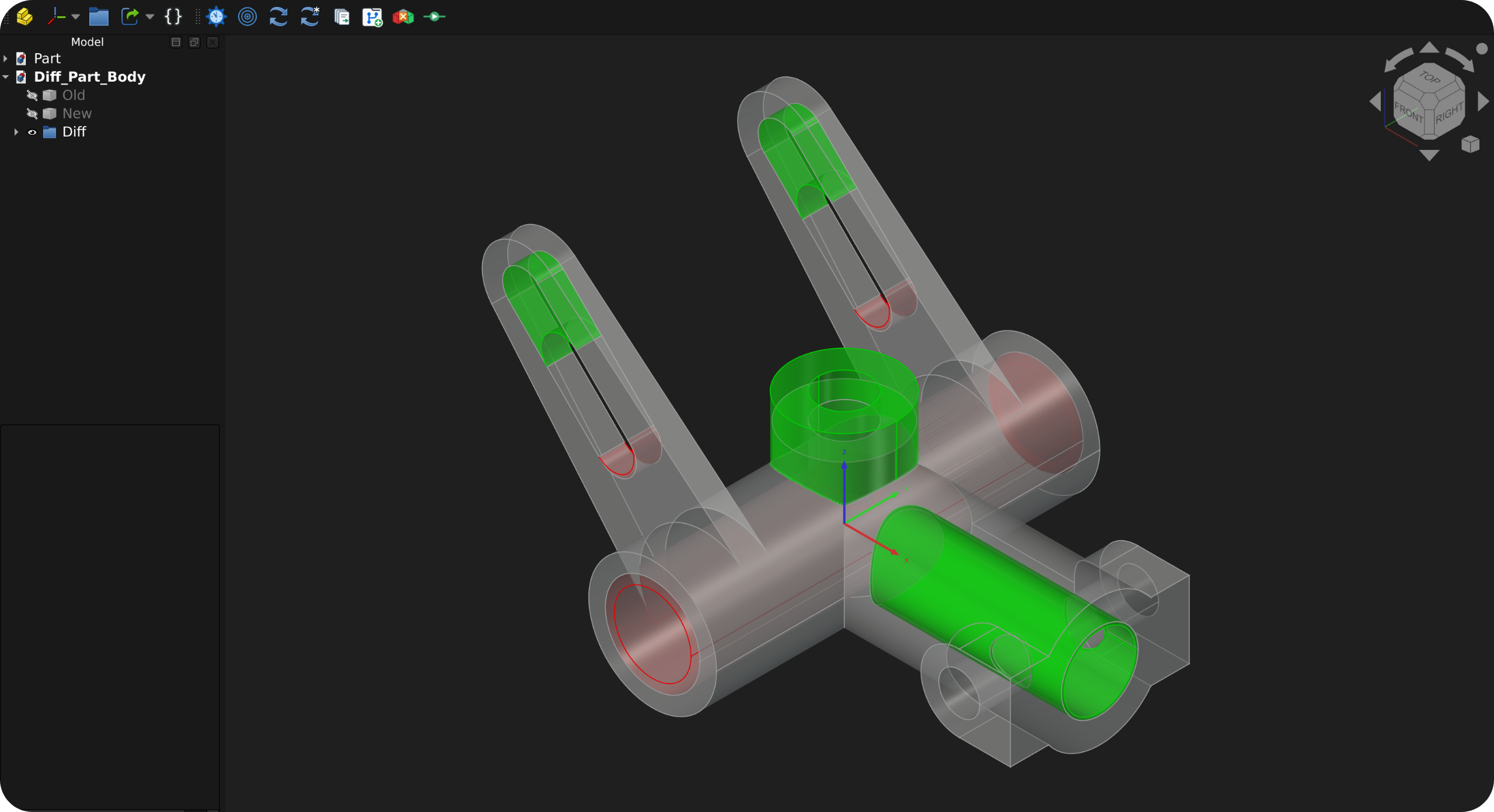
- How does my change look in 3D compared to the last iteration?
- Can I trust that my changes didn't create any unforeseen side-effects?
- FreeCAD core and workbench development: what else did my new feature or bugfix affect?
- Which objects, dimensions, placements, expressions, or dependencies changed?
- Why did I change this model 2 months ago, and what changed?
History Workbench uses Git internally for version control, but Git knowledge is not required for normal use. The workbench intentionally replaces Git terminology with CAD-focused terms so that the workflow intuitively matches how CAD users think about model history.
- 3D feature comparison: Visually compare modified geometry in distinct colors.
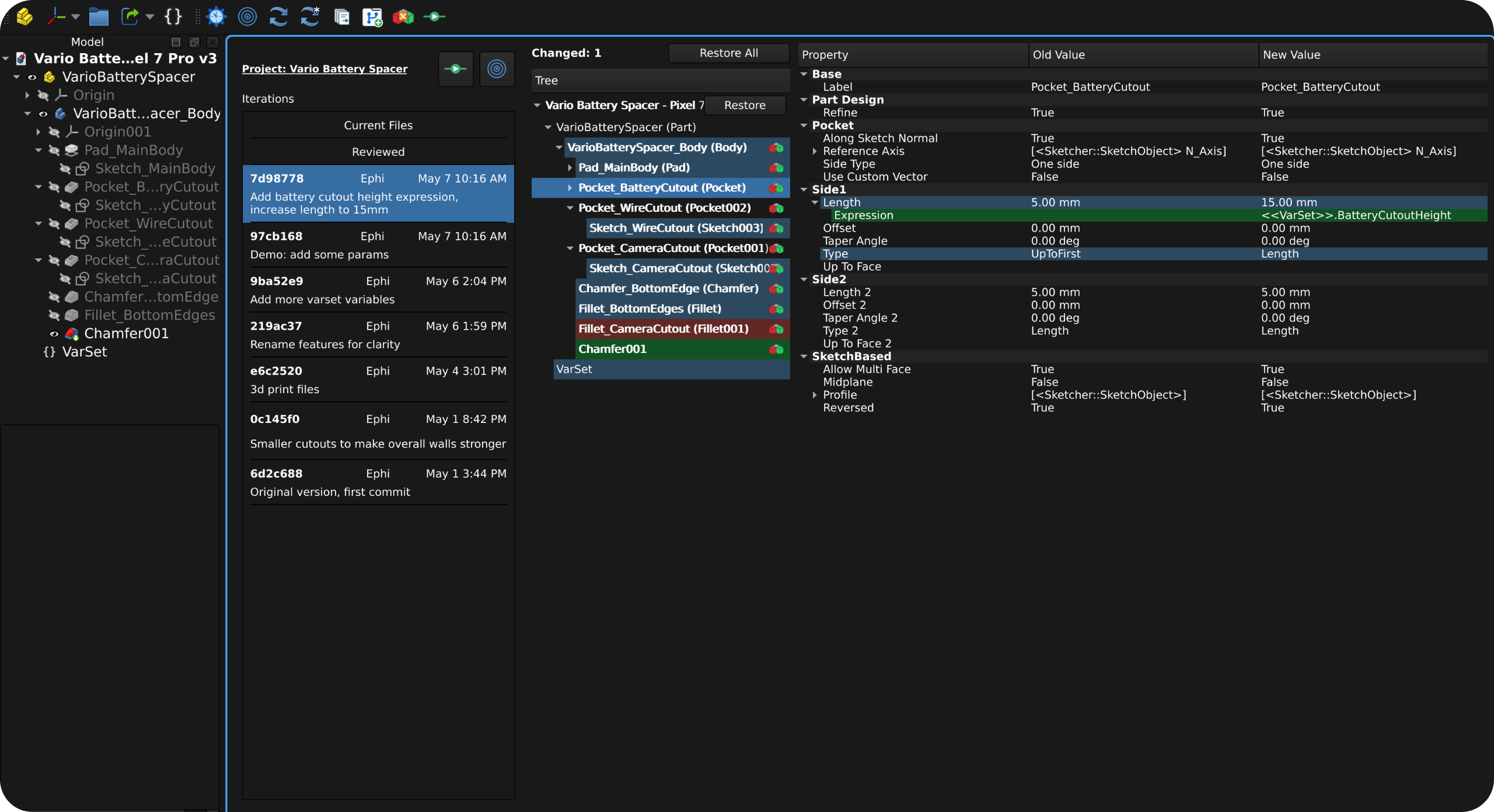
- Document tree comparison: See color-coded added, removed, and modified objects in FreeCAD's document tree hierarchy.
- Detailed property review: Inspect exact changes to dimensions, placements, expressions, constraints, links, and other properties.
- Review workflow: Review model changes incrementally and save the result as a new iteration when ready.
- Project history timeline: Move between in-progress work, reviewed changes, and saved iterations from one history panel.
- Safe restore workflow: Restore individual files or batches without rewriting project history.
- Multi-document support: Review and iterate on multiple related documents at once, such as assemblies spread across several
.FCStdfiles. - Noise control: Hide any object types or properties, tune floating-point precision, and keep comparisons focused on meaningful CAD changes.
- Local-first storage: your project stays on your computer. Optional remote storage and sharing available for advanced users.
Don't have time? Start here.
- Install the addon: search "History" in FreeCAD's addon manager. Ensure git is installed on your computer.
- Initialize your project: open a FreeCAD folder you want to designate as your project, then click
Initialize Project.
- Make changes and review them: work on your CAD models. Use History panel's Current Files Area to view your changes as compared to the last iteration. Click the 3d icon to compare models in 3d view. Click "Reviewed" to save a copy to the Reviewed Area.
- Make more changes: now new changes will be compared to the file you already reviewed. Work iteratively. Keep making changes, keep reviewing.
- Save an iteration: go to Reviewed Area to do a final check. Click
Save Iteration to finalize an iteration using the reviewed files.
- Rinse and repeat: keep working and adding new iterations.
- View and restore files: click any iteration to see the changes that happened in it, and use Restore buttons to restore files. History is not affected.


When you're ready to learn more, jump into the documentation.
- Detect
.FCStdfile renames and moves, and update snapshots to match - Implement "File Save History" to be able to restore any previous file save (include configurable retention and diffing)
- Track and compare non-FCStd files in the project
- Compare any commits, not just to the previous commit
- Push project to GitHub or other git remote services
- Ability to regenerate historical snapshots (discussion in #5)
Done:
- Create a more in-depth public documentation site
- Move reviewed documents back to Current Files from inside History Workbench
- Initialize new project history repositories from inside History Workbench
- 3D view comparisons
This workbench is shared publicly so as to serve you, the FreeCAD community. Please open an issue to report bugs, confusing comparisons, or other problems, or start a discussion to ask questions or share feedback. Development so far has happened on Linux, so additional platform setup notes and test instructions are also welcome as contributions.
Visit the Development Docs for information on how to contribute code to the workbench.