Repository navigation
Releases
v0.4.2

One package per distro - install the one that matches your system. The
codename after the ~ in the file name is the one to look for:
| System | File name contains |
|---|---|
| Ubuntu 24.04 / Xubuntu 24.04 | ~noble_ |
| Ubuntu 26.04 / Xubuntu 26.04 | ~resolute_ |
| Debian 13 | ~trixie_ |
| Debian testing (forky) | ~forky_ |
sudo apt install ./xfce4-ultimate-shell_<version>_amd64.deb
xfce4-panel -r
Full Changelog: v0.4.1...v0.4.2
xfce4-ultimate-shell 0.4.1

Second beta. A third desktop layout, a second dock style, Quick Settings and two new start menus.
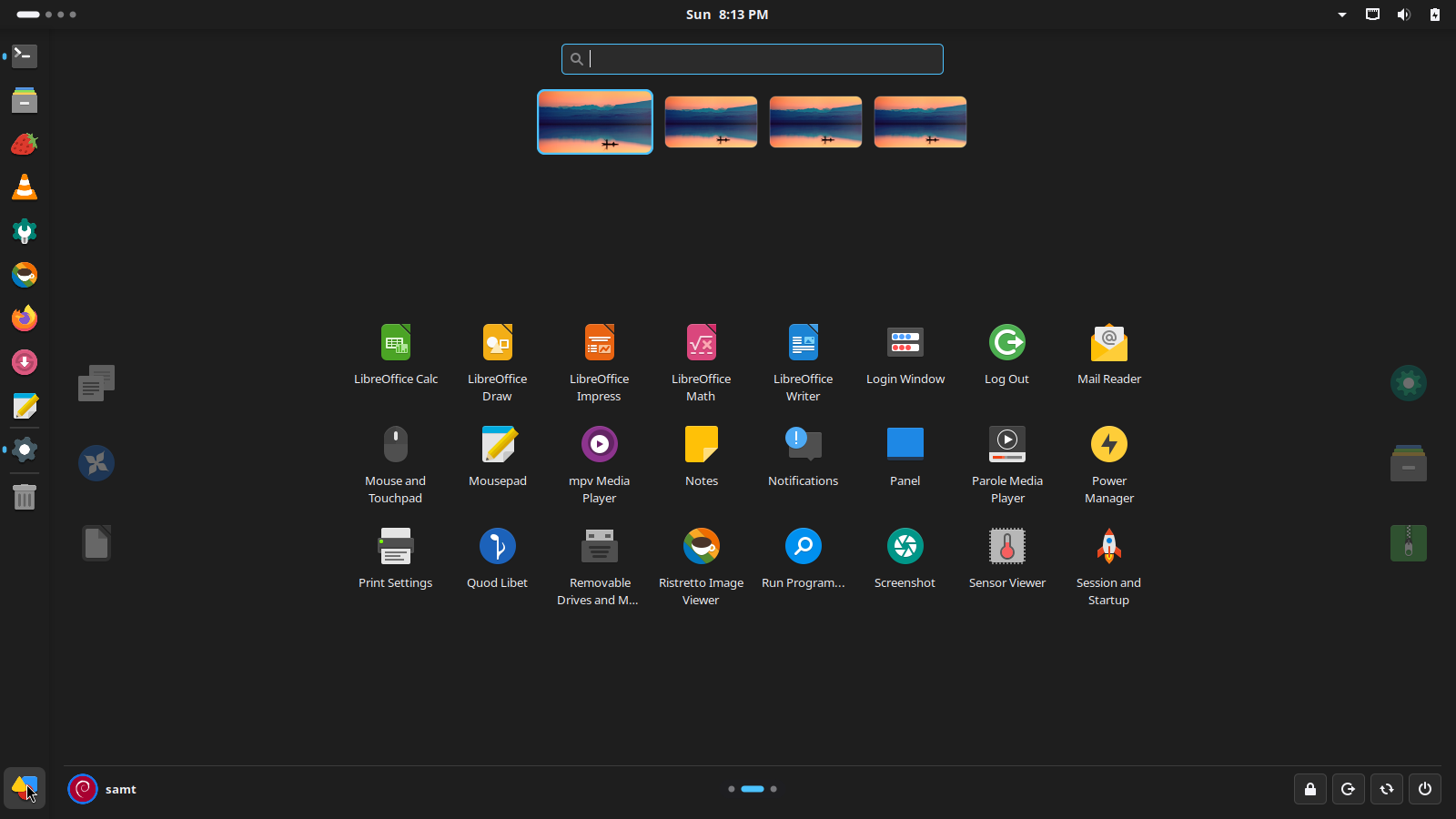
GNOME layout
- New Desktop Shell Paradigm: GNOME Top Bar + Bottom Dock – workspace pill and the focused app's name on the left, the clock in the centre, the tray with Quick Settings on the right
- No start button: the workspace pill and the dock's Show Apps button open the start menu you picked
- The app name has a small menu: New Window and Quit
Dock
- Two dock styles: the macOS dock, and the Ubuntu dock – left edge, full height under the top bar, no zoom, hover tiles, apps and Trash from the top, Show Apps at the bottom, window previews stacked top to bottom
Quick Settings (Windows 11 style)
- Sound, Network, Bluetooth and Power (plus the microphone while it's in use) become one button next to the clock that opens one panel: player, toggles (Wi-Fi, Bluetooth, Airplane, Do Not Disturb, Dark mode, Night light, Caffeine), sound, microphone and brightness sliders, battery, and buttons for System Settings and Ultimate Shell Settings
- Shell themes can be set as the default dark / light theme – the Dark mode toggle switches between them
Start menu
- The Super (Windows) key opens and closes the start menu (on by default; a previous Super binding is restored when turned off)
- New style Windows 10 Tiles: rail, A–Z list with letter headers, resizable pinned tiles in named groups
- New style GNOME App Grid: full screen, workspace maps with their own wallpapers, paged A–Z grid with GNOME Shell's timing (250 ms page slides, peeking neighbour pages)
- Keyboard everywhere, drag-to-reorder in every style, Classic gets a Windows 7 power button, List gets Pin to top
Also
- Animations: on/off plus two styles, Fade and Slide; popups animate when closing too
- Older (XEmbed) tray icons – Notes, IBus, Wine, Java – can be hidden, moved and remembered like the others
- Esc closes every shell popup
- Settings window can be made much narrower
- Several light-colour menu fixes, a clock size warning and a top-bar overflow crash fixed
Full list: CHANGELOG.md
Install (Debian / Ubuntu): download the .deb below, then
sudo apt install ./xfce4-ultimate-shell_0.4.1_amd64.deb && xfce4-panel -r
X11 only. Tested on XFCE 4.20 / Debian.
xfce4-ultimate-shell 0.4.0 – first public beta
Changelog
0.4.0 — first public beta
Appearance
Unified colours: Follow GTK theme, Light, Dark or Custom (background, text,
accent - all with transparency); hover and border colours automatic or custom
One palette for panel, dock, popups, menus, global menu, search fields, check boxes,
sliders, tooltips and the settings window
Panel & dock opacity, popups & menus opacity
Shell themes: Apply, Save as, Delete, Import, Export; built-in macOS / Windows 11
Light and Dark (colours only - your shapes stay); "save your look changes to the
theme?" when leaving the General page, with a (modified) marker
GTK theme, icon theme, title-bar style, shell font, corner radius, popup border and
shadow on the General page
Frameless panel (no square edge line) with a shell-drawn panel shadow; dock and dock
icon shadows drawn by the shell
Indicators page: taskbar and dock styles, active / inactive / attention colours
xfce4-panel's dark mode follows the shell colours
Shell & layouts
macOS and Windows layouts; four Windows panel layouts with a true centered group
Workspace indicator (GNOME pills / dots / numbers) with its own settings page
Animations: Off / Subtle / Full with speed; desktop-compositing switch
One placement rule for every popup, menu and preview (6 px from the bar, beside it on side docks)
Dock & taskbar
App badges and progress bars (Unity LauncherEntry; XApp progress, e.g. Firefox downloads)
Drop files on an icon to open them with that app
Count badges redesigned (red for app counts, neutral for open windows)
Icons update when the icon theme changes
Maximized windows fill the screen (terminals no longer stop a text row short)
Live window thumbnails on taskbar hover (Windows layout); name labels on dock hover (macOS)
Fuller right-click menus (windows, app actions, admin, edit launcher, workspaces, force quit)
Start / Launchpad quick menu (right-click): Task Manager, settings, terminal, power, …
Start menu
Same launcher as the taskbar (terminal apps, working folder, admin apps)
Rebuilds itself when apps are installed or removed
Search: keywords, program name, ranking, Enter, ↓, calculator, web search
"New" badges and Recently added; optional Recent & Recommended
Whisker icon view; Windows 11 opens on Pinned; drag to reorder pinned apps
Exact category matching, accented A–Z headers, edge resizing
Top bar
Global menu shortcuts for GTK / GtkApplication apps (own GTK module)
Window buttons left or right with all title-bar buttons following
Menus that don't fit move into a » overflow menu; the app name stays readable
System tray
New sound popup (devices, now playing with album art and seek, per-app volume)
Microphone-in-use indicator as its own tray icon
Overflow menu: 5 columns, drag to rearrange, popups open beside it
IBus as a movable modern tray icon
Sound settings are now saved and restored correctly
Fixes
Panel heights no longer reset when switching layouts or restarting the panel
Settings applied by a theme, an import or a page reset are no longer overwritten
when the settings window closes
Readable text on light themes (global menu, panel buttons, search boxes)
Sound popup no longer widens with long media titles
Win11 Start menu always opens on Pinned, also from the dock
Clock & calendar
Windows 7 / 10 / 11 and GNOME-macOS flyouts sized like the real ones
Notifications in the GNOME flyout; date formats incl. custom; week numbers
Exact ticking; follows time-zone changes; always opens on today.
Known issue: with Colours → Light on a dark GTK theme, the Recent Items submenu in the global menu can show light text on a light background. A fix is planned for 0.4.1.