Repository navigation
xfce4-ultimate-shell 0.4.1
Pre-release
Pre-release

Second beta. A third desktop layout, a second dock style, Quick Settings and two new start menus.
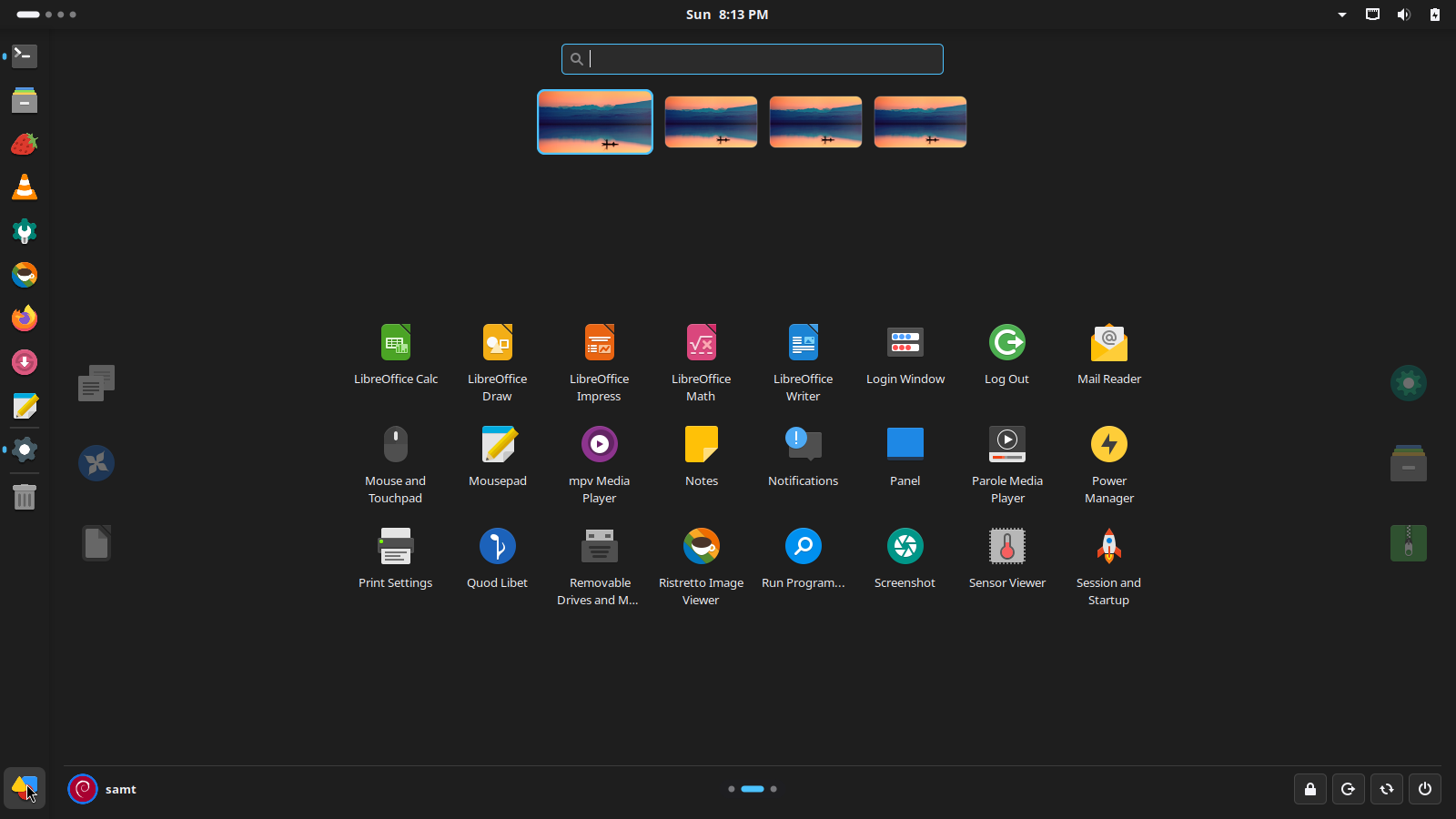
GNOME layout
- New Desktop Shell Paradigm: GNOME Top Bar + Bottom Dock – workspace pill and the focused app's name on the left, the clock in the centre, the tray with Quick Settings on the right
- No start button: the workspace pill and the dock's Show Apps button open the start menu you picked
- The app name has a small menu: New Window and Quit
Dock
- Two dock styles: the macOS dock, and the Ubuntu dock – left edge, full height under the top bar, no zoom, hover tiles, apps and Trash from the top, Show Apps at the bottom, window previews stacked top to bottom
Quick Settings (Windows 11 style)
- Sound, Network, Bluetooth and Power (plus the microphone while it's in use) become one button next to the clock that opens one panel: player, toggles (Wi-Fi, Bluetooth, Airplane, Do Not Disturb, Dark mode, Night light, Caffeine), sound, microphone and brightness sliders, battery, and buttons for System Settings and Ultimate Shell Settings
- Shell themes can be set as the default dark / light theme – the Dark mode toggle switches between them
Start menu
- The Super (Windows) key opens and closes the start menu (on by default; a previous Super binding is restored when turned off)
- New style Windows 10 Tiles: rail, A–Z list with letter headers, resizable pinned tiles in named groups
- New style GNOME App Grid: full screen, workspace maps with their own wallpapers, paged A–Z grid with GNOME Shell's timing (250 ms page slides, peeking neighbour pages)
- Keyboard everywhere, drag-to-reorder in every style, Classic gets a Windows 7 power button, List gets Pin to top
Also
- Animations: on/off plus two styles, Fade and Slide; popups animate when closing too
- Older (XEmbed) tray icons – Notes, IBus, Wine, Java – can be hidden, moved and remembered like the others
- Esc closes every shell popup
- Settings window can be made much narrower
- Several light-colour menu fixes, a clock size warning and a top-bar overflow crash fixed
Full list: CHANGELOG.md
Install (Debian / Ubuntu): download the .deb below, then
sudo apt install ./xfce4-ultimate-shell_0.4.1_amd64.deb && xfce4-panel -r
X11 only. Tested on XFCE 4.20 / Debian.