Repository navigation
v1.27.0 — Efficiency card: a verdict on every graph



If this project helps you, a ⭐ star means a lot — it helps others discover it.
🌟 What's new in v1.27.0?
A second native card, Efficiency, that tells you on every graph whether your heat pump is doing well, judged against the datasheet of your model. Also in this release: Telegram and other notify entities work again, kW power meters are read correctly, and monobloc units with a slimmed-down ESPAltherma definition detect their cycles again.
| You now get | Why it matters for your heat pump |
|---|---|
| 📈 The native Efficiency card: live COP, power → heat, and five tabs (Live, Today, Efficiency, Curve, Advice). It replaces three YAML cards: LWT fine-tuning, COP & energy and the heating curve | One card answers "is my heat pump running well right now?". Nothing to install and nothing to paste: add it from the card picker, and it updates with every release (#457) |
| ✅ A verdict on every graph: good, watch or act, with a plain explanation | The card checks your heat pump against its own datasheet: water temperature range, backup-heater and defrost temperatures, nominal COP and SCOP. "Watch" and "act" tell you what to look at: a curve set too high, short cycling, low flow, a room below its setpoint, or a power meter that reads wrong |
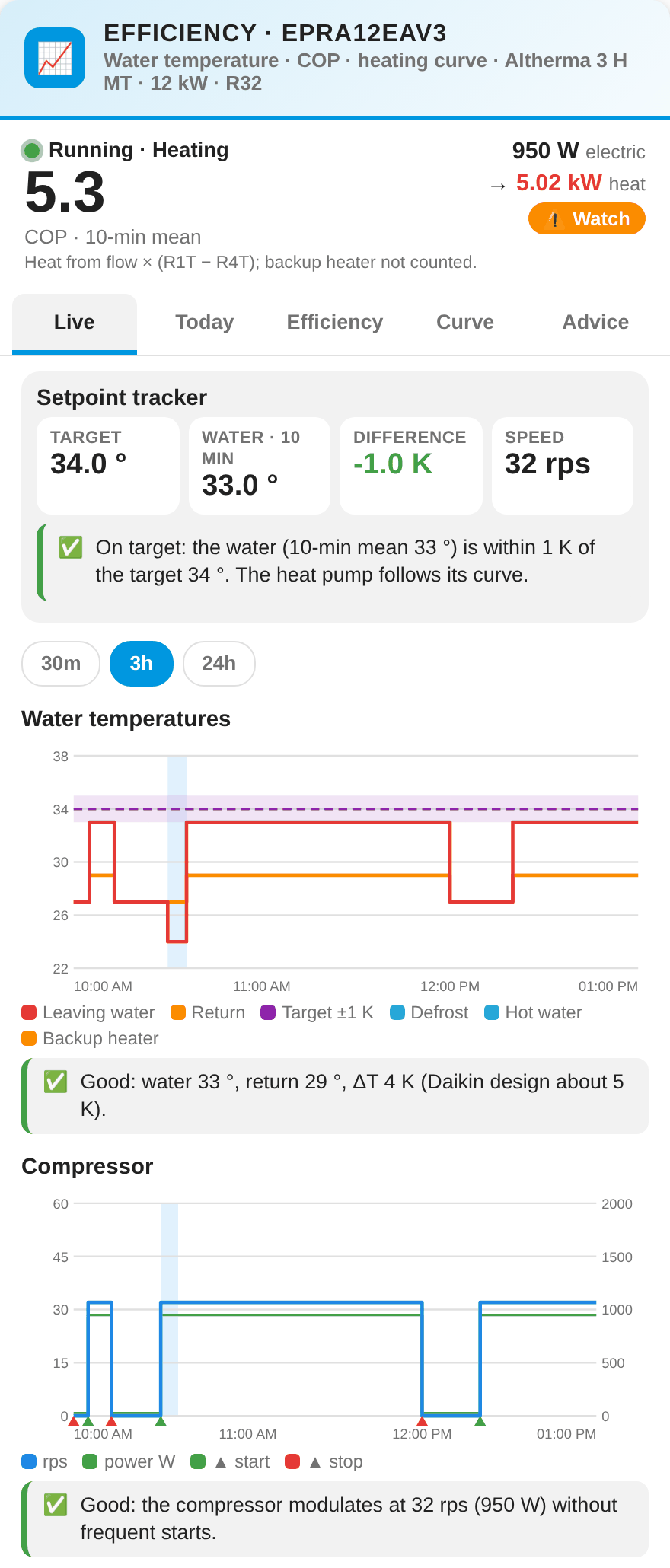
| 🎯 Setpoint tracker: does the water follow the heating curve? | A 10-minute mean against the target, within ±1 K. A start or a defrost does not count against it. When the water stays above target, the heat demand is lower than the compressor's minimum output. That causes stops and starts, and a lower curve helps |
| 📉 Live graphs over 30 min, 3 h or 24 h: water temperatures, compressor (with start ▲ and stop ▲ markers), flow and ΔT, and comfort (room, setpoint, outdoor). Defrost, hot-water and backup-heater periods are shaded | You see why the COP drops: a defrost, a hot-water run, short runs, or a water temperature above what the house needs |
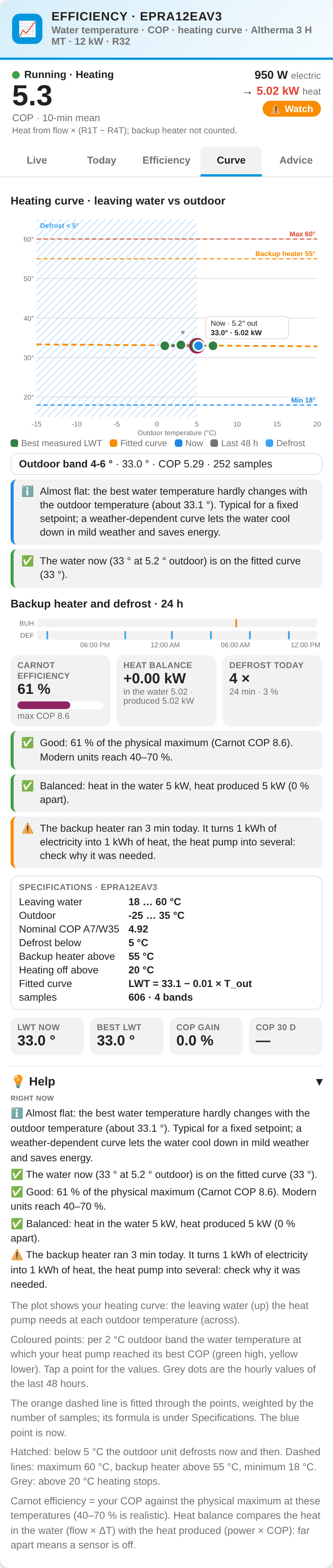
| 🌡️ The heating curve as your heat pump measures it: best water temperature per outdoor band, coloured by COP, with the fitted curve and your unit's limits | It shows whether your curve is too high, or too flat (a fixed setpoint wastes energy in mild weather), and whether the backup heater would be needed on cold days. Carnot efficiency and the heat balance flag measurement errors |
| 🔔 Telegram notifications work again | Since Home Assistant 2025.11 a Telegram chat is a notify entity. Sending to it failed with "notify service not found". Entity targets are now sent with notify.send_message, and the wizard lists notify entities first (#451) |
| ⚡ Power meters in kW are read correctly | A meter reporting 0.85 kW was counted as 0.85 W, which wrecked the COP. Energy meters (kWh) picked by mistake are now skipped, and the wizard only offers power sensors (#435) |
| 🔄 Cycle detection on monobloc units with a slimmed-down ESPAltherma definition | When I/U operation mode or Water pump operation was not enabled (for example EDLA on v1), detection stayed paused and the compressor read as off. Both now have a fallback (#455, discussion #454) |
✅ After updating
- Update via HACS → Daikin Cycle ML → Update, then restart Home Assistant.
- Refresh your browser once (
Ctrl+Shift+R; in the app, pull down), so the new card is loaded. - Add the Efficiency card: Edit dashboard → + Add card, search Daikin Cycle ML · Efficiency. The visual editor lets you pick the first tab, the graph range and the language.
- Give the graphs a day. The live temperatures are new in this release, so the graphs fill up over the next 24 hours. The recorder must keep
sensor.daikin_cycle_ml_thermal_power_live(the default). - Optional:
- set an indoor temperature sensor in the integration options, so the comfort graph and the advice follow your room;
- set your unit's minimum flow (
min_flow, from the installation manual) in the card.
- Telegram users: check that your notify target is your chat's notify entity (for example
notify.telegram_bot_123_456), then send a test withdaikin_cycle_ml.send_test_notification. - No YAML cards to re-paste in this release.
🖼️ The Efficiency card
| Today | Efficiency | Curve | Advice | Dark |
|---|---|---|---|---|
 |
 |
 |
 |
 |
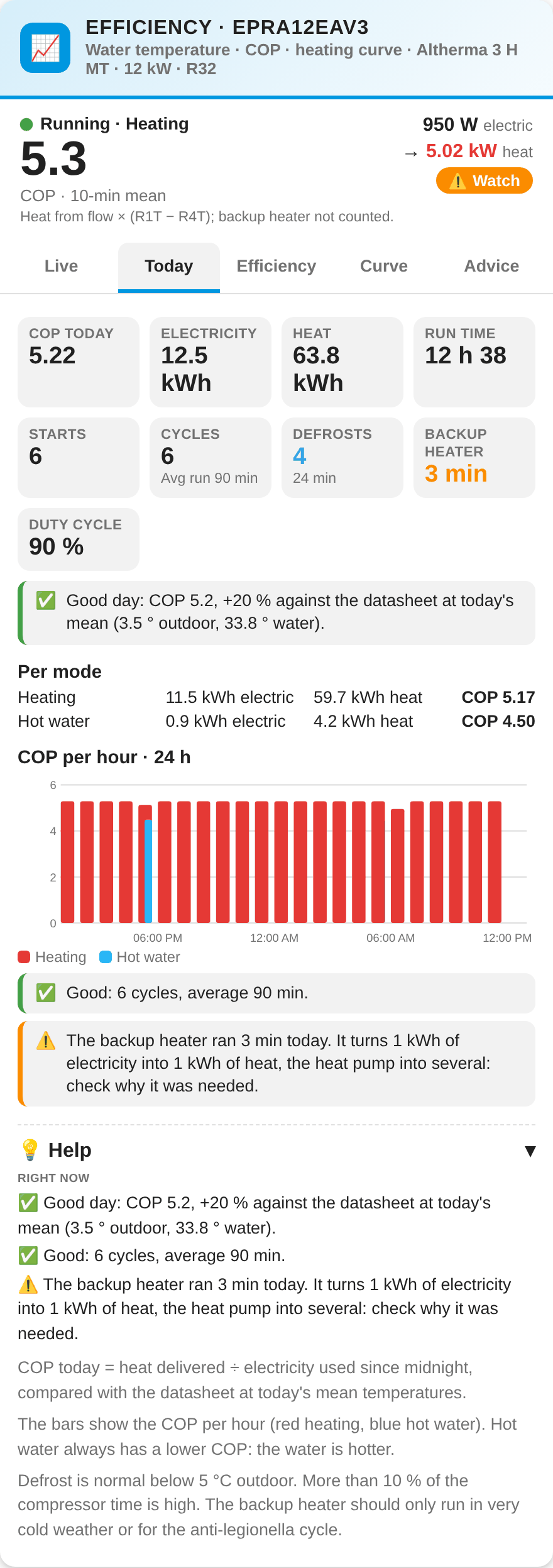
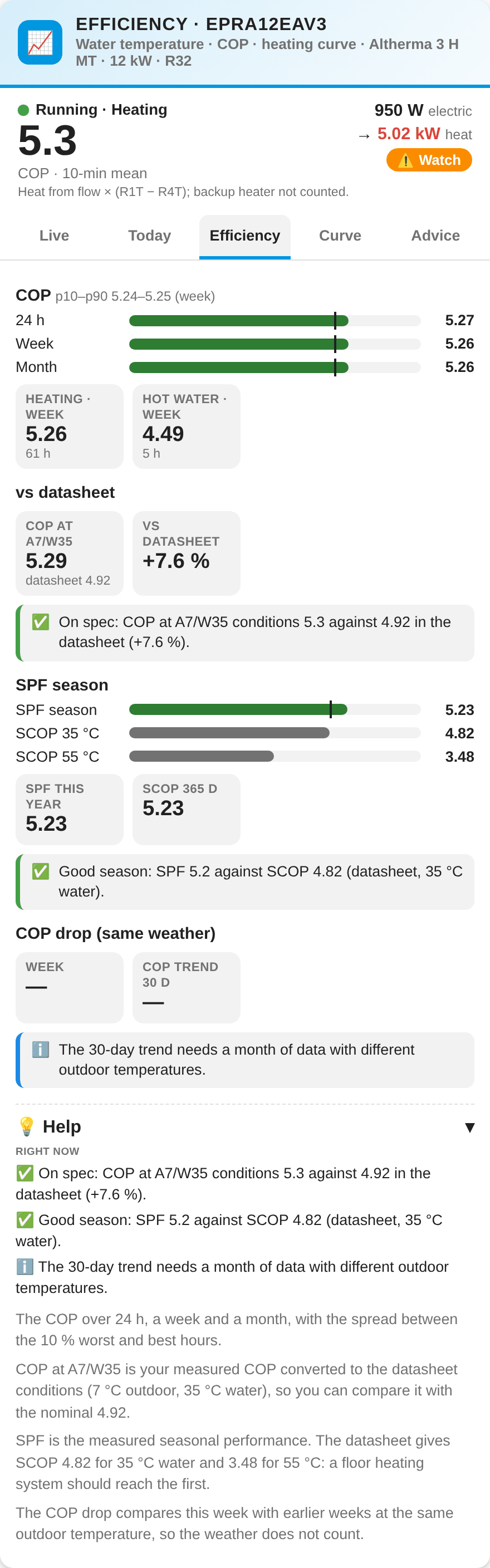
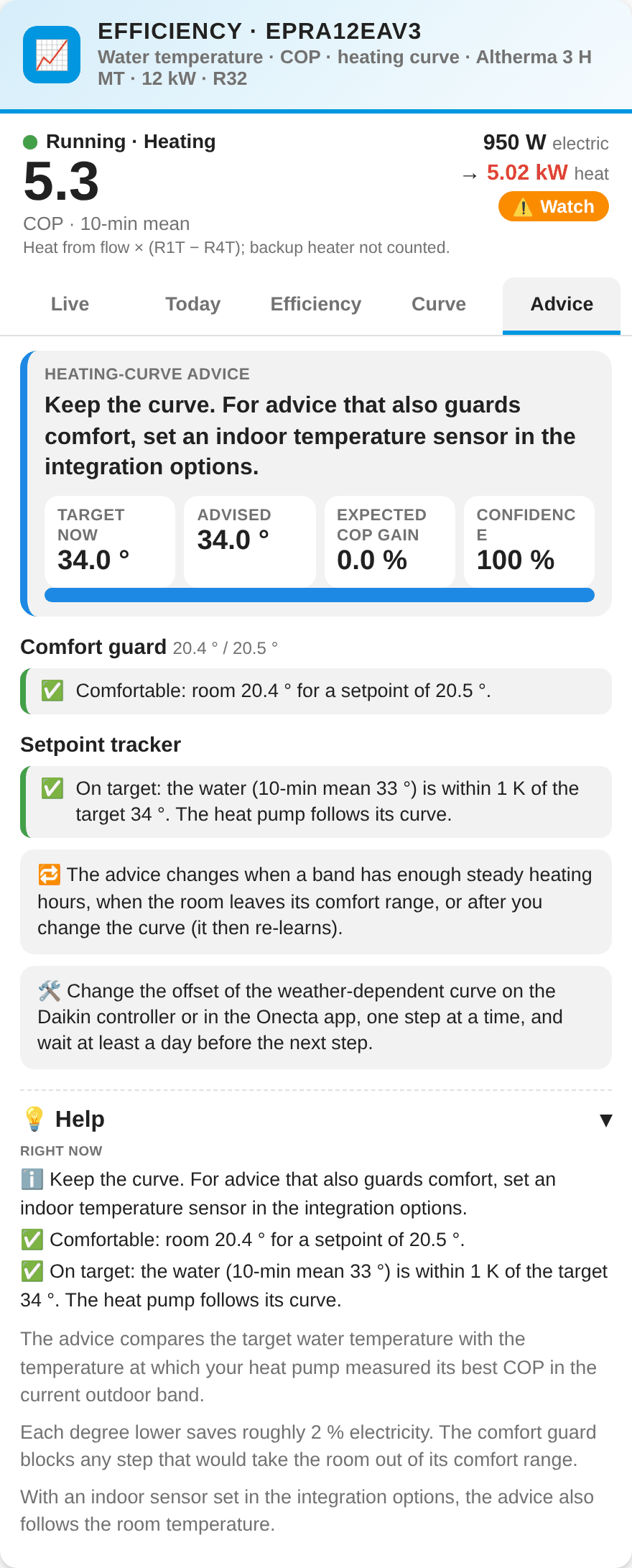
The screenshots are rendered from a simulation of the integration on an EPRA12EAV3, with the water fixed at 33 °C. Your own graphs will show your real curve.
What each tab shows:
- Live — the setpoint tracker and the four graphs, each with its verdict, plus an advanced graph of refrigerant liquid against leaving water.
- Today — COP, electricity and heat per mode, COP per hour, cycles, defrosts and backup heater.
- Efficiency — COP over 24 h, a week and a month; COP at A7/W35 against the datasheet; season SPF against the datasheet SCOP at 35 and 55 °C; COP drop at the same weather.
- Curve — the measured heating curve with your unit's limits, a 24 h strip of backup heater and defrost, Carnot efficiency, heat balance and specifications.
- Advice — the heating-curve advice in plain words, with the comfort guard, when the advice changes and how to change the curve.
Each tab ends with a help section in English, Dutch or French. It repeats the current verdicts and explains the graphs with the numbers of your model.
📖 Efficiency card documentation · All cards, native first
🙏 Thank you
- The #435 reporter: the diagnostics and the meter screenshots showed both the kW bug and the energy-meter mix-up.
- The reporter of discussion #454: the EDLA source attributes made the detection freeze reproducible.
- Telegram users who reported that notifications stopped after the Home Assistant update (#451).
- Everyone who gave feedback on the Daily summary card: it shaped this second native card.
Found something? Open an issue and attach your diagnostics.
📚 Manuals: Dashboard cards · Entities · Documentation index · Troubleshooting
🛠️ Technical Details & Fixes
Added:
-
#457 PR #458 — native card
custom:daikin-efficiency-card:- Files: seven files in
frontend/, each under 500 lines, loaded throughadd_extra_js_url. The element is defined only once every part has registered (any load order). - History: one
history/history_during_periodcall fetches 24 h ofthermal_power_liveplus the compressor, defrost, DHW and backup-heater binary sensors. A recorder value holds until the next one, and the 10-minute means are time-weighted. - Verdicts:
dcm-efficiency-assess.js, with the limits listed in the card README.
- Files: seven files in
-
#457 —
thermal_power_liveattributes:lwt_c,lwt_after_buh_c,return_c,outdoor_c,lw_setpoint_c;room_c(the configured indoor sensor wins),room_setpoint_c;refrigerant_liquid_c.
Read through the compat view, so v1 and v2 names both work.
-
Diagnostics corpus:
tools/ingest_diagnostics.pyandtests/fixtures/diagnostics/(anonymised, trimmed,INDEX.json). It is replayed bytests/test_diagnostics_corpus.py.
Fixes:
- #451 PR #452 —
_dispatch_notify: anotify.*entity target is sent throughnotify.send_messagewithentity_id; legacy services are unchanged. The wizard lists notify entities first. - #435 PR #453 —
_power_from_meter:- a
kWmeter is converted to W; - an energy sensor (
ENERGY_UNITSor device class energy) is skipped with one log line; - the meter selectors use
device_class: power; - diagnostics show
coordinator.power_meter.
- a
- #455 PR #456 —
DETECTION_CRITICAL_ATTRIBUTESno longer containsI/U operation modeorWater pump operation. They are still reported as missing.
Tests: 7,205 tests, 100 % coverage.
- New suites:
test_efficiency_native_card(Node and Chromium, real-integration states and 24 h history in EN / NL / FR, 26 verdict scenarios),test_efficiency_live_temps,test_notify_entity_target,test_435_power_meter_units,test_diagnostics_corpus.
Changelog: CHANGELOG.md | Compare v1.26.1...v1.27.0
🧪 Testers wanted
The Efficiency card is brand new, and the verdict rules are general rules for Daikin air-to-water heat pumps. Your real installation is the best test:
- Try it on desktop and phone, in your language.
- Tell us when a verdict feels wrong for your heat pump. A screenshot of the graph with its verdict helps most. Open an issue, reply on #457, or join the discussion.
- Installers and HVAC engineers: we especially welcome your view on the limits: ±1 K tracking, ΔT 3–8 K, starts per hour, COP against the datasheet.
💚 Help the project grow
- ⭐ Star the repo: it is the easiest way to help other heat-pump owners find it.
- 💬 Mention it on your forum (Tweakers, Home Assistant community, OpenEnergyMonitor) when someone asks about their Daikin Altherma.
- 🐞 Send diagnostics when something looks off. Every report so far has made the integration better for everyone.
☕ Support
Daikin Cycle ML is free, local-only, and open-source. If it has helped you optimize your heat pump or save on energy costs: