Filtering Observables
This section explains operators you can use to filter and select elements from Observables.
-
filter( )orwhere( )— filter elements emitted by an Observable -
takeLast( )— only emit the last n elements emitted by an Observable -
skip( )— ignore the first n elements emitted by an Observable -
take( )— emit only the first n elements emitted by an Observable -
sample( )— emit items emitted by an Observable at a particular time interval -
takeWhile( )andtakeWhileWithIndex( )— emit items emitted an Observable as long as a specified condition is true, then skip the remainder
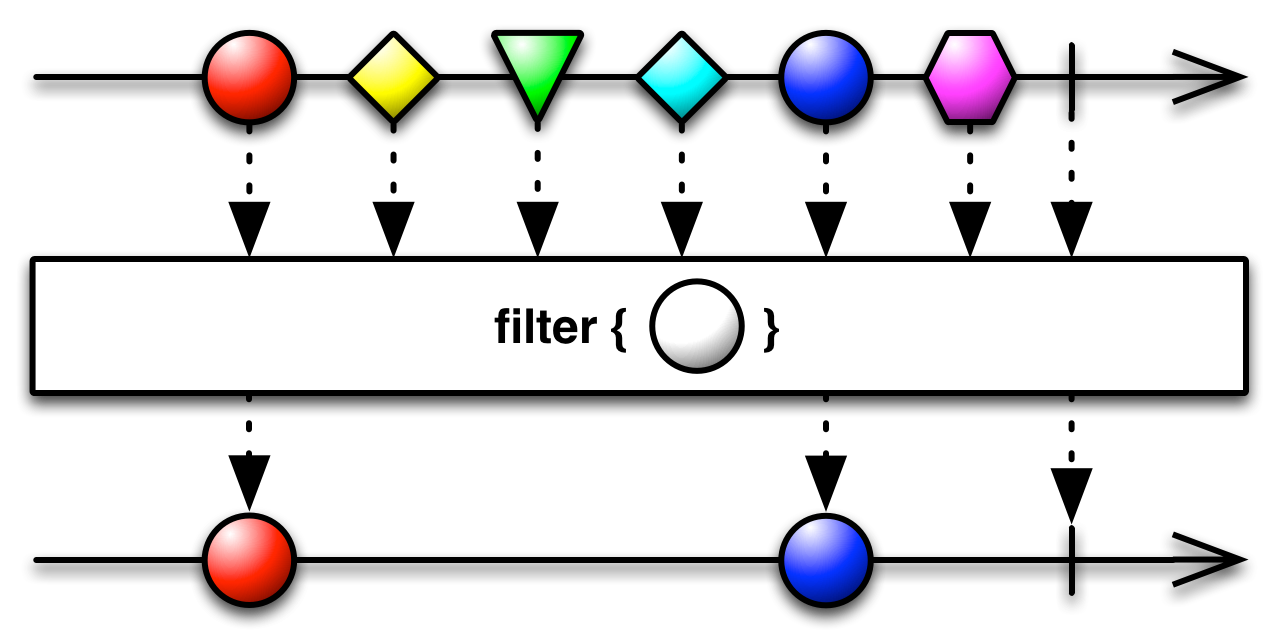
You can filter a Observable, discarding any values that do not meet some test, by passing a filtering closure into the filter( ) method. For example, the following code filters a list of integers, emitting only those that are even (that is, where the remainder from dividing the number by two is zero):
numbers = Observable.toObservable([1, 2, 3, 4, 5, 6, 7, 8, 9]);

Observable.filter(numbers, { 0 == (it % 2) }).subscribe(
  [ onNext:{ myWriter.println(it); },
    onCompleted:{ myWriter.println("Sequence complete"); },
    onError:{ myWriter.println("Error encountered"); } ]
);
2
4
6
8
Sequence complete
In addition to calling filter( ) as a stand-alone method, you can also call it as a method of a Observable object, so, in the example above, instead of
Observable.filter(numbers, { 0 == (it %2) }) ...you could instead write
numbers.filter({ 0 == (it % 2) }) ...The where( ) method has the same purpose as filter( ) but accepts a Func1 evaluator function instead of a closure. Here is the same sample, but implemented with where( ) instead of filter( ):
class isEven implements rx.util.functions.Func1 {
  Boolean call( Object it ) { return(0 == (it % 2)); }
}

myisEven = new isEven();

numbers = Observable.toObservable([1, 2, 3, 4, 5, 6, 7, 8, 9]);

numbers.where(myisEven).subscribe(
  [ onNext:{ myWriter.println(it); },
    onCompleted:{ myWriter.println("Sequence complete"); },
    onError:{ myWriter.println("Error encountered"); } ]
);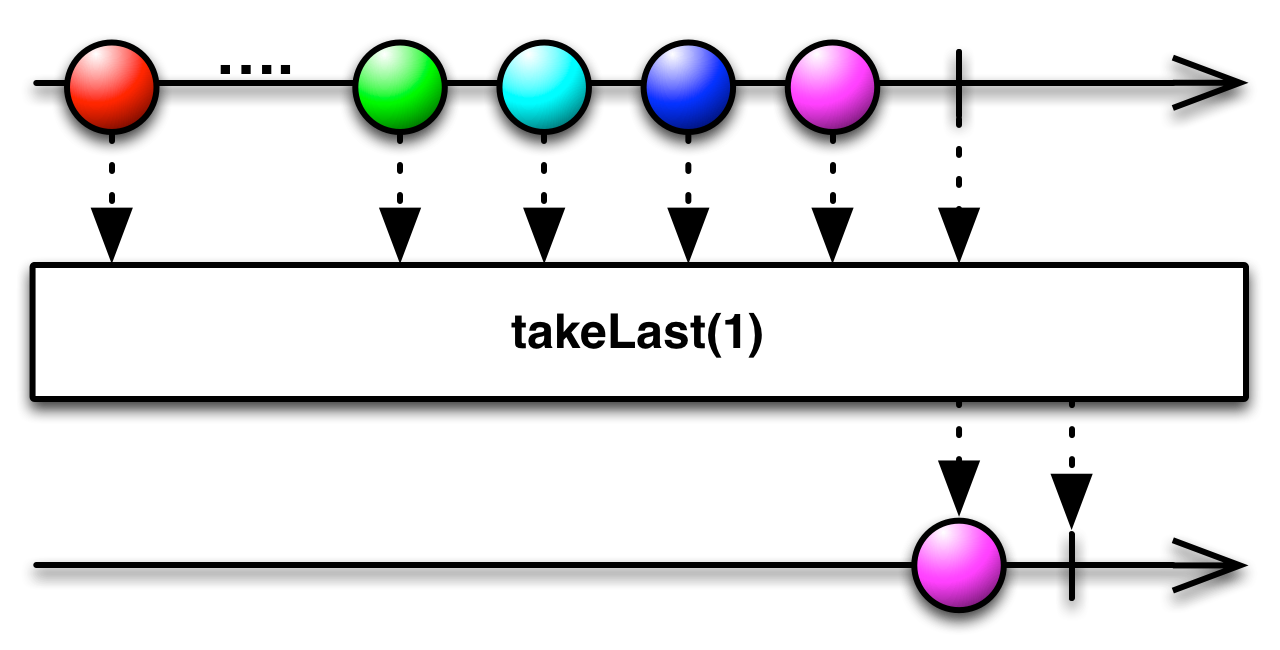
To convert a Observable that emits several objects into one that only emits the last n of these objects before completing, use the takeLast( ) method. For instance, in the following code, takeLast( ) emits only the last integer in the list of integers represented by numbers:
numbers = Observable.toObservable([1, 2, 3, 4, 5, 6, 7, 8, 9]);

Observable.takeLast(numbers,1).subscribe(
  [ onNext:{ myWriter.println(it); },
    onCompleted:{ myWriter.println("Sequence complete"); },
    onError:{ myWriter.println("Error encountered"); } ]
);
9
Sequence complete
In addition to calling takeLast( ) as a stand-alone method, you can also call it as a method of a Observable object, so, in the example above, instead of
Observable.takeLast(numbers,1) ...you could instead write
numbers.takeLast(1) ...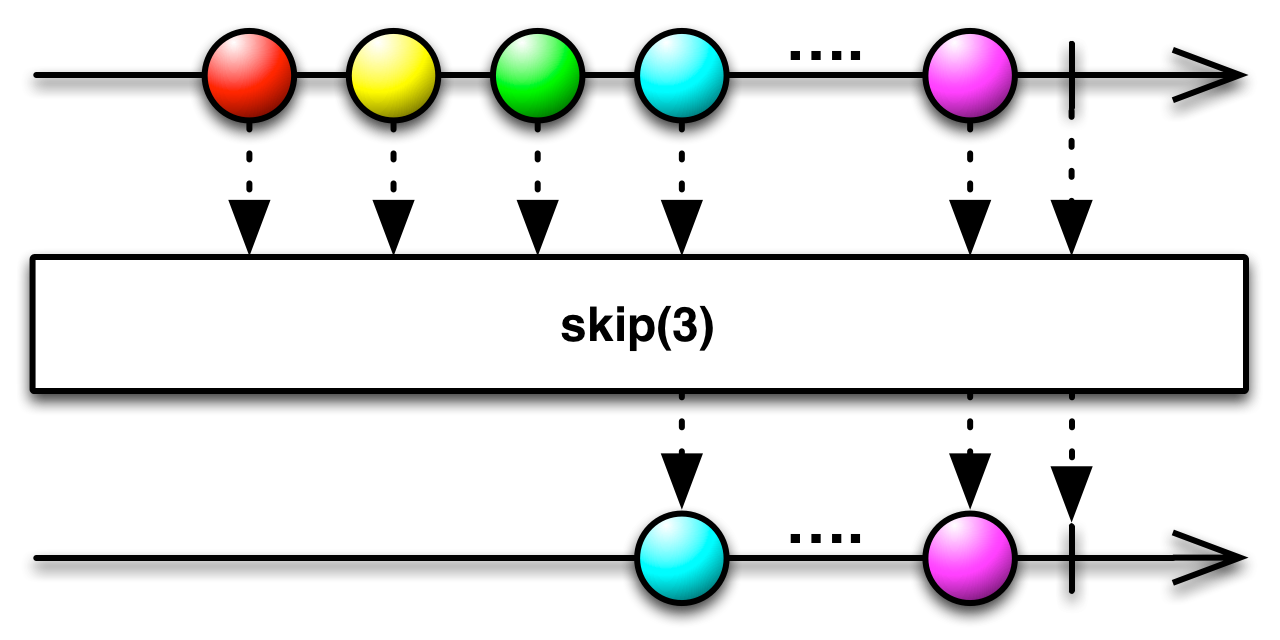
You can ignore the first n items emitted by a Observable and attend only to those items that come after, by modifying the Observable with the Observable.skip(n) method.
numbers = Observable.toObservable([1, 2, 3, 4, 5, 6, 7, 8, 9]);
Observable.skip(numbers, 3).subscribe(
[ onNext:{ myWriter.println(it); },
onCompleted:{ myWriter.println("Sequence complete"); },
onError:{ myWriter.println("Error encountered"); } ]
);4
5
6
7
8
9
Sequence complete
In addition to calling skip( ) as a stand-alone method, you can also call it as a method of a Observable object, so, in the example above, instead of
Observable.skip(numbers, 3) ...you could instead write
numbers.skip(3) ...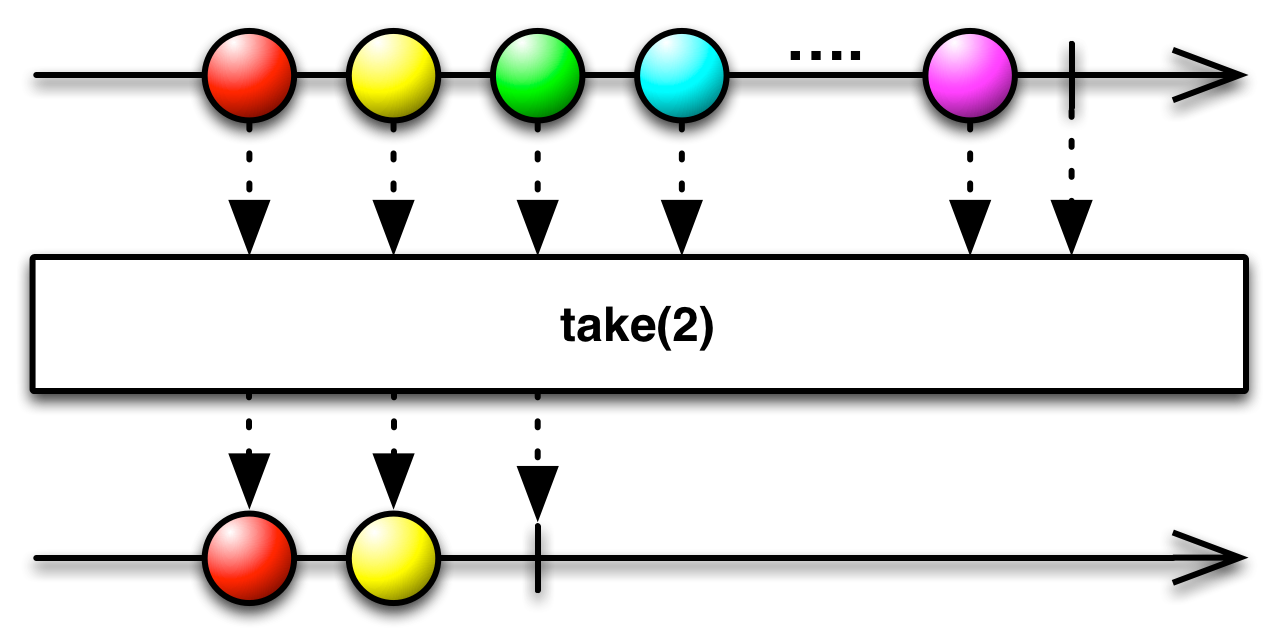
You can choose to pay attention only to the first n values emitted by a Observable by calling its take(n) method. That method returns a Observable that will call a subscribing observer’s onNext closure a maximum of n times before calling onCompleted. For example,
numbers = Observable.toObservable([1, 2, 3, 4, 5, 6, 7, 8, 9]);

Observable.take(numbers, 3).subscribe(
  [ onNext:{ myWriter.println(it); },
    onCompleted:{ myWriter.println("Sequence complete"); },
    onError:{ myWriter.println("Error encountered"); } ]
);
1
2
3
Sequence complete
In addition to calling take( ) as a stand-alone method, you can also call it as a method of a Observable object, so, in the example above, instead of
Observable.take(numbers, 3) ...you could instead write
numbers.take(3) ...If you call take(n) on a Observable, and that Observable emits fewer than n items before completing, the new, take-modified Observable will not throw an error, but will merely emit this same fewer number of items before it completes.
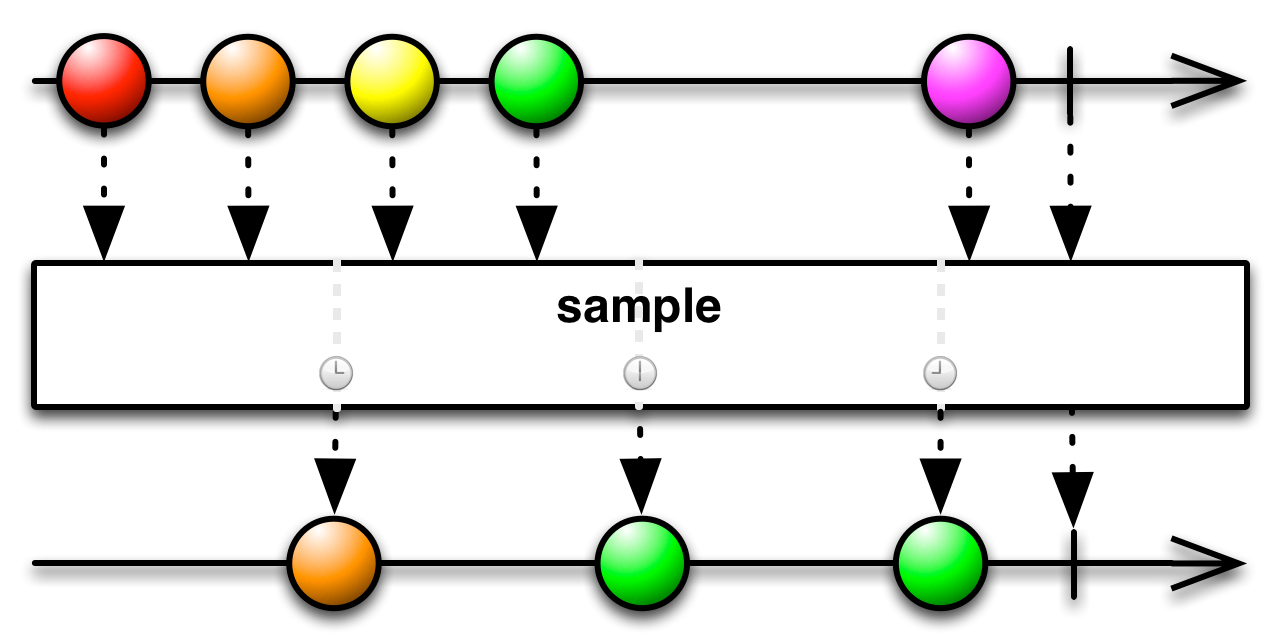
Use the sample( ) method to periodically look at an Observable to see what object it is emitting at a particular time.
The following code constructs an Observable that emits the numbers between one and a million, and then samples that Observable every ten milliseconds to see what number it is emitting at that moment.
def numbers = Observable.range( 1, 1000000 );

numbers.sample(10, java.util.concurrent.TimeUnit.MILLISECONDS).subscribe(
  [ onNext:{ myWriter.println(it); },
    onCompleted:{ myWriter.println("Sequence complete"); },
    onError:{ myWriter.println("Error encountered"); } ]
);
339707
547810
891282
Sequence complete
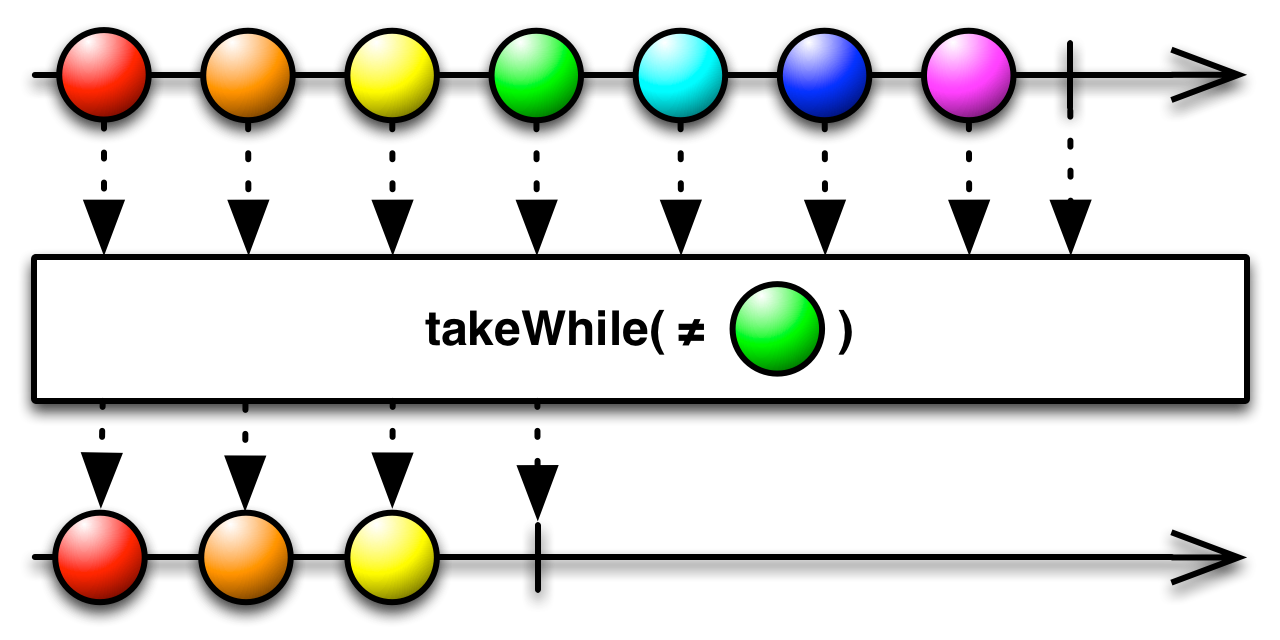
The takeWhile( ) method returns an Observable that mirrors the behavior of the source Observable until such time as a closure applied to an object emitted by that observable returns false, whereupon the new Observable calls onCompleted( ).
numbers = Observable.toObservable( [1, 2, 3, 4, 5, 6, 7, 8, 9] );

numbers.takeWhile({ ((it < 6) || (0 == (it % 2))) }).subscribe(
  [ onNext:{ myWriter.println(it); },
    onCompleted:{ myWriter.println("Sequence complete"); },
    onError:{ myWriter.println("Error encountered"); } ]
);
1
2
3
4
5
6
Sequence complete
The takeWhileWithIndex( ) method is similar, but your closure takes an additional parameter: the (zero-based) index of the object being emitted by the source Observable.
numbers = Observable.toObservable( [1, 2, 3, 4, 5, 6, 7, 8, 9] );

numbers.takeWhileWithIndex({ it, index -> ((it < 6) || (index < 5)) }).subscribe(
  [ onNext:{ myWriter.println(it); },
    onCompleted:{ myWriter.println("Sequence complete"); },
    onError:{ myWriter.println("Error encountered"); } ]
);
1
2
3
4
5
Sequence complete