




Library for converting 2D Python lists to fancy ASCII/Unicode tables
Documentation and examples are available at table2ascii.rtfd.io
pip install -U table2ascii
Requirements: Python 3.7+
from table2ascii import table2ascii

output = table2ascii(
    header=["#", "G", "H", "R", "S"],
    body=[["1", "30", "40", "35", "30"], ["2", "30", "40", "35", "30"]],
    footer=["SUM", "130", "140", "135", "130"],
)

print(output)

"""
╔═════════════════════════════╗
║  #     G     H     R     S  ║
╟─────────────────────────────╢
║  1    30    40    35    30  ║
║  2    30    40    35    30  ║
╟─────────────────────────────╢
║ SUM   130   140   135   130 ║
╚═════════════════════════════╝
"""from table2ascii import table2ascii
output = table2ascii(
body=[["Assignment", "30", "40", "35", "30"], ["Bonus", "10", "20", "5", "10"]],
first_col_heading=True,
)
print(output)
"""
╔════════════╦═══════════════════╗
║ Assignment ║ 30 40 35 30 ║
║ Bonus ║ 10 20 5 10 ║
╚════════════╩═══════════════════╝
"""from table2ascii import table2ascii, Alignment
output = table2ascii(
header=["#", "G", "H", "R", "S"],
body=[["1", "30", "40", "35", "30"], ["2", "30", "40", "35", "30"]],
first_col_heading=True,
column_widths=[5] * 5, # [5, 5, 5, 5, 5]
alignments=[Alignment.LEFT] + [Alignment.RIGHT] * 4, # First is left, remaining 4 are right
)
print(output)
"""
╔═════╦═══════════════════════╗
║ # ║ G H R S ║
╟─────╫───────────────────────╢
║ 1 ║ 30 40 35 30 ║
║ 2 ║ 30 40 35 30 ║
╚═════╩═══════════════════════╝
"""from table2ascii import table2ascii, PresetStyle
output = table2ascii(
header=["First", "Second", "Third", "Fourth"],
body=[["10", "30", "40", "35"], ["20", "10", "20", "5"]],
column_widths=[10] * 4,
style=PresetStyle.ascii_box
)
print(output)
"""
+----------+----------+----------+----------+
| First | Second | Third | Fourth |
+----------+----------+----------+----------+
| 10 | 30 | 40 | 35 |
+----------+----------+----------+----------+
| 20 | 10 | 20 | 5 |
+----------+----------+----------+----------+
"""Check TableStyle for more info and PresetStyle for examples.
from table2ascii import table2ascii, TableStyle

my_style = TableStyle.from_string("*-..*||:+-+:+     *''*")

output = table2ascii(
    header=["First", "Second", "Third"],
    body=[["10", "30", "40"], ["20", "10", "20"], ["30", "20", "30"]],
    style=my_style
)

print(output)

"""
*-------.--------.-------*
| First : Second : Third |
+-------:--------:-------+
|  10   :   30   :  40   |
|  20   :   10   :  20   |
|  30   :   20   :  30   |
*-------'--------'-------*
"""See a list of all preset styles here.
All parameters are optional.
| Option | Type | Default | Description |
|---|---|---|---|
header |
List[str] |
None |
First row of table seperated by header row seperator |
body |
List[List[str]] |
None |
List of rows for the main section of the table |
footer |
List[str] |
None |
Last row of table seperated by header row seperator |
column_widths |
List[int] |
automatic | List of column widths in characters for each column |
alignments |
List[int] |
all centered | Alignments for each column (ex. [Alignment.LEFT, Alignment.CENTER, Alignment.RIGHT]) |
first_col_heading |
bool |
False |
Whether to add a heading column seperator after the first column |
last_col_heading |
bool |
False |
Whether to add a heading column seperator before the last column |
- Display tables nicely inside markdown codeblocks on Discord
- Useful for making Discord bots with Discord.py
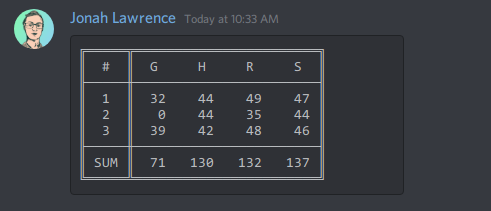
- Tables display nicely whenever monospace fonts are fully supported
- Tables make terminal outputs look more professional

Contributions are welcome!
See CONTRIBUTING.md for more details on how to get involved.