🌍 Language: English | Português | Español
From prompts to systems — learn how to build reusable AI skills.
Skills are one of the core building blocks of modern AI systems. They allow you to define reusable, task-specific capabilities that an AI system can automatically apply when relevant — without repeating instructions every time.
⭐ If this project helped you, please consider giving it a star — it helps others discover it and supports the work!
- Skills Quick Guide
- What are Skills
- How Skills Work
- Skill Structure
- Where Skills Live
- Skills vs Other Customizations
- When to Use Skills
- Example Use Cases
- Creating Your First Skill
- Best Practices
- Common Mistakes
- Advanced Concepts
- Why Skills Matter
- Resources
- Final Thought
- Contributing
- Connect with me
A quick visual reference to understand how skills work — from structure to activation.
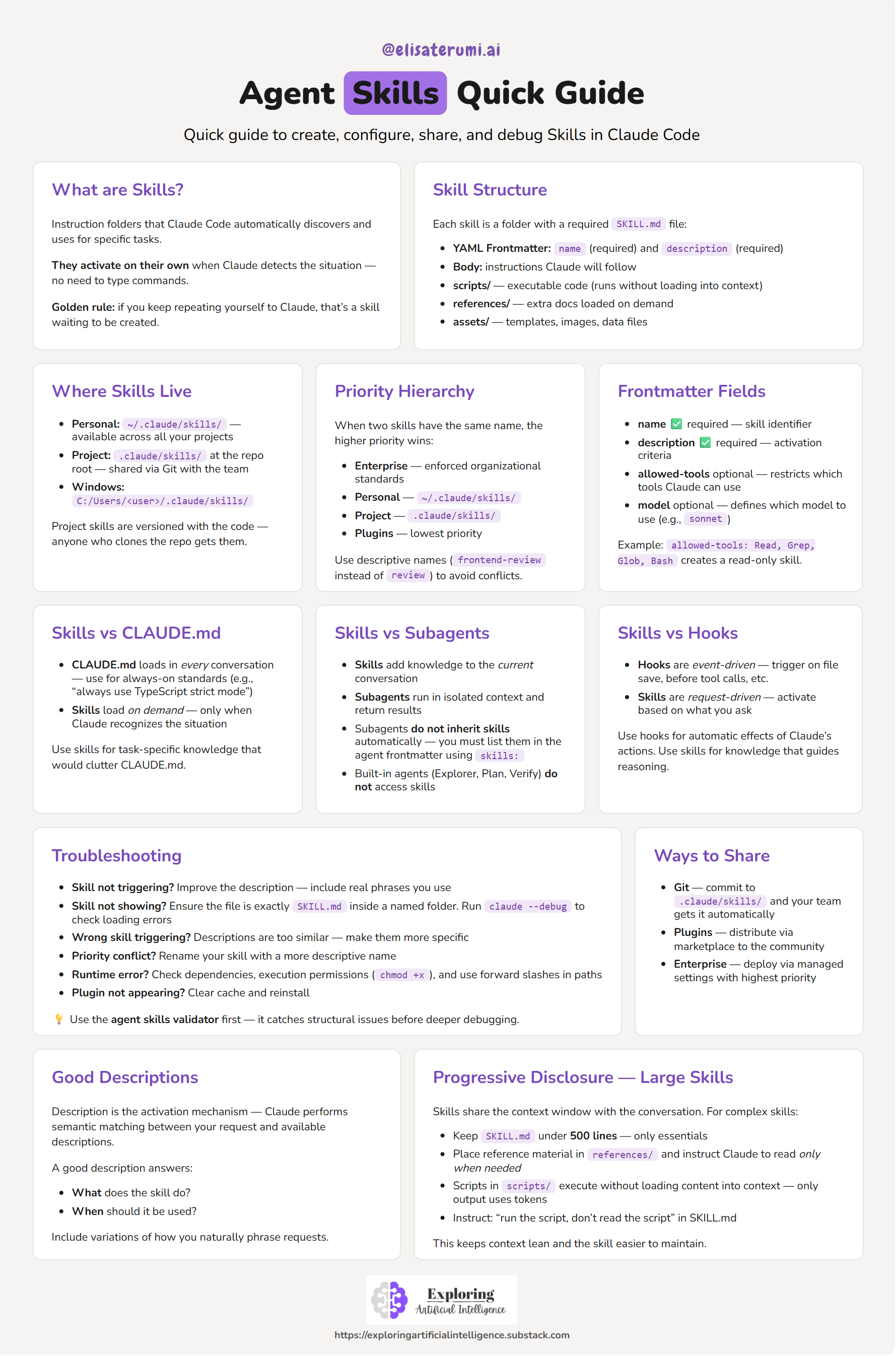
💡 Use this as a quick reference while building your own skills.
A skill is a structured set of instructions that teaches an AI system how to perform a specific task.
In Claude Code, a skill is:
- A directory
- Containing a
SKILL.mdfile - With metadata and instructions
Once defined, the system can discover and use the skill automatically.
Instead of repeating prompts, you encode behavior once — and reuse it.
Skills follow a semantic matching workflow:
- The system loads only skill names and descriptions
- A user request is received
- The system compares the request with available skill descriptions
- Matching skills are selected
- The full skill content is loaded and executed
This means:
- Skills are loaded on demand
- They do not clutter context unnecessarily
- They activate only when relevant
Each skill lives inside a directory and must contain a SKILL.md file.
---
name: pr-review
description: Reviews pull requests for code quality. Use when reviewing PRs or checking code changes.
---
Below the frontmatter, you define the instructions:
When reviewing a PR:

1. Analyze code changes
2. Check for best practices
3. Suggest improvements
4. Format output as structured feedbackSkills can be scoped at different levels:
- Location:
~/.claude/skills - Available across all your projects
- Ideal for personal workflows
- Location:
.claude/skills(inside a repository) - Shared via version control
- Used for team standards
| Feature | Behavior | Use Case |
|---|---|---|
| Skills | Load on demand | Task-specific expertise |
| CLAUDE.md | Always loaded | Global project rules |
| Slash Commands | Manual invocation | Explicit actions |
👉 Skills are automatic and contextual
Use a skill when:
- You repeat the same instructions frequently
- You need consistent output formats
- You want reusable workflows
- You want to share knowledge across a team
Rule of thumb:
If you explain the same thing more than once, it should be a skill.
- Code review standards
- Commit message formatting
- Documentation templates
- Debugging checklists
- Data transformation workflows
- Clinical text anonymization
👉 Explore ready-to-use skills: examples
Some examples are inspired by existing open-source skill repositories.
mkdir -p ~/.claude/skills/my-skillCreate a SKILL.md file inside your skill directory, or copy from the provided template.
---
name: my-skill
description: Describe what the skill does and when to use it.
---Define:
- Steps
- Rules
- Output format
- Write clear and specific descriptions (this controls activation)
- Keep instructions structured and explicit
- Define expected output formats
- Avoid overly generic skills
- Keep
SKILL.mdconcise (use references if needed)
- Treating skills as simple prompts
- Writing vague descriptions (skill won’t trigger)
- Overloading a single skill with multiple responsibilities
- Not defining output structure
name(required)description(required)allowed-tools(optional)model(optional)
- Keep core logic in
SKILL.md - Move large content to:
references/scripts/assets/
Skills transform how we build with AI:
- From prompts → reusable systems
- From manual instructions → automatic behavior
- From experimentation → production-ready workflows
They are a key building block for:
- AI agents
- Automation pipelines
- Scalable AI systems
Curated links, documentation, and example repositories:
Skills shift the mindset from:
“What should I ask the model?”
To:
“What capability should this system have?”
Contributions are welcome!
Ways to contribute:
- Add new skills or use cases
- Improve documentation and examples
- Report issues or suggest improvements
Feel free to open an issue or submit a pull request 🚀
I share practical insights about AI, agents, and real-world applications:
- LinkedIn (Profile): https://www.linkedin.com/in/elisa-terumi
- LinkedIn (Page): https://www.linkedin.com/company/exploring-artificial-intelligence
- Newsletter: https://exploringartificialintelligence.substack.com/
- Medium: https://medium.com/@elisa-terumi