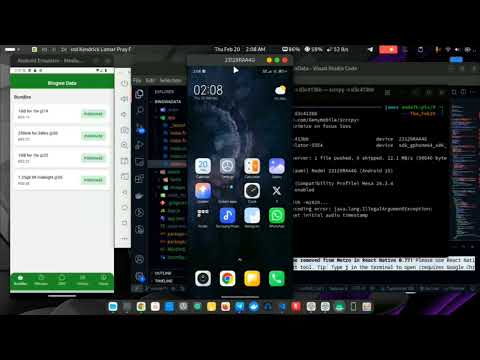
Bingwa Sokoni Data is an open-source React Native app built with Expo that allows users to purchase Bingwa Sokoni (data, minutes, SMS) through a clean, modern interface. It features a custom purchase UI with modals, transaction history, dark mode, and a custom bottom tab navigator with icons.

- Features
- Getting Started
- Installation
- Running the App
- Building for Production
- Project Structure
- Contributing
- Learn More
- License
- Purchase Bundles:
Select a bundle and purchase it via a modal interface. - Clean Response Display:
The app shows only the relevant server status message (e.g., "Purchase Successful, Please Enter Mpesa Pin"). - Transaction History:
View a log of all purchase transactions on the History tab. - Dark Mode / Theming:
Toggle between light and dark themes using a switch in the global header. - Custom Bottom Tab Navigator:
Rounded tab bar with Ionicons for each tab. - Error Handling:
An Error Boundary catches unexpected errors.
When you're ready, run:
npm run reset-projectThis command will move the starter code to the app-example directory and create a blank app directory where you can start developing.
Clone the Repository:
git clone https://github.com/endafk/BingwaData
cd BingwaData
##Install Dependencies:
npm install
# or
yarn installThis app uses a sample API endpoint for handling bundle purchases. The current endpoint is hard-coded as:
const response = await fetch('https://api.bingwasokoni.lore/api/bundle.php', {
  method: 'POST',
  headers: { 'Content-Type': 'application/json; charset=UTF-8' },
  body: JSON.stringify(payload),
});
To use your own API, follow these steps:
- Locate the API Call:
Open index.tsx (or the file where handlePurchaseBundle is defined) and find the fetch call shown above.
- Replace the URL:
Change the URL (https://api.bingwasokoni.lore/api/purchases.php) to your own endpoint.
- Verify the Payload Structure:
The app sends a JSON payload with the following fields:
user_id: (number) Your user's unique identifier.
offer_amount: (number) The bundle amount (extracted from the bundle price).
phone_number: (string) The phone number that will receive the bundle.
mpesa_phone: (string) The phone number associated with mobile money (M-Pesa).
offer_ussd: (string) A USSD code used for the bundle (optional based on your API).
action: "purchase_bundle" – This specifies the type of request.-
Adjust the payload if your API requires different fields.
-
Handle the Response: The app currently expects a JSON response containing at least a status field (e.g., { "status": "Purchase Successful, You will be prompted to enter your Mpesa PIN" }).
If your API returns a different structure, update the response parsing logic in handlePurchaseBundle accordingly.
- Test Your Endpoint: Once you update the API URL and payload (if necessary), test your changes locally by running:
npx expo startand attempting a purchase to ensure that the app communicates properly with your API.
By following these steps, you can easily replace the sample API with your own without affecting the rest of the app's functionality.
To start the development server, run:
npx expo startUse the Expo Go app to scan the QR code, or run the app on an iOS/Android simulator. Building for Production Expo’s EAS (Expo Application Services) makes it easy to build production-ready apps:
npm install -g eas-clieas logineas build:configureFor Android:
eas build --platform androidFor iOS:
eas build --platform iosFollow the prompts to complete your build. Once finished, you'll receive a URL to download your APK/IPA.
- AppNavigator.js: Contains the main navigator with the global header (with dark mode switch), custom bottom tab navigator (with icons), and screens for Bundles, Minutes, SMS, Transaction History, and About.
- Themes: Defined within the code for both light and dark modes. ErrorBoundary:
- Catches unexpected errors to prevent app crashes. Screens:
- Includes individual components for purchasing, viewing transaction history, and app information.
Contributions are welcome! Please follow these steps:
- Fork the repository.
- Create a new branch for your feature or bugfix.
- Commit your changes and push your branch.
- Open a Pull Request with a detailed description of your changes.
The Project is still on development: - Integrate it to daraja api - Reduce final app size(React Native Lore) - Script it
To learn more about developing your project with Expo and React Native, check out these resources:
Expo Documentation React Native Documentation EAS Build Documentation
This project is licensed under the MIT License.