Corporation’s most valuable asset besides employees and customers is data. Most critical decisions made by business come form analyzing lots of data. The data could be related to several areas. Without data analysis, companies work without a direction or strategy. Ads are offered based on your purchasing history. Companies like facebook, amazon collect data of customer and offer customized ads. The data is saved in database. This course shows how to extract critical insight from data that is saved in a relational database.
Database is a collection of tables. Most of database experience is related to deal with working with tables. Tables contain actual data. This course help me master how to get insight from data. To be a master, I need secure skill which is called SQL (Structured Query Language). This language can be related also other databases.

In a table each column contains an information of same data type. Horizontally each row collects data of a supplier, employee, etc. If a table is supplier table, it should only consists supplier information. Download Postgress to run SQL queries in this training.
PJI admin connect database but database does not store data. Data is stored in table. In this lecture, we create a table and then insert data into that table. SQL that will be typing into out PJI admin tool to create and insert tables. SQL is used to both creating and analyzing the data. In each column of table, there can be set restriction about data type (numbers, English characters, etc.). A table structure is defined by using SQL statements. Constraints can be set in SQL. Constraint is basically the databas’s ability to control what kind of data goes in a given column. In SQL, create a table and create columns (Ex: department varchar(100)). Primary key (department) prevents us from entering department two times (accept it once) or empty data (null). To insert data into table, use insert statement. For example “insert into departments values (‘Automotive’, ‘Auto & Hardware’);” code that insert first value goes into first column, and second value goes into second column. ’Automotive’ data cannot be used again since primary key does not allow to use it twice. Primary key can be define only once. But it can be defined for multiple columns. SQL includes statements such as creating the table ‘departments’. Statement ends with semicolumn (Ex: create or insert statement). When a column is created, there is another attribute nex to it. This is data type such as int or varchar. Int refers to integer and varchar symbolize character. Varchar(20) limits that number of characters should be less than 20. First create a table then insert data into this table. Script should be followed step by step.
mock-data.txt is downloaded. Copy the first statement. New database is created in PostgreSQL. Click on Tools and select Query Tool. We wll use mostly this interface to write SQL commands. Paste first statement into Query Tool.
create table departments ( department varchar(100), division varchar(100), primary key (department) );
If we try to write "prima key" instead of "primary key" it gives error in message tab.

Delete first statement and insert data for the column. Select all column and click Run. It succesfully run. Do this for other statements and run that statements. After run the statements run the code "SELECT * FROM employees" to see the employee table.

First row also gives data type. Data scientist must understand the data. To understand the data write SQL statements and understand the data. PostgreSQL only runs the statement that is selected.
region_id in employee table comes from the options region_id of region table. %80 of the time as a data scientist is related to select from commands.

Datatypes are varchar, integer and date
The datatype of course_no column is character with maximum 5 letter.
Student enrollment has 2 columns.
Teach table has 8 rows.
Select statatement is referred to query since it is a kind of question to database. You get the info back that you interested.
To create new query, first select course_data database and then query tool. Call employees table by using select command. Select command retrieve the data. * calls all columns.
WHERE clause filters specific records. For example filter employees in sports department with "WHERE department = 'Sports'". SQL is case insensitive language but data is case sensitive. Commands can be upper letter or lower letter. SQL clauses initially used with capitalized letter to follow the code easily.
It is good to have semicolumn at the end of statement. like clause provide the results that does not exactly match. For example "WHERE deparment like 'F%nitu%';" searches the words starts with capital F and includes 'nitu' part. Another example is "WHERE salary ≥ 100000" finds the salary equal or higher than 100000.
The format of select is "SELECT columns FROM table_name WHERE condition". Condition can be an external condition. Condition is checked every record.
To make multiple conditions write "WRITE department = 'Clothing' AND salary > 90000". This find records that the department as Clothing and salary is higher than 90000.
"WRITE department = 'Clothing' OR salary > 90000". This find records that the department as Clothing or salary is higher than 90000. Record is selected if one of the conditions are met.
"WRITE salary < 90000 AND department = 'Clothing' OR department = 'Pharmacy'". This find records that the department as Clothing or Pharmacy and salary is less than 90000.
"SELECT * FROM employees WHERE NOT department = 'Sports' uses NOT conditions that gives all records except the department is 'Sports'
Use ! before = gives also NOT condition.
"WHERE department <> 'Sports'" code gives also NOT condition.
"WHERE NOT department <> 'Sports'" code gives only 'Sports' department.
If a record is empty, it returns NULL. NULL=NULL gives nothing. Because NULL is not equal NULL. NULL. NULL!=NULL gives nothing. Because NULL cannot be compared with NULL.
"WHERE email IS NULL" gives the record includes NULL.
"WHERE NOT email IS NULL" gives the record except NULL.
"WHERE email IS NOT NULL" gives the record except NULL.
"WHERE department IN ('Sports', 'First Aid', 'Toys')" gives employees that is in specified department.
"WHERE salary BETWEEN 80000 AND 100000" gives employees whose salary is between 80000 and 100000.
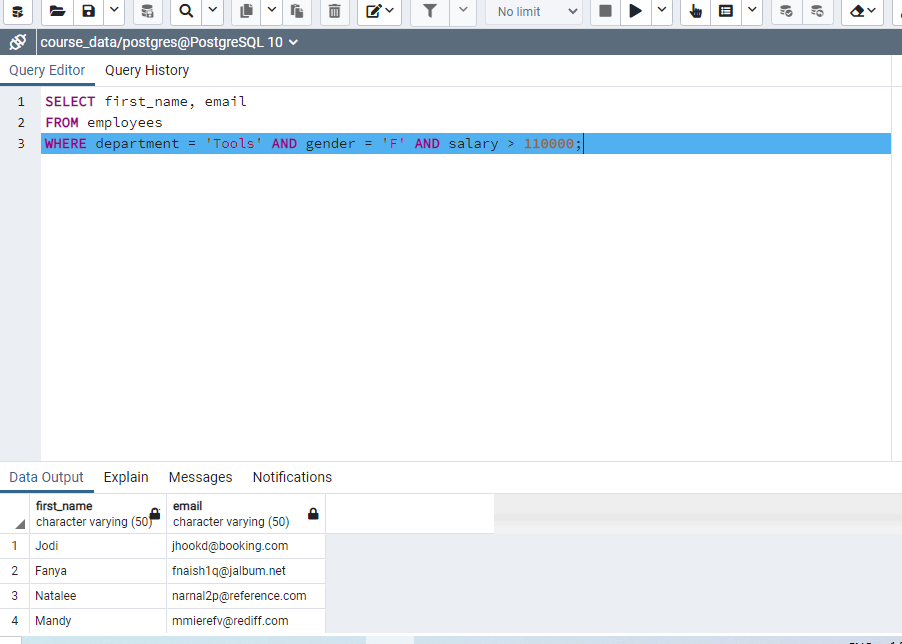

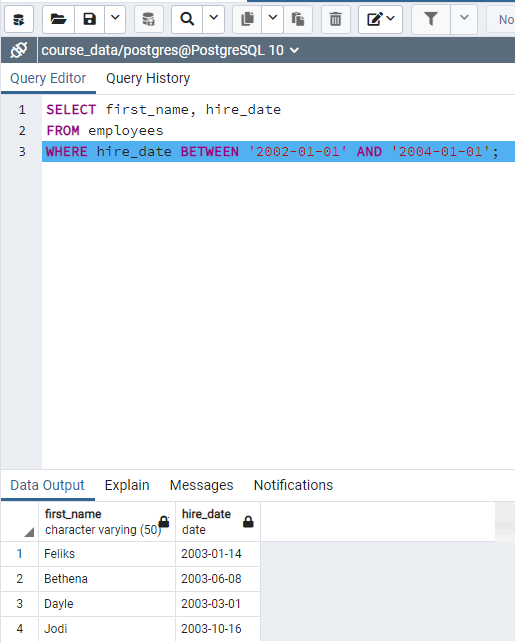
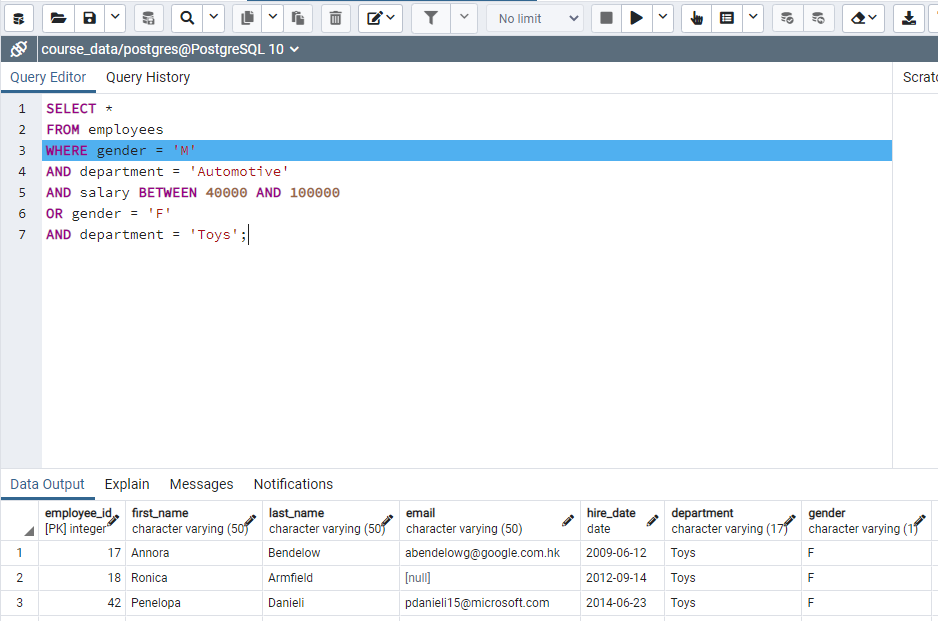 — Two dashes and writes something is considered as comment and not evaluated as command.
ORDER BY command sort data from smallest to largest.
"ORDER BY employee_id desc" sort employee_id from largest to smallest (descending).
"ORDER BY department" sort department alphabetically.
"ORDER BY employee_id asc" sort employee_id from smallest to largest (ascending).
"SELECT DISTINCT department" shows unique list of employee departments.
"SELECT DISTINCT department
FROM employees
ORDER BY 1" shows unique list of employee departments with alphabetic order.
Adding "LIMIT 10" syntax limits and show first 10 rows only. "FETCH FIRST 10 ROWS ONLY" do the same thing.
"SELECT department, salary as yearly_salary" shows department with yearly_salary
To put a space in character, use double quotes like "Yearly Salary"

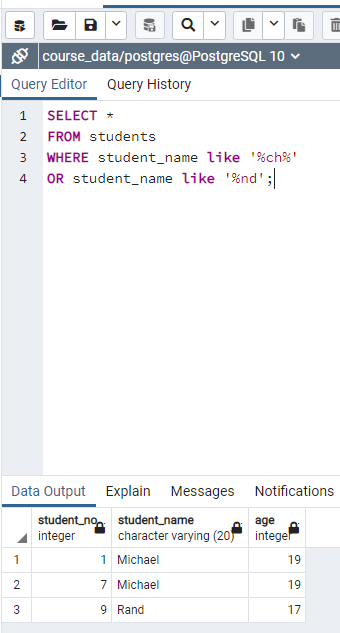


This lecture about formatting data that is displayed in output. For example: combine two columns into one column or make first letters uppercase.
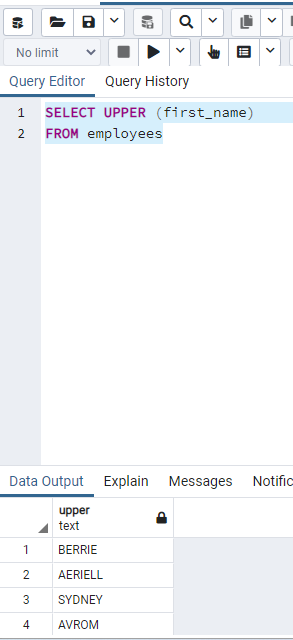
We are changing the data displayed. It is not changing the table.
"SELECT LENGTH (first_name)" gives the length of first_name as values.
"SELECT ' HELLO THERE '" shows the data 'HELLO THERE.'
"SELECT TRIM( ' HELLO THERE ')" shows the data 'HELLO THERE.' and there is no extra spaces.
First the code inside paranthesis is executed.
"SELECT first_name ||' '|| last_name FROM employees" combines two column into one column.
"SELECT first_name ||' '|| last_name full_name FROM employees" combines two column into one column and rename new column as full_name.
Boolean expression is true or false.
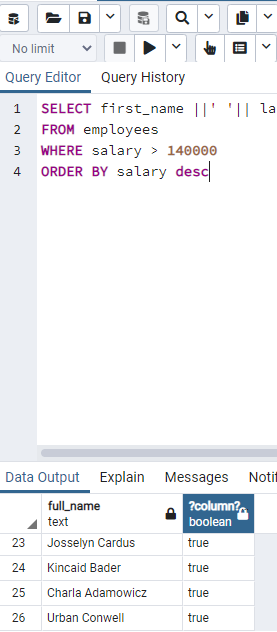
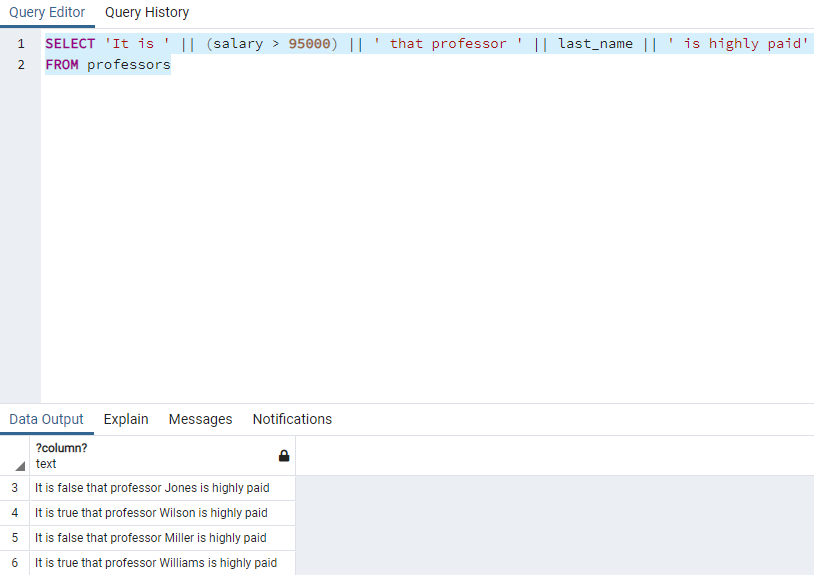
"SELECT first_name ||' '|| last_name full_name, (salary > 140000) FROM employees" combines two column into one column. It adds a boolean column that shows true if salary is higher than 140000 as true. Otherwise, it shows false.
"SELECT department, ('Clothing' IN (department, first_name))" code shows two columns. First column is department and second column is boolean value that is true if 'Clothing' is included in department or first_name columns.
"SELECT department, (department like '%oth%')" code shows two columns. First column is department and second column is boolean value that is true if 'oth' letters are included in department consecutively.
String is a series of characters.
"SELECT 'This is test data' test_data" code set specified string into test_data
"SELECT SUBSTRING('This is test data' FROM 1 FOR 4) test_data_extracted" code extract first four characters from specified string.
"SELECT SUBSTRING('This is test data' FROM 9 FOR 4) test_data_extracted" code extract four characters from starting 9th character of specified string.
"SELECT SUBSTRING('This is test data' FROM 3) test_data_extracted" code extract characters from starting 3th character of specified string.
"SELECT department, REPLACE(department, 'Clothing', 'Attire') modified_data FROM departments" code creates new column as 'modified data' and replaces 'Clothing' string with 'Attire' at 'modified data' column.

Code assignment that add third column with 'department' string
use "as" function to rename the table.
"SELECT POSITION('@ IN email)
FROM employees" shows the position of @ character.
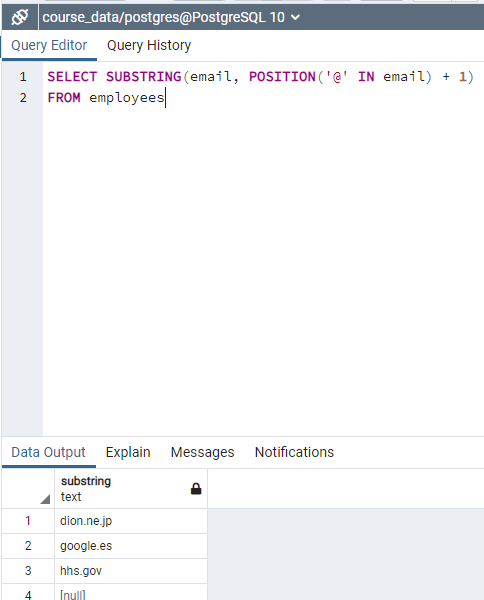
"SELECT email, SUBSTRING(email, POSITION ('@' IN email +1) FROM employees" shows the substring after @.
"SELECT COALESCE(email, 'NONE') as email FROM employees" code gives a column and null rows are shown as 'NONE'.
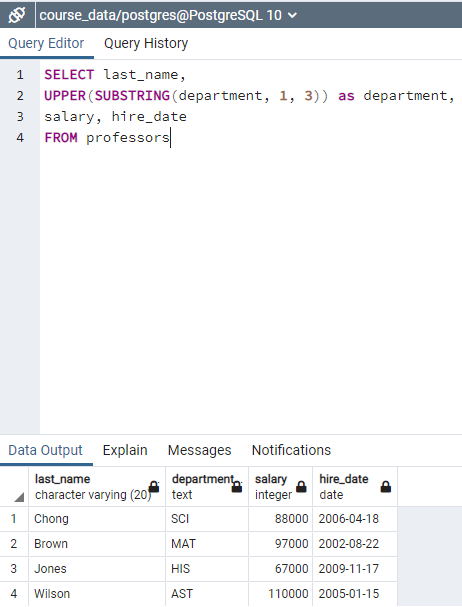
"SELECT UPPER(first_name) FROM employees" gives column of first_name with uppercase letters.
In grouping functions group data together to find aggregate info.
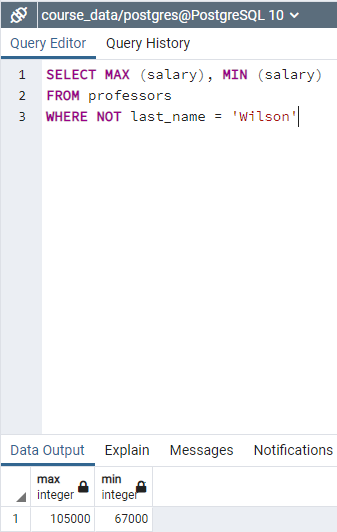
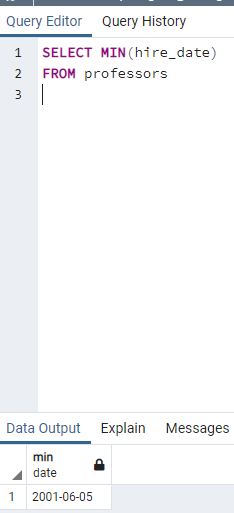
"SELECT MAX(salary) FROM employees" we expect a single query that is max salary.
In grouping functions, # of input row and # output row are not equal.
"SELECT ROUND(AVG(salary)) FROM employees" we expect a single query that is average salary.
"SELECT COUNT(email) FROM employees" gives the number of email address of employees. NULL addresses are not counted.
"SELECT COUNT(*) FROM employees" gives the number of employees.
"SELECT SUM(salary) FROM employees" gives the total amount of salary that is paid to employees.
"SELECT SUM(salary) FROM employees WHERE department = 'TOYS'" gives the total amount of salary that is paid to employees of 'TOYS' department.

"CREATE TABLE cars(make varchar(10))" creates a table with one column
"INSERT INTO cars VALUES ('HONDA');" inserts string values to column.
"SELECT COUNT(*) FROM cars GROUP BY make" gives the number of occurences of each group. Its not telling group name.
"SELECT COUNT(*), make FROM cars GROUP BY make" gives the name of occurencies
"SELECT COUNT(*), make FROM cars GROUP BY make SELECT * FROM cars" gives the name of occurencies with the number of occurencies. (Ex: six records but three groups)
"SELECT department, SUM(salary) FROM employees WHERE 1=1 GROUP BY department" shows total salary paid for each department.
"SELECT department, SUM(salary) FROM employees WHERE region_id (4,5,6,7) GROUP BY department" shows total salary paid of employees with region_id is 4,5,6,7 for each department.

Figure: My code as a course assignment: Calculates number of employees in each department
"SELECT department, count(*) FROM employees GROUP BY department, gender" shows number of male and female in each department.
If you want group in terms of something it needs to be specified in GROUP BY section.
A nonaggreagate column in SELECT needs to be placed in GROUP BY.
"SELECT department, count() FROM employees GROUP BY department HAVING count(*) > 35 ORDER BY department" shows department which has higher than 35 employees
"WHERE count(*) < 35" is not allowed. Because we need to group aggreagated data.

Figure: My code for assignment: first name with number of counts
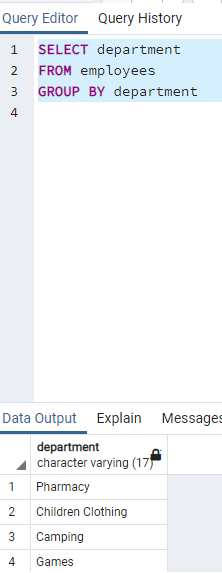
Figure: My code for assignment: first name with number of counts
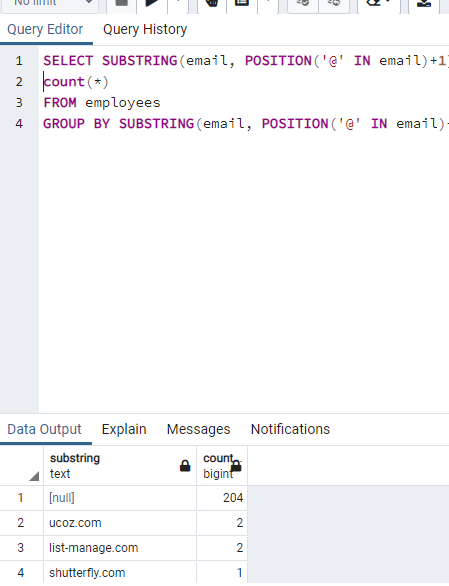
Figure: My code for assignment: Domain names and number of employees that are using this domain
Figure: My code for assignment: Domain names and number of employees that are using this domain
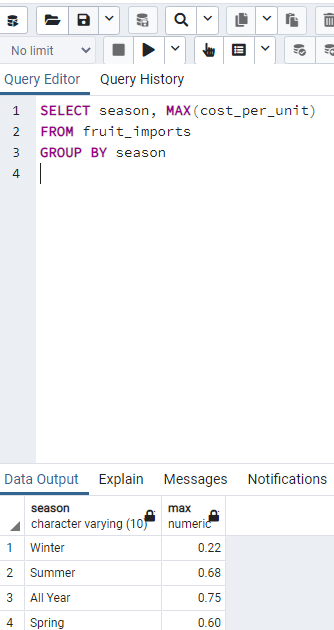
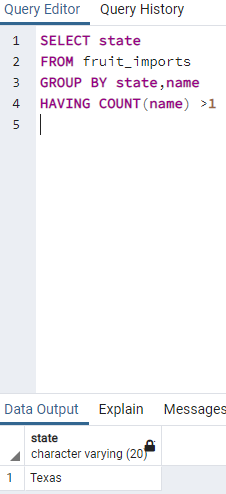
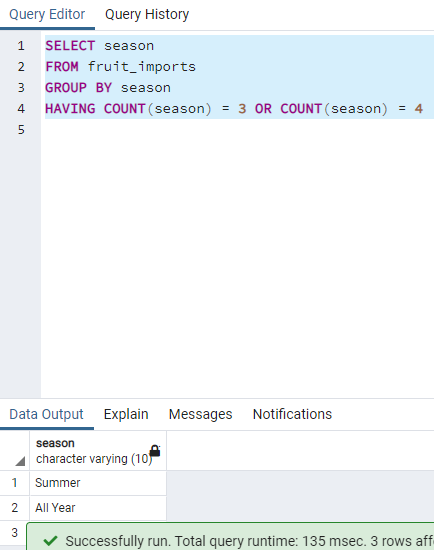
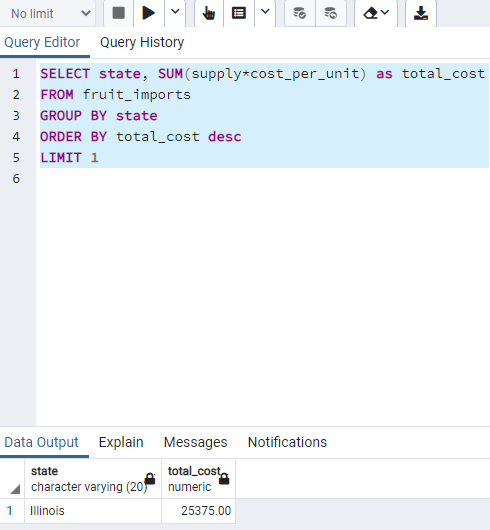
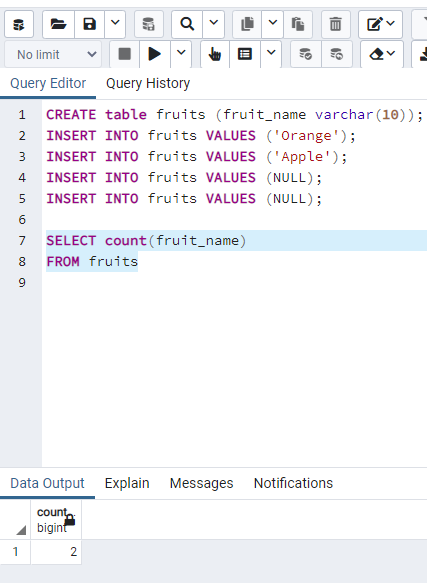
"SELECT COUNT(COALESCE(fruit_name, 'SOMEVALUE')) FROM fruits;" gives the number of count including NULL.
"SELECT first_name, last_name, * FROM employees" gives first_name and last_name columns and then gives all columns.
"SELECT employees.department FROM employees, departments" gives column of employees in department source.
"SELECT e.department FROM employees e, departments d" gives column of employees in department source. e is alias.
"SELECT e.department FROM (SELECT * FROM ASDQE)" is an example using multiple source.
"SELECT * FROM employees WHERE department NOT IN ('DEPART1','DEPART2','DEPART3')" is an example of subquery.
Subquery is query in a query.
"SELECT * FROM employees WHERE department NOT IN (SELECT department FROM departments)" shows the department data that are not included departments
"SELECT * FROM (SELECT * FROM employees WHERE salary > 150000) a" works fine. But without "a", it is a query and it needs a name. so it doesnt work.
"SELECT a.first_name, a.salary FROM (SELECT first_name employee_name, salary yearly_salary FROM employees WHERE salary > 150000) a" is not work since first_name and salary are not recognized in the first column.
"SELECT a.employee_name, a.yearly_salary FROM (SELECT first_name employee_name, salary yearly_salary FROM employees WHERE salary > 150000) a" is works fine.
If we have same name subcolumns, it needs to be defined which subcolumn is called.
"SELECT * FROM (SELECT department FROM departments) a" works fine.
"SELECT first_name, last_name, (SELECT first_name FROM employees limit 1) FROM employees" works fine. We should limit 1 because we cant use more than one record in SELECT clause
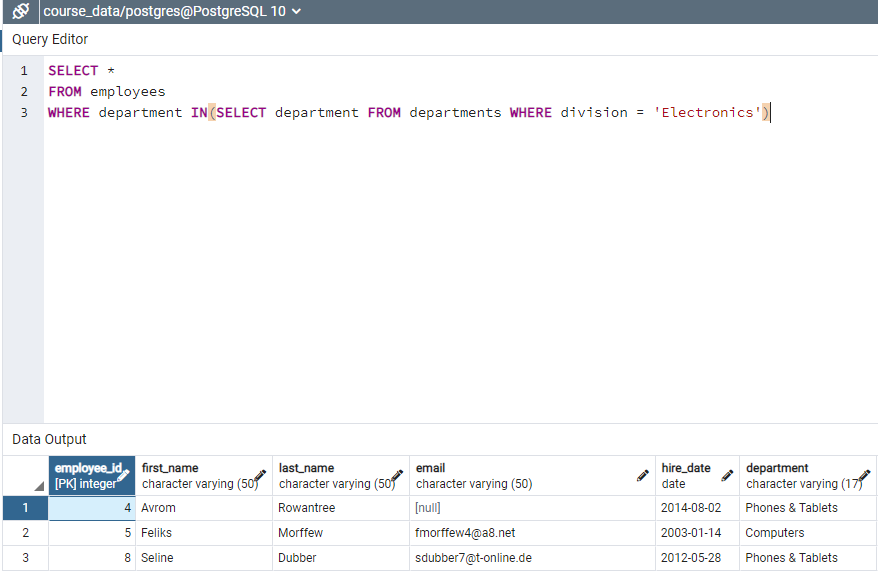
Figure: My code for asssignment: Select employees from electronic division
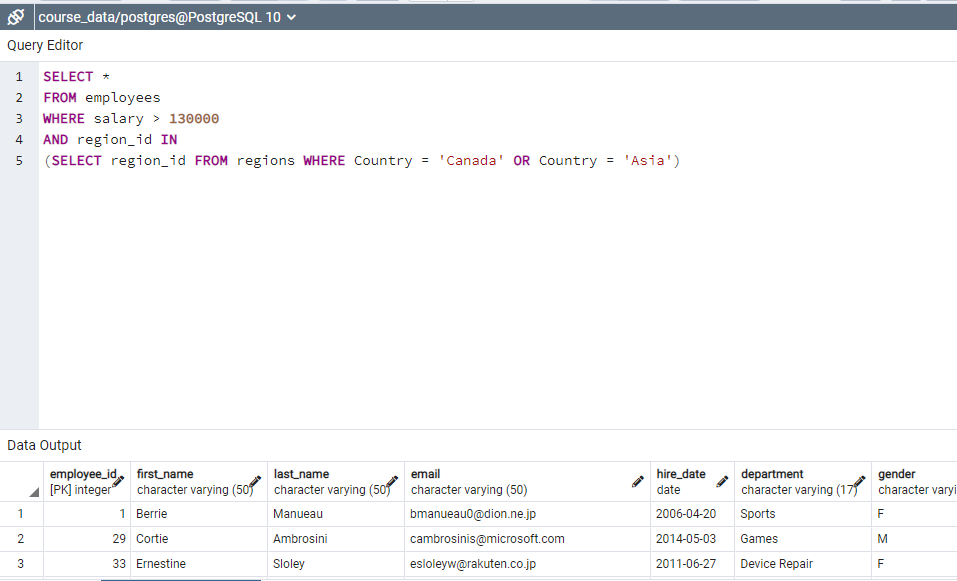
Figure: My code for asssignment: Select employees from electronic division

Figure: My code for the assignment: Shows the difference between salary of employee and max salary.
"SELECT * FROM employees WHERE region_id IN (SELECT region_id FROM regions WHERE Country = 'Canada')" returns the employees in Canada. 'IN' command must be used for multiple data.
ANY condition returns true if any of subquery vales meet requirements.
ALL condition returns true if all of subquery vales meet requirements.
"SELECT * FROM employees WHERE region_id > ALL (SELECT region_id FROM regions WHERE Country = 'Canada')" returns all values higher than region_id Country_Canada
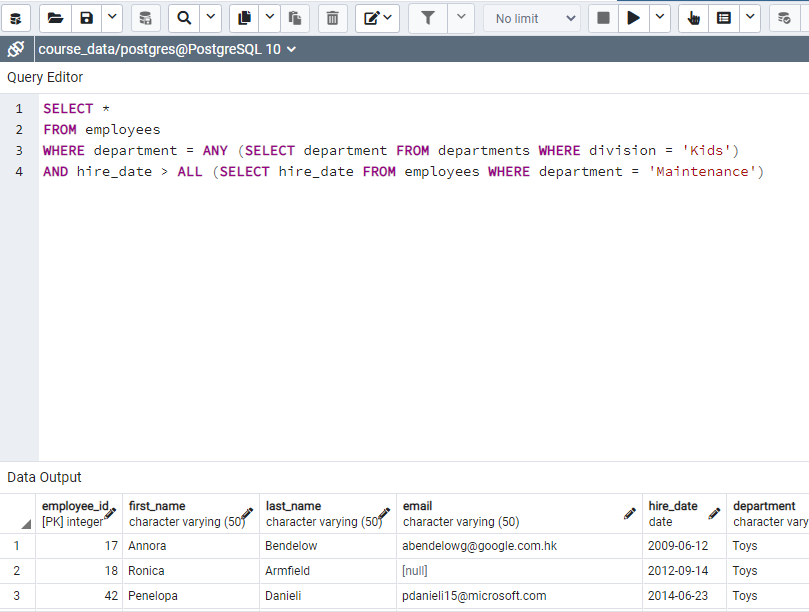
Figure: This code is checked by solution and I understand the usage of ALL and ANY
ALL is used hire_data must be higher that all hire_date of Maintenance employees.
ANY is used to combine two subdepartments of 'Kids'.

Figure: My code for assignment: This assignment shows most frequent salary (if more than one salaries have same frequency then shows the highest one). I learned that order by can be used for more than one parameter.

Figure: My code for assignment: Show only once names with id
DELETE command deletes the records that are filtered through the clause
"drop table dupes" code delete the table 'dupes'
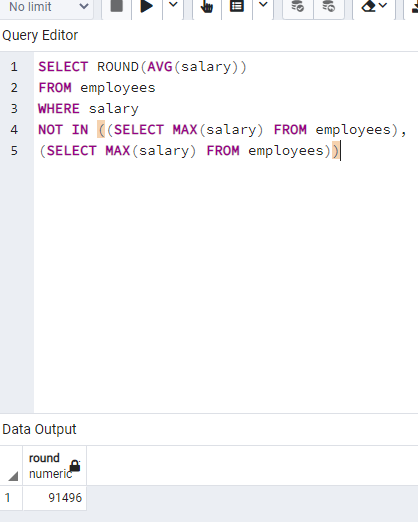
Figure: My code for average salary excluding min and max

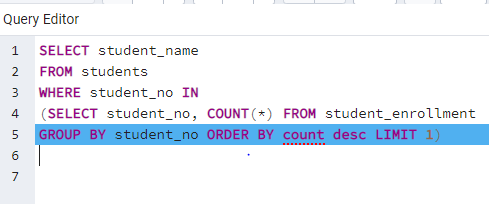
Figure: My code for the assignment I found succesfully the student who takes max course and count. But I checked solution how to show student_name and I understand solution.

Case statement is used for conditional expressions.
"SELECT first_name, salary CASE WHEN salary < 100000 THEN 'under paid' WHEN salary > 100000 AND salary < 160000 THEN 'paid well' ELSE 'executive' END as category FROM employees" shows a conditional expression with respect salary level.
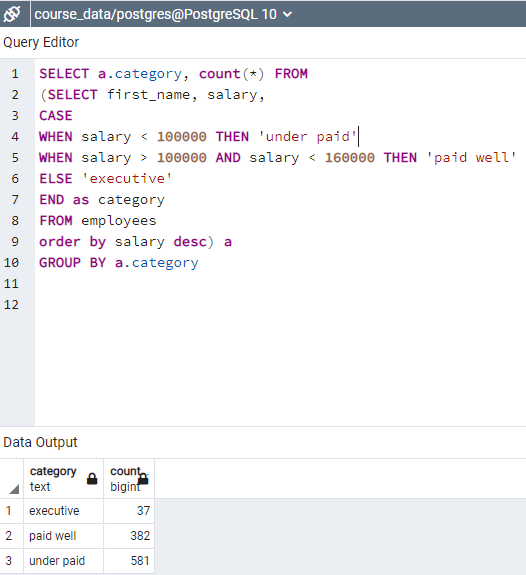
Figure: My code for assignment: case condition
"SELECT a.category, count(*) FROM (SELECT first_name, salary, CASE WHEN salary < 100000 THEN 0 WHEN salary > 100000 AND salary < 160000 THEN 1 ELSE 2 END as category FROM employees order by salary desc) a GROUP BY a.category" code gives category with integer number
"SELECT SUM(CASE WHEN salary < 100000 THEN 1 ELSE 0 END) as under_paid, SUM(CASE WHEN salary > 100000 AND salary < 150000 THEN 1 ELSE 0 END) as paid_well, SUM(CASE WHEN salary > 150000 THEN 1 ELSE 0 END) as executive FROM employees" shows sum of employees for payment level with transposed table.
"SELECT SUM( CASE WHEN department = 'Sports' THEN 1 ELSE 0 END) as Sports_Employees, SUM(CASE WHEN department = 'Tools' THEN 1 ELSE 0 END) as Tools_Employees, SUM(CASE WHEN department = 'Clothing' THEN 1 ELSE 0 END) as Clothing_Employees, SUM(CASE WHEN department = 'Computers' THEN 1 ELSE 0 END) as Computers_Employees FROM employees" code gives transposed version of total number of employees for each department
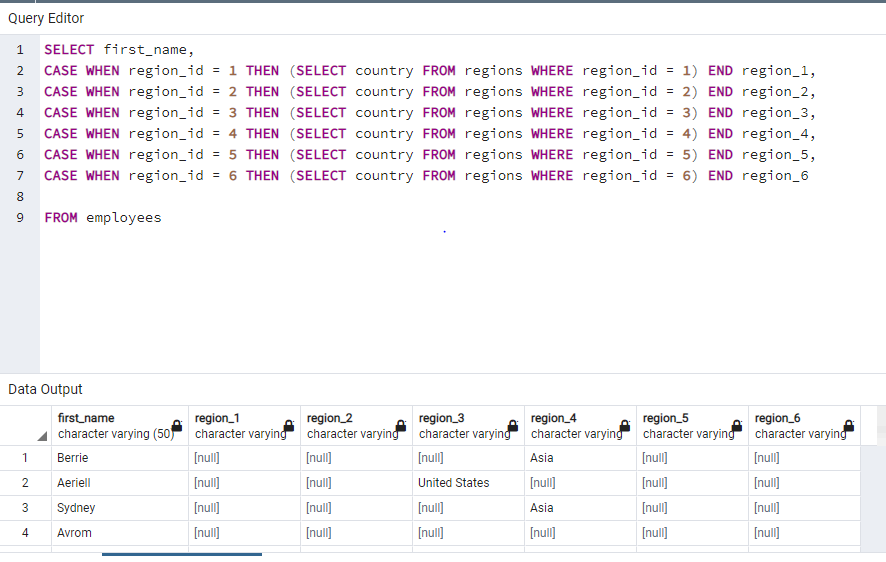
Figure: My code for assignment: shows countries of employees in their region_id
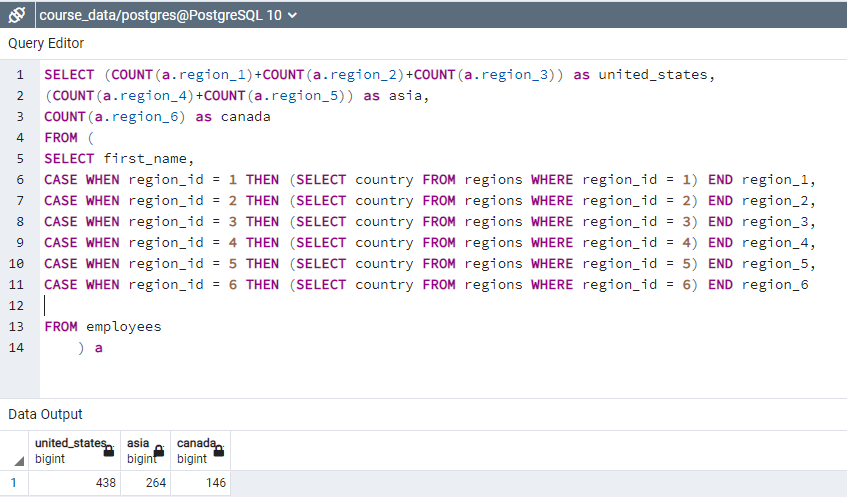
Figure: My code for assignment: shows countries of employees in their region_id

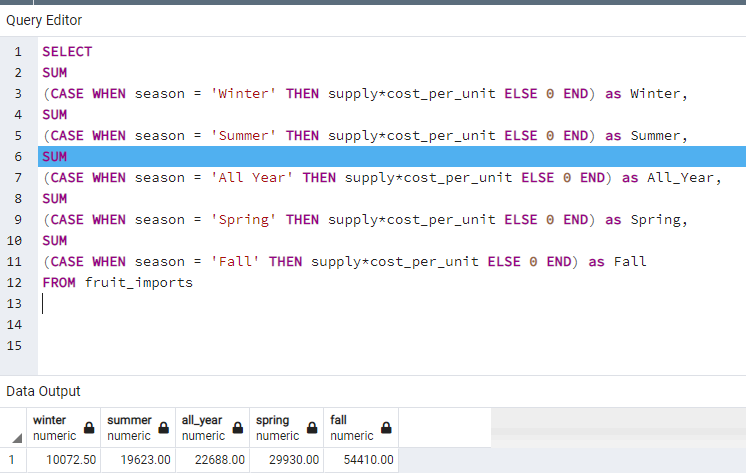
Correlated subquery means that subquery portion is correlated with the out of query. Correlated subquery can use any values from out of subquery.
"SELECT first_name, salary FROM employees e1 WHERE salary > (SELECT round(AVG(salary)) FROM employees e2 WHERE e1.department = e2.department)" code compare salary of each record with average salary of corresponding department
"SELECT first_name, salary, (SELECT round(AVG(salary)) FROM employees e2 WHERE e1.department = e2.department) as avg_dep_salary FROM employees e1" is also works.
"SELECT department FROM departments WHERE 38 < (SELECT COUNT(*) FROM employees e WHERE e.department = departments.department)" gives departments which have higher that 38 employees
"SELECT department FROM employees e1 WHERE 38 < (SELECT COUNT(*) FROM employees e2 WHERE e1.department = e2.department) GROUP BY department" code gives also departments which have higher than 38 employees
SELECT distinct department FROM employees e1 WHERE 38 < (SELECT COUNT(*) FROM employees e2 WHERE e1.department = e2.department) code gives also departments which have higher than 38 employees
It is better to use table which has less data to become faster.
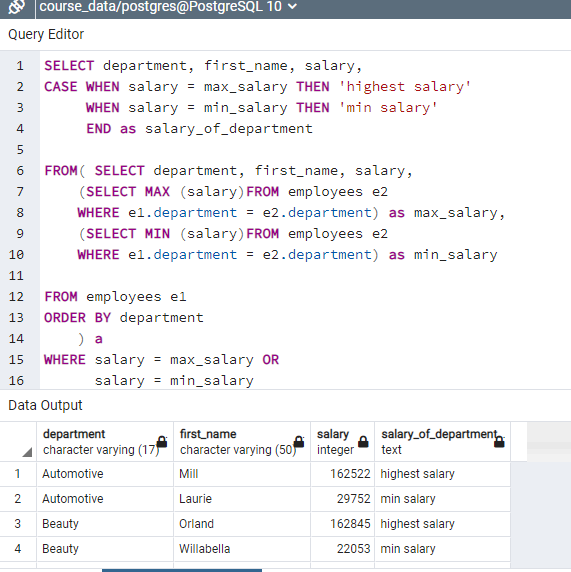
Figure: Assignment for using correlated subqueries to find employees who have min and max salary in each department
Joins is a technique to link data together on a common column. It is similar to subquery.
Join can join multiple tables.
"SELECT first_name, country FROM employees, regions WHERE employees.region_id = regions.region_id" is a joining data. Joining two tables on these two columns, the region_id.
"SELECT first_name, email, division FROM employees, departments WHERE employees.department = departments.department AND email IS NOT NULL" code gives data from two table for the records who have email addresses.
"SELECT first_name, email, employees.department, division, country FROM employees, departments, regions WHERE employees.department = departments.department AND employees.region_id = regions.region_id AND email IS NOT NULL" gives data from three different tables.
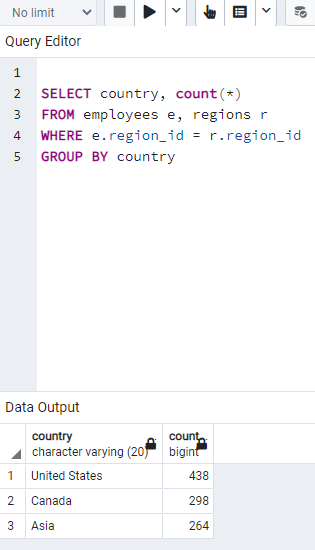
Figure: My code for assignment: Calculate number of employees in each country
"SELECT first_name, email, e.department, division, country FROM employees e, departments d, regions r WHERE e.department = d.department AND e.region_id = r.region_id AND email IS NOT NULL" gives data from three different tables with aliases.
We used in e.department since department is in both two tables.
"SELECT country, count(*) FROM employees e, (SELECT * FROM regions) r WHERE e.region_id = r.region_id GROUP BY country" cod. In this code "(SELECT * FROM regions)" is non correlated subquery since it doesnt get any data from outside of subquery.
"SELECT first_name, country FROM employees INNER JOIN regions ON employees.region_id = regions.region_id WHERE email IS NOT NULL" provides join of two tables with inner join.
"SELECT first_name, email, division, country FROM employees INNER JOIN departments ON employees.department = departments.department INNER JOIN regions ON employees.region_id = regions.region_id WHERE email IS NOT NULL" code gives that first employees and departments table are joined together. Then regions table is joined to this combined table. If we add a new table, this table would be joining with the result sets of combining all of this data together.
If some employees were assigned to departments that did not exist in departments table, then we need to use OUTER JOIN.
"SELECT distinct department FROM employees -- 27 departments
SELECT distinct department FROM departments -- 24 departments
SELECT distinct employees.department, departments.department FROM employees INNER JOIN departments ON employees.department = departments.department" gives common departments that are included in both tables (23 departments).
In order to show outer departments that do not involve in both tables can be found with LEFT JOIN
"SELECT distinct employees.department, departments.department FROM employees LEFT JOIN departments ON employees.department = departments.department" shows all departments in employees table regardless these departments are included in department table. This shows 27 department. "departments.department" table has some NULL records when these departments are not exist in departments table.
"SELECT distinct employees.department, departments.department FROM employees RIGHT JOIN departments ON employees.department = departments.department" shows all departments in department table regardless these departments are included in employees table. This shows 24 department. "employees.department" table has some NULL records when these departments are not exist in employees table.
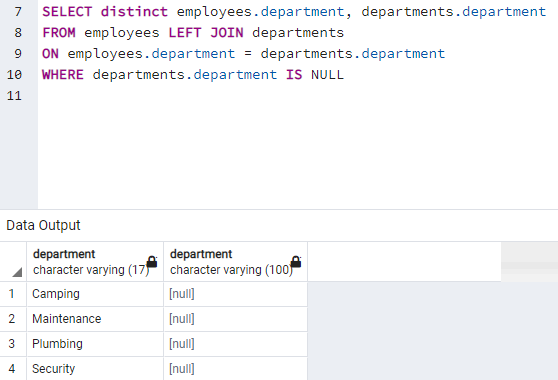
Figure: My code for assignment: Find departments that only exist in employees table
"SELECT distinct employees.department FROM employees FULL OUTER JOIN departments ON employees.department = departments.department" code gives 28 rows with all departments. One of them is NULL which only exist in departments table
UNION used to stack one set of data on top another.
"SELECT department FROM employees -- 27 departments UNION SELECT department FROM departments -- 24 departments" code take department in employees and stack it into department in departments and eliminate duplicates.
"SELECT distinct department FROM employees -- 27 departments UNION ALL SELECT department FROM departments -- 24 departments" code take department in employees and stack it into department in departments and UNION ALL does not eliminate duplicates.
"SELECT distinct department, region_id FROM employees -- 27 departments UNION ALL SELECT department FROM departments -- 24 departments" code does not work since upside has two columns and bottom side has one column
"SELECT distinct department, region_id FROM employees -- 27 departments UNION ALL SELECT department, division FROM departments -- 24 departments" code does not work since region_id is integer and division is string. Data type must be same.
ORDER BY can be used for all query that is UNION. ORDER BY department sorts the UNION data alphabetically.
"SELECT distinct department FROM employees -- 27 departments EXCEPT SELECT department FROM departments -- 24 departments" find departments that only exist in employees table

Figure: My code for assignment to show employees in each department and total number of employees
Cartesian product occurs when there is no joins.
"SELECT COUNT(*) FROM employees, departments" every single combination between two table returns. It is called cartesian product. 24 x1000 = 24000 records are returned.
"SELECT COUNT(*) FROM employees a, employees b" every single combination between two identical table returns. It is called cartesian product. 1000x1000 = 1000000 records are returned.
"SELECT COUNT(*) FROM employees a CROSS JOIN employees b" every single combination between two identical table returns. It is called cartesian product. 1000x1000 = 1000000 records are returned.

Figure: My code for assignment: Employees who have earliest and latest hiring date
UNION ALL also sort by written code.

Figure: My code for assignment: sum of salary of each employee who is hiring his hiring date and 90 days before
SUM is going to change that is not accumulated which is called moving range.
A view is like virtual table. It is generated with SQL query. You cant insert or delete data to view.
All kind of queries until this point can be generated with views.
"SELECT first_name, email, e.department, salary, division, region, country FROM employees e, departments d, regions r WHERE e.department = d.department AND e.region_id = r.region_id" code is an example of combining columns in different tables.
"CREATE VIEW v_employee_information as SELECT first_name, email, e.department, salary, division, region, country FROM employees e, departments d, regions r WHERE e.department = d.department AND e.region_id = r.region_id" creates a view table and we can look this table with "SELECT * FROM v_employee_information" code (hard view). You cannot insert or delete data to view.
"SELECT * FROM (select * from departments)" code is inline view. Hard view is provide more flexibility.
View can be used instead of joins and make our life easier.
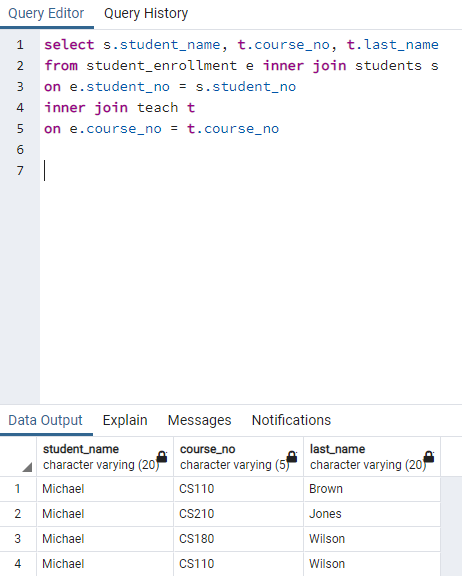
Figure: This is my code for the assignment. I am not sure how to combine last name of professors in one column for each course
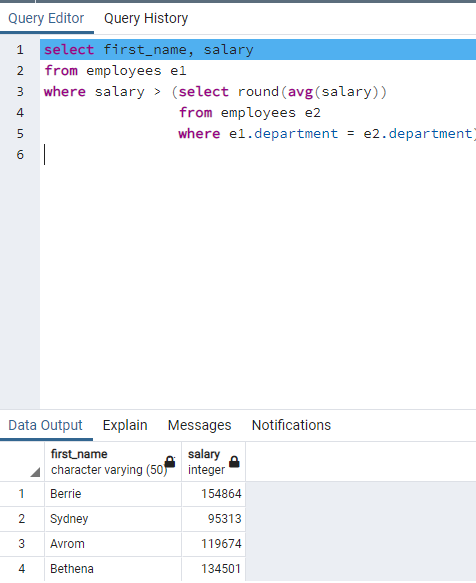
Figure: Answer of Question 6
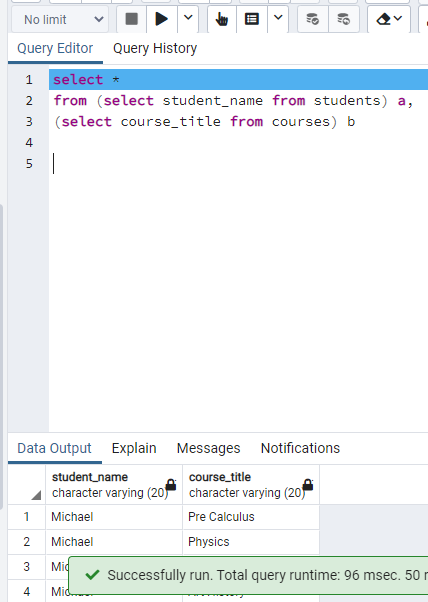
Figure: Answer of Question 7. I used a different solution to show all students and all course names. I used cross product and it is different than the solution code.
Window function allows s to slice and dice of data. It is analytical functions.
"select first_name, department, (select count(*) from employees e1 where e1.department = e2. department) from employees e2 group by department, first_name" shows 999 columns since there are two employees who have same name.
Above code is using subquery and it is slow and expensive. Instead of subquery we can use window function.
"select first_name, department, count(*) over() from employees e2" gives the count overall 1000.
"select first_name, department, count(*) over(partition by department) from employees e2" returns name, department and number of employees in corresponding department with 1000 columns.
"select first_name, department, sum(salary) over(partition by department) from employees e2" returns name, department and total salary paid in corresponding department with 1000 columns.
"select first_name, department, count() over(partition by department) dept_count, count() over(partition by region_id) region_count from employees e2" returns name, department, number of employees in corresponding department and region with 1000 columns.
Note that where clause limits count() over(). For example "select first_name, department, count() over() from employees where region_id = 3" shows third column as 145 values for all 145 columns. Where clause changes the result of over function.
In a query first from clause works. Multiple tables are joined. After that where clause is run. Where clause filter the data. After that select clause is evaluated.
Window compute an aggregation. Window changes based on partition.
"select first_name, hire_date, salary, sum(salary) over(order by hire_date range between unbounded preceding and current row) as run_total_of_salaries from employees" code gives in fourth column the sum of salaries upper rows and current row
All the rows that proceded our part of frame in the window. Previous rows are part of this frame. As we proceed down to list we get more row and add it to sum of salary.
We can delete "range between unbounded preceding and current row" code because it calculates upper row and current row by default.
"select first_name, hire_date, salary, sum(salary) over (partition by department order by hire_date) as run_total_of_salaries from employees" code gives fourth column the sum of salaries upper rows and current row by department
"select first_name, hire_date, salary, sum(salary) over(order by hire_date rows between 1 preceding and current row) from employees" code gives fourth column sum of current column and one previous column.
"select first_name, email, department, salary, RANK() OVER (PARTITION BY department ORDER BY salary DESC) FROM employees" code gives employees in each department order by salary and show their salary rank in their department.
"select * from ( select first_name, email, department, salary, RANK() OVER (PARTITION BY department ORDER BY salary DESC) FROM employees ) a WHERE rank = 8" code shows only employees whose salary rank in their department is 8
"select first_name, email, department, salary, RANK() OVER (PARTITION BY department ORDER BY salary DESC) FROM employees WHERE rank = 8" code doesnt work because rank column runs after where column. Therefore code doesnt know the rank in where clause
"select first_name, email, department, salary, NTILE(5) OVER (PARTITION BY department ORDER BY salary DESC) FROM employees" code gives rank for each 5 employees. 5 highest salary employees are ranked as 1.
"select first_name, email, department, salary, first_value(salary) OVER (PARTITION BY department ORDER BY salary DESC) FROM employees" code gives fourth column max salary of this department for all rows of corresponding department. "first_value" function provides ordering by a parameter.
"select first_name, email, department, salary, nth_value(salary, 5) OVER (PARTITION BY department ORDER BY salary asc) first_value FROM employees" code gives fourth column as fifth highest salary for department in each column.
Lead and lag is used to get values from a role that is directly above or below currently processing row.
"select first_name, last_name,salary, LEAD(salary)OVER() closest_lower_salary FROM employees" code gives fourth column as a shift one row up salary. For example first row of fourth column gives salary of second employee.
"select first_name, last_name,salary, LAG(salary)OVER() closest_higher_salary FROM employees" code gives fourth column as a shift one row up salary. For example second row of fourth column gives salary of first employee.
"select continent, country, city, sum(units_sold) from sales GROUP BY GROUPING SETS(continent, country, city)" code gives sum of unit_sold for each continent in upper rows, sum of unit sold for each country in middle rows, sum of unit_sold for each city in bottom rows.
If we change as "GROUP BY GROUPING SETS(continent, country, city, ())", it adds a column that gives total unit_sold of all country, continent or city.
"select continent, country, city, sum(units_sold) from sales GROUP BY ROLLUP(continent, country, city)" code gives the amount if we were a group by just one, two and three of the columns with ROLLUP command.
"select continent, country, city, sum(units_sold) from sales GROUP BY CUBE(continent, country, city)" code gives the amount if we were a group by all combinations of one, two and three of the columns with CUBE

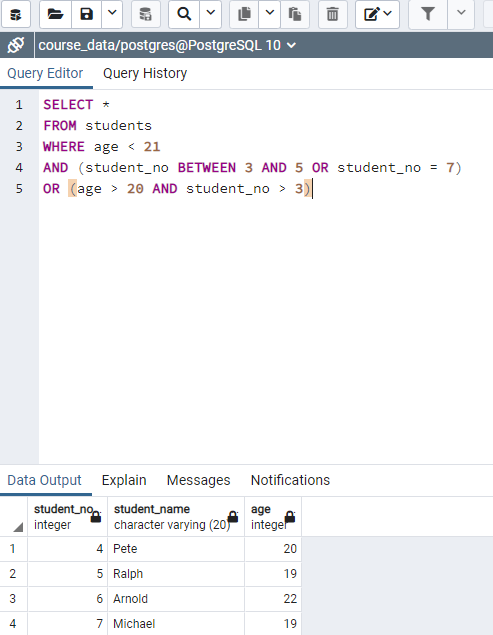
Figure: My code for first assignment. I catch four of the students and miss last three of them. I looked at solution and understand.
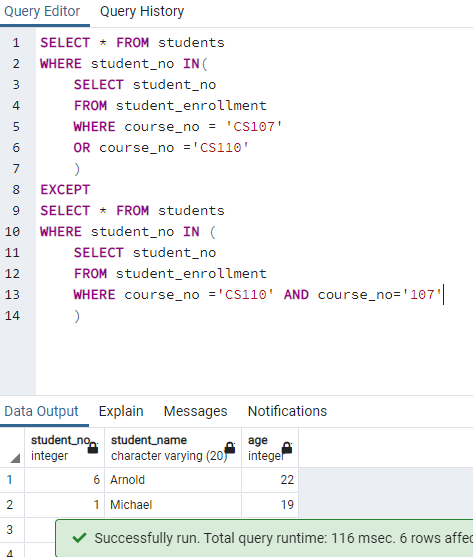
Figure: My code for the second assignment gives correct result but I think my and function does not work correct. I checked and understand the solution.
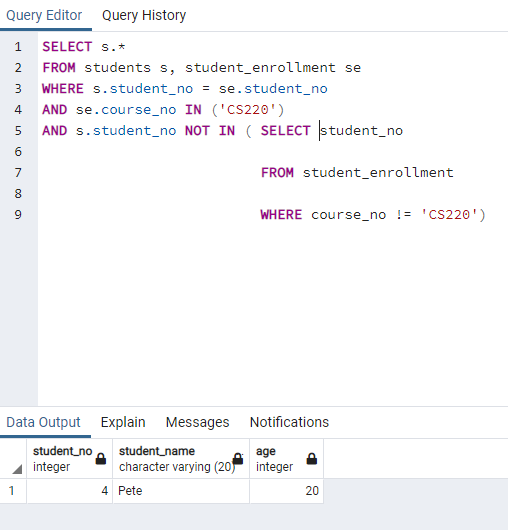
Figure: My code for the third assignment to find students who take CS 220 and not take other courses

Figure: My code for the fourth assignment to find students who take only one course

Figure: Fifth code assignment to show students who has older than two students at most