Repository navigation
Folio v0.4.3

Folio (foliowiki) 0.4.3 tidies the app itself. You told us the sidebar was uneven, the header was crowded and some controls were hard to find, so we reworked the chrome around the page. Nothing was removed: things moved and got quieter.
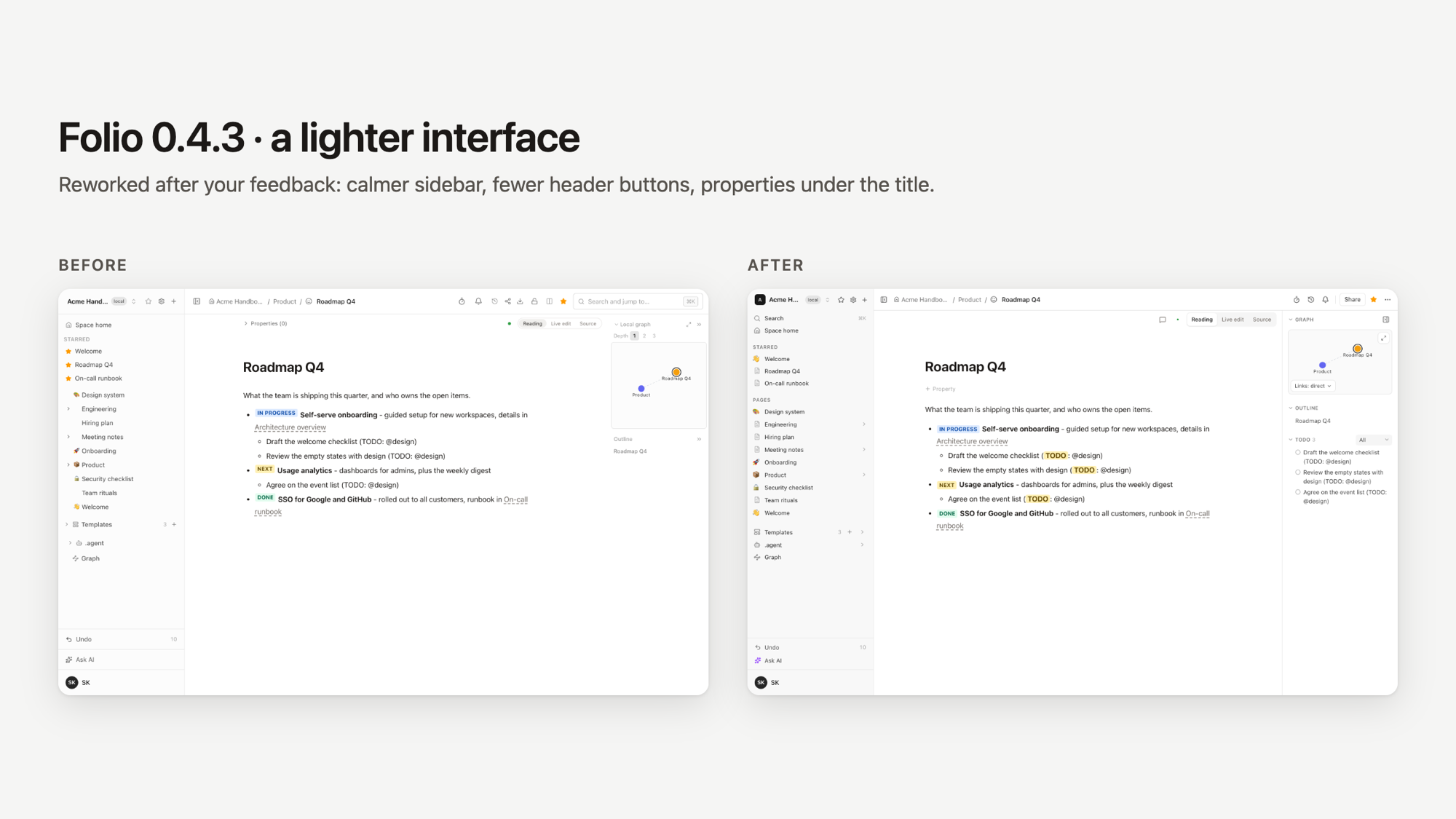
What is different on screen.
- Sidebar tree. Every page has an icon in one column (its emoji, its page kind, or a faint document glyph), so there are no empty gaps. The expand arrow sits at the right end of the row and is always visible. Titles in Search, Home, Starred and the tree start at one edge, Starred shows each page's own icon, and a "Pages" label sits above the tree.
- Search is in the sidebar. A "Search" row with its shortcut. Ctrl/Cmd+K still opens it from anywhere.
- A header with fewer buttons. Timer, history and notifications stay visible, and Share is a labelled button. Export, page access, side-by-side compare and writing rules (and the file actions on PDF and Office pages) are in a labelled "..." menu. On phones the same menu holds everything.
- Properties are under the page title. An empty page shows a faint "+ Property".
- A calmer right panel. Local graph, Outline, Notes and TODO collapse by their headers. The graph has no buttons on top of it: it fits its nodes, shortens long labels and rings the current page, and a quiet "Showing: direct links" line under it picks the depth. The outline runs along a thin rail that marks the heading you are reading, with long headings on two lines. Notes and TODO share one layout. The hide-panel button sits in the editor toolbar.
- A smaller editor mode switch (Reading, Live edit, Source), and, once after the update, small tags next to the moved controls that show where things are now.
New in the same release.
- A TODO panel. Every line with the word TODO is collected in the right panel. Filter by assignee (the @mentions on the line, or the whole row in a table); a click jumps to the line and highlights it. The word is highlighted in the editor and in Reading.
- Comments on page text. Select a passage, press Comment, and the thread follows the text as the page changes. Comments live in the database, not in the Markdown file. MCP tools
list_comments,add_commentandreply_commentlet an agent answer them. - MDX pages (Nimbus, Starlight, Astro, Docusaurus docs) are kept intact and shown as compact blocks in Live edit.
- Writing rules. A
writing-rulespage in.agentholds your style rules; "Check against writing rules" lists findings with suggested rewrites. The MCP server has 49 tools. - Public sites are readable by AI agents:
llms.txt,llms-full.txtand a Markdown copy of every page.
Fixed. Copy, cut and paste of a status tag; the tag sitting 6px above the text baseline; History and Page access closing on the first click on phones; single sign-on returning to the page you opened; double-click inside an empty board shape typing into that shape; a share link of an artifact with no empty strip and no source link shown to guests; Git sync no longer pushing an unresolved deletion conflict. Dependency updates close 19 Dependabot advisories. The full list is in CHANGELOG.md.
Known limits are listed in LIMITATIONS.md.
Links: https://foliowiki.online, try it without installing: https://demo.foliowiki.online (shared, resets every 24 hours).
Upgrading
Back up first, then update as usual (docs/INSTALL.md). One migration is new since 0.4.2: 060 (comments). It applies at startup and is one-way, so an upgraded database cannot go back to 0.4.x without restoring the backup.