Repository navigation
Releases
Pokopia Recomp 0.6.2 (build J: Jackrabbit)

Extract it over your 0.6.1 install: the game code is unchanged, so no Set up again is needed.
New
DLC (add-on content)
The game can now see the add-on content you own. Put each add-on, already decrypted, in the dump folder as
aoc/<add-on id>/romfs/ (for the Bubbly Basin key: aoc/0400A3A01EE4D001/romfs/). The launcher finds it, shows it on the
Game files page and sets [fs] aoc_dir in pkp.ini, and the game lists the add-on and opens its data. Like the game itself,
the add-ons must come from your own dump: the download contains none.
Fixes
The Linux download starts on more systems, and is smaller
What was wrong: the Linux launcher needed glibc 2.39, so it did not start on Ubuntu 22.04, Debian 12, Mint 21 or Pop!_OS 22.04,
and its AppImage needed FUSE 2, which Ubuntu 24.04 and others no longer install. The download also carried the Windows-only
Python, Zig and start script (about 330 MB unpacked), and its README.txt described Windows.
Now: the launcher needs glibc 2.35 and no FUSE 2, the Windows-only files are left out, and README.txt explains the Linux steps.
For developers
.github/workflows/launcher-checks.yml: on pull requests and pushes to main that touchlauncher/orgame-build/release_b/,
builds the launcher front end, runscargo check(native andx86_64-pc-windows-gnu) andcargo clippy, and checks
pkp_build.pycompiles, with the cargo registry and target cached.
Pokopia Recomp 0.6.1 (build J: Jackal)
Hotfix for 0.6.0. Extract it over your 0.6.0 install: the game code is unchanged, so no Set up again is needed.
New
The launcher runs on Linux (#52)
The launcher builds as a native Linux program (and as an AppImage), so it no longer needs Microsoft's WebView2, which Proton
does not have. On Linux it fetches its build tools on the first Set up, compiles pkp.exe there, and runs the shader translator
and the game through Steam's Proton (in the Steam Linux Runtime, as Steam starts games), umu-run or Wine. Set up, Play, Link
Play and the save import work there; see launcher/README.md. Thanks to @jerbanpls.
Download for Linux: PokopiaRecomp-0.6.1-linux-x64.tar.gz is the same package with PokopiaLauncher.AppImage in place of
the Windows launcher. Install Proton Experimental in Steam, extract it anywhere and run the AppImage; see "Linux, SteamOS and the
Steam Deck" in the README.
Name entry with Steam's keyboard (Steam Deck, SteamOS)
When the game asks for a name under Proton on a Steam Deck, on SteamOS or in Steam's gamepad UI, Steam's own on-screen keyboard
comes up with the question, and its Enter answers. Press any button to get the in-game keys instead; Steam + X brings Steam's back.
[applet] steam_keyboard = off turns it off. Thanks to @tinfoil-chewer.
Start the game straight from a shortcut
PokopiaLauncher --play starts the game the way the Play button does, without the launcher window, and waits for it: for a
Steam shortcut, Sunshine/Moonlight streaming or a desktop icon.
Bug fixes
AMD GPUs (Steam Deck included): shaders computed wrong results
What was wrong: the game's shaders were written for NVIDIA's 32-wide subgroups; AMD runs 64 wide by default, so shaders that
shuffle, ballot or vote across a subgroup gave wrong results. Depth views in a 24-bit format were refused on AMD (it has no 24-bit
depth), so fog and soft particles that read the depth buffer covered the ground in white on the Steam Deck.
Now: game pipelines ask for 32-wide subgroups where the driver allows it ([nvn] subgroup32), and those depth views read the
32-bit depth the image really has. NVIDIA is unchanged. Thanks to @tinfoil-chewer.
Handhelds run in handheld mode
On a Steam Deck or Legion Go S the game is now told it is in handheld mode, as on the console's own screen, and picks its own
lighter graphics settings: a Legion Go S went from 50-57 to 62-69 fps. Under Proton on a handheld, the game's very short waits
for the GPU now sleep instead of spinning a CPU core, which leaves more power to the GPU (Steam Deck LCD: 52 to 54 fps, 1% lows
~27 to ~30). [am] operation_mode = docked and [kernel] short_sleep = yield bring the old behaviour back. Windows desktops are
unchanged. Thanks to @tinfoil-chewer.
Leaving an area above 60 fps: the Poké Ball wipe crawled or seemed stuck (#144)
What was wrong: 0.6.0's fix was not enough. Above 60 fps the wipe that opens after leaving a house crawled: about 15 seconds at
180 fps, and at higher frame rates it looked stuck until the frame limit was set to 60. A part of the transition breaks on the shorter
frames the game gets above 60 fps.
Now: whenever you can't move the camera (an area transition and its load, but also cutscenes, dialogue and menus) the game is held
at 60 fps, as on the console; back in free play your frame limit applies again. [pkp] transition_hold = false turns it off.
"The graphics device was lost" a few seconds after launch under Proton (#169)
What was wrong: on SteamOS / Proton (Steam Deck, Legion Go S) the game showed a black screen with the menu music playing, then
closed with "The graphics device was lost", unless pkp.ini had tex_write_watch = false. Every Proton version failed the same way.
Now: the game starts without the ini line. [nvn] tex_write_watch is auto (off under Proton, on under Windows).
The in-game clock fell behind after the handheld slept (#172)
What was wrong: put a Steam Deck or Legion Go S to sleep with the game open, wake it, and the in-game clock was behind by the
whole nap until you restarted the game: under Proton the counter the game's clock runs on stops during sleep.
Now: a few seconds after waking, the in-game clock catches up with the device's clock. [time] resync = false turns it off.
Thanks to @Exon0t for finding and measuring this on a Legion Go S.
Contributors


Assets 5
Pokopia Recomp 0.6.0 (build J: Jaguar)
Highlights
- The 3D world is drawn in the right place again below 100% scene size on Steam Deck, Legion Go S, 1440p and ultrawide screens.
- No more getting stuck on the Poké Ball wipe when you leave an area above 60 fps. Frame limits above 60 and unlimited work again.
- Lamp lights no longer show a ghost copy at 16:10 or 1440p.
- The in-game clock shows your real time.
- New one-click presets: Steam Deck, Legion Go S, Laptop and Desktop PC.
- Steam Deck: smoother play, plus a batch of anti-stutter changes.
Bug fixes
The world was drawn in the wrong spot below 100% scene size (#163)
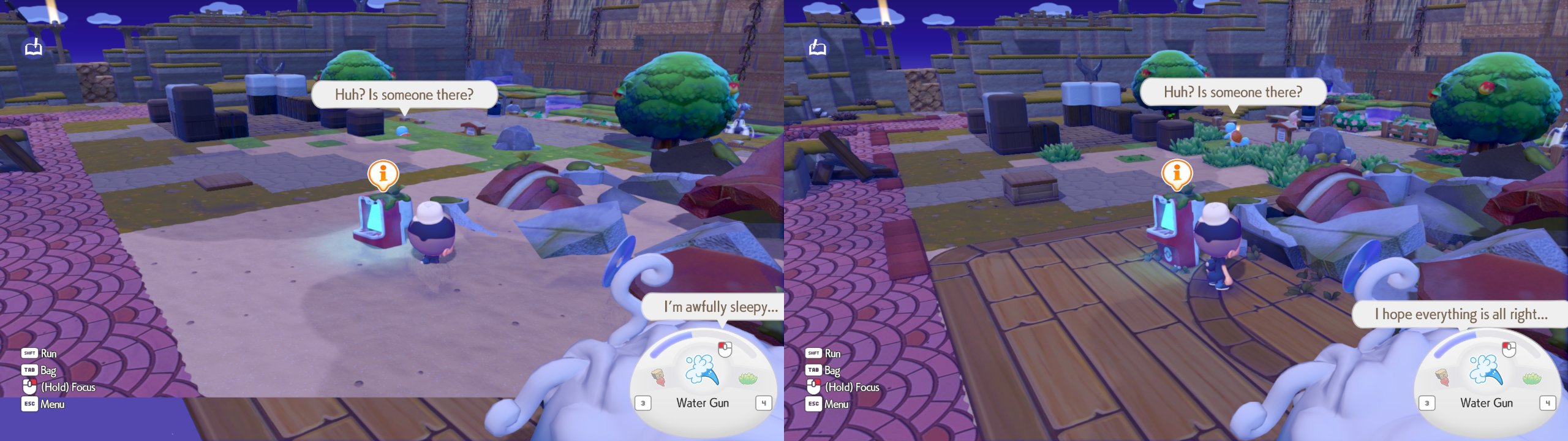
What was wrong: with Scene size under 100% (FSR 3 / DLSS quality presets and dynamic resolution count too) on any screen that is
not exactly 1920x1080, the 3D world went into the wrong part of the screen. On 16:10 (Steam Deck, Legion Go S) the player and objects
stood at the wrong height, floors such as the planks by the Pokémon Center were missing and a blank band sat under the picture. At
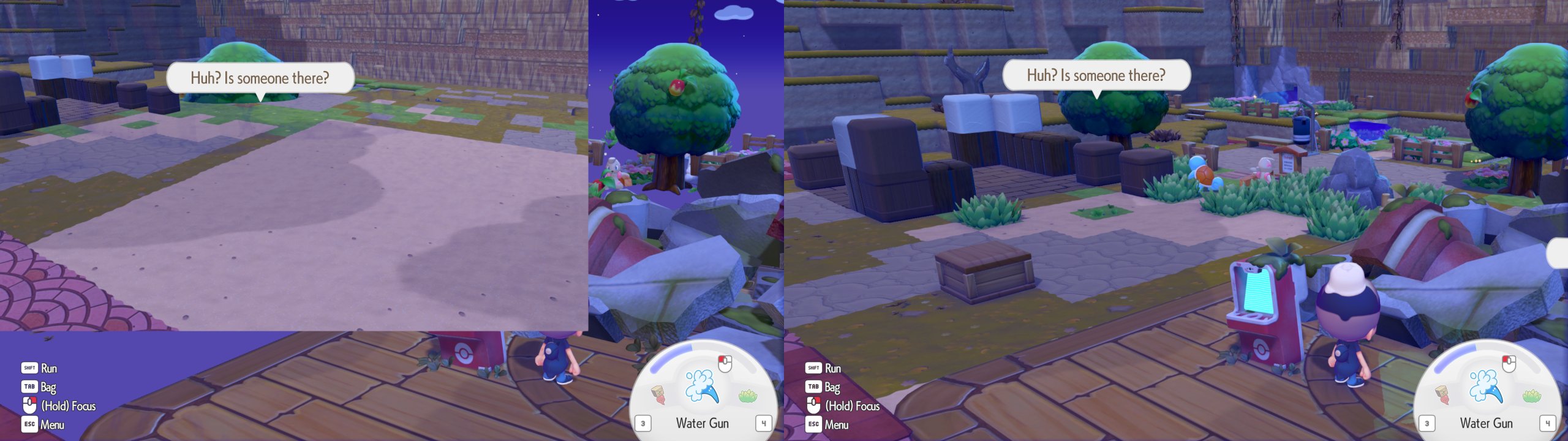
1440p and wider, only a corner of the screen showed the world.
Now: the world fills the frame. Left = before, right = 0.6.0 (16:10, scene size 75%):
1440p, scene size 75%:
Stuck on the Poké Ball wipe when leaving an area (#144)
What was wrong: above 60 fps (or unlimited), leaving an area could leave the Poké Ball wipe half open with your controls locked.
Now: fixed. The stopgap that held everyone to 60 fps is gone, so frame limits above 60 and unlimited work normally again.
Ghost lights at 16:10, 1440p and other sizes (#44)
What was wrong: lamp light and other glows showed up shifted, or as a second copy, whenever the picture was not 1920x1080.
Now: lighting follows your render size.
Wrong time of day in the game (#120)
What was wrong: the in-game clock was off by however long your PC or handheld had been switched on (a whole day ahead on a
handheld left on for days).
Now: the game shows your real local time. Times saved by older versions count as coming from another clock, like a console whose
clock was reset.
Missing placement outline (#120)
The dashed outline when you place an item shows up again.
Crash on Pokédex pictures (NVIDIA) (#121)
Some Pokédex pictures crashed the game with a "GPU lost" error. Fixed.
Freeze at start with an incomplete game dump (#128)
Some update dumps are missing the base game's files, and the game froze at start ("exited with code 4"). If your dump also has the base
game, the launcher now combines the two for you; otherwise it tells you which files are missing and what to do.
Silent crash when Windows' page file is off (error 1455)
The game now tells you what is wrong and how to turn the page file back on, instead of closing without a word.
D-pad prompts all looked the same (#95)
With Xbox or PlayStation icons, "press up" and "press left" showed the same picture. Each direction now lights up its own arm.
Smaller fixes
- Setup checks that it can write to your game folder (Windows "Controlled folder access" and some antivirus block it) and says so
plainly instead of failing halfway. - A rare GPU hang caused by garbage draw data is prevented.
- If the GPU is lost anyway, the log records what it was doing, which makes bug reports much more useful.
New
Device presets (F1 > Graphics)
One pick sets view distance, texture sharpness, render scale and frame limit:
| Preset | Render scale | Frame limit |
|---|---|---|
| Steam Deck | 75% | 40 fps |
| Legion Go S | 80% | 60 fps |
| Laptop | 75% | 60 fps |
| Desktop PC | auto | your screen's refresh rate |
Change any value and it becomes Custom. 40 and 45 fps are now in the frame limit list.
Scene size now works (#116)
The Scene size slider used to do nothing. Now FSR 1, NIS, FSR 3 and DLSS can draw the world smaller and scale it up, and the F1 page
tells you what is in effect.
F1 shows your real render resolution (#117)
The Display page shows the size actually being drawn, and what scales it up to your screen.
Link Play: Interact everywhere (experimental)
Outside Palette Town the game puts every Link Play player in Spectator Mode. A new toggle on the launcher's Link Play page lets you
interact in the story areas too. Everyone in the room needs the same setting: a player whose setting differs is refused with a
message. Off by default.
Steam Deck: smoother play
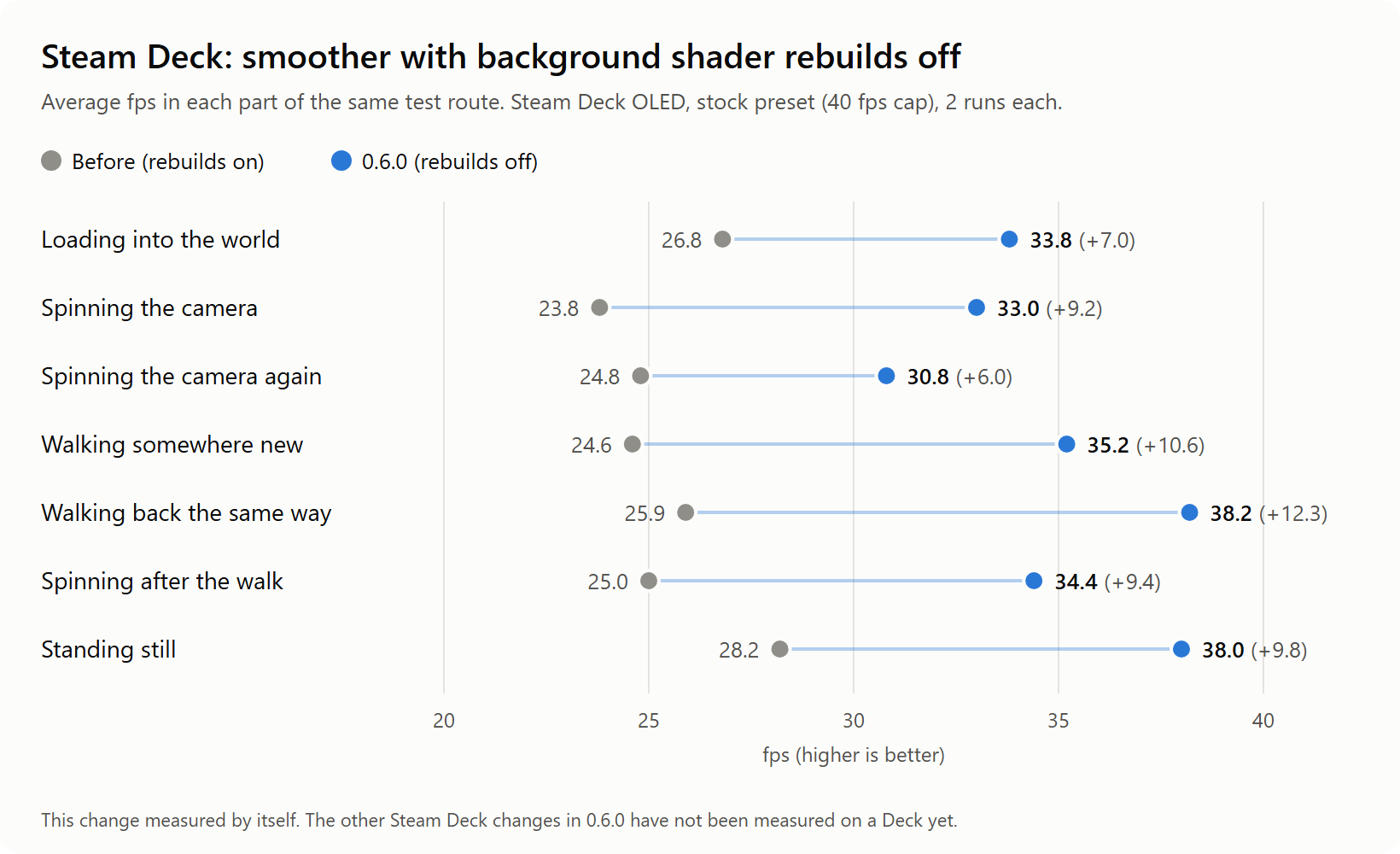
Shaders are no longer rebuilt in the background while you play. On a Steam Deck's 4 cores that work fought with the game itself.
Measured on a Steam Deck OLED with this change alone:
Steam Deck and Linux: less stutter (not yet measured on a Deck)
- No more hitch about once a second: reading a picture back from the GPU no longer pauses the game.
- Something new on screen no longer freezes the game while its shader builds: it pops in a frame or two later instead. This is on for
every platform now. - The game's memory is handed to the GPU in a cheaper way, and each frame is sent to the GPU in one go instead of two.
These should help, but we haven't measured them on a Deck yet. Tell us how it plays.
Steam Deck: "Cap FPS to 30" box (F1 > Display)
On the 90 Hz Deck OLED, a 40 fps limit runs at an even 30, because frame rates that divide the refresh rate look smoother. Pick 80 Hz in
Steam's Performance menu if you want a real 40. Ticked by default only on a Steam Deck; untick it to keep your limit as set.
Known issues
- The Steam Deck changes under "less stutter" are not measured on a Deck yet.
- On some Windows PCs the slowest frames may be a little less smooth than in 0.5.0. The average frame rate is unchanged.
- Some players crash at 4K in the Ditto jumping scene (#119). Not fixed yet.
- The launcher doesn't start under Proton / Linux (it needs WebView2), so handheld players don't see the update banner.
For tinkerers: switching things back
Every change above can be undone in pkp.ini (details in CONFIG.md): [pkp] scene_viewport_fix = 0, [pkp] target_fix = off,
[nvn] gpl_upgrade = whole, [nvn] readback_async = false, [nvn] gpl_gate = time, [nvn] async_whole = false, [nvn] async_compute = false,
[nvn] compute_prewarm = false, [nvn] pool_copy = off, [nvn] one_submit = off, [display] fps_snap = false. New:
[pkp] link_interact_everywhere, [gfx] gpu_checkpoints, [fs] romfs_base, [fs] romfs_check.
Pokopia Recomp 0.5.0 (build I: Iguana)
What's new
- Multiplayer (Link Play) is part of every release now. A new Link Play page in the launcher: play alone, host on this PC or visit
a friend. Hosting shows the address to give out (LAN, Tailscale or ZeroTier) with Copy buttons, warns when Windows treats your
network as Public, and gives you a room code. In the game, pick Local connection. Each player needs their own save: a copied save
can't join its original. - Room codes: a room hosted with a code is hidden from everyone else and only players with the code can join. Rooms without a code
work as before on a LAN. Every player and the host need this version (older ones are refused with a message). - Game traffic can travel over UDP to the relay, so a lossy internet link no longer stalls everything. TCP stays as the fallback
([net] udp = offto always use TCP). - Steam Deck, Legion Go S and other 16:10 screens: with
aspect = autothe picture fills the whole screen with the taller view, and
objects and players at the right height (#73). Not yet verified in the world.taller_fov = falseunder[pkp]goes back to bars. - Import your save from Eden or Ryujinx (or any folder) on the Settings page. Your current save is moved to a dated backup first.
- Set up: a setup log (Open setup log button), checks before it starts (free disk space, Vulkan, memory, a warning for Intel
13th/14th gen desktop CPUs), and a "fewer cores" option that keeps the PC usable while it builds. - "Set up again" is much faster after an update: compiled game code is kept and reused (up to 3 GB,
--cache-mb). - .nup dumps: checked against their checksums, the version is checked before the big unpack, free space is checked, and the unpack
can be cancelled. - Clearer dump errors: files copied over FTP in text mode, an older game version or a base-only dump now tell you what to do.
- Both sticks reach full speed by default (outer zone 0.92, new
right_stick_max). Saved settings keep their value. - A way out of the game besides Alt+F4 (#70): hold Select and Start (View and Menu on an Xbox pad) together, or press "Quit game" on
the F1 page, and confirm with A. - Steam Deck, Legion Go S and other Linux / SteamOS players: drawing work is handed to the graphics card from a separate thread by
default ([nvn] submit_thread = auto); about 26 -> 53 fps on a Steam Deck (measured by a player).
Fixes
- Saves: if a save can't be written (full disk, a file locked by OneDrive or antivirus), the last good save is kept and a notice
says so. Before, a half-written save could replace it. - Sound comes back after unplugging headphones, a Bluetooth reconnect or the monitor turning off, instead of staying silent.
- Windows 11 no longer slows the game down when its window is behind other windows or on a second monitor.
- Graphics: particles, light culling and a volume effect get their real buffer sizes; depth-of-field blur and lens flares get the
right instance; volumetric fog sees its real size; shadow tests on default textures match the console. - A rare hang in the game's waiting loops is prevented (needs Set up again).
- Safer on GPUs that lack some formats (blending, filtering and vertex formats are checked; signed 10-bit textures fall back).
- Faster pipeline lookups (less CPU per frame).
For developers
- New opt-in keys, all off:
[sched] precise_sleep,[sched] precise_waits,[sched] yield_backoff,[diag] yield_census,
[nvn] shader_key_check,[nvn] reduced_precision. On by default:[sched] power_throttling,[nvn] pipe_last. See CONFIG.md. - Releases run the launcher tests first and ship SHA256SUMS.txt; pull requests are scanned for private text.
- Uses code and ideas from pokopia-native (MIT), credited in CREDITS.md.
Pokopia Recomp 0.4.1 (build H: Hedgehog, hotfix)
Fixes
- Steam Deck, Legion Go S and other 16:10 screens: trees, rocks, stairs, players and Pokémon are drawn at the right height again. They
used to float above the screen centre and sink into the ground below it, and only settled when you walked up to them. With
aspect = autothe picture now stays 16:9 with thin bars on screens taller than 16:9 (#73).aspect = 16:10still gives the full
taller view, with the old placement problem, until it is fixed properly.
Pokopia Recomp 0.4.0 (build H: Hedgehog)
What's new
- Much faster on the Legion Go S (and by extension Steam Decks): in the world at its native 1920x1200, with no upscaler, about 55 -> 75 fps (+36%), and the slowest
frames are smoother (1% low 31 -> 38 fps). Measured on this release build, three before/after pairs. - Windows PCs gain too: the game needs about 20% less CPU time per frame to hand its drawing work to the graphics card (RX 9060 XT:
6.9 -> 5.5 ms per frame). - Each speed-up has its own setting in
pkp.ini(see the developer notes below), so a problem on one machine can be switched off
without losing the rest. - The launcher shows an "Update available" banner with a "What's new" link when a newer release is out. One request at start,
silent when offline, nothing is downloaded.
Fixes
- Render resolutions of about 3800x2140 and up (4K) no longer crash at start: the game's graphics memory now grows with the render
size. 1920x1080 and below are unchanged. Very large sizes (above about 5300x2990) are lowered to the largest that fits, with a
warning in the log. Setup builds pkp.exe again once (new hook sites). - Xbox and PlayStation button prompts now show in the game when picked in the settings or by "auto" (before, Switch prompts stayed).
- When the graphics driver loses the GPU, the game shows one clear error and closes, instead of hanging and filling the log.
- Timed waits inside the game no longer end too early (they assumed the wrong console clock rate).
Known issues
- The launcher does not start under Proton/Linux: it needs Microsoft's WebView2, which Proton does not include. So Steam Deck and
Legion Go S players do not see the update banner. Will be fixed soon.
Release notes for developers
Base: fork 0.3.0 (9edefb8).
- #59 (fixes #49)
pkp_gfx_heap.cpp: mid hooks at0x710112f008(pool config: generalsp+0x40, render targetssp+0xa0) and0x710112fb08
(graphics arena[x3+0x48]), registered only for game targets above 1920x1080. General pool +28 B per extra pixel, render-target
pool only past 3500 MiB (937.6 MiB + 160 B/pixel + 1 GiB), arena by the sum; pools capped under 4 GiB, larger sizes clamped.
main.siteschanged: installs re-lift. - #40 pkp prompts: the UI atlas glyph patch (
pkp_kbm.cpp) now covers the Xbox and PlayStation styles, not only keyboard
(fixes #39). - #50 Kernel wait deadlines use the registered console tick frequency instead of 19.2 MHz; regression test with 10 ms hook slicing.
- #51 The first
VK_ERROR_DEVICE_LOSTis latched at the Vulkan device layer: replay, acquire, submit and present stop, NVN serials
complete on the CPU so game threads leave GPU waits, one error on the main thread, then exit. - #42, #43, #56 README: multiplayer work-in-progress note, new layout, link to the multiplayer tracking issue.
- #71 Performance overhaul (runtime only; no re-lift). Each item names its ini key and default:
- Config lookups cached per thread (
[config] cache, on). Idea from ultratears (GPL-3.0). - Self-sampling draws use
VK_EXT_attachment_feedback_loop_layoutinstead of a copy of the attachment ([nvn] feedback_loop,
auto). Legion Go S: +9% on its own. - Guest memory is imported into Vulkan lazily in 16 MiB pieces when first bound under Wine (
[nvn] pool_lazy, auto = Wine only). - Descriptor sets are reused when the bindings did not change (
[nvn] set_reuse, on). - Fewer Vulkan calls per draw: dynamic state and bindings are only set when they change (
[nvn] bind_coalesce, on); texture
handles are resolved once per draw ([nvn] resolve_once, on) with a pool lookup cache ([nvn] pool_cache, on). PC: dynamic-state
calls 1542 -> 384 per frame, resolves 4.2 -> 1.0 per draw. - Cheaper per replay call setup: write-watch polls read a summary bitmap (
[nvn] setup_coalesce, on). PC: 1.5 -> 0.24 ms per frame. - The GPU wait before the input sample lets the GPU hold two frames instead of one (
[latency] gpu_frames_ahead, 2; 1 = the old
wait, one frame less latency). - A submit thread for NVN submissions and presents (
[nvn] submit_thread, off: no gain at the frame rate on the Legion Go S). - Profiling:
[prof] gpu_passes,replay_fine,render_splitand theftrace_report.py/gpu_pass_report.pyscripts (all off). - Legion Go S numbers: SteamOS, Proton 11, in the world at native 1920x1200 on a time-based walk, three ABAB pairs on the release
build: 54.0 / 55.3 / 56.9 -> 74.5 / 76.1 / 75.0 fps (mean 55.4 -> 75.2, +36%), 1% low 31.3 -> 37.5, 0 error lines.
- Config lookups cached per thread (
- #72
launcher/src-tauri/src/update.rs: one GET of/repos/featureJosh/pokopia-recomp/releases/latestat start (ureq 2 +
rustls, 5 s timeout), semver compare against the launcher's own version; untagged builds (0.0.0, 0.1.1) skip it. The banner's link
opens onlyhttps://github.com/URLs.
Pokopia Recomp 0.3.0 (build G: Gecko)
What's new
- Name entry has an on-screen keyboard drawn in the game. It works with a controller, mouse or keyboard, including in Steam's Game Mode
on handhelds, where the old Windows popup lost keys or never got focus. - Faster start: after the first launch, the game packs its boot shaders into one file (about 285 MB) and reads that instead of
thousands of small files. The first launch writes it in the background. - Steam Deck and Legion Go S are detected. Button prompts stay as controller icons when you use the trackpad or touchscreen (the
title screen used to show Enter for A), and automatic render scale follows the screen instead of rendering at 1080p or more. - Setup works when the Windows user folder has accented or other non-English characters in its name (it failed after compiling).
Known issues
- The launcher does not start under Proton/Linux: it needs Microsoft's WebView2, which Proton does not include.
- Legion Go S: 60 fps, not yet a steady 90.
Release notes for developers
Base: fork 0.2.0 (98e50b8).
- #31 swkbd: ImGui on-screen keyboard instead of the Win32 prompt (fork #29). The game blocks its window thread while the applet
is open: kernel waits on that thread run a hook in 10 ms slices and the last frame is presented again with the overlay on top. - #32
pkp_build.pywrites thezig arresponse files as UTF-8 (orezraey, upstream drakolordx7#6). - #33
host_is_handheld():SteamDeck=1, SMBIOS product Jupiter/Galileo or familyLegion Go S*(registry BIOS key, else
Wine'sZ:\sys\class\dmi);[host] handheld. Render scale auto = window size; prompt style auto keeps pad prompts on mouse
input (based on tinfoil-chewer/pokopia-recomp-linux 8b150a4). - #34
<shader_cache>.preload.pack: the order file's SPIR-V in one zstd file (1096 -> 284 MiB), written in the background after
a boot preload, read front to back on later boots; stale entries by results.tsv line hash;[nvn] shader_pack. zstd 1.5.7 pinned.
Go S: written in 20 s, preload 2.6 -> 1.7 s (tinfoil-chewer/pokopia-recomp-linux c7a15e4).
Pokopia Recomp 0.2.0 (build F: Fennec fox)
What's new
Our test builds have letters (A, B, C ...). Each entry is what got better for you in that build.
Build A: the starting point
- Everything from the original 0.1.1 release, plus a long list of small fixes to setup, the launcher and stability.
- Colours look right now. Before, the game looked washed out and too bright (the Pokédex was orange instead of red, Ditto was pale pink).
- AMD graphics cards no longer show black or white blocks instead of textures.
- First-time setup is gentler on your PC: it no longer runs out of memory while it builds the game, and a step that fails is retried.
- The launcher checks shaders before every start and warms them up, so there is less stutter the first time you see something new.
Build B: names and menus
- Typing your name works: before, only the first letter was kept ("Ash" became "A").
- The mouse no longer makes the menu selection jump around. Click to pick what is selected.
Build C: Steam Deck and Linux picture fix
- On Steam Deck, Legion Go and other Linux/Proton devices, the game showed a black screen. It now draws the game.
- The sky and backgrounds are no longer black, and there are no more bright white halos around things on those devices.
Build D: tidier game files
- The game files moved into the folder layout the launcher expects. Nothing for you to do.
Build E: one game file, smoother on handhelds
- The launcher can use the game as a single
.nuppackage file instead of a folder of extracted files. - Name entry: the game accepts your name and characters say it correctly.
- New controller setting: "stick max" (F1 > Controls > Gamepad) for sticks that never reach their edge.
- First speed-up for handheld PCs on Linux/Proton.
Build F: much faster on Legion Go S and Steam Deck class devices
- In the game world on a Legion Go S, about 35 fps before, about 55-60 fps now.
- Windows PCs are not affected by this change.
Also in 0.2.0
- Playing above 1080p (for example 1440p): dark outlines of characters drawn in the wrong place, and blotchy shadows, are fixed.
- Updating: when a new version changes the game code, the launcher now asks you to run Set up again (once), so the fix actually reaches
your game. Every existing install rebuilds once after this update. - Steam Deck / Legion Go S tip: if you want more fps, lower the render scale or turn on FSR 3 in F1 > Graphics (about 70-80 fps on a
Legion Go S at 67%).
Known issues
- Legion Go S: 60 fps, not yet a steady 90 (being worked on).
- First setup still takes a while: about 7 minutes to build the game, then 1 to 2 hours for the shaders (you can pause and continue).
Release notes for developers
Base: upstream 2c29515 (v0.1.1). Fork PRs on featureJosh/pokopia-recomp; issue numbers are fork issues.
- #1 sweep: build, test, NVN, kernel, shader and launcher fixes (upstream tests compile again).
- #2 spirv_harness with server GC (~4x faster translation). #4 HFMA2/HADD2
.H0_NH1swaps lanes and negates the low one.
The package'sspirv_harnessis built from this source; the upstream 0.1.1 binary does not match its source (34k of 99k shaders
differ, washed-out colours, fork #8). - #3 the launcher translates shaders the game built at run time; shader warm-up run before Play.
- AMD depth:
D24S8unsupported ->D32S8view fallback applied to views as well as images (black/white textures on RDNA). - #5 setup compiles within free memory and retries a failed unit alone.
- #9 / #20 swkbd: SDK 0x140010 packed 0x530-byte config (use_utf8 at 0x3AA);
ngc:uname check answered; text check in UTF-8;
#16 reverted (fork #6). - #10 menus: pointer movement no longer drives the selection; click = A on the game's selection (fork #7).
- #14 NVN: every vertex-stage output starts at (0,0,0,1) at module load (
spirv_init_outputs,[nvn] init_outputs); RADV left
unwritten components NaN -> black sky, NaN bloom halos (fork #13). - #18 heap: private memory under Wine so pools are imported as userptr (Wine sections are file-backed), whole-pool imports
(fork #11). Under Proton keep[nvn] tex_write_watch = false: write-watch mprotect invalidates the userptr BOs. - #15 / #17
.nuppackage as the game source (launcher + runtime, stored zstd blocks). - #21
[pad] stick_max. - #22
[nvn] submit_batch(auto =frameunder Wine): one kernel submission per frame, merged into the present's
vkQueueSubmit2; early flush only when a thread waits on or polls a batched serial. amdgpu re-walks every userptr BO on each CS
(~4-5 ms with 4.7 GB imported). Go S in game 33-39 -> 55-60 fps (fork #19; follow-up #23). - #25 viewports recorded by 0x17c0420 (64 callers) follow the render size: at render heights above 1080 the G-buffer AO
composite landed at 1.333x (dark silhouettes, misplaced ground AO; upstream drakolordx7#17). - #26 rebuild on update: pkp_build.py tool stamp (lifter, main.sites, sdk, pkp_rt.lib, flags; FORMAT 2) and
--check; the
launcher treats a stale build as not set up. - Packaging:
game-build/scripts/make-release.ps1+.github/workflows/release.yml; third-party payload from the upstream 0.1.1 zip.