Repository navigation
Releases
FieldMesh 2.3.0

Based on MeshCore v1.18.0. Installs over 2.2.0 — settings, contacts, channels and identity are kept.
Tip
Easiest way to install or update: the FieldMesh Web Flasher. Chrome or Edge on a computer, pick your device, flash. It never erases your device.
New on 25 Nov: T-Echo, MeshTracker X1 and Heltec V4
Three more devices now have release files and are in the web flasher: the LilyGo T-Echo, the SenseCAP MeshTracker X1 and the Heltec V4 as FieldMesh Repeater. It is the same 2.3.0 code as everything else here, nothing changes for the other devices.
I don't own any of them, so this only happened because people flashed the test builds and reported back. A big thank you to @bittwiddlers, who put FieldMesh on his X1 and his V4, went through the X1's button patterns and LED colours and answered every question I had, and to @RemakingEden, who ran the T-Echo over the last week and found an Off-Grid issue with the app's radio settings that will be fixed in the next version. That's what makes it possible to support hardware I've never held in my hands.
Not checked yet: GPS on the T-Echo and the menu on a V4 with OLED (the tested one has no display). If you have one of those, let me know how it goes.
Sun times on the FieldMesh Repeater
Out in the field the most useful question is often not "will it rain" but "how long do we still have light". The FieldMesh Repeater now answers it: write !sun (or !sonne in German) in the room and the box posts sunrise, sunset and daylight until — the end of civil twilight, when you need a lamp — for everyone on the board. !sun tomorrow / !sonne morgen gives the next day.
Everything is computed on the box from its position and clock, completely offline. The time zone comes from the phones: every phone that opens the dashboard hands over its time zone including the daylight saving rule, so the times stay right after the clocks change, even if nobody opens the dashboard for weeks. You can also pick it in Setup → Box or set it with set tz.
Sun Nov 23: sunrise 07:44, sunset 16:36, daylight until 17:11
Block list
Some nodes keep flooding adverts — one near me has been sending a fake position in Africa every 3 hours for a year, and it zooms the map in the app out every time. FieldMesh companions can now block such a node, right from the normal MeshCore app:
- Direct message
!blockto the contact, then delete it once — it won't come back - For a repeater, room or sensor: log in with the password
!block(the app shows the login as failed, that is expected) !blocklist,!unblock <n>and!unblock allin any channel
The commands never go on air. Up to 8 nodes. Only your device ignores the node — in Off-Grid you still relay its packets for the others.
Fixes
- Identity backup — a truncated identity file could end up in the backup and the device created a new identity at the next start. Only a complete identity is backed up now, and a damaged one is restored from the backup
- ThinkNode M1 — no more power-off on a single low battery reading (e.g. a voltage dip while sending); it now needs 3 low readings in a row
- GPS — positions outside ±90° / ±180° are ignored
Also new
- Builds for more devices, untested — Heltec T114, RAK WisMesh Pocket V2, RAK WisMesh Tag and ThinkNode M3 build from source. No release files yet — testers welcome in Discussion #56. Station G3 as FieldMesh Repeater: Discussion #39
- Licenses — the firmware files contain third-party libraries under their own licenses; the ThinkNode M1 and T-Echo files include GxEPD2 (GPL-3.0), its source is this release's tag. Details: THIRD_PARTY_NOTICES.md
Files
| Device | File |
|---|---|
| Elecrow ThinkNode M1 | ThinkNode_M1_companion_radio_ble_FieldMeshv2.3.0.zip |
| Seeed Wio Tracker L1 / L1 Pro | WioTrackerL1_companion_radio_ble_FieldMeshv2.3.0.zip |
| LilyGo T-Echo | LilyGo_T-Echo_companion_radio_ble_FieldMeshv2.3.0.zip |
| Seeed T1000-E | t1000e_companion_radio_ble_FieldMeshv2.3.0.zip |
| SenseCAP MeshTracker X1 | MeshTracker_X1_companion_radio_ble_FieldMeshv2.3.0.zip |
| Station G2 (FieldMesh Repeater) | …_update.bin from the dashboard (Setup → Firmware update), or …_full.bin with the web flasher |
| Heltec V4 (FieldMesh Repeater) | same as the Station G2 |
The ZIP files can also be flashed with the MeshCore Flasher as custom firmware. After updating the repeater, open the dashboard once so the box gets the time zone. All files are attached below.
Full changelog: RELEASE.md
Thanks
- @P4tches — the idea for the low battery fix (meshcore-dev#3462)
- @nullrouten0 — the idea for the GPS position check (meshcore-dev#3626)
- @bittwiddlers — tested the MeshTracker X1 and the Heltec V4
- @RemakingEden — tested the T-Echo and reported the Off-Grid issue
Contributors


Assets 11
FieldMesh 2.2.0
Based on MeshCore v1.18.0. Installs over 2.1.0 — settings, contacts, channels and identity are kept.
Tip
Easiest way to install or update: the FieldMesh Web Flasher. Chrome or Edge on a computer, pick your device, flash. It never erases your device.
Smarter relaying in Off-Grid
The biggest change in this release is under the hood. When Off-Grid is on, FieldMesh now relays like Meshtastic's managed flooding: devices wait for a free channel instead of talking over each other, devices that heard a packet weakly (= far away) relay first, and an advert is not relayed again when someone else already did it. The FieldMesh Repeater always relays, but waits for the companions first.
In our simulations, a group of 20 devices now gets about the delivery that 10 devices had before (~92 % instead of ~65 %), with half the airtime. Messages take a few seconds longer per hop. Normal operation is unchanged, and devices on 2.1.0 or stock MeshCore in the same Off-Grid network keep working.
SOS on the T1000-E
The T1000-E can now send an SOS on its own: click once, then press again and hold. A 5 second countdown with faster and faster beeps follows, then the SOS goes out. Let go earlier to cancel.
Also new on the T1000-E: 4× press switches GPS and tracking on or off together, 3× is the buzzer, and the LED now shows what the device is doing (soft pulse while tracking, fast blinking on an SOS alarm).
Also new
- SOS switches the GPS on — if the GPS was off, it is switched on. An SOS sent without a position is sent once more as soon as there is a fix (within 10 minutes). On the ThinkNode M1 with the GPS switch off, the display tells you to switch it on
- FieldMesh version everywhere — splash screen, MeshCore app, CLI
verand repeater dashboard now show the FieldMesh version - FieldMesh Repeater — relays everything in Off-Grid, regardless of region/scope rules. The dashboard got the FieldMesh look and loads much faster (compressed, logo and font cached)
- Heltec V4 and Station G3 — FieldMesh Repeater builds from source, not tested on hardware yet. Testers welcome: Discussion
Fixes
- A pending SOS resend is dropped when you switch Off-Grid or change the radio settings, so it never goes out into a network that did not get the first SOS
- Repeater dashboard: Mesh cards stayed "-" when opened on the Network view
Files
| Device | File |
|---|---|
| Elecrow ThinkNode M1 | ThinkNode_M1_companion_radio_ble_FieldMeshv2.2.0.zip |
| Seeed Wio Tracker L1 | WioTrackerL1_companion_radio_ble_FieldMeshv2.2.0.zip |
| Seeed T1000-E | t1000e_companion_radio_ble_FieldMeshv2.2.0.zip |
| Station G2 (FieldMesh Repeater) | …_update.bin from the dashboard (Setup → Firmware update), or …_full.bin with the web flasher |
The ZIP files can also be flashed with the MeshCore Flasher as custom firmware. All files are attached below.
Full changelog: RELEASE.md
Thanks
- @liamcottle — the web flasher uses his nRF52 DFU code from rnode-flasher
Contributors

Assets 7
FieldMesh 2.1.0

Note
Formerly v6.1. FieldMesh moved to semantic versioning in November 2026; only the version number changed.
The ThinkNode M1 file was rebuilt so its splash screen shows "v2.1.0" - the only change against tag v2.1.0 (source: branch rebuild/v2.1.0). All other files are unchanged.
Tip
Easiest install: FieldMesh Web Flasher — pick your device, click Flash (Chrome or Edge on a computer). Settings, contacts and identity stay on the device.
FieldMesh Repeater, GPS Duty Cycle & Smarter Tracking
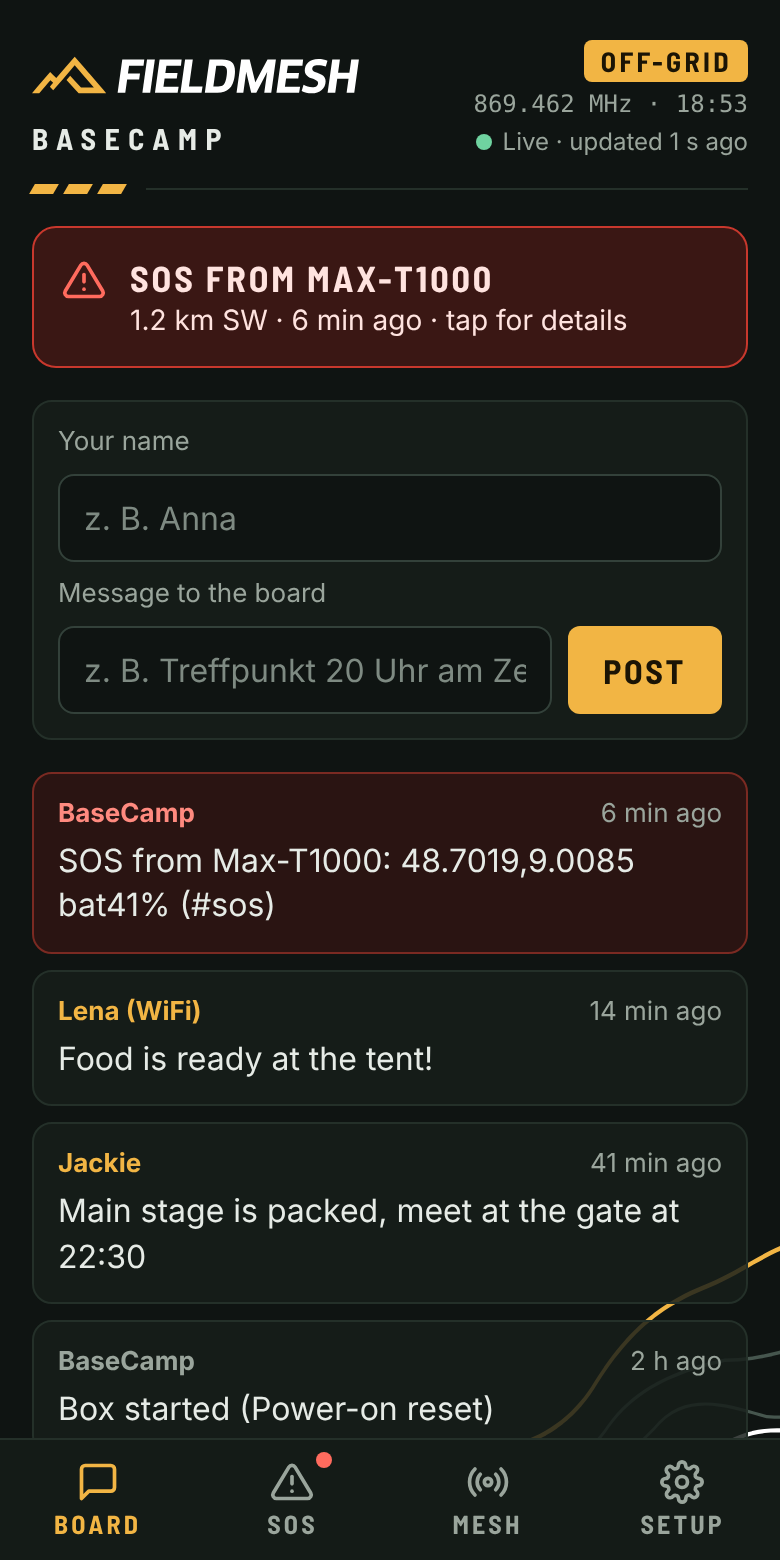
v2.1.0 brings the biggest addition to FieldMesh so far: the FieldMesh Repeater. A Station G2 becomes the base station for your camp, festival or multi-day tour — a full MeshCore repeater with its own message board, a WiFi dashboard for phones, SOS on the board and a weather forecast that works in the field.
All trackers also get a new GPS engine (about 2–2½ days with GPS on in our T1000-E tests), smarter tracking and one firmware file for all regions. Still based on MeshCore v1.18.0.
New: FieldMesh Repeater (Station G2)
Set up a Station G2 at your base — for example in a box with a power station — and your group has a meeting point in the mesh. It is still a normal MeshCore repeater (all repeater settings, CLI commands and app tools work as usual), with these additions:
- Message board — a room server runs as a second identity next to the repeater (e.g. "BaseCamp"). Read and post from the MeshCore app; posts and users survive a restart. The repeater keeps repeating and shows up correctly in the app's paths
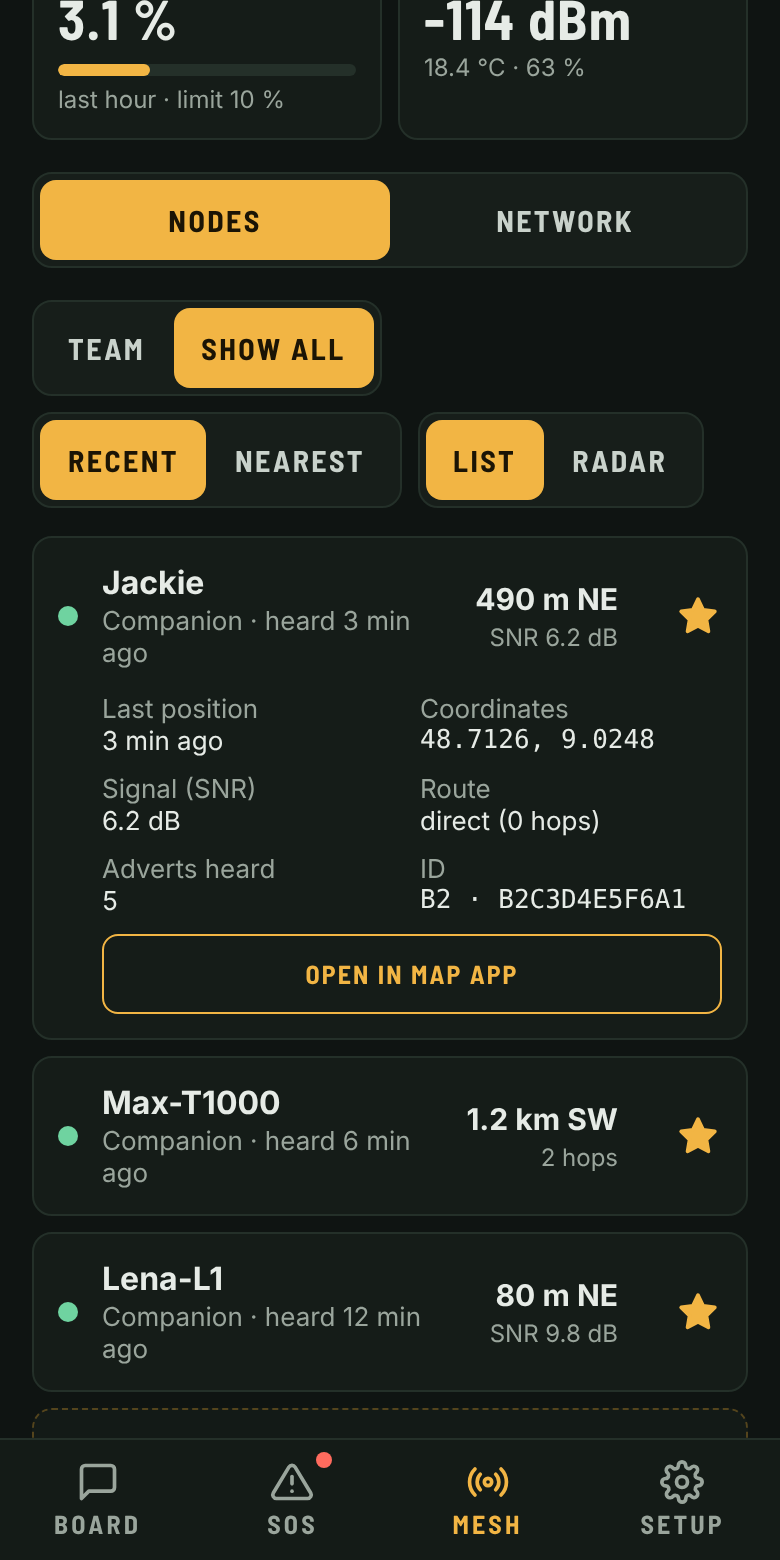
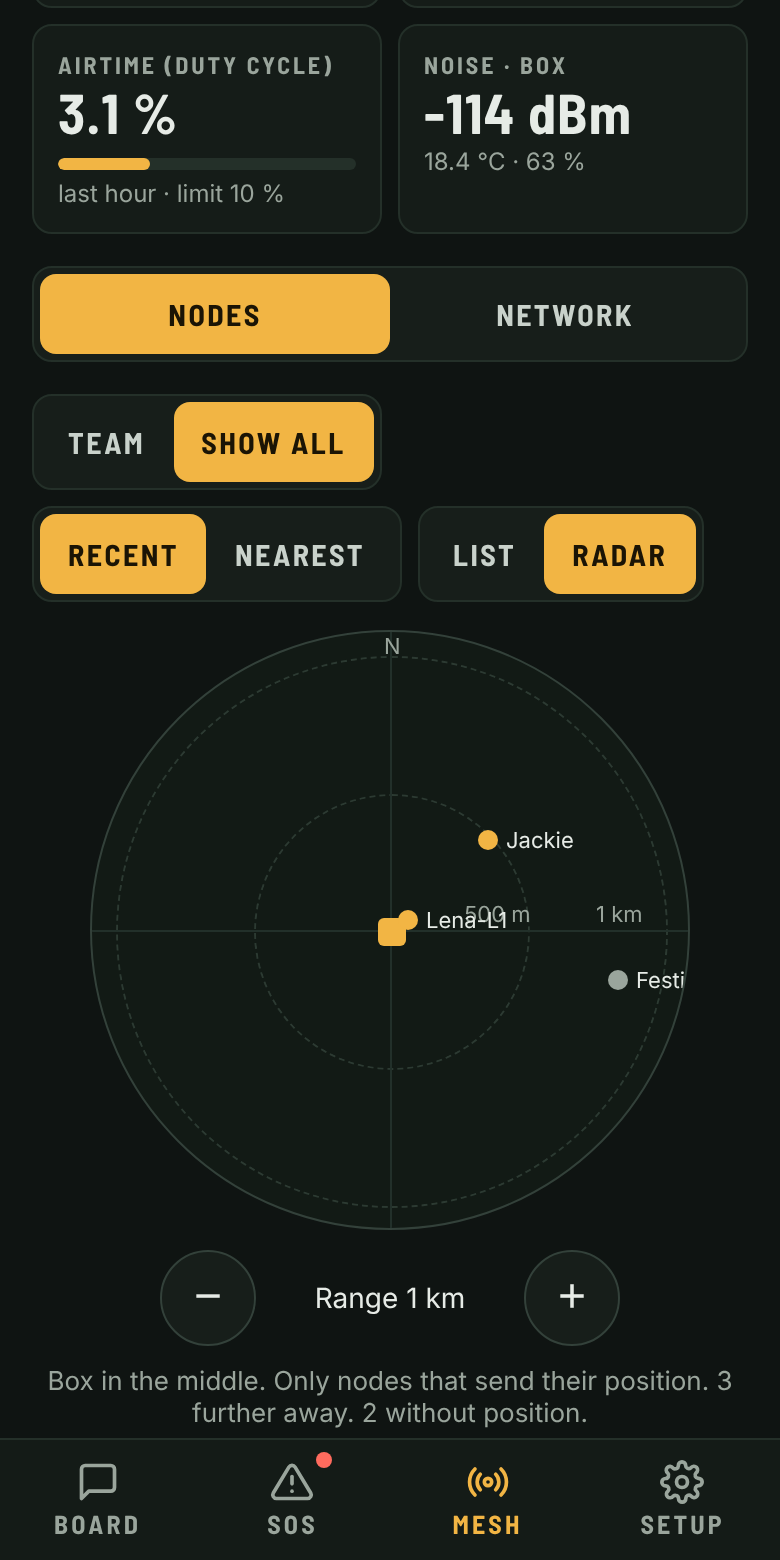
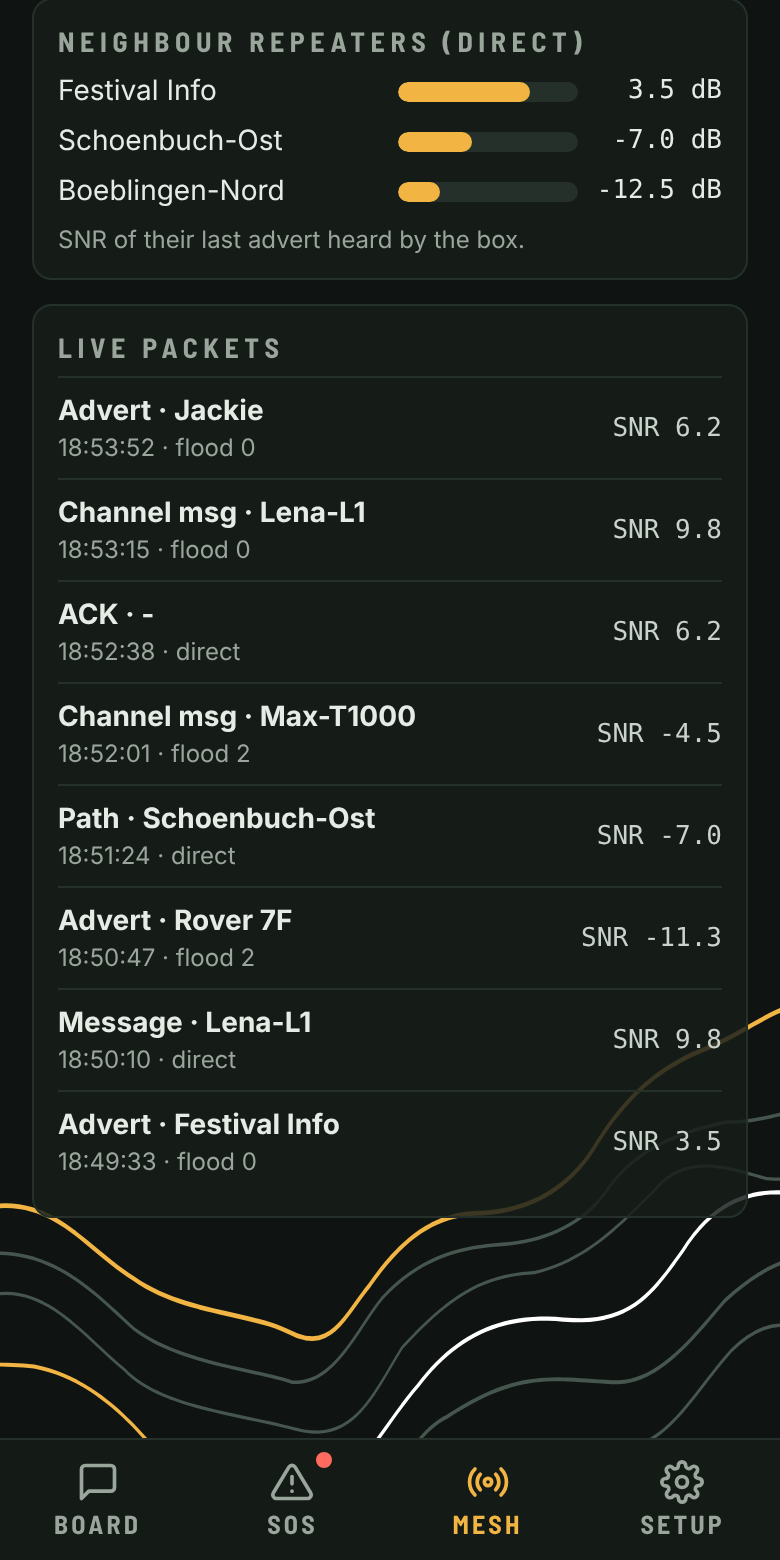
- WiFi dashboard — the box opens its own WiFi. Any phone sees the board, SOS alerts, all nodes as a list or radar with distance and direction (team first) and network statistics — no app, no LoRa device, no internet needed
- SOS on the board — every
!SOSheard in the box's SOS channels appears on the board and in the dashboard, with position, battery and an "Open in map app" button - Weather in the field — when a phone with mobile data opens the dashboard, the box loads a 48 h forecast. Anyone can then ask
!weather(or!wetterin German) in the room: rain from when, wind gusts, frost, thunderstorms — metric or imperial - Off-Grid with one press — switch the whole repeater to the Off-Grid frequency of your FieldMesh nodes and back, live, from the G2 menu, the CLI (
set offgrid on|off) or the dashboard - Room commands —
!ping,!status,!weatherfor everyone;!commandsand/<CLI command>for the admin - Easy to run — G2 menu (Status, Off-Grid, Room, Room reset, WiFi, Power off), admin setup in the dashboard and firmware updates straight from the dashboard
Getting started, menu, commands and dashboard: see the [README].
GPS Duty Cycle & Tracking
- GPS duty cycle — while GPS is on, the receiver takes a fix every 2 minutes and sleeps in between (timing modelled on Meshtastic). T1000-E with GPS on: about 2–2½ days in our tests
- Adapts to the sky — short searches indoors, longer ones at a window, up to 4 minutes under open sky. In our field tests the first fix after leaving the house came within 1–2 minutes, even after a night indoors
- All satellite systems — GPS, GLONASS, Galileo, BeiDou (and QZSS) wherever the receiver supports them
- Smarter tracking (GPS-Share on) — position is sent when you moved ≥ 100 m (at most every 2 min) plus a heartbeat every 10 min. At ≥ 30 km/h (car, bike) the GPS measures and sends every 60 s
- Fresh positions only — adverts and SOS only carry a fix that is at most 2 minutes old
- ThinkNode M1 GPS switch — the GPS runs only when the hardware switch and the setting are on
One Firmware for All Regions
Off-Grid now picks the region automatically from your normal frequency: below 900 MHz → 869.4625 MHz (EU/UK), 900 MHz and above → 916.4625 MHz (US/AU). The alert shows which one ("Off-Grid: ON (EU)"). No more separate US files.
SOS
- The SOS message includes your battery level:
!SOS 48.7636,9.1621 bat78%/!SOS no GPS bat78% - The alarm only goes off for
!SOSin an SOS channel —!SOSin Public is shown as a normal message
Identity Backup
Node identity and settings are copied to a second file system and restored automatically if the main copy is lost — the fix for the identity reset some users saw when updating to 2.0.0. A factory reset clears the backup too.
Bug Fixes
- Flood-routed DMs are tagged
[DM]in the message history instead of[CH] !SOS no GPSinstead of the German text- Splash screen shows "v2.1.0" (ThinkNode M1)
Download
All files are attached below under Assets. One file per device — works in all regions.
Trackers
Flash the zip with the web flasher (DFU):
| Device | File |
|---|---|
| ThinkNode M1 | ThinkNode_M1_companion_radio_ble_FieldMeshv2.1.0.zip |
| Wio Tracker L1 | WioTrackerL1_companion_radio_ble_FieldMeshv2.1.0.zip |
| T1000-E | t1000e_companion_radio_ble_FieldMeshv2.1.0.zip |
Updating from 2.0.0: settings, contacts and channels are kept. Updating from 1.x (formerly V5.x): export your private key in the MeshCore app first.
FieldMesh Repeater (Station G2)
| Use | File |
|---|---|
| First installation or via USB: write at 0x0 with [esptool-js], without Erase Flash | Station_G2_fieldmesh_repeater_FieldMeshv2.1.0_full.bin |
| Update from the dashboard (Setup → Firmware update) | Station_G2_fieldmesh_repeater_FieldMeshv2.1.0_update.bin |
Coming from a stock MeshCore repeater? Back up your key first (get prv.key on the USB console) and change the default admin password after setup.
Full changelog: [RELEASE.md]
FieldMesh 2.0.0
Note
Formerly v6.0. FieldMesh moved to semantic versioning in November 2026; only the version number changed.
The ThinkNode M1 files were rebuilt so the splash screen shows "v2.0.0" - the only change against tag v2.0.0 (source: branch rebuild/v2.0.0; the US file additionally uses the US Off-Grid frequency, as before). The Wio Tracker L1 and T1000-E files are the original files, only renamed.
⚠️ Known issue: On some devices, updating from 1.x (formerly V5.x) to 2.0.0 reset the node identity (new public key) and settings (name, radio parameters). Contacts and channels were kept. Before updating, export your private key in the MeshCore app so you can re-import it if needed. Investigation in progress.
MeshCore v1.18.0 Base
FieldMesh now runs on MeshCore v1.18.0 (previously v1.15.0). All FieldMesh features are kept and sit on top of the current upstream firmware. New features will follow in 2.x.
New from upstream (MeshCore v1.16 – v1.18)
- Repeater discovery page (
ui-new) — new home screen page before the SOS page; scans for repeaters in direct range and shows their signal strength - Charging indicator (
ui-new) — lightning bolt while charging, plug when full, next to the battery icon - Startup tone — short tune on boot on all devices with a buzzer (respects buzzer mute)
- Low-battery shutdown — no longer shuts down while externally powered; the warning is shown on all display types
- Settings stored as JSON (
/prefs.json) — migrated automatically from the old binary format on first boot - Power saving on nRF52 — CPU sleeps between events
- T1000-E — RGB status LED and vibration motor support from upstream
ui-orig - Plus all other upstream changes: multi-interface companion (BLE/USB/WiFi), companion CLI, 5-byte ACKs, reserved anonymous contact slots, new display colour API
Changes
- UI decoupled from MyMesh — MeshCore v1.18 introduced a listener interface; FieldMesh's message handling (history only when the app is not connected, online node counter, SOS detection, favourites, advert refresh on RECENT/TRACKING) moved from
MyMesh.cppinto the UI (ui-newandui-orig).MyMesh.cppis now much closer to upstream - Off-Grid return parameters are stored in their own JSON object
"fm"in the settings file and migrated from 1.x - GPS flag of adverts is now passed via
BaseChatMesh::lastAdvertHasLatLon()instead of bit 4 (0x10) incontact.type—contact.typeis no longer modified, the three masking points are gone - Static BLE PIN moved to
main.cpp(upstream moved the PIN logic there) - Off-Grid uses the upstream radio wrapper call
radio_driver.setParams()(upstream removedradio_set_params()) - Splash screen shows "v2.0.0" (ThinkNode M1)
Bug Fixes
- Room server login with GPS adverts — a room server whose last advert contained GPS had
type = 0x13instead of0x03(bit 4), so the login was sent in the wrong format; fixed by the new GPS flag approach - Favourite detection with a full contact list —
isSenderFavorite()now also checks the last 8 contacts (upstream added 8 reserved slots at the start of the contact table) - CLI text messages (
TXT_TYPE_CLI_COMMAND, new in upstream) are not shown in the message history _msgcountis now initialised inUITask(ui-new)
Updating from 1.x (formerly V5.x)
- Contacts and channels are kept (file format unchanged)
- Settings are migrated to
/prefs.json; the old/new_prefsfile is left in place, so going back to 1.x restores the settings as they were before the update - New home screen page: page indicator shows one more dot
Thanks
- @jenswei — requested the Heltec Mesh Node T1 and SenseCAP MeshTracker X1 build targets (#30)
- @karolzamosc — requested Wio Tracker L1 E-Ink support (#31)
- @ClemPera — opened a MeshCore v1.18.0 merge PR (#32)
Download
All files are attached below under Assets. Flash the zip with the web flasher (DFU). This release still has separate files for the Off-Grid region (one firmware for all regions came with 2.1.0).
| Device | EU Off-Grid frequency (869.4625 MHz) | US Off-Grid frequency (916.4625 MHz) |
|---|---|---|
| ThinkNode M1 | ThinkNode_M1_companion_radio_ble_FieldMeshv2.0.0.zip |
ThinkNode_M1_companion_radio_ble_FieldMeshv2.0.0_US.zip |
| Wio Tracker L1 | WioTrackerL1_companion_radio_ble_FieldMeshv2.0.0.zip |
WioTrackerL1_companion_radio_ble_FieldMeshv2.0.0_US.zip |
| T1000-E | t1000e_companion_radio_ble_FieldMeshv2.0.0.zip |
t1000e_companion_radio_ble_FieldMeshv2.0.0_US.zip |
Other devices (Heltec Mesh Node T1, SenseCAP MeshTracker X1, Wio Tracker L1 E-Ink, Wio Tracker L1 1W) build from source but are untested — no prebuilt firmware.
Contributors


Assets 8
FieldMesh 1.10.0
Note
Formerly v5.3. FieldMesh moved to semantic versioning in November 2026; only the version number changed.
MeshCore Upstream Sync
Changes
- MeshCore upstream alignment — codebase updated to track MeshCore v1.15.0; no FieldMesh-specific feature changes in this release
Download
All files are attached below under Assets. Flash the zip with the web flasher (DFU). This release still has separate files for the Off-Grid region (one firmware for all regions came with 2.1.0).
| Device | EU Off-Grid frequency (869.4625 MHz) | US Off-Grid frequency (916.4625 MHz) |
|---|---|---|
| ThinkNode M1 | ThinkNode_M1_companion_radio_ble_FieldMeshv1.10.0.zip |
ThinkNode_M1_companion_radio_ble_FieldMeshv1.10.0_US.zip |
| Wio Tracker L1 | WioTrackerL1_companion_radio_ble_FieldMeshv1.10.0.zip |
WioTrackerL1_companion_radio_ble_FieldMeshv1.10.0_US.zip |
| T1000-E | t1000e_companion_radio_ble_FieldMeshv1.10.0.zip |
t1000e_companion_radio_ble_FieldMeshv1.10.0_US.zip |
FieldMesh 1.9.0
Note
Formerly v5.2. FieldMesh moved to semantic versioning in November 2026; only the version number changed.
HomeScreen Redesign & Online Node Counter
New features
- Online node counter — HomeScreen now shows how many nodes have been
heard in the last 30 minutes, combining advert senders and message senders
in a single deduplicated count (16-entry LRU cache) - Node counter icon — the online count is displayed with a filled circle
icon (●) instead of plain [X] text - Real channel name in title bar — message history and favorite preview
now show the actual channel name (e.g. "Public") instead of the hardcoded
"[CH]" tag - Mode indicator — GPS-SHARE and OFF-GRID modes are now shown on the
HomeScreen FIRST page
Changes
- M1 HomeScreen layout — node counter fixed at y=22 regardless of
connection state; MSG:X replaces< Connected >when disconnected;
nodes_icon y-offset corrected (+3px) to align with text baseline - Channel message title bar — sender name omitted from title bar for
channel messages (already visible inside the message text) - Favorite indicator — clears correctly after all messages are deleted
(deleteEntry / clearAll); no longer persists stale data after app sync - MSG:X counter — hidden on HomeScreen while phone app is connected
- RECENT/TRACKING pages — row limits now display-height-adaptive via
max_y variable instead of hardcoded values
Bug fixes
- BLE init: send_queue flood — between
onSecured()andCMD_APP_START
async pushes could fill all 12 send_queue slots, causing the app to time
out. Fixed via_app_initializedflag andisWriteBusy()guard - Double-counting in node counter — nodes heard via both advert and
message were counted twice. Fixed viacountOnlineNodesExcluding() - adv_fresh buffer — was reusing the 4-entry RECENT display array,
capping the advert-based node count at 4. Now uses a dedicated
ADVERT_PATH_TABLE_SIZE (16) buffer - formatRelTime undefined behavior — replaced signed int cast with
safe uint32_t arithmetic
Technical notes
- Changes confined to
UITask.cpp,UITask.h,MyMesh.cpp,MyMesh.h,
icons.h DataStore,AbstractUITask,platformio.iniunaffected
Download latest build
EU Offgrid frequency
ThinkNode_M1_companion_radio_ble_FieldMeshv5.2.zip
WioTrackerL1_companion_radio_ble_FieldMeshv5.2.zip
t1000e_companion_radio_ble_FieldMeshv5.2.zip
US Offgrid frequency
ThinkNode_M1_companion_radio_ble_USFieldMeshv5.2.zip
WioTrackerL1_companion_radio_ble_USFieldMeshv5.2.zip
t1000e_companion_radio_ble_USFieldMeshv5.2.zip
FieldMesh 1.8.0
Note
Formerly v5.1. FieldMesh moved to semantic versioning in November 2026; only the version number changed.
Headless Device Support (T1000-E, RAK WiseMesh TAG)
New features
- Headless device support —
ui-orignow fully integrated into FieldMesh; devices with no display and a single button (Seeed T1000-E, RAK WiseMesh TAG) are supported as first-class citizens - Off-Grid toggle via 5× click — 5 presses on the single button toggles Off-Grid mode on/off; buzzer feedback is forced regardless of mute state (ascending tone = on, descending = off)
- SOS alarm via buzzer — incoming
!SOSmessages trigger a continuous buzzer siren that overrides quiet mode and loops until acknowledged with a short press
Changes
- All button actions (advert, GPS toggle, buzzer toggle, Off-Grid toggle) now produce forced buzzer feedback regardless of quiet mode — essential for display-less operation
- Ascending tone (
c,e) = feature enabled; descending tone (e,c) = feature disabled — consistent across all actions newMsg()signature updated to includeis_favoriteparameter — compatible with the v1.7AbstractUITaskinterfacerefreshDisplay()andisOnRecentOrTrackingPage()added as explicit no-op overrides — required forMyMeshcompatibility
Button mapping (headless devices — single button)
| Press | Action |
|---|---|
| 1× | Wake display / acknowledge SOS alarm |
| 2× | Send advert |
| 3× | Buzzer mute on/off |
| 4× | GPS on/off |
| 5× | Off-Grid mode on/off |
| Long press (first 8 s) | CLI Rescue Mode |
| Long press | Shutdown |
Technical notes
- Changes confined to
ui-orig/Button.h,ui-orig/Button.cpp,ui-orig/UITask.h,ui-orig/UITask.cpp ui-new(ThinkNode M1, Wio Tracker L1) is completely unaffected_buzzer_restore_quietflag ensures non-blocking buzzer playback before quiet state is restored
Download latest build
EU Offgrid frequency
ThinkNode_M1_companion_radio_ble_FieldMeshv5.1.zip
WioTrackerL1_companion_radio_ble_FieldMeshv5.1.zip
t1000e_companion_radio_ble_FieldMeshv5.1.zip
US Offgrid frequency
ThinkNode_M1_companion_radio_ble_USFieldMeshv5.1.zip
WioTrackerL1_companion_radio_ble_USFieldMeshv5.1.zip
t1000e_companion_radio_ble_USFieldMeshv5.1.zip
FieldMesh 1.7.0
Note
Formerly v5.09. FieldMesh moved to semantic versioning in November 2026; only the version number changed.
the first release that makes the node fully standalone for messaging. No phone required.
What's new
Message History (ThinkNode M1 + Wio Tracker L1)
- Received messages are stored on the device and browsable without the companion app
- Home screen redesigned: shows unread counter and the name + timestamp of the most recent message from a favourite contact
- Long press on home screen opens the message menu (filter: All / Favourites)
- One message per view, newest first — short press = next, long press = clear all
- Channel tag (
[CH1],[DM]) and timestamp shown per message - New message while history is open:
+1 newalert, no automatic screen switch
Text Input & Send (Wio Tracker L1 only)
- Compose and send channel messages directly from the device via joystick
- Channel select → character compose → "Sent!" confirmation
- Character selection via joystick left/right, confirm with short press, send with long press
- 80 character limit
Important notes
- Message history is RAM-only — messages are lost on reboot. This is intentional: smartphone sync via the companion app is never affected by what the device shows or clears.
- Text send is available on Wio Tracker L1 only. Single-button input on ThinkNode M1 does not support text composition.
- No DM sending — channel messages only.
Files changed
UITask.h, UITask.cpp, MyMesh.h, MyMesh.cpp, AbstractUITask.h
Full changelog
See RELEASE.md for the complete version history.
FieldMesh 1.6.0
Note
Formerly v4.04. FieldMesh moved to semantic versioning in November 2026; only the version number changed.
Wio Tracker L1 Joystick UI Fixes
target.cpp / target.h
- Added
joystick_up(JOYSTICK_UP) andjoystick_down(JOYSTICK_DOWN) asMomentaryButton
UITask.cpp — loop()
- Joystick Up →
KEY_PREV, Joystick Down →KEY_NEXT - Joystick press short →
KEY_ENTER(confirm in menus) - Joystick press long →
handleLongPress()(context action)
UITask.cpp — HomeScreen
- Removed dead code:
KEY_ENTERon Tracking page directly toggled GPS-Share — unused since V1.1.0 (Outdoor Menu), but accidentally active on Wio Tracker - Tracking hint text:
"Settings: press Enter"(joystick) instead of"Settings: long press"
UITask.cpp — OutdoorMenuScreen
- Removed footer
"short=next long=select"on joystick devices (self-explanatory) - Menu navigation: Up/Down instead of Left/Right
UITask.cpp — SOSSendScreen
handleLongPress()now sendsKEY_SELECTinstead ofKEY_ENTERtoSOSSendScreento distinguish short and long press- Short press = always go back (both states)
- Long press = confirm / send (both states)
- Hint text both states:
"long press: SEND
FieldMesh 1.5.3
Note
Formerly v4.03. FieldMesh moved to semantic versioning in November 2026; only the version number changed.
Backlight & Display Logic Overhaul
Fixed
AUTO_OFF_MILLIS=0removed fromplatformio.ini– display now correctly sleeps after 15 seconds of inactivity- 5-minute backlight auto-off timer removed – no longer needed with display sleep active
- Backlight now correctly follows
_backlight_onstate on everyturnOn()call, overriding GxEPD driver behavior
Improved
- Backlight state is fully decoupled from display wake events – incoming messages and adverts wake the display without changing the backlight state
- Added
refreshDisplay()– wakes display briefly on incoming adverts when on Recent or Tracking page, without affecting backlight - Advert-triggered display refresh works even when a phone is connected via BLE
Technical
- Added
refreshDisplay()andisOnRecentOrTrackingPage()toAbstractUITaskas virtual methods _backlight_off_atmember removed fromUITask