Examples
The following script compiles the flux runtime.
./build.sh noTests
To run the end-to-end examples, you must have a mysql installation running on your system.
To keep it simple we assume that the root user has create database privileges and works without a password. If these are not the settings on your system, please change setup_db.sh and configuration.yml appropriately
Run the following script to setup a skeleton database for use in Flux. Flux has to be built first before running the setup script, as liquibase is used for setting up internally.
./setup_db.sh
We've put up an example to demonstrate the power of flux to run multiple independent tasks concurrently.
For this, please check out class com.flipkart.flux.examples.concurrent.EmailMarketingWorkflow
To run the class, the codebase must be built and the database setup using steps documented above. Then, you can run the class using:
cd examples
./run_example.sh com.flipkart.flux.examples.concurrent.RunEmailMarketingWorkflow
Or, simply run com.flipkart.flux.examples.concurrent.RunEmailMarketingWorkflow in your IDE while keeping flux process running (you can start flux by running com.flipkart.flux.initializer.FluxInitializer)
Following is a code snippet from the given example:
for (Email email : emails) {
    emailDispatcher.sendEmail(email);
}
When the @Workflow annotated method is invoked, the client library intercepts the call & further intercepts all calls made to @Task annotated methods.
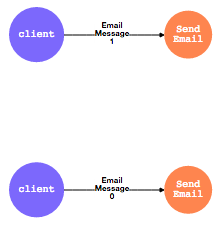
This is used to create a state machine representation and submitted to the Flux engine for execution.
In flux, the following state machine is created:
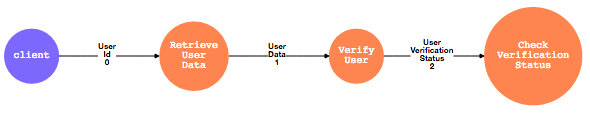
We've put up an example to demonstrate how you can take decisions in your workflow.
For this, please check out class com.flipkart.flux.examples.decision.UserVerificationWorkflow
To run the class, the codebase must be built and the database setup using steps documented above Then, you can run the class using:
cd examples
./run_example.sh com.flipkart.flux.examples.decision.RunUserVerificationWorkflow
Or, simply run com.flipkart.flux.examples.decision.RunUserVerificationWorkflow in your IDE
Again, the client library intercepts the @Workflow method and creates the following state machine in the Flux Runtime
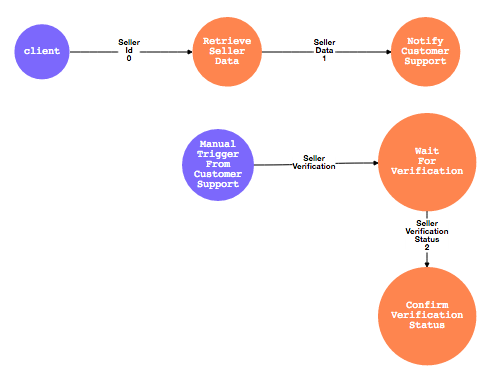
In a lot of cases, Workflows would need to wait for external events. For example, Seller verifications would require manual intervention from the Customer Support team. Once the seller Id is generated, the workflow would essentially involve notifying customer support and waiting for them to verify the seller.
This scenario is captured in com.flipkart.flux.examples.externalevents.ManualSellerVerificationFlow
To run the class, the codebase must be built and the database setup using steps documented above Then, you can run the class using:
cd examples
./run_example.sh com.flipkart.flux.examples.externalevents.RunManualSellerVerificationWorkflow
Or, simply run com.flipkart.flux.examples.externalevents.RunManualSellerVerificationWorkflow in your IDE
Once the database setup is over using the above mentioned setup script, you can run com.flipkart.flux.examples.WorkflowExecutionDemo class from IDE to run or debug the workflows in local.
Usage: com.flipkart.flux.examples.WorkflowExecutionDemo <module_name> <workflow_class_fqn>
           module_name : name of user module in which workflow code is present, for ex: examples
           workflow_class_fqn: fully qualified name of main class which triggers user workflow execution at client side
                               ex: com.flipkart.flux.examples.concurrent.RunEmailMarketingWorkflow

This demo class requires maven to copy dependencies to create a sample deployment unit structure.
If maven is NOT present on the class path pass its absolute location as third argument

       for ex: WorkflowExecutionDemo <module_name> <workflow_class_fqn> /opt/apache-maven-3.3.3/bin/mvn