Repository navigation
Runtime Discovery and Mapping
The generated observer appends tab-separated telemetry under the game's BepInEx\config directory. The Studio tails this file when Watch discovery is active.
Common row kinds include:
-
SCENE,LOADED_SCENE, andACTIVE_SCENE. - Animator state/loop activity.
- Legacy Animation playback.
- PlayableDirector/Timeline playback.
- Mono Spine track playback.
- PlayMaker FSM state changes.
-
CAPABILITYevidence. -
OBSERVER_SCANsummaries. -
OBSERVER_ERRORfailures. -
SCRIPT_PLAYandSCRIPT_STOPdecisions.
Capability evidence never becomes a mapping candidate by itself.
Capture cycle is available for timed:
- Animator/Mecanim events.
- Legacy Animation events.
- PlayableDirector/Timeline events.
- Mono Spine animation events.
It requires an active rolling capture session and timing details in a recent telemetry row. Select the newest matching event from the current playback before its frames leave the rolling buffer. The Studio derives the cycle start from event timestamp and phase, waits up to three seconds beyond the expected end for encoded frames, then snapshots the calculated cycle interval.
The selected cycle must still fit in the rolling buffer. Encoded frames must reach the calculated end. The start check permits the earliest retained frame to be up to 250 ms after the calculated start, so inspect the first and last review frames before saving.
Successful capture prepares a fresh scene, runtime name/correlation, loop setting, and explicit candidate/object-path/duration mapping. Save scene or Save + lock commits that mapping. For supported games, this should be preferred over manual trim.
After capture, Pause output can reduce telemetry UI work while scripting. Telemetry continues accumulating in the file and catches up when output resumes.
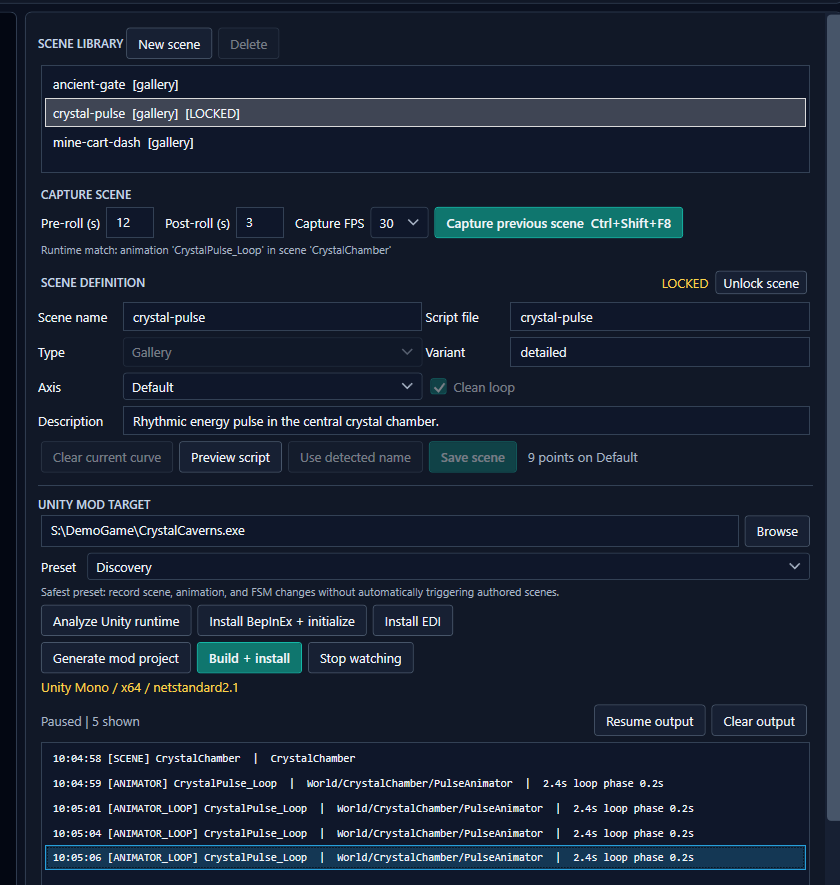
A selected timed Animator loop in the paused discovery output, alongside its locked authored scene.
- Discovery: explicit mappings only; also emits telemetry.
- SceneNames: explicit mappings plus normalized scene-name convention matches.
- AnimationNames: explicit mappings plus normalized animation-name convention matches.
- SceneAndAnimationNames: enables both convention sources.
Names normalize to lowercase letters and digits. For example, enemy-hit, Enemy Hit, and enemy_hit normalize identically. When multiple authored names normalize to the same value, the ambiguous convention alias is omitted rather than selecting one arbitrarily.
An explicit animation mapping can include:
- Normalized candidate name.
- Hierarchy object path.
- Cycle duration in milliseconds.
- Authored EDI action.
Path matching is case-insensitive. It accepts an exact path or a multi-segment hierarchy suffix so Gallery wrappers and gameplay roots can differ. A single leaf such as Animator is intentionally too weak.
Timed mappings accept a duration difference up to:
max(25 ms, mapped duration / 10)
The most path-specific, timing-specific, and closest-duration mapping wins.
Explicit runtime activity can temporarily override a scene-level action. Reaction actions are treated as interruptions and can return to the prior gallery/scene action. Stop transitions return EDI to its registered filler when filler is enabled and has been activated.
The generated plugin primes filler on startup and focus/pause return. Its default manual activation key is top-row or numpad 5; all generated plugin hotkeys can be changed live in BepInEx\config\<plugin-guid>.cfg.
Runtime names are evidence, not universal semantics. Procedural transforms, custom native animation, stripped IL2CPP methods, obfuscation, and game-specific state machines may require a targeted adapter or Harmony patch.