1.2.1. UserInterface
- Main Panel in ZAPROXY's workpanel
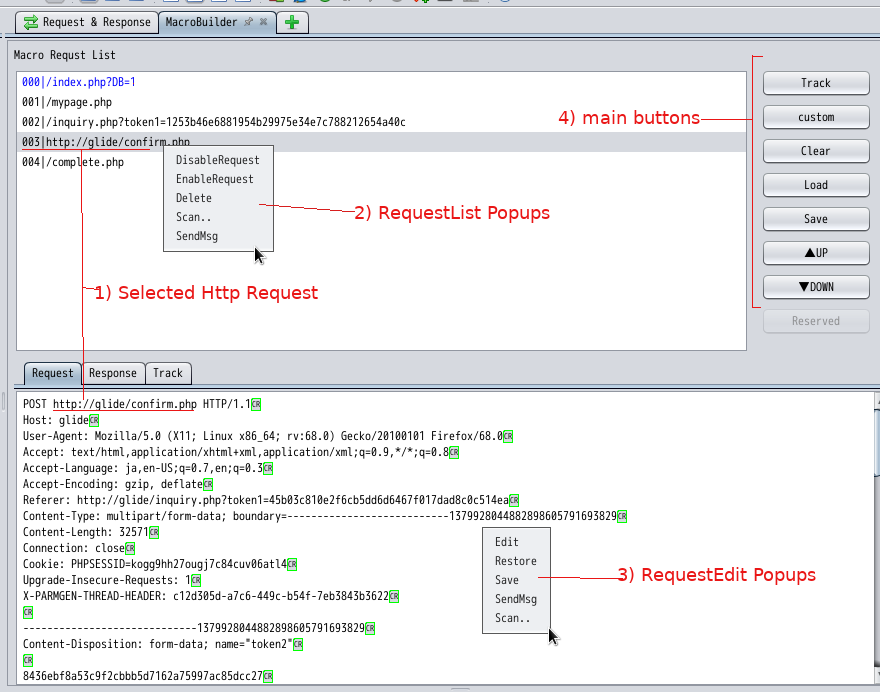
-
1)Selected HTTP Request
In the [Macro Request List] pane, You can select [Http Request] and perform operations such as view/edit/sendmsg/scan actions as described in the following items. -
2)RequestList Popups
[DisableRequest]: If you set the request to be disabled, the request will be ignored(no sending) during zaproxy scans or sendmsg.
[EnableRequest]: You can enable disabled request.
[Delete]: Delete the selected request if unnecessary.
[Scan..]: Execute ActiveScan for the selected request.
[Sendmsg]: Execute Sendmsg(Resend Request) for the selected request.
- 3)RequestEdit Popups
[Edit]: Edit selected Http Request in the Macro Request List.
[Restore]: Restore(Rollback) edited Http Request to Original.
[Save]: Save edited Http Request to Original.
[Scan..]: Execute ActiveScan for the selected request.
[Sendmsg]: Execute Sendmsg(Resend Request) for the selected request.