Android Basics: tip-calculator #168

Description

In which task and step of the codelab can this issue be found?
Enable view binding
Open the app's build.gradle file ( Gradle Scripts > build.gradle (Module: Tip_Time.app) )
In the android section, add the following lines:
buildFeatures {
viewBinding = true
}
Note the message Gradle files have changed since last project sync.
Press Sync Now.
aa49f2389f1d1b19.png
After a few moments, you should see a message at the bottom of the Android Studio window, Gradle sync finished. You can close the build.gradle file if you want.
Describe the problem
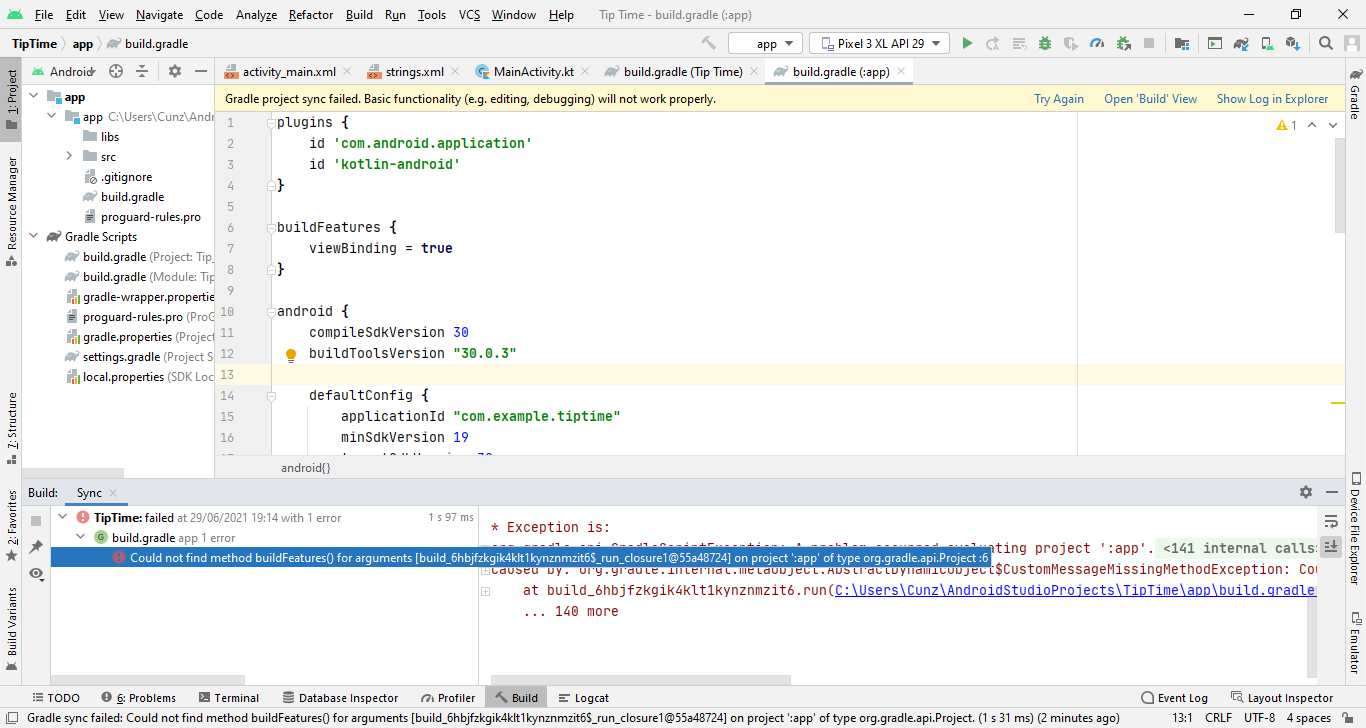
After I press sync now, there is error which said:
Could not find method buildFeatures() for arguments [build_6hbjfzkgik4klt1kynznmzit6$_run_closure1@55a48724] on project ':app' of type org.gradle.api.Project

Steps to reproduce?
- Go to...
- Click on...
- See error...
Versions
Android Studio version:
API version of the emulator:
Additional information
Include screenshots if they would be useful in clarifying the problem.