Added hover UI for front end#228
Conversation


This commit adds support for the `show_hover` notification that comes
from core.
Hover results now display in a popover placed at the baseline of the
selected symbol.
EditView will now update its tracking area for mouseMoved, to be used
with the hover event.
The height calculation will now take in account the fixed width of 500 for the hover view.
Clarify that 500 was chosen because it is XCode's width for quick help.

|
Okay playing around this seems excellent! The only visual issue I see is that a second option+click while the hover view is visible causes a jerky animation. |

|
I was testing this out, noticed a new notable bugs/ unintended behaviour.
I am not sure if it is happening with only me or is a general problem. I am using a multi-monitor setup so not sure if that is causing any error (since I read you discussing some issue about it on IRC) though I noticed it with a single screen plugged in as well. |

|
@betterclever Heya, can you explain a little bit more on how the view is rendered a bit off sometimes? As in, does the arrow point to weird places? Gotcha on the popover behaviour, I'll try to tweak it and find out what works best. |
 nangtrongvuon
force-pushed
the
hover-frontend
branch
from
nangtrongvuon
force-pushed
the
hover-frontend
branch
from
75e52f1 to
205c24f
Compare
nangtrongvuon
force-pushed
the
hover-frontend
branch
from
205c24f to
6492225
Compare
|
It is a but hard to describe it here. Probably it is best to do a screenshare where I can show you what is happening in my computer. |

There was a problem hiding this comment.
Some observations. There are also two rendering issues, one of which is a bug and one of which is maybe more of a design thing, but both of which are present in this screenshot:
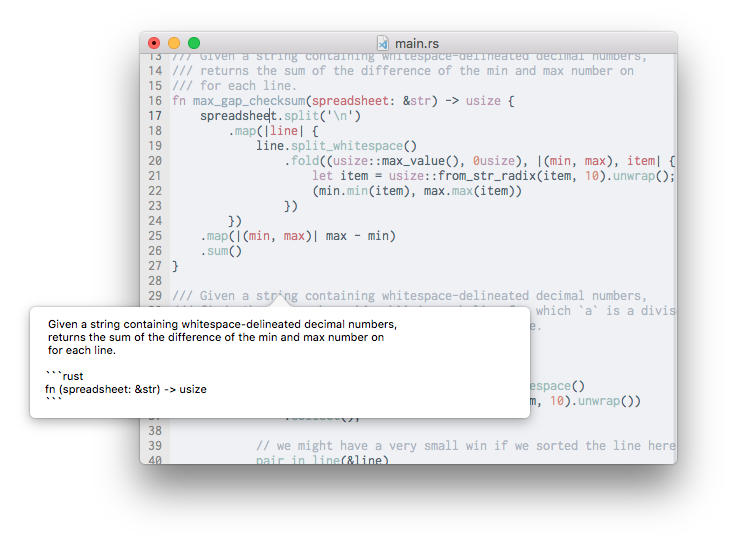
The bug is that the vertical position of the hover view does not take the scroll position into account. (My cursor is on line 16)
The design thing is that I think the hover view should shrink horizontally (with a minimum size) if the text its displaying does not fill the view.
Otherwise this is looking good!
| var hoverRequestID = 0 | ||
|
|
||
| override func viewDidLoad() { | ||
| if let path = ProcessInfo.processInfo.environment["PATH"] { |
There was a problem hiding this comment.
we probably don't need to commit this.
| } | ||
|
|
||
|
|
||
| override func mouseMoved(with theEvent: NSEvent) { |
There was a problem hiding this comment.
is this supposed to do anything? I can't seem to get it to work.
There was a problem hiding this comment.
This is the one part that I don't think this implementation would do justice. In order to get us a real hover, some more work that hooks on text is required. For now, Option+Click is the most reliable option when trying to get a hover to work.
| let hoverPosition = editView.bufferPositionFromPoint(event.locationInWindow) | ||
| hoverTimer?.invalidate() | ||
| hoverTimer = nil | ||
| document.sendRpcAsync("request_hover", params: ["request_id": hoverRequestID, "position": ["type": "utf8_line_char", "line": hoverPosition.line, "character": hoverPosition.column]]) |
There was a problem hiding this comment.
If we're going to use this in two places, I would add a method to Document that handles the implementation.
I believe that the RPC expected in core has changed as well; we don't send type and we send column instead of character.
| if gestureType == "request_hover" { | ||
| document.sendRpcAsync("request_hover", params: ["request_id": hoverRequestID, "position": ["type": "utf8_line_char", "line": position.line, "character": position.column]]) | ||
| hoverEvent = theEvent | ||
| hoverRequestID += 1 |
There was a problem hiding this comment.
we don't seem to actually ever use this anywhere. Perhaps it's unnecessary?
There was a problem hiding this comment.
It is used for when an Option+Click is detected.
| // Lets AppKit do all the work when setting up a new text view | ||
| override init(frame frameRect: NSRect, textContainer container: NSTextContainer?) { | ||
| let textView = NSTextView(frame: .zero) | ||
| super.init(frame: frameRect, textContainer: textView.textContainer) |
There was a problem hiding this comment.
this override doesn't seem to actually do anything. What happens if we just leave it out?
There was a problem hiding this comment.
init(frame, container) is the designated initializer for NSTextView subclasses. I had to let Cocoa make a text container on its own and use that container, which also contains conveniently created a NSLayoutManager and a NSTextStorage for my own NSTextView, since otherwise I would have had to create my own collection of objects associated with my custom text view.
| }() | ||
| var resultContent: String | ||
| var hoverView: HoverView | ||
| let hoverPopoverWidth: CGFloat = 500 // XCode size for quick help popovers |
There was a problem hiding this comment.
I think we should probably have a minimum and a maximum width, and then we resize ourself to the preferred width of our text, within those constraints.
There was a problem hiding this comment.
I tried this, and there is a whole host of unintended behaviors when I tried to get the view to size itself to fit all the text perfectly.
Through much trial and error I and lots of reading I realized many macOS popovers (not just in XCode) works best when they have a fixed width or fixed height, because it's much easier to calculate how much space text would take in one direction. Fixed width was chosen because scrolling vertically is much more intuitive than scrolling horizontally.
Also, I think it looks a bit more aesthetically more pleasing this way. :)
Popovers now take in account the current scroll origin, which would fix
popovers showing up at the wrong places.
This commit also justifies the text which is in the hover's content.
nangtrongvuon
force-pushed
the
hover-frontend
branch
2 times, most recently
from
9c1bf6c to
1107f7c
Compare

| @objc func sendHover() { | ||
| if let event = hoverEvent { | ||
| let hoverPosition = editView.bufferPositionFromPoint(event.locationInWindow) | ||
| hoverTimer?.invalidate() |

There was a problem hiding this comment.
Compilation is failing for me on these two lines. Looking more closely, I see it is not declared anywhere.
There was a problem hiding this comment.
Also, after removing these lines, hover does not work. Am I missing something?
There was a problem hiding this comment.
No, this was my fault, I hastily committed these. It should be working now.
nangtrongvuon
force-pushed
the
hover-frontend
branch
from
1107f7c to
a95dbb1
Compare
The hover needs more work before it can be implemented. The state that
is in the PR right now is not sufficient.
nangtrongvuon
force-pushed
the
hover-frontend
branch
from
a95dbb1 to
45db8b3
Compare
This commit fixes an issue that can be see on white backgrounds, where the scroll view kept the popover's background, causing it to show up and making the popover corners not actually look rounded.
This will make it clearer that holding Option will enter an "inspection" state, and clicking on valid symbols will trigger a hover.
This commit removes background off the popover's content views, so it uses the natural popover background, maintaining consistency with other macOS apps.
 cmyr
left a comment
cmyr
left a comment
cmyr
left a comment
There was a problem hiding this comment.
Okay, one more little thing and I think this is good to go.
| infoPopover.contentSize = hoverContentSize | ||
| infoPopover.contentViewController = hoverViewController | ||
|
|
||
| if let event = hoverEvent { |
There was a problem hiding this comment.
along with checking for hoverEvent, we should also make sure that the request_id we get back is the same is current. Otherwise we can have a situation where we request hover multiple times, and then the first result arrives and is displayed even though it isn't what we want.
The scroll view will now only expand in height up to the predefined popover width, to prevent cases where an overly long comment will cause a very tall popover to show.
| let positioningSize = CGSize(width: 1, height: 1) // Generic size to center popover on cursor | ||
|
|
||
| infoPopover.show(relativeTo: NSRect(origin: positioningPoint, size: positioningSize), of: self.view, preferredEdge: .minY) | ||
| hoverRequestID += 1 |
There was a problem hiding this comment.
Doesn't this mean multiple requests could be sent with the same ID?
There was a problem hiding this comment.
Yes, but I'm not quite sure what the request ID is meant to represent in the first place. As it is right now, the ID doesn't get incremented if a result wasn't shown, which happens when:
- The result we get back is empty (as in, fallback errors and the like)
- The request ID in the RPC notification we get from core is different from what's currently expected
Since (in my personal opinion) I think that hover requests should return results instantly, it's fine even if we send many requests with the same ID?
Now request IDs are checked to make sure the hover results shown are not
stale.
Having the popover animate felt jarring when quickly switching between
different symbols, and as such animations were disabled. This also gives
the advantage and illusion of a smoother experience.
cmyr
left a comment
cmyr
left a comment
There was a problem hiding this comment.
Okay this is working well for me. Will hold the merge until we get the core work in, but lets freeze this and focus on auto-complete. 👍
| infoPopover.performClose(self) | ||
| } | ||
|
|
||
| let hoverContent = result["content"] as! String |
There was a problem hiding this comment.
As per latest work in xi-editor/xi-editor#753 , the result is now just a String, so you don't need to extract content out here.
show_hover has been changed to handle a String instead of a Dictionary.

3 participants


This is the hover part of #221. This PR adds the hover UI to Xi to work with the LSP's hover feature.
In order to use hover, Option+Click on the desired symbol.
This PR can be tested using my dummy plugin, or with xi-editor's #753.