Repository navigation
Releases
com-morpheus-plugin 0.5.0

Tested on Morpheus 9.0.1 with the live COM API. This release has two parts: security hardening and faster tabs.
Security hardening from an independent review on October 31, 2026 (no Critical findings; see Independent security review).
tools/create-com-user.pygrants only what the tabs need. Earlier copies set Read on every Morpheus permission that wasn't on a short block list: about 45 features on Morpheus 9.0.1, including logs, health, tasks, templates and Terraform state. The role now gets Read on Operations: Dashboard and Infrastructure: Compute, Clusters, Groups, Clouds, default access to groups and clouds, and the plugin's own permissions. Everything else stays at None, and the script stops before creating a user if anything else is above None. If you made a role with the 0.4.2 script, delete it and run the new script, or set the other permissions to None by hand.- The client secret and token go only to HPE. The COM API URL, Token URL override and COM UI URL settings must be
https://addresses undergreenlake.hpe.comorcloud.hpe.com, with no user name, query or fragment. The workspace ID must be 32 hexadecimal characters, and the proxy URL must behttp://orhttps://with a host name. If a setting doesn't qualify, the tabs show which one to fix and the plugin doesn't sign in. - Memory stays bounded on large workspaces. Matching keeps only each server's MAC addresses, not its whole inventory. The response cache holds at most 1,000 entries, dropping expired ones first. Responses over 16 MB are refused.
- Per-user limits on the action routes. Each Morpheus user can make 60 route calls a minute and start 20 actions an hour. An iLO can be reset once every 10 minutes. Job progress is reused for 3 seconds, so polling costs COM one call per interval.
- Action tokens expire. A host tab's action token works on the day it was issued and the next day. (It isn't tied to the user, because Morpheus doesn't tell a tab who's viewing it. The routes still need the actions permission.)
- iLO links are made only from a plain IP address or host name reported to COM; anything else is shown as text.
- Errors: unexpected errors on the host tab and during matching show a reference number instead of the exception text.
- COM groups are read once an hour in the background, instead of one COM call per group while a page loads.
- Diagnostics: the unused
probeOpenroute is gone, and the probe route no longer echoes the caller's name and permission. - Build:
tools/check-plugin-core.shworks inbuild/compatinstead of a shared/tmpfolder. Test data uses example values for NIC serial numbers and storage identifiers. - New
SECURITY.md: how to report a vulnerability, and which versions get fixes. - Docs: the screenshots use example values (
host-a,cluster-a,XYZ0000001,192.0.2.21, workspacemy-workspace) instead of blocked-out text, and the same value means the same thing in every image and section. The README shows the plugin in the Morpheus UI: annotated host and cluster pages from a real 9.0.1 appliance. The install guide lists the example values up front.
Faster tabs, smaller COM reads and a quicker index refresh, from measurements on a Morpheus 9.0 appliance (October 31, 2026). Nothing changes in what the tabs show or in the checks on the action routes.
- Faster tabs. Morpheus asks a tab whether to show itself and then renders it, one right after the other. The host tab now reads the host from Morpheus once per page instead of two or three times (each read took 0.7 to 1.1 s), and the cluster tab lists the cluster's servers once instead of twice (2 to 2.8 s each). What was read is reused for at most 15 seconds. Each tab still checks the viewer's permission and tenant on every page, and the action buttons always read the host fresh.
- Smaller COM reads. The plugin asks COM for compressed (gzip) answers: a server's inventory drops from about 136 KB to 14 KB. The 16 MB limit applies to the uncompressed size.
- The cluster summary reads only its own servers from COM, 50 at a time, instead of paging through every server in the workspace. If COM refuses that query, it reads the whole list as before. If a COM list is ever longer than the plugin reads (50 pages), the Morpheus log says so once.
- Quicker index refresh. Rebuilding the host-to-COM match between the regular 6-hour refreshes reads a server's inventory only when COM has collected a new one since the last build, or after a successful Collect inventory action; the 6-hour refresh still reads every inventory. A host with no match triggers a rebuild at most once an hour, and never when Morpheus has no MAC addresses for it, so a server newly added to COM can take up to an hour to match on a host page that already showed "No COM match". After a failed build the plugin waits longer each time (up to 15 minutes), or as long as COM asks after a rate limit. A build stops if COM can't be reached, and the last good index stays in use.
- Outages: when sign-in fails or COM can't be reached, tabs show the error at once for the next 45 seconds instead of each waiting for timeouts. Action buttons fail the same way during those 45 seconds. Matching keeps retrying in the background. A broken or cut-off answer fails only that request.
- Changing the connection settings stops a build that's still using the old ones, and the new connection starts clean (its error state, alert fallback and rebuild limits).
- Reliability: cached COM answers are plain maps and lists, safe to share between page loads.
com-morpheus-plugin 0.4.2
Unofficial community project. Not an HPE or Morpheus Data product, and not endorsed or supported by HPE. See NOTICE.md for sources and trademarks.
One jar for Morpheus 9.0 and 9.1 (including HPE VM Essentials): com-morpheus-plugin-0.4.2.jar. Upload it in Administration → Integrations → Plugins; it replaces the earlier version and keeps your settings. Check it against SHA256SUMS.
Upgrade if you run 0.4.1 or earlier. On October 29, 2026, HPE tightened the Compute Ops Management API, and 0.4.1 started failing on host tabs ("HTTP 500") and in the cluster summary's alerts. 0.4.2 has been running on a Morpheus 9.0.1 appliance against the live COM API. After upgrading, set the GreenLake workspace ID in the plugin settings: see the install guide.
HPE tightened the Compute Ops Management API on October 29, 2026, and 0.4.1 broke on host tabs and in the cluster summary. The COM console itself kept working. This release adapts to the live API. The published API reference hasn't changed, so each change is noted under Known issues.
- Page size capped at 500 for every COM list. Alerts asked for 1000, which COM now refuses with HTTP 400.
- Alerts without
select. COM refusesselect=serverId,device/id. The plugin reads the server id from the full alert (serverId,device.id,server.idor the alert'sresourceUri). - Single-server read fallback. When
GET /v1/servers/{id}answers 5xx, the plugin tries/v1beta2/servers/{id}, then the id with a raw+. If all fail, the host tab shows the server's entry from COM's server list, with a note, instead of an error. The COM maintenance check falls back the same way. - Sign-in order. With a workspace ID set, the plugin signs in through the workspace token issuer first and legacy SSO last, matching what other HPE services now expect. If COM refuses a token on a read (HTTP 401), the plugin moves on to the next sign-in URL. The workspace ID setting is now recommended.
- Morpheus 9.0.1: the host tab now loads the full server record by id before deciding whether to show itself, because 9.0.1 can pass a shallow server. It never relied on the account argument, which 9.0.1 leaves empty.
- New
tools/create-com-user.py: creates a Morpheus role for the HPE COM tabs in one run, instead of setting hundreds of role permissions by hand. It gives read-only access to the pages the tabs live on, plus View HPE COM tab, and optionally Run HPE COM actions; then it reads the role back to check it, and can create a user with it. Python standard library only; writes no files. See Roles in the install guide. - Tests for each change. Tested against Plugin API 1.4.1 (Morpheus 9.0) and 1.5.0 (Morpheus 9.1). Tested on a Morpheus 9.0.1 appliance against the live COM API (host and cluster tabs, UID action, create-com-user.py).
New install guide: the install guide now walks first-time users through every step, with screenshots from a real Morpheus 9.0.1 appliance and GreenLake workspace (names, addresses and ids blocked out).
com-morpheus-plugin 0.4.1
Unofficial community project. Not an HPE or Morpheus Data product, and not endorsed or supported by HPE. See NOTICE.md for sources and trademarks.
One jar for Morpheus 9.0 and 9.1 (including HPE VM Essentials): com-morpheus-plugin-0.4.1.jar. Upload it in Administration → Integrations → Plugins; it replaces the earlier version. Check it against SHA256SUMS. Recommended for everyone on 0.4.0.
- Fix: cluster summary showed "Couldn't load alerts: … HTTP 400" and 0 alerts. Some COM workspaces refuse the workspace-wide alerts query (
/v1/alerts), even though COM's API reference documents it. The cluster tab now falls back to each matched server's own alerts, the same endpoint the host tab uses (and shares its one-minute cache), and doesn't retry the workspace query for six hours. It never reads the full alert history. - When alerts can't be read at all, the tab now says Active alerts: unknown and shows
--per host, instead of a misleading 0. - The "How it works" infographic and README describe the fallback.
- Known issue documented: the workspace alerts HTTP 400 and its impact (none from 0.4.1 on). See Known issues.
- README rewritten to explain what the plugin is for, with a short getting-started path and a screenshot tour, including the new cluster summary and COM maintenance screenshots. All screenshots were regenerated from anonymized test data; the host tab ones now show the maintenance button.
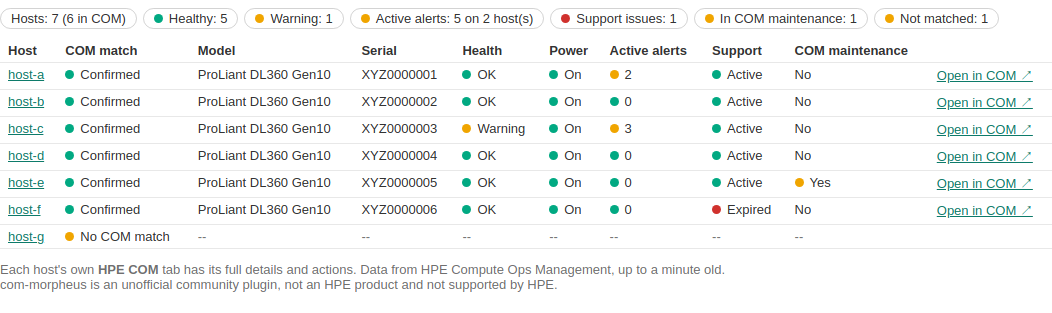
Screenshot rendered from anonymized test data.
com-morpheus-plugin 0.4.0
Unofficial community project. Not an HPE or Morpheus Data product, and not endorsed or supported by HPE. See NOTICE.md for sources and trademarks.
One jar for Morpheus 9.0 and 9.1 (including HPE VM Essentials): com-morpheus-plugin-0.4.0.jar. Upload it in Administration → Integrations → Plugins; it replaces the earlier version. Check it against SHA256SUMS.
- New: cluster summary tab. Each cluster's page gets an HPE COM tab with one row per hypervisor host: COM match, model, serial, health, power, active alerts, support state and COM maintenance mode, plus totals and links to each host and to its COM page. It's read-only and needs the view permission. It lists only hosts that belong to the cluster's own tenant, and users of other tenants can't open it (master-tenant users can). It appears only on clusters with at least one physical HPE host, unless "show on any host" is on. It makes three bulk COM reads for the whole cluster (server list, active alerts only, warranties), cached for a minute; viewers who arrive together share one read.
- New: Enter / Exit COM maintenance buttons on the host tab. They run COM's maintenance-mode jobs, which suspend COM's automatic support cases, ServiceNow incidents and email notifications for that server. They don't change the server or Morpheus maintenance mode. Both ask to confirm, and they pass the same checks as the other actions (see 0.3.1). The plugin also re-reads the server from COM first and refuses a change to the state it's already in, so a button left over on an old page can't do the opposite of what it says. While maintenance is on, the host tab shows a warning, and entering it is logged as a warning with the Morpheus user's name.
- Independent security review before release: the same Fable reviewer as 0.3.1 checked the new tab and actions. It found two Medium issues (the cluster tab didn't check tenants; it read the workspace's full alert history on every refresh) and two Low ones (maintenance mode needed more safeguards; the tab showed on clusters without HPE hosts). All are fixed in this release, with tests, and none affected a released version.
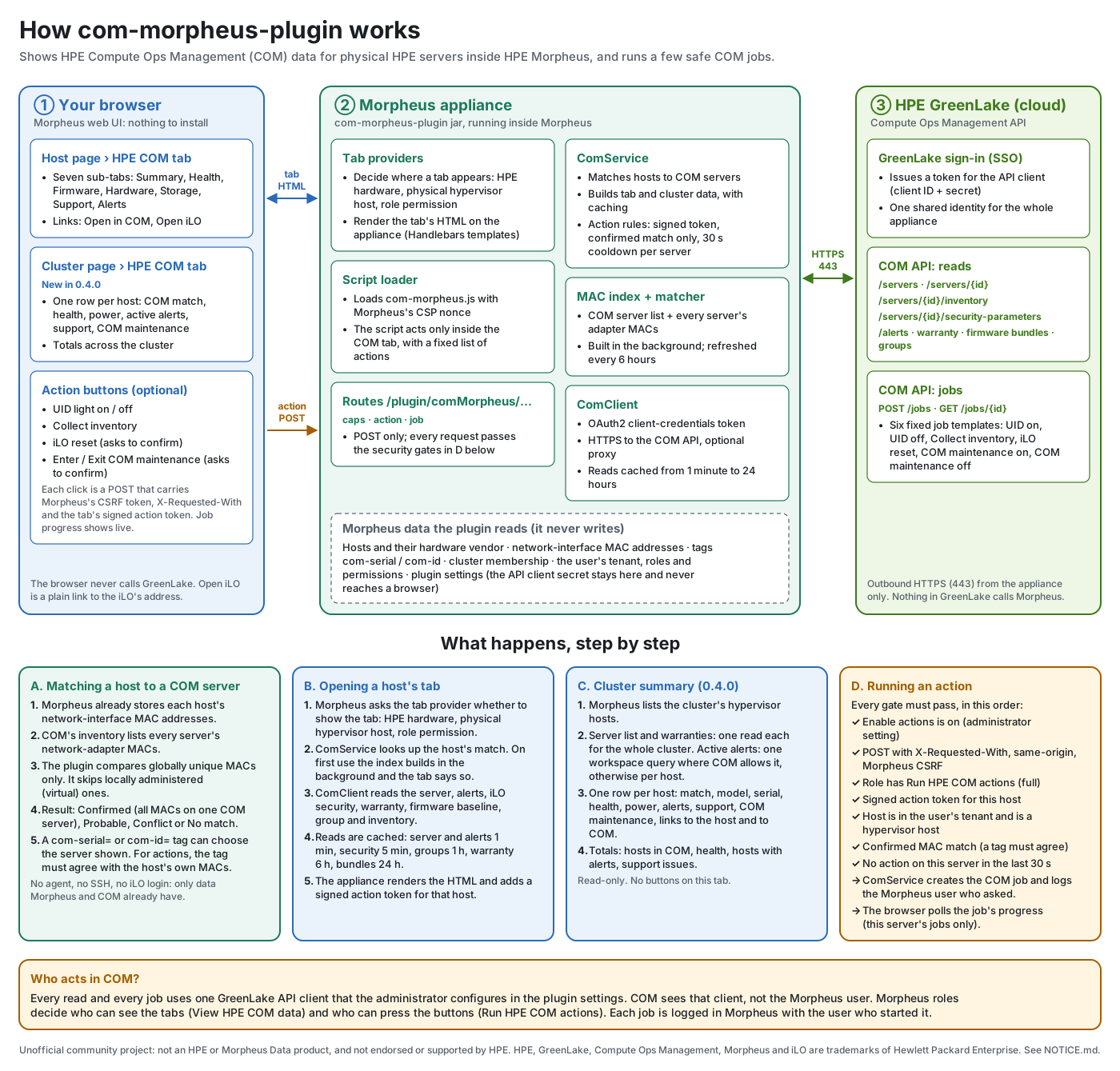
- Docs: a How it works infographic (
docs/images/how-it-works.svg, generated bytools/draw-how-it-works.py), and a README section on why COM maintenance mode is a safe action. - US English throughout the docs and UI text (for example "anonymized", "license", "behavior").
- Tested against Plugin API 1.4.1 (Morpheus 9.0) and 1.5.0 (Morpheus 9.1).
After upgrading: reload the browser page. The cluster tab is under Infrastructure → Clusters → (cluster) → HPE COM. If you use the action buttons, give the API client's GreenLake account a COM role that can run server jobs; maintenance mode uses the same jobs API as the other actions.
Not yet tried on a live appliance. The new cluster tab and COM maintenance buttons pass the automated tests but haven't been smoke-tested on a Morpheus appliance yet. Please open an issue if anything misbehaves.
com-morpheus-plugin 0.3.1 (security release)
Unofficial community plugin: not an HPE or Morpheus Data product, and not supported by HPE. See NOTICE.md.
Security release: upgrade if you use the action buttons
Affected: 0.2.0 and 0.3.0 with Enable actions turned on. The read-only tab wasn't affected. Every issue required a signed-in Morpheus user with the "Run HPE COM actions" permission; none was reachable anonymously.
Upgrade: upload com-morpheus-plugin-0.3.1.jar over the installed plugin, then reload pages that have the HPE COM tab open. Your settings are kept.
Independent security review
Before this release, the action routes, the permission model and the browser script were reviewed independently. The reviewer was a separate AI reviewer (Anthropic's Claude Fable model), working read-only from this project's source and HPE's published morpheus-plugin-core source. It wasn't shown the author's conclusions. Every finding below is fixed with tests. The same reviewer then re-reviewed the fixes, confirmed each one, and gave a go for release.
| Severity | Finding | Fix in 0.3.1 |
|---|---|---|
| High | A com-id / com-serial tag on a user's own host could aim an action at any COM server the shared GreenLake client can reach, beyond the user's tenant. |
Tags only change which server is shown. For actions, the tagged server must share at least one of the host's MAC addresses, and no other server may have any of them. |
| Medium | Cross-site request protection relied entirely on Morpheus, and an unknown request method was let through. | Action routes require POST, X-Requested-With: XMLHttpRequest and a same-origin request, on top of Morpheus's CSRF filter. |
| Medium | Markup injected anywhere in the UI could trigger an action through the page-wide script. | The script only acts inside the plugin's tab, with fixed actions and confirmations. Each tab carries a signed per-host action token that the routes require. |
| Low | Job status could report jobs without a target, and its errors revealed whether a job existed. | The job must name this host's server; one generic answer otherwise. |
| Low | Errors could show internal detail. | Errors return a reference number; details go to the Morpheus log. |
| Low | Actions had no rate limit, and job polls grew the cache. | One action per server every 30 seconds; job polls aren't cached. |
| Info | Missing host-type re-check; /caps gated on the view permission. |
Both fixed. |
Behavior changes to know
- A host matched only by a tag must agree with its hardware before actions run. Otherwise the tab explains why the buttons are off.
- One action per server every 30 seconds.
- Behind a reverse proxy that rewrites
Hostwithout sendingX-Forwarded-Host, actions are refused as "cross-origin". See Troubleshooting.
Verification
-
117 automated tests (22 new, for these fixes), run against Plugin API 1.4.1 (Morpheus 9.0) and 1.5.0 (Morpheus 9.1).
-
The jar loads, with its routes, through the plugin manager of both API versions.
-
Browser test in headless Chromium against a stand-in server:
- planted buttons outside the tab do nothing;
- a planted button with a forged token is refused;
- iLO reset always asks for confirmation;
- the real buttons work.
-
The release-time compatibility check against HPE's published plugin-core and docs is clean.
-
Verified on a real Morpheus 9.0.1 appliance (2026-10-26), through its production web front end:
Test Result The UID light button 200, job completed The same request without X-Requested-With403, "missing X-Requested-With header" The same request with the header 200, so the plugin's own check did the refusing A plain GET link to the action route 403, "POST only." The front end passed the request headers through, with no false "cross-origin" refusal. If actions are refused behind a different proxy, see the troubleshooting table and please open an issue.
Pull requests and security reports are welcome. Report security issues privately via Security → Report a vulnerability.
com-morpheus-plugin 0.3.0
Unofficial community plugin: not an HPE or Morpheus Data product, and not supported by HPE. See NOTICE.md for sources, attribution and trademarks.
One jar for Morpheus 9.0 and 9.1
com-morpheus-plugin-0.3.0.jar works on HPE Morpheus / HPE VM Essentials 9.0.x and 9.1.x. It replaces 0.2.0's separate -vme9.0 / -vme9.1 jars.
- The jar is compiled against the oldest supported Plugin API (1.4.1, Morpheus 9.0), so it can't use anything newer.
- Its full test suite also runs against Plugin API 1.5.0 (Morpheus 9.1).
- It loads, with its web routes, through the plugin manager of both API versions.
- This came from a finding after 0.2.0: the 9.1 build ran unchanged on a 9.0 appliance.
Upgrading from 0.2.0: upload this jar over the installed one. Your settings are kept.
Also new
tools/check-plugin-core.sh: a release-time check of HPE's published morpheus-plugin-core and morpheus-docs. It reports new Plugin API releases, new release lines, and changes to the API classes this plugin uses. It ran clean for this release.- Docs and contribution templates updated for the single jar.
Download
Check the jar with sha256sum -c SHA256SUMS, then follow the install guide. Features are unchanged from 0.2.0.
Pull requests are welcome. See CONTRIBUTING.md.
com-morpheus-plugin 0.2.0
Unofficial community plugin: not an HPE or Morpheus Data product, and not supported by HPE. See NOTICE.md for sources, attribution and trademarks.
The first public release. It adds an HPE COM tab to physical HPE host pages in HPE Morpheus / HPE VM Essentials, showing the server as HPE Compute Ops Management sees it.
Download
| Jar | For | Built against |
|---|---|---|
com-morpheus-plugin-0.2.0-vme9.0.jar |
Morpheus / VM Essentials 9.0.x | Plugin API 1.4.1 |
com-morpheus-plugin-0.2.0-vme9.1.jar |
Morpheus / VM Essentials 9.1.x | Plugin API 1.5.0 |
Check the download with sha256sum -c SHA256SUMS. Then follow the install guide: create a GreenLake API client, upload the jar, enter the settings and grant the permissions.
What's in it
- Automatic matching of each Morpheus host to its COM server by factory NIC MAC addresses, with no access to the host. The
com-serial/com-idtags override it. - Seven sub-tabs: Summary, Health (with iLO security), Firmware, Hardware, Storage, Support and Alerts. Links to Open in COM and Open iLO.
- Optional actions: UID light on/off, Collect inventory and iLO reset, run as COM jobs with live progress. They're off by default, gated by a role permission at full access, re-checked on the appliance and limited to confirmed matches. See Why these actions.
- One identity: all COM reads and actions run as the GreenLake API client's user, for the whole appliance. Use a dedicated account with the smallest COM role (see Security).
Verified on Morpheus 9.0.1 with a ProLiant DL360 Gen10 (iLO 5). The 9.1 jar passes the same tests but hasn't yet been installed on a 9.1 appliance with physical HPE hosts.
Pull requests are welcome. See CONTRIBUTING.md.