Repository navigation
com-morpheus-plugin 0.4.0

Unofficial community project. Not an HPE or Morpheus Data product, and not endorsed or supported by HPE. See NOTICE.md for sources and trademarks.
One jar for Morpheus 9.0 and 9.1 (including HPE VM Essentials): com-morpheus-plugin-0.4.0.jar. Upload it in Administration → Integrations → Plugins; it replaces the earlier version. Check it against SHA256SUMS.
- New: cluster summary tab. Each cluster's page gets an HPE COM tab with one row per hypervisor host: COM match, model, serial, health, power, active alerts, support state and COM maintenance mode, plus totals and links to each host and to its COM page. It's read-only and needs the view permission. It lists only hosts that belong to the cluster's own tenant, and users of other tenants can't open it (master-tenant users can). It appears only on clusters with at least one physical HPE host, unless "show on any host" is on. It makes three bulk COM reads for the whole cluster (server list, active alerts only, warranties), cached for a minute; viewers who arrive together share one read.
- New: Enter / Exit COM maintenance buttons on the host tab. They run COM's maintenance-mode jobs, which suspend COM's automatic support cases, ServiceNow incidents and email notifications for that server. They don't change the server or Morpheus maintenance mode. Both ask to confirm, and they pass the same checks as the other actions (see 0.3.1). The plugin also re-reads the server from COM first and refuses a change to the state it's already in, so a button left over on an old page can't do the opposite of what it says. While maintenance is on, the host tab shows a warning, and entering it is logged as a warning with the Morpheus user's name.
- Independent security review before release: the same Fable reviewer as 0.3.1 checked the new tab and actions. It found two Medium issues (the cluster tab didn't check tenants; it read the workspace's full alert history on every refresh) and two Low ones (maintenance mode needed more safeguards; the tab showed on clusters without HPE hosts). All are fixed in this release, with tests, and none affected a released version.
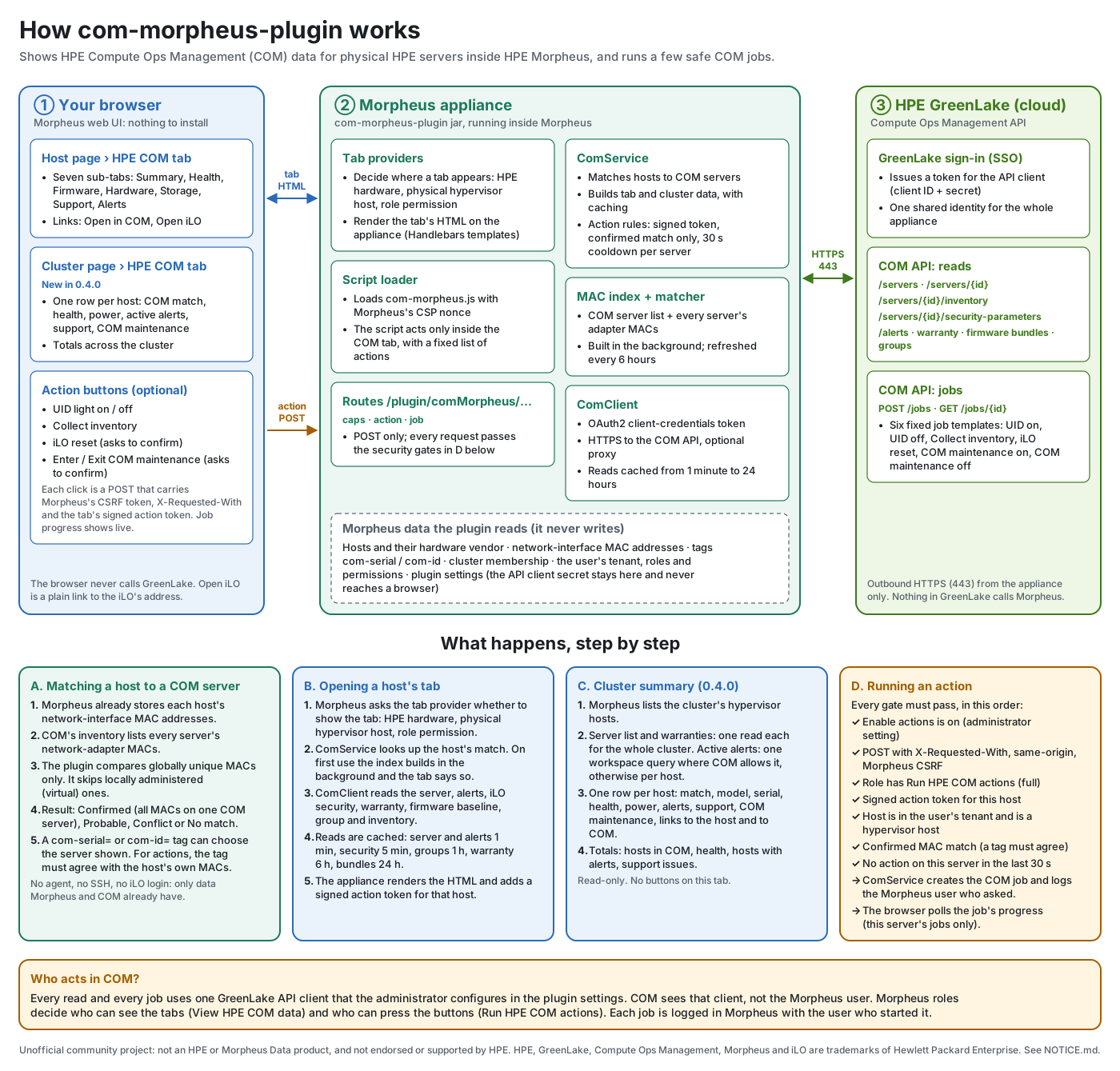
- Docs: a How it works infographic (
docs/images/how-it-works.svg, generated bytools/draw-how-it-works.py), and a README section on why COM maintenance mode is a safe action. - US English throughout the docs and UI text (for example "anonymized", "license", "behavior").
- Tested against Plugin API 1.4.1 (Morpheus 9.0) and 1.5.0 (Morpheus 9.1).
After upgrading: reload the browser page. The cluster tab is under Infrastructure → Clusters → (cluster) → HPE COM. If you use the action buttons, give the API client's GreenLake account a COM role that can run server jobs; maintenance mode uses the same jobs API as the other actions.
Not yet tried on a live appliance. The new cluster tab and COM maintenance buttons pass the automated tests but haven't been smoke-tested on a Morpheus appliance yet. Please open an issue if anything misbehaves.